
IPTV Checker
A fast desktop app for validating IPTV playlists.
Built with Tauri v2 — runs on macOS, Windows, and Linux.
Download
  <a href="https://github.com/kristofferR/IPTVChecker/releases/download/v2.2.0/IPTV.Checker_2.2.0_mac_arm.dmg">
    <img src="docs/icons/download.svg" width="56" height="56" alt="" />
    <strong>Download for macOS</strong>
    Apple Silicon · .dmg
  </a>


  <a href="https://github.com/kristofferR/IPTVChecker/releases/download/v2.2.0/IPTV.Checker_2.2.0_win_x64_setup.exe">
    <img src="docs/icons/download.svg" width="56" height="56" alt="" />
    <strong>Download for Windows</strong>
    64-bit installer · .exe
  </a>


  <a href="https://github.com/kristofferR/IPTVChecker/releases/download/v2.2.0/IPTV.Checker_2.2.0_lin_x64.AppImage">
    <img src="docs/icons/download.svg" width="56" height="56" alt="" />
    <strong>Download for Linux</strong>
    AppImage · x64
  </a>
Intel Mac, Windows ARM, Linux ARM, .deb/.rpm, or Windows portable?
<a href="https://github.com/kristofferR/IPTVChecker/releases/latest">See all files →</a>


Homebrew for macOS/Linux and other package managers are mentioned further down.
Features
Load any playlist
Open M3U files from disk or URL, connect to Xtream Codes or Stalker portal accounts, or batch-load an entire folder of playlists. A sample playlist from iptv-org is included to get started immediately.
See what's actually working
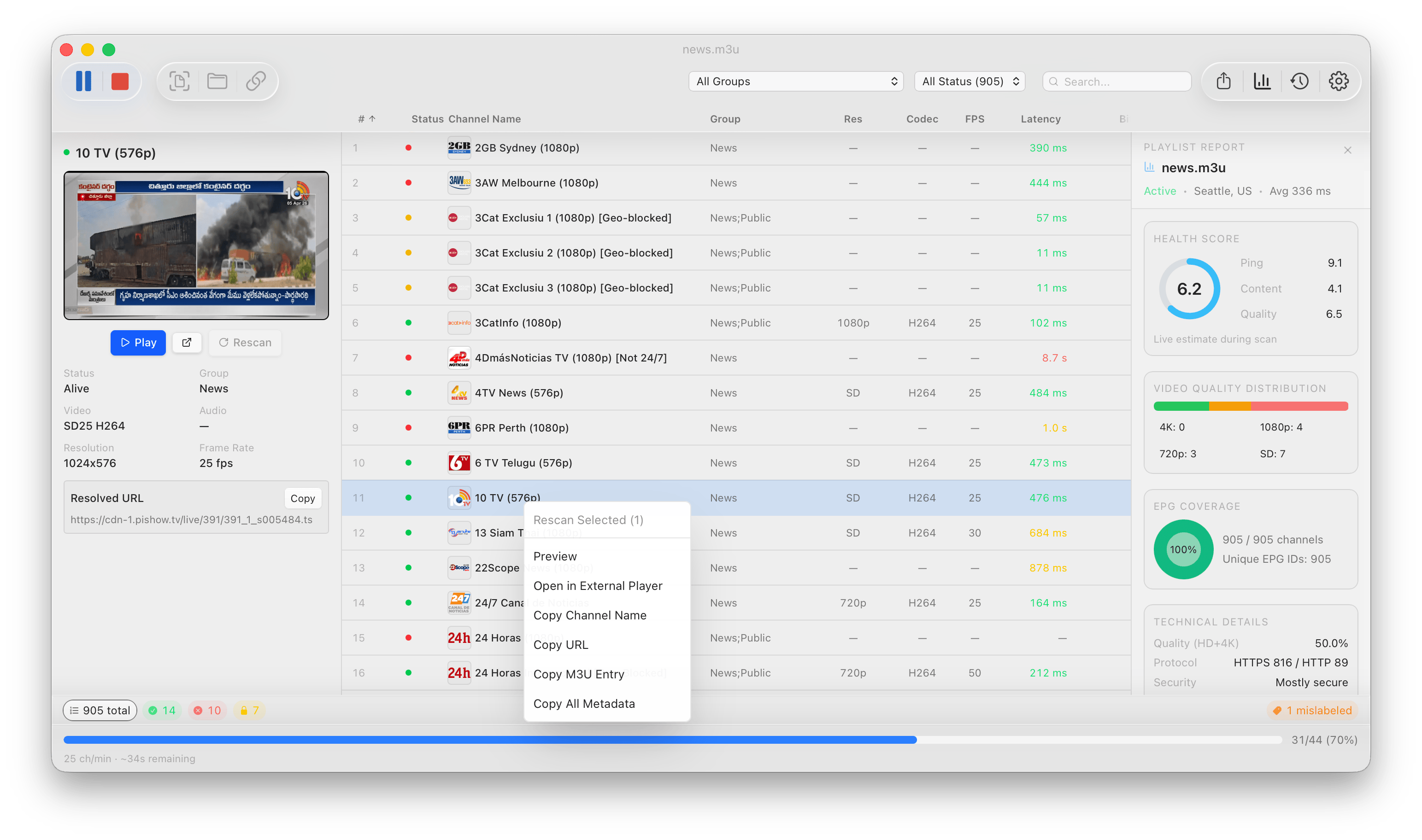
Scans every channel and tells you what's alive, dead, geoblocked, DRM-protected, or audio-only. Uses ffmpeg to capture stream thumbnails and detect codec, resolution, FPS, and bitrate. Flags label mismatches and duplicates automatically.
Results stream in live with an ETA and throughput counter. When the scan finishes, a health report panel slides in with per-group scoring. Pause and resume at any time, or compare results across scan history.
Supports HTTP/HLS, RTSP, and RTMP streams. Route checks through a proxy if needed.
Browse, filter, and export
Click any channel to see its thumbnail, preview it in the built-in player, or open the lightbox to browse screenshots with the arrow keys. Filter by group, status, or regex search. Double-click a channel to play it in VLC, IINA, or whatever you have installed.
Export results as CSV, M3U (alive only, split by group, or renamed), or a full JSON scan log. Export everything, just alive channels, or your current selection.
Catch-up that actually works
Channels that advertise catch-up (catchup/catchup-days in M3U, tv_archive on Xtream) get a chip in the table and a pill in the status bar. Verify tells you which ones are real: quick mode asks each archive for the last hour, full mode also checks how far back the archive is available. Fakes come back with a reason (empty archive, serves the live stream, HTTP error, timeout), filter to them, and export either a playlist of only the working catch-up channels or your list with the fake flags stripped. Verdicts stay within the current playlist session and are cleared when the playlist is reopened or the app restarts.
The Guide view shows the EPG for every channel as one scrollable timeline. Replay a past programme on a catch-up channel, use Play from beginning for one still airing, or choose Play live. Right-click an available archive programme and choose Download… to save it to disk with ffmpeg.
Lightweight and fast
Liquid Glass vibrancy on macOS, platform menus, keyboard shortcuts, dark/light/system theme, and desktop notifications when scans finish. Handles playlists with thousands of channels without breaking a sweat.
Keyboard Shortcuts
Arrow Up / Down moves the channel selection so you can step through results quickly.Space opens or closes the screenshot lightbox for the selected channel.S starts a scan when idle, or stops the current scan.Cmd/Ctrl + / opens the full shortcuts dialog in the app.
❤️ Support the project
Enjoying IPTVChecker? Sponsoring its development is a lovely way to say thanks and help keep the project growing.

Install
Homebrew
Tap repo: kristofferR/homebrew-tap
Homebrew uses the same cask token on macOS and Linux:
brew install --cask kristofferR/tap/iptv-checker
On macOS, the cask installs IPTV Checker.app into /Applications.
If it is already there, use:
brew install --cask --adopt kristofferR/tap/iptv-checker
Arch Linux (AUR)
Package: iptv-checker-gui
yay -S iptv-checker-gui
Uses the system ffmpeg package instead of the bundled sidecar binaries.
The buttons above link to the default installer for each OS. Every architecture and package format is attached to each GitHub release:
| Platform | Architecture | Files |
|---|
| macOS | Apple Silicon / Intel | .dmg |
| Windows | x64 / ARM | .exe installer or portable .zip |
| Linux | x64 / ARM | .AppImage, .deb, .rpm |
Building from source
Prerequisites
- Rust (latest stable)
- Bun (JavaScript runtime and package manager)
- ffmpeg + ffprobe — optional but recommended for thumbnails and codec detection
Getting Started
# Clone the repo
git clone https://github.com/kristofferR/IPTVChecker.git
cd IPTVChecker

# Install frontend dependencies
bun install

# (Optional) Download ffmpeg/ffprobe binaries for your platform
bun run setup:ffmpeg

# Run in development mode
bun tauri dev
Building
Linux AppImage builds require patchelf to be available on PATH.
# Production build (creates platform-specific installer)
bun tauri build
Backend Benchmark Harness
Deterministic local scan/check throughput benchmark (mock local HTTP stream server):
# Runs Rust backend benchmark binary
bun run perf:backend-scan -- --channels 2000 --concurrency 16 --timeout-secs 2.0 --payload-kb 600
Outputs JSON with:
time_to_first_result_msthroughput_channels_per_sectotal_elapsed_ms- status buckets (
alive, drm, dead, geoblocked, errors)
Project Structure
src/                    Frontend (React + TypeScript)
├── components/         UI components (Toolbar, ChannelTable, FilterBar, etc.)
├── hooks/              React hooks (useScan, useSettings, useScreenshot)
└── lib/                Types, Tauri IPC wrappers, formatting, sort/filter logic

src-tauri/src/          Backend (Rust)
├── engine/             Core logic: parser, checker, ffmpeg, proxy, resume, disk
├── commands/           Tauri IPC commands: playlist, scan, export, settings
├── models/             Data types: Channel, ChannelResult, AppSettings, etc.
├── state.rs            App state management
└── error.rs            Error types
Tech Stack
License
MIT