MLB-TCKR Paul R. Charovkine
Use this command to install MLB-TCKR with WinGet:
winget install --id=krypdoh.MLB-TCKR -e MLB-TCKR Setup
winget install --id=krypdoh.MLB-TCKR -e MLB-TCKR Setup
A sleek, performant scrolling ticker that displays live Major League Baseball game data at the top of your screen — just like the tickers you see on sports networks and in sports bars.


Live games — in-progress with scores, runners, outs, pitcher info, and odds:

Multi-game view with team colors, logos, and real-time score data:

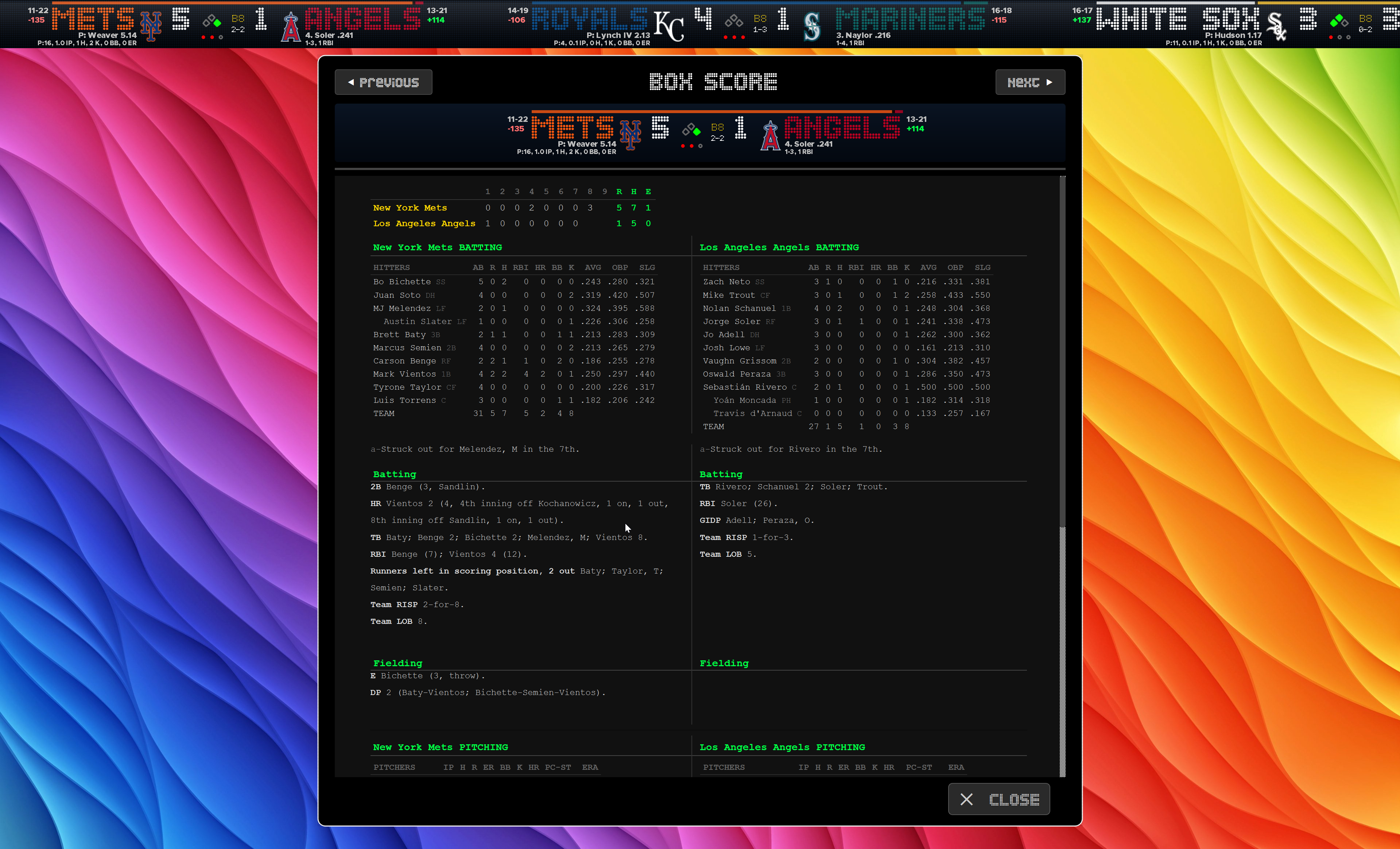
Fullscreen Box Scores / Scorecard view:
P: Name ERA W-L formatYANKEES SCORE Judge: Home Run (2 RBI)GAME STARTING YANKEES vs METS fires as the game goes live
FINAL YANKEES DEFEAT METS 10-1 fires when the game ends
atBatIndex check), eliminating redundant UI updates between pitchesWFAN 660/101.9 FM, WTAM 1100) — generic network names and app-only entries automatically filtered> Click the ticker bar to give it focus first.
| Key | Action | Persists? |
|---|---|---|
Q | Quit application | — |
S | Open Scoreboard (Scorecard) window | — |
L | Open Standings window | — |
M | Open TV / Radio / XM Schedule | — |
B | Open Box Scores window | — |
. | Open Settings dialog | — |
P | Pause / unpause scroll | — |
G | Refresh game data now | no |
I | Restart intro animation | no |
R | Replay last alert | no |
Y | Switch to Yesterday's games | no |
D | Pin to Today / return to auto-mode | no |
T | Switch to Tomorrow's games | no |
F | Toggle FPS overlay | no |
+ or = | Increase scroll speed by 1 (max 30) | no |
- | Decrease scroll speed by 1 (min 1) | no |
1 – 4 | Move ticker to that monitor number | no |
Shift + A | Trigger test scoring alert (debug) | no |
Shortcuts marked no are session-only and do not write to the settings file.
+820 / -2200statsapi — MLB game dataPyQt5 — GUI frameworkCython (optional) — performance optimizationsgit clone https://github.com/yourusername/MLB-TCKR.git
cd MLB-TCKR
pip install -r requirements.txt
The ticker automatically creates its data directory at %APPDATA%\MLB-TCKR\:
MLB-TCKR.images\ — Place team logo PNG files here (e.g., yankees.png, dodgers.png)led_board-7.ttf — Custom LED font (optional)mlb.png — System tray icon (optional)MLB-TCKR.Settings.json — Auto-generated on first runpython MLB-TCKR.py
For maximum smoothness, compile the Cython optimizations:
.\build_performance.bat
This compiles the Cython module and automatically reads the version from MLB-TCKR.py to update all version resource files before building. The application falls back to pure Python if the Cython module is not present.
Cython functions:
calculate_smooth_scroll() — Optimized scroll calculationsget_pixel_position() — Fast float-to-int conversionadjust_speed_for_framerate() — FPS-aware speed scalingPerformance targets:
Right-click the system tray icon to access:
See the full hotkeys table in the Keyboard Shortcuts feature section above.
#RRGGBB)1 to use the official MLB team colorMLB-TCKR/
│
├── MLB-TCKR.py # Main application
├── mlb_ticker_utils_cython.pyx # Cython optimizations source
├── setup_mlb_cython.py # Cython build config
├── build_performance.bat # Automated build + version extraction
├── requirements.txt # Python dependencies
├── CHANGELOG.txt # Version history
├── README.md # This file
├── PERFORMANCE.md # Optimization guide
│
└── %APPDATA%\MLB-TCKR\ # User data directory
├── MLB-TCKR.Settings.json # Settings file
├── led_board-7.ttf # Custom font
├── mlb.png # Tray icon
└── MLB-TCKR.images\ # Team logos
├── yankees.png
├── dodgers.png
└── ... (30 teams)
GameDataWorker) fetches data from MLB-StatsAPI#00FF00) when runner is on base; gray outline when empty#FF0000) for recorded outs; gray outline for remaining outs#FFD700)
T5 = Top of 5th, B5 = Bottom of 5th, F = FinalWhen a score updates, the changed number immediately switches to gold (#FFD700). After 2.5 seconds it returns to white. Away and home scores are tracked independently. The glow uses a high-precision elapsed timer and invalidates the render cache automatically to ensure smooth transitions.
Odds are fetched from The Odds API on a configurable interval (default: 15 minutes). A free API account provides enough quota for a full season of use. Odds appear inline in the ticker as color-coded moneyline values (e.g., +820 / -2200). Odds are shown for scheduled and live games and hidden once a game is final. Configure your API key and refresh rate in Settings → Odds tab.
.) → Odds tab%APPDATA%\MLB-TCKR\MLB-TCKR.Settings.json
{
    "speed": 6,
    "update_interval": 8,
    "ticker_height": 64,
    "font": "Ozone",
    "show_team_records": true,
    "show_team_cities": false,
    "include_final_games": true,
    "include_scheduled_games": true,
    "led_background": true,
    "glass_overlay": true,
    "background_opacity": 255,
    "team_colors": {
        "Rays": 1,
        "White Sox": "#3a3a3a",
        "Guardians": 1,
        "Tigers": 1,
        "Twins": 1,
        "Athletics": "#005045",
        "Mariners": 1,
        "Braves": 1,
        "Mets": 1,
        "Brewers": 1,
        "Pirates": "#ffee00",
        "Padres": 1
    },
    "font_scale_percent": 150,
    "show_fps_overlay": false,
    "use_proxy": false,
    "proxy": "",
    "use_cert": false,
    "cert_file": "",
    "monitor_index": 0,
    "player_info_font": "Metropolis Black",
    "content_opacity": 255,
    "load_at_startup": false,
    "player_font_scale_percent": 100,
    "yesterday_cutoff_minutes": 240,
    "show_moneyline": true,
    "odds_api_key": "",
    "odds_refresh_minutes": 15
}
| Key | Type | Description |
|---|---|---|
speed | int (1–30) | Scroll speed |
update_interval | int (5–300) | Game data refresh in seconds |
ticker_height | int (40–200) | Ticker bar height in pixels |
font | string | Primary font name |
font_scale_percent | int | Main font size scale % |
player_info_font | string | Pitcher/player subtext font |
player_font_scale_percent | int | Player font size scale % |
background_opacity | int (0–255) | Background layer opacity |
content_opacity | int (0–255) | Text/icon layer opacity |
monitor_index | int | Target monitor (0 = primary) |
yesterday_cutoff_minutes | int | Minutes past midnight to still show yesterday's games |
show_win_probability | bool | Show/hide live-game win probability bars |
show_moneyline | bool | Show/hide moneyline odds |
odds_api_key | string | The Odds API key |
odds_refresh_minutes | int | How often to refresh odds |
team_colors | object | Per-team color overrides ("#RRGGBB" or 1 for official color) |
load_at_startup | bool | Launch with Windows |
show_fps_overlay | bool | Show FPS counter on ticker |
Logo files go in %APPDATA%\MLB-TCKR\MLB-TCKR.images\. Use lowercase team nicknames with no spaces:
yankees.png, redsox.png, dodgers.png, whitesox.png, bluejays.png, etc.Case-insensitive lookup is used. If a logo is missing, the ticker falls back to a colored square with the team abbreviation.
%APPDATA%\MLB-TCKR\MLB-TCKR.images\build_performance.bat to enable Cython optimizationsG%APPDATA%\MLB-TCKR\ is writable| Class | Description |
|---|---|
MLBTickerWindow | Main application window with DPI-aware AppBar integration |
GameDataWorker | Background thread for MLB API calls |
StandingsWindow | AL/NL standings popup with LED-style background |
_StandingsWorker | Background thread for standings fetch |
TVScheduleWindow | TV / Radio / SiriusXM broadcast schedule popup |
_TvScheduleWorker | Background thread for broadcast + SiriusXM fetch |
FontPreviewDelegate | Custom delegate for font combo box live previews |
SettingsDialog | Configuration UI with tabbed layout |
| Method | Description |
|---|---|
fetch_todays_games() | MLB API integration |
build_ticker_pixmap() | Render complete ticker to pixmap |
build_game_pixmap() | Render a single game segment with score glow |
draw_baseball_diamond() | Render runners/outs diamond |
update_scroll() | 60 FPS animation loop |
setup_appbar() | DPI-aware Win32 AppBar registration |
_effective_fetch_date() | Returns today's or yesterday's date based on mode |
_invalidate_glow_cache() | Triggers rebuild while score glow is active |
build_performance.bat — Compiles Cython, extracts version from MLB-TCKR.py line 13, updates version-mlb-tckr.txt automaticallysetup_mlb_cython.py — Distutils configuration with MSVC optimizationsGNU Affero General Public License v3.0 (AGPL-3.0)
This program is free software: you can redistribute it and/or modify it under the terms of the GNU Affero General Public License as published by the Free Software Foundation, either version 3 of the License, or (at your option) any later version.
This program is distributed in the hope that it will be useful, but WITHOUT ANY WARRANTY; without even the implied warranty of MERCHANTABILITY or FITNESS FOR A PARTICULAR PURPOSE. See the GNU Affero General Public License for more details.
You should have received a copy of the GNU Affero General Public License along with this program. If not, see .
Paul R. Charovkine
For issues, questions, or feature requests:
CHANGELOG.txt for version history and known issuesPERFORMANCE.md for optimization guidancepip install -r requirements.txtEnjoy your MLB ticker! ⚾
