sap-odata-explorer
> A focused SAP OData explorer for real systems, with catalog discovery, metadata browsing, and query tooling.



> [!TIP]
> 📸 Take the visual tour in the Showcase before reading further — system setup, SAP View annotation overlay, F4 value-help picker, Fiori-readiness linter, and pre-flight validator. Screenshots before commitment.
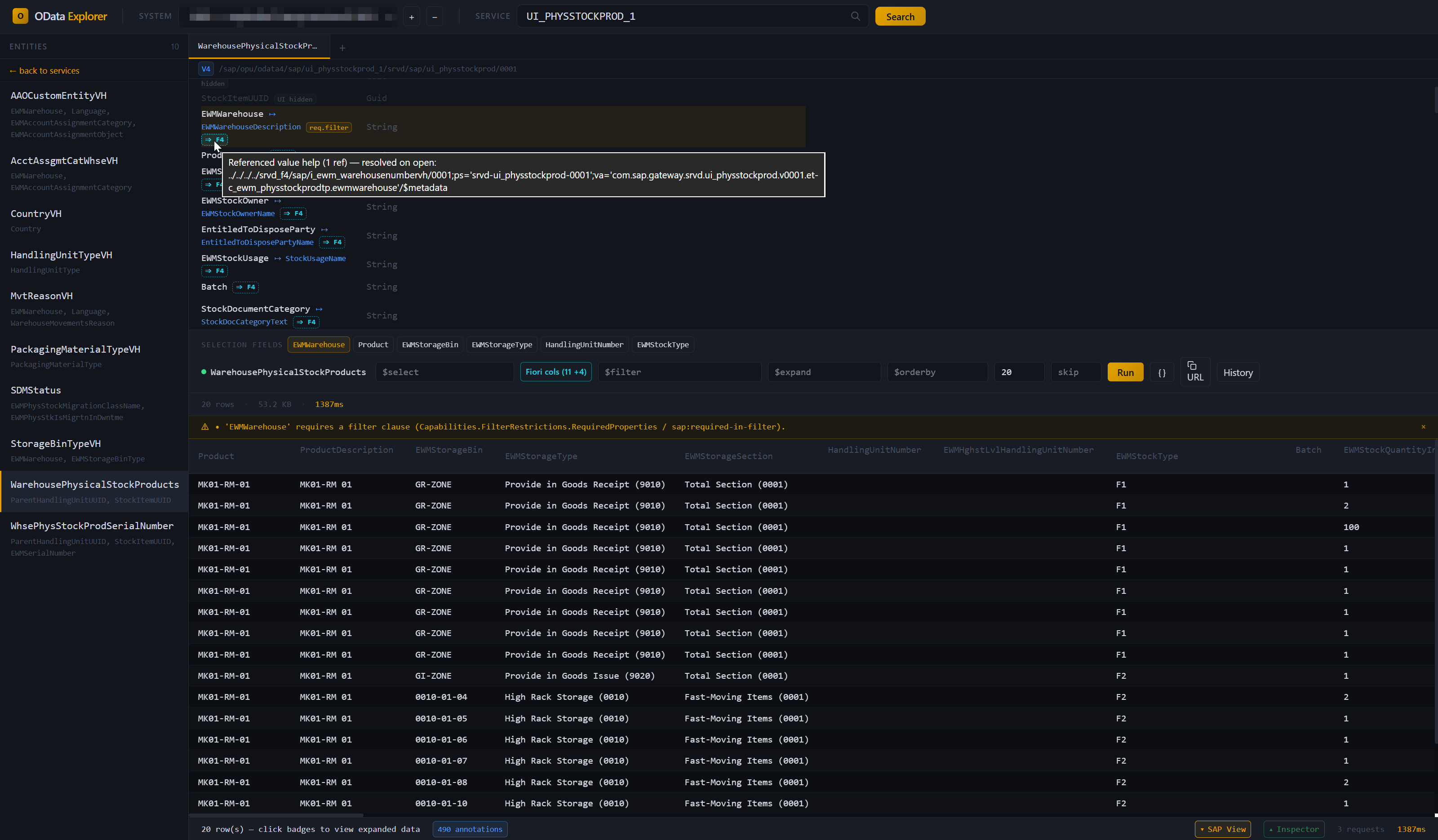
A CLI tool and desktop app for exploring and testing SAP OData services against real customer systems. It supports OData V2 and V4, SAP Gateway catalog discovery, and three common authentication modes: basic auth, Windows SSO (Kerberos / SPNEGO), and browser-based SSO (Azure AD / SAP IAS / SAML flows).
> [!NOTE]
> Early-stage project. Core workflows work end-to-end on real SAP systems, but packaging, docs, and polish are still evolving.
>
> This is an independent project and is not affiliated with, endorsed by, or sponsored by SAP SE.
Why
Working with SAP OData often means choosing between SAP-native tools that are awkward to use and generic API clients that do not understand SAP conventions.
- SAP Gateway Client (
/IWFND/GW_CLIENT) is useful, but dated and tied to a single SAP session.
- Postman / Insomnia / Bruno are strong general-purpose API clients, but they do not know about SAP CSRF handling,
sap-client, Gateway catalogs, or OData V4 service discovery.
- SAP Business Accelerator Hub is useful for standard SAP APIs, not for customer-specific services behind real SAP landscape authentication.
- SAP Business Application Studio is a full cloud IDE, not a focused OData exploration tool.
This project is aimed at a narrower problem: understand a real SAP OData service quickly, query it safely, and move on.
Features
- Service discovery — browse V2 and V4 services from SAP Gateway catalogs with search
- Entity explorer — inspect entity sets, properties, keys, navigation properties, and labels
- Visual query builder — build
$select, $expand, $filter, $orderby, $top, and $skip interactively, with autocomplete from the entity's metadata (properties, navigations, operators, functions)
- Results grid — tabular results with expandable nested data from
$expand, paging with totals (follows server-driven next links), row details with one-click navigation drill-down, and copy as TSV / CSV (TSV pastes straight into Excel)
- HTTP inspector — per-tab request/response trace in the desktop app (headers, body preview, timing) with copy-as-curl; same data on the CLI via
--verbose
- SAP-aware error hints — 404/403/5xx responses get actionable hints pointing at
/IWFND/MAINT_SERVICE, /IWFND/ERROR_LOG, ST22, or the browser SSO sign-in flow when appropriate
- SAP View — opt-in overlay that reads a service's SAP/UI5 annotations and renders the explorer as a Fiori-aware view: Fiori-ordered columns, filter chips, value-help (F4) pickers, restriction validation. Toggle from the status bar. See docs/SAP-VIEW.md for the full annotation list.
- Fiori-readiness linter — evaluates a service's annotations against a Fiori list-report / object-page checklist: profile-aware (list-report / object-page / value-help / analytical / transactional), catches dangling
Path references, and emits ABAP CDS fix hints pointing at the source annotation. Severity levels filter the output. Available in the CLI (sap-odata lint) and the desktop describe panel.
- Connection profiles — save SAP systems and store Basic-auth passwords in the OS keyring
- Three auth modes — basic auth, Windows SSO (SPNEGO), and browser SSO
- Service aliases — use short names for long service paths
- Auto resolution — type
API_WAREHOUSE_2 and resolve it from the catalog
- Tabs — keep multiple independent workspaces open, each with its own profile, service, and trace
- Favorites and history — star services — catalog entries or pasted paths — and replay recent queries; history is kept per profile and service across restarts, with pinning
- Environment labels — mark profiles DEV / QAS / PRD; production systems get a red band in the desktop app and a notice on the CLI
- Hand-offs — copy the current query as a
sap-odata CLI command, or an entity as markdown ("copy for AI") for an AI chat or a ticket
- Sample service — no SAP system at hand? The start screen opens a bundled synthetic service to try SAP View, the linter and the query bar
- Copy helpers — copy rows, columns, generated query URLs, request/response bodies, or curl commands
- Filter helper — click a cell value to turn it into a filter
- Offline mode — save a service's
$metadata from a connected system, or import an EDMX file from disk (API Hub download, GW_CLIENT "Save Response", curl > out.xml). Cached services browse through the same UI as live ones — describe, lint, annotations, all work without network access, in the desktop app and on the CLI (sap-odata -p "" -s describe …). The route-around for customer sites where the unsigned exe can't be installed on the SAP host: pull $metadata over curl / /IWFND/GW_CLIENT / browser, hand the file to a consultant running the explorer on their own laptop.
- Local-first — single-binary CLI and desktop app, no server component, no runtime dependencies (Windows / Linux / macOS source builds)
Installation
Download a prebuilt binary (Windows)
Go to the Releases page and pick the latest tag. Each release attaches the following assets:
| Asset | What it is | When to use |
|---|
SAP-OData-Explorer__x64_en-US.msi | Desktop app installer (MSI) | Easiest path. Double-click, install, launch from the Start menu. |
SAP-OData-Explorer__x64-setup.exe | Desktop app installer (NSIS) | Alternative installer with different uninstall hooks. |
SAP-OData-Explorer__portable.exe | Desktop app, no install | Locked-down environments (Citrix, no-admin laptop, customer VM). Copy and run — no installer, no admin required. |
sap-odata.exe | CLI tool, no install | Scripting, CI, or terminal use. Put on your PATH and run sap-odata setup. |
SHA256SUMS.txt | Checksums | Verify downloads with Get-FileHash -Algorithm SHA256 and compare. |
The CLI and the desktop app share the same connections.toml and Windows Credential Manager entries — no need to duplicate profiles between them.
> [!WARNING]
> Binaries are unsigned. Windows SmartScreen will show an "unrecognized app" warning — click More info → Run anyway. Code signing is planned.
Package managers
Cargo (CLI, any OS with Rust 1.88+ — builds from source, no SmartScreen involved):
cargo install sap-odata-cli
# → `sap-odata` on your PATH
On Linux the build needs pkg-config and the OpenSSL and D-Bus headers: sudo apt install pkg-config libssl-dev libdbus-1-dev (Debian/Ubuntu) or sudo dnf install pkg-config openssl-devel dbus-devel (Fedora). Passwords go to the Secret Service (GNOME Keyring, KWallet). On a machine without one, such as a headless server or WSL, profile add says so and --plaintext stores the password in the config file instead.
WinGet (Windows — desktop app, MSI):
winget install kts982.SAPODataExplorer
Scoop (Windows):
scoop bucket add kts982 https://github.com/kts982/scoop-bucket
scoop install sap-odata            # CLI
scoop install sap-odata-explorer   # Desktop app (portable)
Build from source (Linux, macOS, or if you prefer)
Prerequisites: Rust 1.88+ for the CLI, 1.90+ for the desktop app (rustup.rs), and Node.js 20+ for the desktop app frontend build. On Linux, also the packages listed under Cargo above.
git clone https://github.com/kts982/sap-odata-explorer.git
cd sap-odata-explorer

# CLI only — fast
cargo build --release -p sap-odata-cli
# → target/release/sap-odata(.exe on Windows)

# Desktop app — slower, especially on first build
cd tauri-app
npm install
cargo tauri build
# → ../target/release/bundle/msi/  (Windows installer)
# → ../target/release/bundle/deb/  (Linux .deb)
# → ../target/release/bundle/macos/ (macOS .app)
See CONTRIBUTING.md for development setup, tests, and contribution guidelines.
Config location
Profiles, aliases, and (optionally) plaintext-fallback passwords are stored in connections.toml. The CLI and the desktop app read the same file.
| Mode | Path |
|---|
| Default | %APPDATA%\sap-odata-explorer\config\connections.toml on Windows · ~/.config/sap-odata-explorer/connections.toml on Linux · ~/Library/Application Support/sap-odata-explorer/connections.toml on macOS |
| Portable | A connections.toml placed next to the exe takes precedence — useful when running from a USB stick or a copied folder on a locked-down machine. |
| Explicit | The SAP_ODATA_CONFIG_DIR environment variable overrides both — useful for CI or for keeping separate configs side by side. |
Run sap-odata profile where to print the exact path in use. Basic-auth passwords are stored in the OS keyring by default — see Security notes below.
Quick start
Desktop app
- Launch the app — from the Start menu if you installed it, or by running the portable exe directly
- Click
+ next to the profile dropdown to add a system. Use ✎ to edit an existing profile (URL, password, auth mode) or − to remove it. Profile name and basic-auth username are locked on edit — both feed the keyring entry key, so changing them = delete + re-add.
- Choose auth mode and save the profile
- For Browser SSO profiles, click Sign In once and complete the login flow
- Click Search to browse services and pick one. If your system has the V4 catalog SICF node inactive (
/IWFND/CONFIG V4 node off — a common customer config), the sidebar shows a hint to paste the full /sap/opu/odata4/... path directly into the search box.
- Click an entity set in the sidebar → click property names to add them to
$select, navigation properties to $expand → Run. collapse folds the entity details away to give the results room; URL copies the OData URL and CLI copies the same query as a sap-odata command (for scripts or an AI agent).
- Toggle SAP View in the status bar to overlay SAP/UI5 annotation hints (entity titles, description pairings, criticality colors, filter restrictions, selection-field chips). Toggle Inspector to see the full HTTP trace for the last call. The version at the far right checks for a newer release on click; Feedback opens GitHub to report a bug or suggest something.
- Offline mode is in the header: Save offline (visible when a service is loaded on a connected profile) opens a small dialog — pick a target bucket, label, and note, or just hit Save for the defaults — and caches the
$metadata under a (offline) bucket; Import EDMX opens a file picker for EDMX files hand-pulled outside the tool. Offline profiles appear in the picker with an [OFFLINE] badge; selecting one lets you browse the cached services normally — Run / query / value-help are disabled (no network), and each cached row has a ✕ to remove it from the library.
CLI
# Easiest path: guided setup
sap-odata setup

# Then browse and query
sap-odata -p DEV services -f warehouse
sap-odata -p DEV -s API_WAREHOUSE_2 entities
sap-odata -p DEV -s API_WAREHOUSE_2 describe Warehouse
sap-odata -p DEV -s API_WAREHOUSE_2 run Warehouse --top 5

# Any command with --verbose prints the full HTTP trace to stderr
# (same data as the desktop app's Inspector, with auth headers redacted).
sap-odata -v -p DEV -s API_WAREHOUSE_2 run Warehouse --top 1

# Offline mode — capture from a live system or import a file from disk
sap-odata -p DEV -s API_WAREHOUSE_2 offline save           # cache $metadata under DEV (offline)
sap-odata offline import ./from-customer.edmx              # ingest a file the user already has
sap-odata offline list                                     # list buckets
sap-odata offline list --profile "DEV (offline)"           # list services in a bucket
sap-odata offline delete --profile "DEV (offline)"         # remove a bucket (asks for confirm)
If you prefer scripted setup, sap-odata profile add ... is still available for direct profile creation.
CLI commands
| Command | Purpose |
|---|
setup | Interactive wizard to add a new SAP system |
signout | Clear persisted Browser SSO session |
profile list/add/remove/test/where | Manage saved SAP systems |
alias add/list/remove | Per-profile short names for services |
services | List available OData services from the catalog |
entities | List entity sets in a service |
describe | Show properties, keys, nav properties, labels |
functions | List function imports / actions |
build [query] | Dry-run: print the OData URL without querying it |
run [query] | Execute query, show results as table |
metadata | Dump raw $metadata XML |
verify | Smoke-test every entity set with a small $top probe; exit code reflects failures (CI-friendly) |
lint [] | Fiori-readiness checklist — check a service's annotations against list-report / object-page expectations, with ABAP CDS fix hints. --min-severity pass|warn|miss to filter. |
annotations | List every SAP/UI5 annotation parsed from $metadata, grouped by vocabulary. --namespace / --filter to narrow. |
offline save | Cache the connected service's $metadata for offline browsing. Requires -p PROFILE -s SERVICE. |
offline import | Import an EDMX file (API Hub, GW_CLIENT, curl dump). No connection needed. --offline-profile NAME to target a specific bucket. |
offline list [--profile NAME] | List offline buckets, or services within one. |
offline delete --profile NAME [--service-id ID] | Remove a whole bucket or one service. -y skips the confirm prompt. |
skill [--save DIR] | Print the agent skill matching this CLI version, or write it to DIR/SKILL.md (see Use with AI agents). |
See CLI-REFERENCE.md for all options (or run sap-odata --help).
Use with AI agents
The CLI is deliberately agent-friendly: --json on every command that returns
data, clean stdout (banners, logs and HTTP traces go to stderr), meaningful exit codes, and a
strictly read-only SAP surface. skills/sap-odata-cli/SKILL.md
is a ready-made skill that teaches a coding agent the safe workflows —
discovery, describe, queries, lint, offline EDMX — plus the failure
playbook (SSO expiry, keyring states, unpublished V4 catalogs).
The skill ships inside the CLI, so it always matches the installed version.
For Claude Code, write it into your skills
directory:
sap-odata skill --save ~/.claude/skills/sap-odata-cli    # personal (all projects)
sap-odata skill --save .claude/skills/sap-odata-cli      # or per-project
Re-run after upgrading the CLI. For other agents (Cursor, Codex, ...),
sap-odata skill prints it; save it where your rules / AGENTS.md can
reference it. On Windows PowerShell 5.1 use --save rather than >, which
writes UTF-16. The skill assumes profiles already exist — agents are told to
never run the interactive setup wizard and never to handle passwords.
Authentication
- Basic — username/password, stored in the OS keyring by default
- Windows SSO — SPNEGO/Kerberos via Windows SSPI, with no password prompt on supported domain-joined machines
- Browser SSO — for SAP systems behind SAML-style login chains such as Azure AD or SAP IAS; sign-in happens in the desktop app and the resulting session can be reused by the CLI
Setup wizard
The CLI has an interactive wizard for adding profiles:
sap-odata setup
This walks through profile name, URL, client, language, auth method, and credentials where needed. For Basic and Windows SSO profiles it can also test the connection immediately.
For Browser SSO, the wizard saves the profile, but the first interactive sign-in happens from the desktop app. After that, the CLI reuses the persisted session automatically.
Persisted browser SSO sessions
For Browser SSO profiles, the desktop app and CLI work together:
- Create the profile with
sap-odata setup or from the desktop app.
- In the desktop app, click Sign In once and complete the IdP flow.
- The session is stored in the OS keyring under the current user account.
- Subsequent CLI commands reuse that session automatically until it expires.
Typical flow:
sap-odata -p PRD services
sap-odata -p PRD -s API_X run ...

# Clear the persisted CLI session:
sap-odata signout PRD
The desktop app also has a Sign Out button for Browser SSO profiles. That clears the persisted session and local webview cookies for SAP and common IdP hosts.
Sessions still expire server-side. When that happens, the CLI tells you to sign in again from the desktop app. If a profile's base_url or client changes, any persisted Browser SSO session is treated as stale and discarded automatically (language doesn't affect sessions).
Security notes
- TLS verification is enabled by default. For self-signed SAP certificates, set
insecure_tls = true in the profile's connections.toml.
- Passwords are stored in the OS keyring (Windows Credential Manager / macOS Keychain / Linux Secret Service) by default rather than in plaintext config.
- Browser SSO session cookies are serialized, compressed, and stored in the OS keyring under the current user account. The risk profile is similar to a browser persisting auth cookies locally.
- Sign-out behavior is explicit:
sap-odata signout clears the persisted Browser SSO session; the desktop app's Sign Out also clears local webview cookies for SAP and common IdP hosts.
- CSP is enforced in the Tauri app; assets are bundled locally and not loaded from external CDNs.
- Query history (desktop) keeps the last 50 queries per profile and service, plus pinned ones, in the app's local storage — query parameters only, never results. Filter values can still contain business identifiers; clear in the History panel removes everything that isn't pinned.
- No telemetry. The tools talk only to the SAP systems you configure. The one exception is the desktop app's version button in the status bar: clicking it asks GitHub's releases API whether a newer version exists — nothing runs on its own, and nothing about you or your systems is sent.
Responsible use
Use this tool only with SAP systems and endpoints you are authorized to access. SAP's API Policy distinguishes published/documented APIs from internal or private interfaces and describes API controls for availability, limits, security, bulk extraction, and automated use.
sap-odata-explorer is intended for human-driven inspection and testing of documented SAP OData services or customer-owned services. It is not intended to bypass SAP API controls, access internal/private SAP APIs, perform large-scale data extraction, or act as an autonomous API-calling agent.
How it compares
The short version: other tools treat an SAP OData service as generic REST. This one reads the SAP/UI5 annotations that come with the service, renders results the way a Fiori app would, and flags Fiori-readiness gaps with ABAP CDS fix hints.
| Tool | Where it fits |
|---|
| SAP Gateway Client | Better suited to backend QA replay inside SAP. sap-odata-explorer runs cross-platform, discovers V2+V4 catalogs, overlays a Fiori-aware view from the service's own UI5 annotations (column order, filter chips, F4 pickers, Capabilities.* restrictions), and lints for Fiori-readiness with ABAP CDS fix hints — GW Client shows the raw OData response. |
| SAP Business Accelerator Hub | Better suited to official SAP API browsing and SDK downloads. sap-odata-explorer works against live customer systems and custom services, with annotation-driven rendering and a Fiori-readiness linter — things reference docs can't provide. |
| Postman / Insomnia / Bruno / Hoppscotch | Better suited to broad API workflows, collections, and collaboration. sap-odata-explorer is focused on SAP specifics — CSRF handling, sap-client, Gateway catalog discovery — reads UI5 annotations to render results the way a Fiori app would, and lints annotations for dangling references and missing Fiori expectations. Generic HTTP clients don't attempt any of this. |
The CLI is scriptable by design (stable subcommands, exit codes, --verbose trace output) and composes cleanly with shell pipelines, CI steps, or external wrappers — so while the tool is aimed at human-driven exploration, nothing stops you from invoking it from higher-level automation when that's what you need.
Best fit: "I need to quickly understand and query this SAP OData service."
Project structure
sap-odata-explorer/
├── crates/
│   ├── core/       # Shared library (auth, HTTP, metadata, query, catalog, config, SSO)
│   └── cli/        # CLI binary
└── tauri-app/
    ├── src/        # Frontend (HTML + Tailwind + vanilla JS)
    └── src-tauri/  # Tauri commands wrapping core
The sap-odata-core crate holds all protocol logic. CLI and Tauri are thin wrappers. This makes it easy to add a third frontend later (MCP server, web app, etc.).
Directions
Not a commitment — priorities may shift.
Legend: [x] done · [-] partial / in progress · [ ] planned
Contributing
See CONTRIBUTING.md. Bug reports, PRs, and discussions welcome.
License
MIT — see LICENSE.