




Kache
Kache is a compiler cache for Rust, C/C++, and CUDA. It keys every compiler invocation by the content of its inputs, so a crate built once is restored instead of rebuilt in your next worktree, branch, or CI run. Outputs live in a local content-addressed store and can be shared through S3-compatible or filesystem remotes. Linux, macOS, and Windows are supported and release-tested.
Built by Kunobi.
Benchmarks · Kache vs sccache · CI setup
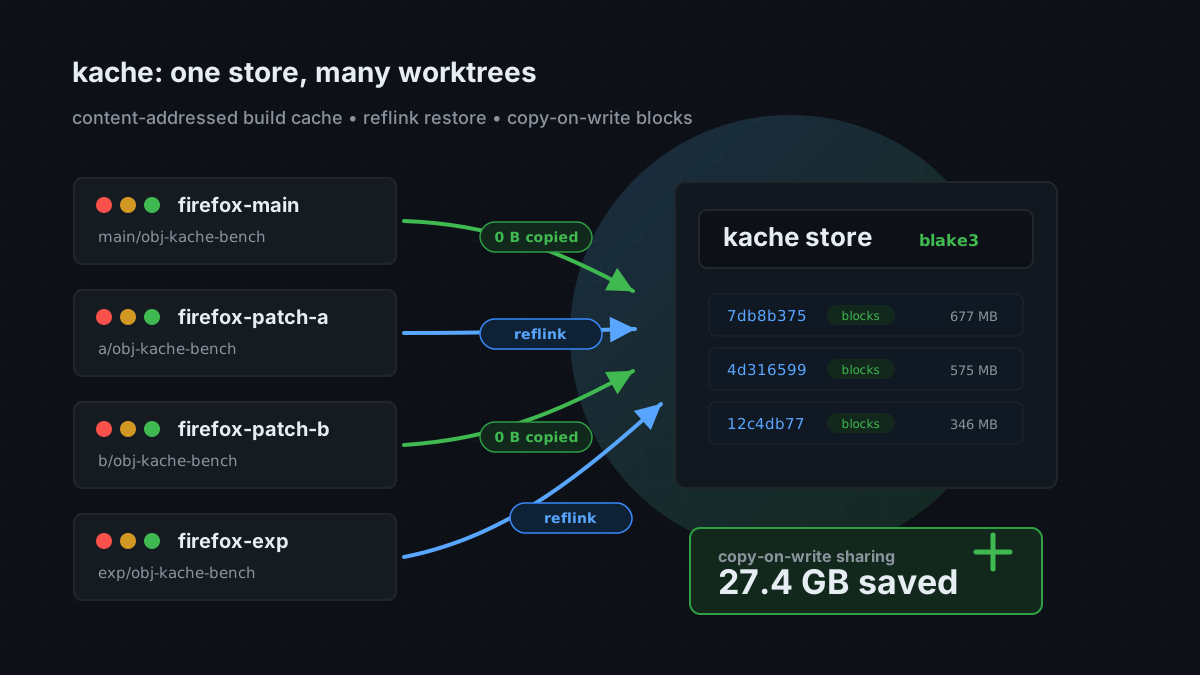
See how Kache shares build outputs across worktrees →
Install
cargo install kache
kache init
Your Cargo commands do not change.
kache init sets rustc-wrapper in Cargo's config. On Unix it also adds the [env] keys for build-script C and C++. Run kache init --check to preview the changes, or kache init --no-service to skip the OS service.

cargo install needs Rust 1.95 or newer. Prebuilt packages exist for Homebrew, APT, AUR, winget, Scoop, Chocolatey, mise, and Nix. Release builds cover x86_64 and ARM on Linux, macOS, and Windows. See Install Kache for each channel.
See your first cache hit
After kache init, build the same revision in two temporary worktrees. Each gets its own target directory, so your existing build outputs stay in place. The second tree's report lists the hits and a bypass reason for every unit that still compiled.

How it works
Kache has three parts: a compiler wrapper, a local store, and an optional daemon.
- The wrapper parses each
rustc, rustdoc, cc, c++, or nvcc invocation, hashes the inputs that change the output, and normalizes the machine-local paths that do not. Two worktrees of the same revision produce the same key.
- Wrappers that reach the same key at the same time join one flight, so the compiler runs once per key on a machine, however many Cargo processes ask for it.
- The store keeps outputs as content-addressed blobs. Identical bytes are stored once. Restores use copy-on-write clones where the filesystem supports them, so a second worktree costs little disk.
- The daemon serves remote lookups after a local miss and uploads new entries in the background.
Hits, misses, and passthroughs are reported per unit, and kache explain says what changed. Read the architecture →
What Kache caches
| Workload | Status | Notes |
|---|
| Rust libraries and build scripts | Supported | Run kache init. Build-script runs are cached on Linux and macOS |
| Rust executables | Supported on Linux and macOS | Disabled by default on Windows |
| C and C++ object files | Supported | GCC, Clang, Apple Clang, and clang-cl. Build scripts via kache init; other builds via shims or CC/CXX |
| CUDA object files | Supported | Single-source nvcc -c and -dc via CUDACXX="kache nvcc" or a CMake launcher |
| Rust documentation | Unix | cargo doc with RUSTC_BOOTSTRAP=1 and -Z rustdoc-depinfo -Z rustdoc-mergeable-info. Windows has no compiler shims, so cargo doc is not cached there |
| Local storage | Built in | Content-addressed store with garbage collection |
| S3-compatible remote storage | Built in | Includes AWS S3, MinIO, and Cloudflare R2 |
| Google Cloud Storage | Built in | Application Default Credentials, including GKE workload identity |
| Filesystem remote storage | Built in | Useful for shared disks and CI volumes |
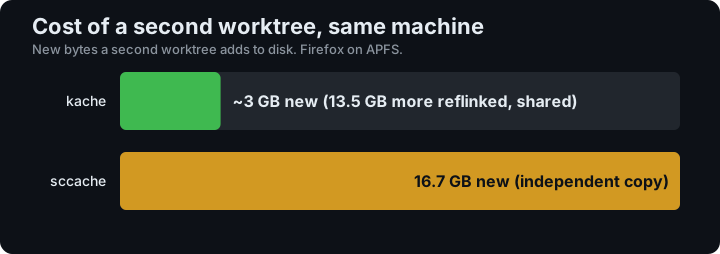
In a Firefox 151 benchmark with Kache 0.7.0 on macOS/APFS, the second worktree added about 3 GB of new data. Read the measurements and methodology →
For a comparison with sccache, read Kache or sccache?.
Tested nightly on real projects
The scheduled benchmark workflow runs real cold and warm builds of Firefox, LLVM, SurrealDB, Lance, OpenDAL, cuda-oxide, and eza on Linux. Separate workflows build Firefox on Windows every night and compare Firefox with sccache once a week. It also measures how much of a Firefox build survives a source update.
Each run checks its own measurement validity and uploads reports, traces, and logs for 30 days. Treat timing or hit-rate numbers as evidence only when the individual job succeeds and its benchmark verdict is ok.
See the benchmark setup and report guide →
CI
The official action installs Kache and wires it into the build:
- uses: kunobi-ninja/kache-action@v1

- run: cargo build --locked
See the CI guide for GitHub Actions and shell-based CI examples.
C and C++
On Unix, kache init creates compiler-name shims and offers to add their directory to PATH in your zsh, bash, or fish startup file. Make, CMake, autotools, and Arch PKGBUILDs that call gcc by name then go through Kache, with no CC= edit or shell wrapper.
For managed dotfiles or another shell, set it up by hand:
kache init --shims
export PATH="$HOME/.local/lib/kache/shims:$PATH"
APT and AUR packages install /usr/lib/kache. Nix packages include the same symlinks in ${kache}/shims and ${kache}/lib/kache; see the Nix configuration example.
For makepkg, put the same assignment in ~/.makepkg.conf. kache init also links versioned compilers on PATH, such as clang-19. Wrap target-prefixed names with kache init --shims --from-path.
Kache inspects the real compiler invocation. Unsupported or unsafe invocations pass through. See C and C++.
Storage and remotes
The default local cache is:
- Linux:
$XDG_CACHE_HOME/kache or ~/.cache/kache
- macOS:
~/Library/Caches/kache
- Windows:
%LOCALAPPDATA%\kache
Open the configuration editor with kache config, or edit the TOML file directly. A minimal S3-compatible remote looks like this:
[cache.remote]
type = "s3"
bucket = "my-build-cache"
region = "us-east-1"
Credentials come from the standard AWS environment variables or credential chain. See S3 setup and filesystem setup.
Useful commands
kache monitor                 # live build and cache activity
kache stats                   # hit rate, time saved, cache size
kache stats --last-build      # hits, misses, and bypass reasons of the latest build
kache stats --full --redact   # full report without cache keys and paths, for sharing
kache explain                 # why the latest build missed, costliest cause first
kache doctor                  # setup and integrity checks
kache explain          # what changed in one crate's key
kache list                    # inspect cached entries
kache clean --dry-run         # target dirs, what each frees, what a clean removes
kache clean --orphans --yes   # remove the targets of deleted worktrees
kache clean --cache           # empty the cache (the daemon keeps it under its limit)
kache sync                    # pull from and push to the configured remote
kache daemon status           # inspect the background service

Run kache help for exact flags. The command reference covers every top-level command.
To pass one build through without changing the setup, run it with KACHE_DISABLED=1.
Documentation
Also from Kunobi
For Kubernetes and GitOps, Kunobi Desktop lets you inspect clusters and manage Flux and Argo CD.
Questions and gaps
Development
git clone https://github.com/kunobi-ninja/kache.git
cd kache
cargo test --workspace --all-features
See CONTRIBUTING.md before opening a pull request.
Kache is licensed under the Apache License 2.0.