uxplay-windows leapbtw
Use this command to install uxplay-windows:
winget install --id=leapbtw.uxplay -e FREE AirPlay to Windows PC
winget install --id=leapbtw.uxplay -e FREE AirPlay to Windows PC
Free as both in "freedom" and "free beer"!
Download the latest version of uxplay-windows from releases.
After installing, control uxplay-windows from it's tray icon! Right-click it to start or stop AirPlay. You can also set it to run automatically when your PC starts
> [!NOTE]
> What is uxplay-windows?
>
> UxPlay allows you to screen share from your Apple devices to non-Apple ones using AirPlay.
>
> uxplay-windows (this project) wraps binaries of UxPlay into a fully featured App for Windows 10/11 users, making it easier for those who may find compiling UxPlay challenging. Most other software achieving the same functionality as uxplay-windows is usually paid and non-free.
> [!TIP]
> My \ can't connect to my PC!!!
> 1. Check if the uxplay.exe is running: right-click the tray icon and restart it.
> 2. Toggle Wi-Fi OFF on your iPhone/iPad/Mac, wait a couple of seconds and reconnect. It might take a few attempts.
> 3. As last resort, close uxplay-windows, open Task Manager and restart Bonjour Service from the Services tab. Then reopen uxplay-windows and try again
> [!IMPORTANT]
> Why is Windows Defender complaining during installation?
>
> 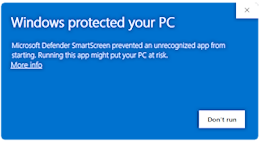 >
> Just click on
>
> Just click on More info and it will let you install. It complains because the executable is not signed. If you don't trust this software you can always build it yourself! See below.
>
> If prompted by Windows Firewall, please allow uxplay-windows to ensure it functions properly.
> [!NOTE] > How do I build this software myself? > > Please see BUILDING.md
Please report issues related to the build system created with GitHub Actions in this repository. For issues related to other parts of this software, report them in their respective repositories.
Please take a look at the LICENSE.