AxonHub - All-in-one AI 开发平台
任意 SDK、任意模型、零代码改动

❤️ 赞助商
  <a href="https://apikey.fun/register?aff=axonhub">
    <img src="docs/sponsors/apikey-fun.png" alt="APIKEY.FUN" height="50" />

    <strong>APIKEY.FUN</strong>
  </a>
  <div>
    <a href="https://apikey.fun/register?aff=axonhub">
      <img src="docs/sponsors/api-key.fun.banner.png" alt="APIKEY.FUN banner" width="100%" />
    </a>
  </div>
  <div>
    APIKEY.FUN 是一家专业的企业级 AI 中转站,致力于为企业和个人开发者提供稳定、高效、低成本的 AI 模型 API 接入服务。
    平台支持 Claude、OpenAI、Gemini 等主流热门模型,价格低至官方原价的 7%。
    AxonHub 用户通过<a href="https://apikey.fun/register?aff=axonhub">专属链接注册</a>,还可享受最高充值永久 95 折专属优惠。
  </div>


  <a href="https://lj.s.gy/DUq59H">
    <img src="https://www.infistar.cc/logo.png" alt="无限星河 Infistar.cc" height="50" />

    <strong>无限星河 Infistar.cc</strong>
  </a>
  <div>
    <a href="https://lj.s.gy/DUq59H">
      <img src="docs/sponsors/infistar-banner.png" alt="Infistar.cc 无限星河" width="100%" />
    </a>
  </div>
  <div>
   <strong>AxonHub × Infistar.cc 无限星河|高可用全模型 API</strong>
  </div>
  <div>
    ⚡ 企业级高并发稳定调度|官方 1 折起 · 透明倍率 · 多节点冗余
    🧠 全系模型支持|ChatGPT · Claude · Gemini · DeepSeek
    🎨 全模态接入|文本 · 图像 · 视频 · Embedding / Rerank
  </div>
  <div>
    AxonHub 用户通过<a href="https://lj.s.gy/DUq59H">专属链接</a>注册,可享专属特惠。
  </div>
赞助商
详情
<a href="https://lj.s.gy/8HNo22">
<img src="https://www-static.qbox.me/_next/static/media/logo.0fc18feaa621d2068a7180631f742256.jpg" alt="七牛云 AI" height="90" />
<strong>七牛云 AI</strong>
</a>
七牛云 AI 是七牛云(02567.HK)旗下企业级大模型 MaaS 平台,一站式调用全球 150+ 主流模型,兼容全球主流模型厂商协议,覆盖文本、图像、音频、视频、文件处理等全模态处理能力,服务超过 169 万企业及开发者用户。七牛云 AI 为 AxonHub 项目的用户提供了专属福利:通过<a href="https://lj.s.gy/8HNo22">此链接</a>注册,企业用户免费领 1200 万 Token,开发者免费领 300 万 Token。
<a href="https://lj.s.gy/Wo8IuN">
<img src="https://api.fenno.ai/branding/standard/icon.webp" alt="FennoAI" height="90" />
<strong>FennoAI</strong>
</a>
FennoAI 是一家面向企业研发团队和开发者的高稳定、高性能 API 中转服务商,兼容 OpenAI 与 Anthropic 协议,可无缝接入 Codex、Claude Code、OpenCode 等主流 AI 编程工具。平台具备企业级稳定性,可支撑千亿 Token/日的调用规模,并支持境内外主体公对公结算及开票,满足企业级研发与采购需求。作为 AxonHub 用户专属福利,通过<a href="https://lj.s.gy/Wo8IuN">专属链接</a>购买订阅,仅需 1.99 美元即可获得价值 50 美元的 Coding Plan 额度。同时支持邀请奖励,邀请好友购买最高可获得 20% 返佣,邀请越多,奖励越高。
<a href="https://bloome.im/app?ref=MjgMzmCY&utm_medium=github&utm_source=looplj-axonhub-ivor-202606">
<img src="docs/sponsors/bloome.png" alt="Bloome" height="90" />
<strong>Bloome</strong>
</a>
想试用 AxonHub,但不想在本地配置环境?可以在 Bloome 上运行:
<a href="https://bloome.im/app?ref=MjgMzmCY&utm_medium=github&utm_source=looplj-axonhub-ivor-202606">快速使用</a>,
通过浏览器或手机一键启动,也可以轻松分享给你的团队。
📖 项目介绍
All-in-one AI 开发平台
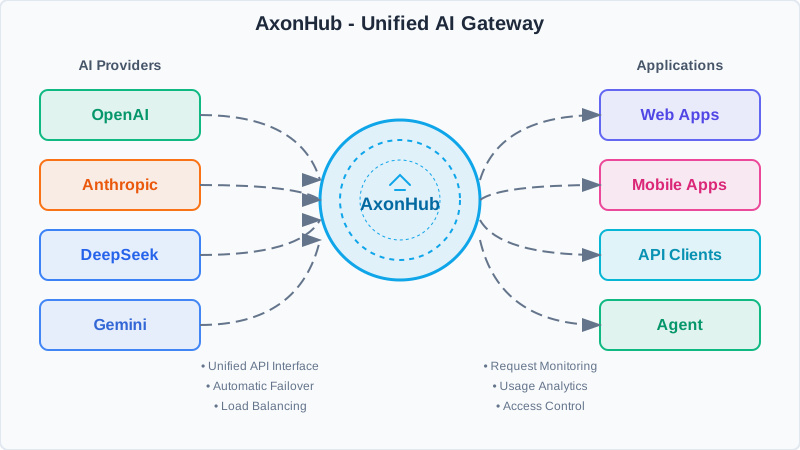
AxonHub 是 AI 网关,让你无需改动一行代码即可切换模型供应商。
无论你使用的是 OpenAI SDK、Anthropic SDK 还是任何 AI SDK,AxonHub 都会透明地将你的请求转换为与任何支持的模型供应商兼容的格式。无需重构,无需更换 SDK——只需更改配置即可。
它解决了什么问题:
- 🔒 供应商锁定 - 从 GPT-4 瞬间切换到 Claude 或 Gemini
- 🔧 集成复杂性 - 一个 API 格式对接 10+ 供应商
- 📊 可观测性缺口 - 开箱即用的完整请求追踪
- 💸 成本控制 - 实时用量追踪和预算管理
核心特性 Core Features
| 特性 | 你能获得什么 |
|---|
| 🔄 任意 SDK → 任意模型 | 用 OpenAI SDK 调用 Claude,或用 Anthropic SDK 调用 GPT。零代码改动。 |
| 🔍 完整请求追踪 | 线程级可观测性的完整请求时间线。更快定位问题。 |
| 🔐 企业级 RBAC | 细粒度访问控制、用量配额和数据隔离。 |
| ⚡ 智能负载均衡 | <100ms 自动故障转移。始终路由到最健康的渠道。 |
| 💰 实时成本追踪 | 每次请求的成本明细。输入、输出、缓存 Token——全部追踪。 |
📚 文档 | Documentation
文档索引 | Documentation Index
DeepWiki
详细的技术文档、API 参考、架构设计等内容,可以访问
🎯 演示 | Demo
在我们的 演示实例 上体验 AxonHub!
注意:演示网站目前配置了 Zhipu 和 OpenRouter 的免费模型。
演示账号 | Demo Account
⭐ 特性 | Features
📸 截图 | Screenshots
以下是 AxonHub 的实际运行截图:
  <a href="docs/screenshots/axonhub-dashboard.png">
    <img src="docs/screenshots/axonhub-dashboard.png" alt="系统仪表板" width="250" />
  </a>

  系统仪表板


  <a href="docs/screenshots/axonhub-channels.png">
    <img src="docs/screenshots/axonhub-channels.png" alt="渠道管理" width="250" />
  </a>

  渠道管理


  <a href="docs/screenshots/axonhub-model-price.png">
    <img src="docs/screenshots/axonhub-model-price.png" alt="模型价格" width="250" />
  </a>

  模型价格


  <a href="docs/screenshots/axonhub-models.png">
    <img src="docs/screenshots/axonhub-models.png" alt="模型" width="250" />
  </a>

  模型


  <a href="docs/screenshots/axonhub-trace.png">
    <img src="docs/screenshots/axonhub-trace.png" alt="追踪查看" width="250" />
  </a>

  追踪查看


  <a href="docs/screenshots/axonhub-requests.png">
    <img src="docs/screenshots/axonhub-requests.png" alt="请求监控" width="250" />
  </a>

  请求监控
🚀 API 类型 | API Types
🤖 支持的提供商 | Supported Providers
| 提供商 Provider | 状态 Status | 支持模型 Models | 兼容 API |
|---|
| OpenAI | ✅ 已完成 | GPT-4, GPT-4o, GPT-5 等 | OpenAI, Anthropic, Gemini, Embedding, Image Generation |
| Anthropic | ✅ 已完成 | Claude 3.5, Claude 3.0 等 | OpenAI, Anthropic, Gemini |
| 智谱 AI (Zhipu) | ✅ 已完成 | GLM-4.5, GLM-4.5-air 等 | OpenAI, Anthropic, Gemini |
| 月之暗面 (Moonshot) | ✅ 已完成 | kimi-k2 等 | OpenAI, Anthropic, Gemini |
| DeepSeek | ✅ 已完成 | DeepSeek-V3.1 等 | OpenAI, Anthropic, Gemini |
| 字节跳动豆包 | ✅ 已完成 | doubao-1.6 等 | OpenAI, Anthropic, Gemini, Image Generation |
| Gemini | ✅ 已完成 | Gemini 2.5 等 | OpenAI, Anthropic, Gemini, Image Generation |
| Jina AI | ✅ 已完成 | Embeddings, Reranker 等 | Jina Embedding, Jina Rerank |
| OpenRouter | ✅ 已完成 | 多种模型 | OpenAI, Anthropic, Gemini, Image Generation |
| ZAI | ✅ 已完成 | - | Image Generation |
| AWS Bedrock | 🔄 测试中 | Claude on AWS | OpenAI, Anthropic, Gemini |
| Google Cloud | 🔄 测试中 | Claude on GCP | OpenAI, Anthropic, Gemini |
| NanoGPT | ✅ 已完成 | 多种模型、图像生成 | OpenAI, Anthropic, Gemini, Image Generation |
🚀 部署指南 | Deployment Guide
让你的 Agent 读取并遵循 deploy-axonhub 来部署 AxonHub。
⚡ 快速开始 | Quick Start
部署完成后:
- 初始化系统
- 打开 Agent 返回的 AxonHub 访问地址。
- 按照初始化向导创建管理员账号。
- 添加渠道
- 在 Channels(渠道) 中添加 AI 提供商及其 API Key。
- 配置支持的模型,测试连接并启用渠道。
- 创建 API Key
- 在 API Keys(API 密钥) 中创建供客户端使用的 AxonHub API Key。
- 发起第一个请求
from openai import OpenAI

client = OpenAI(
    base_url="http://localhost:8090/v1",
    api_key="your-axonhub-api-key"
)

response = client.chat.completions.create(
    model="gpt-4o",
    messages=[{"role": "user", "content": "Hello, AxonHub!"}]
)

print(response.choices[0].message.content)
更多配置和 API 示例请查看完整文档索引。
🛠️ 开发指南
详细的开发说明、架构设计和贡献指南,请查看 docs/zh/development/development.md。
👥 团队 | Team
  <a href="https://github.com/looplj">
    <img src="https://github.com/looplj.png?size=100" width="100" alt="looplj" />
    <b>looplj</b>
  </a>


  <a href="https://github.com/llc1123">
    <img src="https://github.com/llc1123.png?size=100" width="100" alt="llc1123" />
    <b>llc1123</b>
  </a>
🤝 致谢 | Acknowledgments
📄 许可证 | License
本项目采用多种许可证授权(Apache-2.0 和 LGPL-3.0)。授权范围详见 NOTICE,协议全文见 LICENSE 和 llm/LICENSE。
AxonHub - All-in-one AI 开发平台,让 AI 开发更简单
🏠 官网 • 📚 文档 • 🐛 问题反馈
Built with ❤️ by the AxonHub team