OMP Manager marlocarlo
Use this command to install OMP Manager with WinGet:
winget install --id=marlocarlo.OmpManager -e A terminal user interface to browse themes, install Nerd Fonts, and configure shell profiles for Oh My Posh with zero effort.
winget install --id=marlocarlo.OmpManager -e A terminal user interface to browse themes, install Nerd Fonts, and configure shell profiles for Oh My Posh with zero effort.
A terminal UI (TUI) that sets up Oh My Posh from scratch - no prior knowledge needed.
> You don't need Oh My Posh installed. The app detects what's missing and walks you through everything: installing Oh My Posh, picking a Nerd Font, previewing and applying a theme, and configuring your shell. Just run it and follow the wizard.
Built with Rust, Ratatui, and a PowerShell-blue color scheme.
cargo install omp-manager
winget install marlocarlo.OmpManager
choco install omp-manager
scoop bucket add omp-manager https://github.com/marlocarlo/scoop-omp-manager
scoop install omp-manager
Download the pre-built binary for your platform from the latest release, extract, and put omp-manager (or omp-manager.exe) anywhere on your PATH.
| Platform | Archive |
|---|---|
| Windows x64 | omp-manager-vX.Y.Z-windows-x64.zip |
| Windows x86 | omp-manager-vX.Y.Z-windows-x86.zip |
| Windows ARM64 | omp-manager-vX.Y.Z-windows-arm64.zip |
| Linux x64 | omp-manager-vX.Y.Z-linux-x64.tar.gz |
| Linux ARM64 | omp-manager-vX.Y.Z-linux-arm64.tar.gz |
| macOS Intel | omp-manager-vX.Y.Z-macos-x64.tar.gz |
| macOS Apple Silicon | omp-manager-vX.Y.Z-macos-arm64.tar.gz |
> Windows note: All Windows binaries are statically compiled — no VC runtime DLLs required.
git clone https://github.com/marlocarlo/omp-manager.git
cd omp-manager
cargo install --path .
Then run:
omp-manager
When you launch the app, go to Quick Setup (first item on the Dashboard) and press Enter at each step:
| Step | What happens |
|---|---|
| 1. Install Oh My Posh | Downloads and installs the OMP binary (winget on Windows, brew on macOS, official script on Linux) |
| 2. Install a Nerd Font | Presents a curated list of Nerd Fonts - pick one, press Enter, done |
| 3. Pick a Theme | Quick-pick from popular themes, or go to the Themes tab to browse all 100+ with live preview |
| 4. Configure Shells | Auto-detects your installed shells, toggle which ones to configure, press Enter |
After step 4, restart your terminal and your prompt is ready.
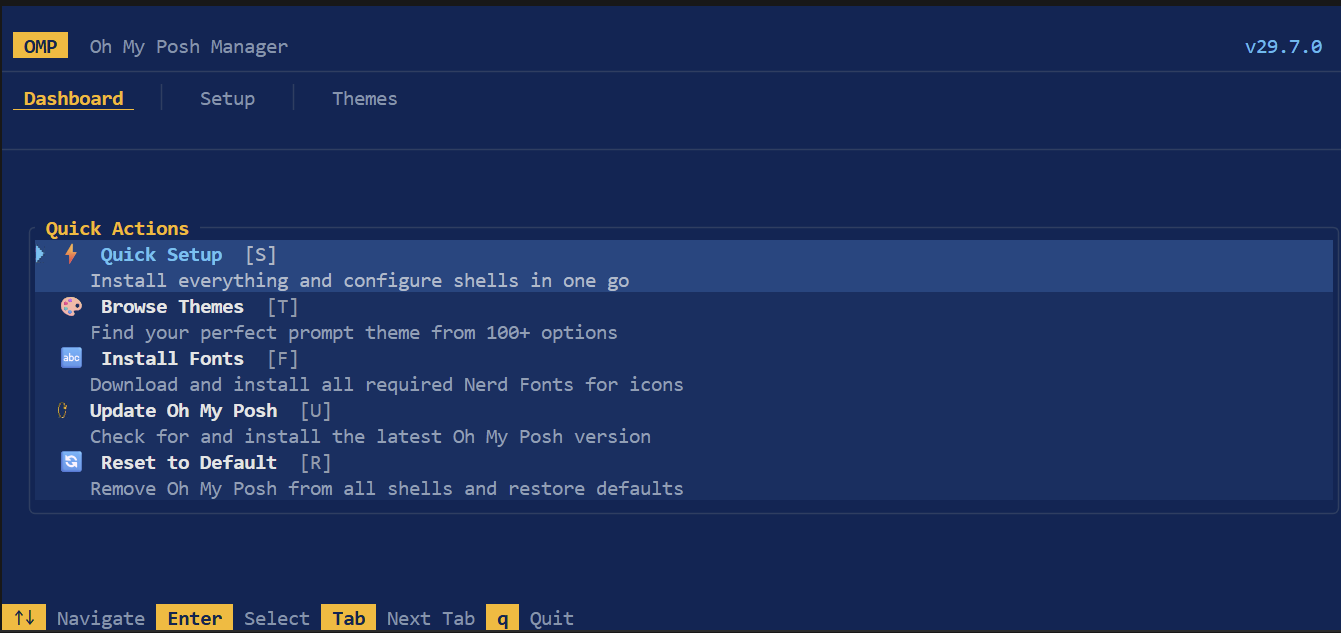
System status at a glance - OMP version, active theme, Nerd Font status, shell config status. Quick actions: open Setup Wizard, jump to Themes, install fonts, update, or reset everything to default.
Browse 100+ built-in themes with:
/ and type to filterEnter to download (if needed) and apply any themeThemes are auto-downloaded from the official Oh My Posh GitHub repo on demand. No manual file management needed.
| Key | Action |
|---|---|
Tab / 1-3 | Switch tabs |
↑ ↓ | Navigate lists |
← → | Switch panels / categories |
/ | Search themes |
Enter | Execute / Apply |
Space | Toggle (setup shells) |
R | Reset to default (dashboard) |
q | Quit |
Mouse is fully supported - click tabs, click list items, scroll with the wheel, right-click themes for options.
The app auto-detects which of these are installed and lets you configure any combination:
| Shell | Config File |
|---|---|
| PowerShell 7+ | $PROFILE |
| Windows PowerShell | ~/Documents/WindowsPowerShell/...profile.ps1 |
| Bash | ~/.bashrc |
| Zsh | ~/.zshrc |
| Fish | ~/.config/fish/config.fish |
| Nushell | ~/.config/nushell/config.nu |
| Cmd (Clink) | ~/.config/clink/oh-my-posh.lua |
| Elvish | ~/.config/elvish/rc.elv |
oh-my-posh binary, checks POSH_THEMES_PATH, detects installed shells and Nerd Fonts.omp.json files found on diskhttps://raw.githubusercontent.com/JanDeDobbeleer/oh-my-posh/main/themes/src/
├── main.rs Entry point, event loop, input handlers
├── app.rs Central state machine (App struct, Tab/Focus enums)
├── ui.rs All ratatui rendering - tabs, body, overlays, footer
├── theme.rs PowerShell-inspired color palette constants
├── detect.rs OS, Oh My Posh binary, Nerd Font detection
├── install.rs Platform-specific OMP install, shell configuration
├── themes.rs 100+ built-in theme catalog, discovery from disk
├── config.rs OMP JSON config parsing (Block, Segment, etc.)
├── segments.rs 70+ segment type catalog with icons/examples
├── fonts.rs 18 Nerd Font catalog, install via `oh-my-posh font`
├── shell.rs Shell profile paths, init command generation
└── preview.rs Theme preview renderer (colored PowerLine segments)
> You do not need Oh My Posh or a Nerd Font pre-installed - the app installs both for you.
MIT