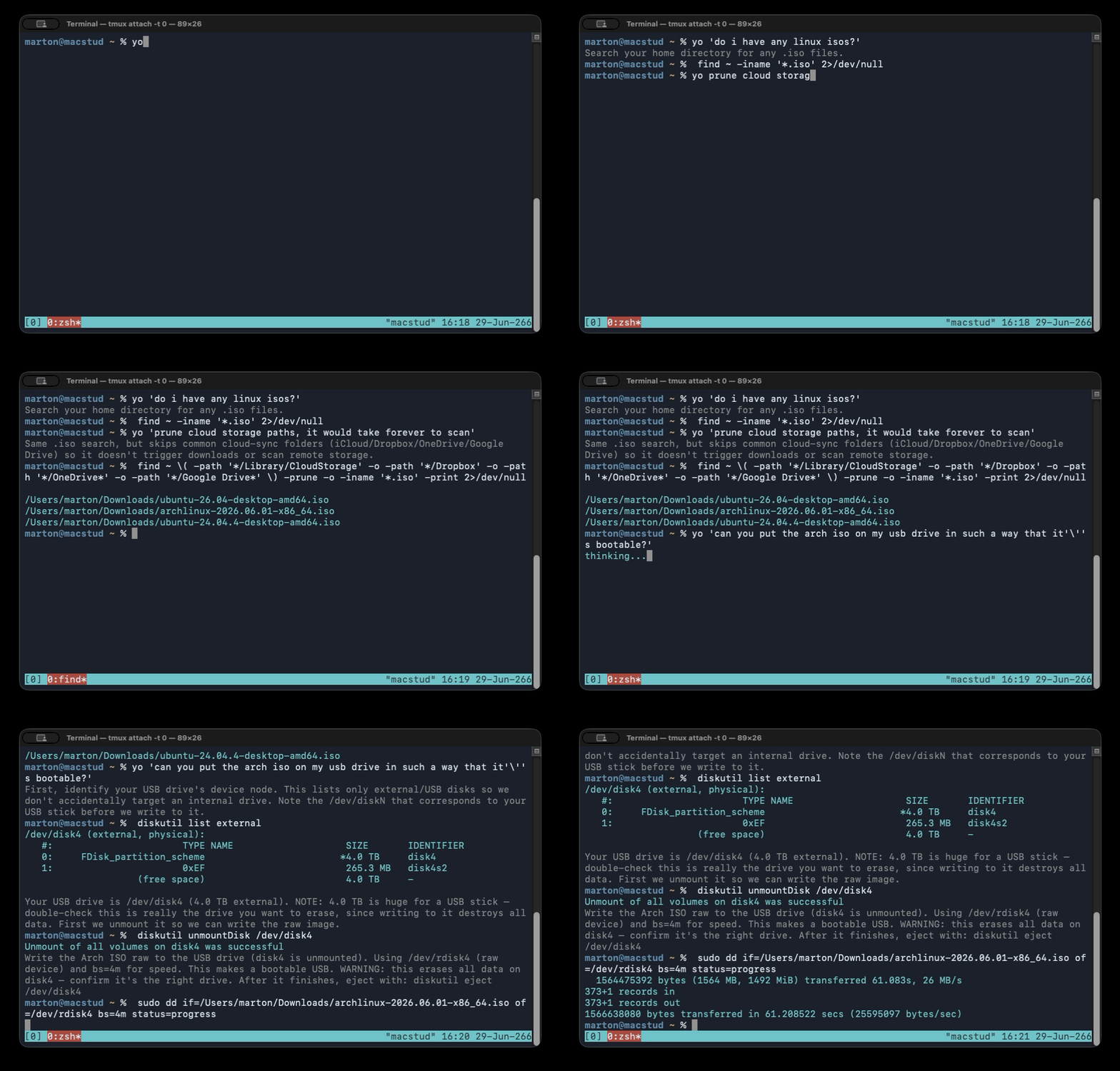
Type `yo <what you want>` at your PowerShell prompt and the suggested command is
prefilled on your next line -- ready to run, edit, or cancel -- or you get a printed
answer. A native Go binary plus a small PowerShell integration; an acknowledged
GPLv3 derivative of yoshell (pizlonator/yosh).
After installing, run `yo --setup` to wire your $PROFILE, check PSReadLine, and set
an API key (ANTHROPIC_API_KEY or OPENAI_API_KEY) -- winget only puts yo.exe on PATH.
README
yo: a natural-language command assistant for your shell
Type yo at your prompt. The request goes to an LLM, and the
command it suggests is prefilled onto your next prompt line: ready to run,
edit, or cancel. Ask a question instead and you get a printed answer. No command
runs until you press Enter.
Works today: Windows PowerShell 7+ and 5.1; macOS and
Linux with zsh or bash 4.2+. Providers: Anthropic (default),
OpenAI, Grok (xAI), and Gemini (Google).
Release builds: Windows zips are Authenticode-signed. macOS zips are
Developer ID-signed and notarized by Apple. Linux ships .deb/.rpm/Arch
packages and a static binary. All artifacts are GitHub-attested.
Install
You need the yo binary on your machine, the integration line in your shell
profile, and an API key. The quickest install per platform:
Then run yo --setup once: it wires the shell integration into your profile and
configures an API key. The platform guides cover manual and package installs,
building from source, and binary verification.
Each macOS/Windows zip contains the yo binary plus license/provenance files; the
Linux packages bundle those under /usr/share/doc/yo/. Release assets also include
install.sh,
SHA256SUMS.txt,
and yo.cdx.json.
Every release zip is attested by GitHub's build-provenance flow:
Release workflow details and signing inputs are in
docs/RELEASING.md.
Usage
Just type yo followed by what you want, in plain language:
yo list every pdf modified this week
yo show disk usage for this directory
yo set my git user.email to me@example.com
A command is prefilled on your next prompt with a one-line explanation above it.
Press Enter to run, edit it first, or press Ctrl-C / clear the line to cancel.
A question with no obvious command is answered inline instead.
Multi-step, and "run a diagnostic then tell me the answer"
yo favors a simple, reusable command over a clever one-liner. When answering needs
more than one step — or needs to see a command's output first — it issues one step,
waits for you to run it, reads the result, and continues or answers:
yo is the print spooler running, and start it if it's stopped
#  -> Get-Service Spooler         (you run it)
#  -> if it's stopped: Start-Service Spooler   (you run it)
#  -> "Done — the Spooler service is now running."
Each step is prefilled and waits for you; nothing auto-chains.
"Why did that fail?"
If recent output is on your screen, yo can use it as context:
go buid ./cmd/yo        # oops, typo -> error on screen
yo why did that fail
#  -> "You typed `buid` instead of `build`. Try: go build ./cmd/yo"
Screen context comes from tmux / zellij if you run inside either, or
from the Windows console buffer. Outbound screen text is secret-scrubbed
before it leaves your machine (see
Safety & privacy). Context is immensely useful, but under
Windows Terminal we're limited to the viewport, not actual scrollback data. A
multiplexer gives yo deeper resolved screen history when one is available. On macOS and Linux
tmux is strongly recommended, otherwise no context is available to the LLM.
Configuration
All settings live in ~/.yoconf (%USERPROFILE%\.yoconf on Windows), re-read on
every call. Every directive is optional; see yoconf.example.
Directive
Default
Meaning
provider
inferred from key
anthropic or openai. If omitted, inferred from whichever key env var is set.
model
per provider
claude-opus-4-8 (anthropic) / gpt-5.5 (openai).
key
from env var
API key override. The env var is the preferred path.
Trace each LLM call's scaffolding to stderr (see below).
prefill_space
off
Prefix prefilled commands with a leading space, so history tools that ignore space-prefixed lines (e.g. Atuin) skip them.
Environment variables:ANTHROPIC_API_KEY / OPENAI_API_KEY supply the key (and
pick the provider when none is configured). YO_DEBUG overrides the debug directive
for one session.
Debug tracing prints a one-line trace per call to stderr: provider/model, your query, the sizes of any attached context, and the response type + pending flag:
yo[debug] -> anthropic/claude-opus-4-8  q="is my usb mounted"  [scrollback +537ch, memory +2744ch]
yo[debug] <- command pending=true  "Get-CimInstance Win32_DiskDrive ..."
Safety & privacy
Nothing runs until you press Enter.yo only prefills; you review and decide. The tool assumes an adult at the keyboard.
No telemetry.yo makes exactly one kind of network call: to the LLM API you
configure (Anthropic, OpenAI, Grok, Gemini, or your base_url). Nothing else phones home; there
is no analytics of any kind.
Secrets are redacted from any screen output before it is sent, using
gitleaks' detection engine (embedded; nothing
extra to install). It fails closed — if the detector can't initialize, the screen
context is dropped rather than sent raw.
Session memory is local. Recent exchanges are kept in a per-session file under
your OS temp directory (no command output), used only to resolve follow-ups like
"delete the top one." Disable with memory false.
How it works
yo is a native Go binary; the per-shell snippet (emitted by yo --init powershell,
yo --init zsh, or yo --init bash) is the only shell-specific part. The binary assembles the
request (your text + optional screen context + session memory), calls the
provider with forced tool use so the model must return a typed command or
chat, and prints a shell-readable result. The
snippet prefills the command or prints the answer. Multi-step continuation rides
YO_STATE; the binary itself stays stateless.
Command-line reference
Command
Purpose
yo
Natural-language request → prefilled command or chat answer.
yo is licensed under the GNU General Public License v3 (LICENSE) — the
same license as yoshell, Bash, and Readline.
It is an acknowledged derivative work of
yoshell (pizlonator/yosh): it reuses yoshell's
LLM system-prompt design and its tool/response (function-calling) contract and
multi-step protocol, re-expressed as a standalone tool. The full derivative-work statement,
the list of significant changes, and bundled third-party notices (e.g. gitleaks, MIT) are in
NOTICE.
This is a personal, non-commercial project. Copyright (C) 2026 Marton Anka