Use this command to install karikari with WinGet:
winget install --id=megamega39.karikari -e Copy WinGet command to clipboard karikari is a native Windows image/video/audio viewer with tree-view
folder navigation, archive support (CBZ/CBR/ZIP/RAR/7z), Direct2D GPU
rendering, background prefetching, and a 12-language UI.
karikari
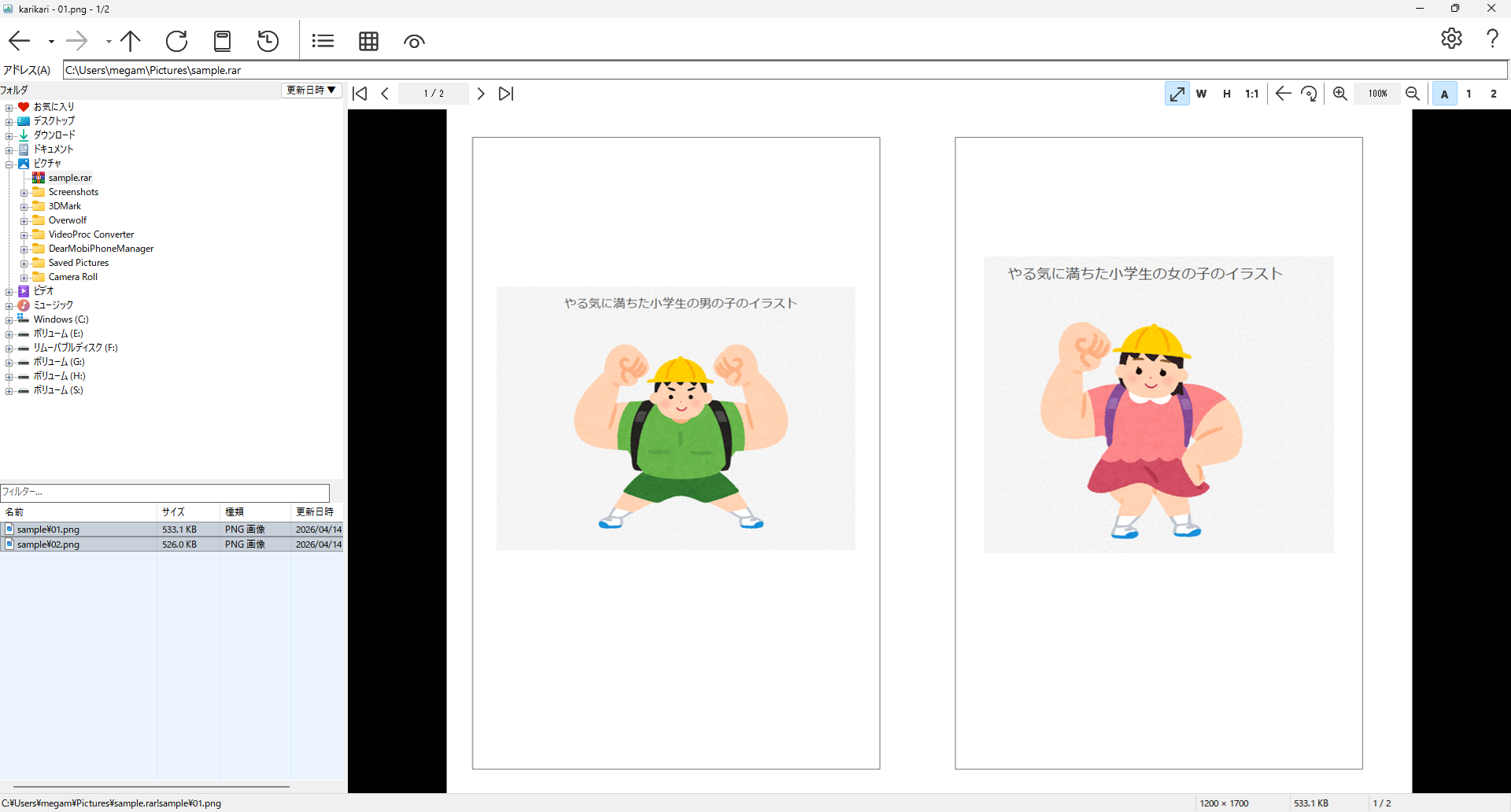
Windows 向けの画像・動画・音声ビューア。ツリービューでフォルダや書庫を直感的に操作しながら、画像や動画をサクサク閲覧できます。
特徴
書庫対応 — CBZ / CBR / ZIP / RAR / 7z をそのまま見開き表示。右綴じ・左綴じ切替対応フォルダツリー — 左側のツリービューでフォルダを自由に行き来。エクスプローラー感覚でファイルを探せる画像ビューア — JPEG, PNG, WebP, AVIF, GIF アニメーション, TIFF など主要フォーマットに対応。GIF・WebP のアニメーション再生にも対応動画・音声プレイヤー — MP4, MKV, WebM などの動画や MP3, FLAC, WAV などの音声もそのまま再生。速度変更・ループ・音量調節付き高速描画 — Direct2D によるGPU描画で大きな画像もなめらかに表示先読み — 次のページをバックグラウンドで先読み。ページ送りで待たされない本棚・お気に入り・履歴 — よく見るフォルダや書庫を登録してすぐアクセスキーボードショートカット — すべてのキーを自由にカスタマイズ可能多言語対応 — 日本語・英語・中国語(簡体/繁体)・韓国語・スペイン語・ポルトガル語・フランス語・ドイツ語・ロシア語・ベトナム語・タイ語
ダウンロード
winget(推奨)
winget install megamega39.karikari
手動ダウンロード
最新リリース から入手できます。
ファイル 説明 karikari-x.x.x-setup.exeインストーラー版 karikari-x.x.x-portable.zipポータブル版(展開してすぐ使える)
対応フォーマット
種類 フォーマット 画像 JPEG, PNG, BMP, GIF, WebP, AVIF, TIFF, ICO 動画 MP4, MKV, AVI, MOV, WMV, WebM, FLV, M4V, TS, MPG 音声 MP3, WAV, OGG, FLAC, M4A, AAC, WMA, Opus 書庫 ZIP, 7z, RAR (v4/v5), CBZ, CBR, CB7
操作方法
キー 動作 ← →前 / 次のページ ↑ ↓前 / 次の書庫 Home End最初 / 最後のページ Alt+← Alt+→戻る / 進む Alt+↑親フォルダへ Wウィンドウに合わせる 1 2 3単独 / 見開き / 自動 B綴じ方向切替 F11全画面 Ctrl+ホイールズーム Space再生 / 一時停止 Ctrl+C画像コピー Ctrl+R回転
すべてのキーは設定から変更できます。
動作環境
ライセンス
GPL-3.0
karikari (English)
An image, video, and audio viewer for Windows. Navigate folders and archives intuitively with the tree view, and browse images and videos seamlessly.
Features
Archive support — Open CBZ / CBR / ZIP / RAR / 7z directly in spread view. Right-to-left and left-to-right bindingFolder tree — Browse folders freely with the tree view on the left, just like a file explorerImage viewer — Supports JPEG, PNG, WebP, AVIF, animated GIF, TIFF and more. Animated GIF and WebP playback includedVideo & audio player — Play MP4, MKV, WebM videos and MP3, FLAC, WAV audio inline. Speed control, loop, and volume adjustmentFast rendering — GPU-accelerated drawing with Direct2D for smooth display of large imagesPrefetch — Background preloading of upcoming pages for instant page turnsBookshelf, favorites & history — Pin frequently visited folders and archives for quick accessCustom keybindings — Fully configurable keyboard shortcutsMultilingual — Japanese, English, Chinese (Simplified/Traditional), Korean, Spanish, Portuguese, French, German, Russian, Vietnamese, and Thai
Download
Download from the latest release .
File Description karikari-x.x.x-setup.exeInstaller karikari-x.x.x-portable.zipPortable (extract and run)
Type Formats Image JPEG, PNG, BMP, GIF, WebP, AVIF, TIFF, ICO Video MP4, MKV, AVI, MOV, WMV, WebM, FLV, M4V, TS, MPG Audio MP3, WAV, OGG, FLAC, M4A, AAC, WMA, Opus Archive ZIP, 7z, RAR (v4/v5), CBZ, CBR, CB7
Keyboard Shortcuts
Key Action ← →Previous / next page ↑ ↓Previous / next archive Home EndFirst / last page Alt+← Alt+→Back / forward Alt+↑Go to parent folder WFit to window 1 2 3Single / spread / auto BToggle binding direction F11Fullscreen Ctrl+WheelZoom SpacePlay / pause Ctrl+CCopy image Ctrl+RRotate
All keybindings can be customized in settings.
System Requirements
License
GPL-3.0