Claude Usage Tray
A minimalist Windows 11 system-tray app that shows your Claude usage at a glance: a live percentage in the tray
icon, and a small dark flyout with every usage window, reset countdowns, plan tier, burn rate, history charts and
local token/cost analytics.


> Unofficial tool. Claude Usage Tray is a community project. It is not affiliated with, endorsed by, or supported
> by Anthropic. It relies on an undocumented endpoint that can change or stop working at any time.
> Status: all eight milestones complete; released since v0.1.0 (2026-09-07), latest in the Releases. Solution scaffold, CI, docs, the data layer
> (credential discovery, the usage endpoint provider with backoff and cache, verified live), the generated tray icon
> with its context menu, the flyout, local analytics from the session logs with history, the charts, settings with
> notifications, autostart and single instance, and the release pipeline. Downloads are on the
> Releases page; see CHANGELOG.md for what
> each version contains.
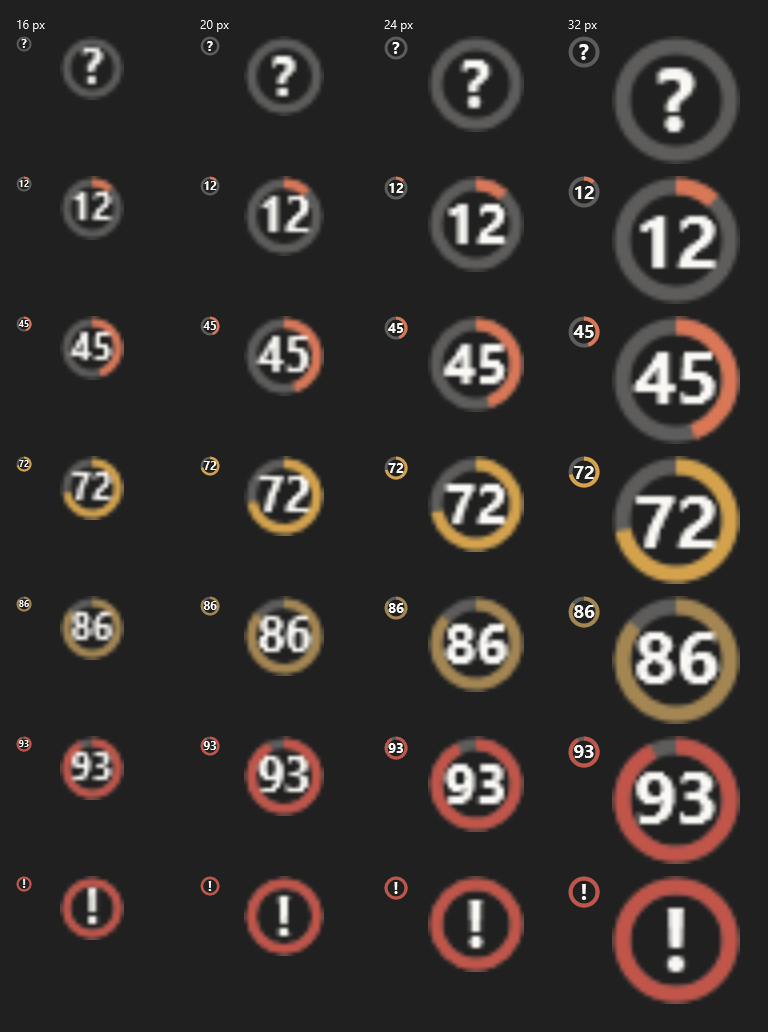
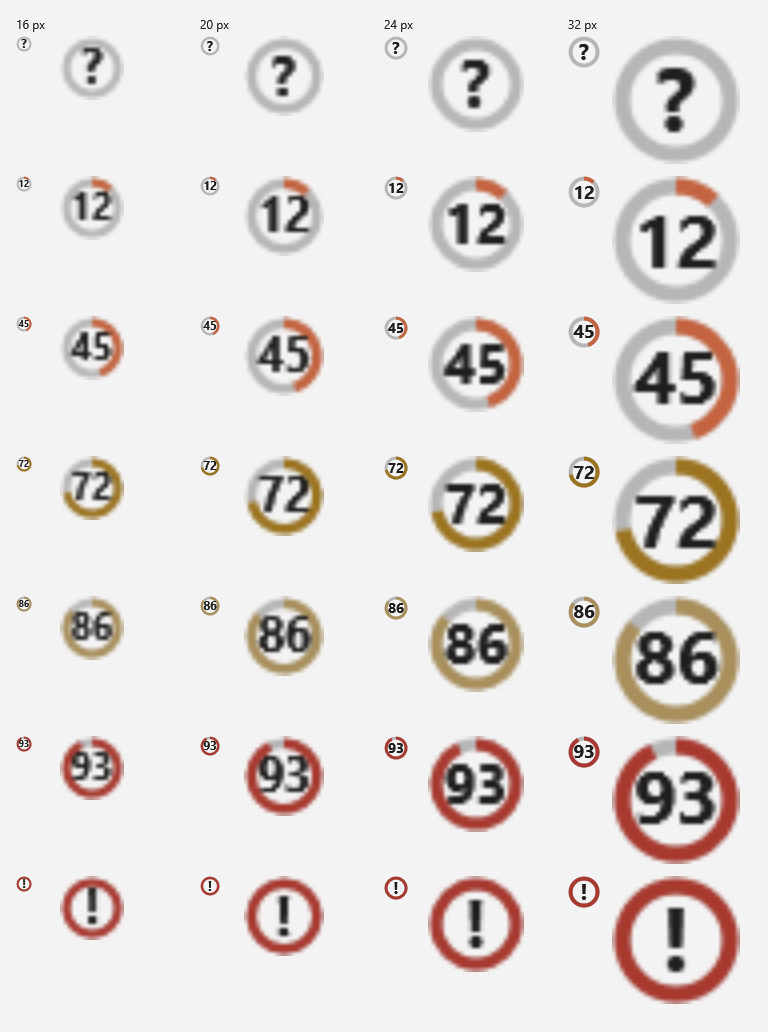
The tray icon in every state and size, on a dark and a light taskbar (native rendering with a 4x blow-up):
What it shows
- Tray icon. A ring-arc progress indicator around a compact numeral for the window you choose, coloured in the
Claude accent (terracotta) while there is headroom and turning amber, then red, as the window fills; redrawn live
and legible at 16 px on light and dark taskbars. The tooltip is a one-line summary.
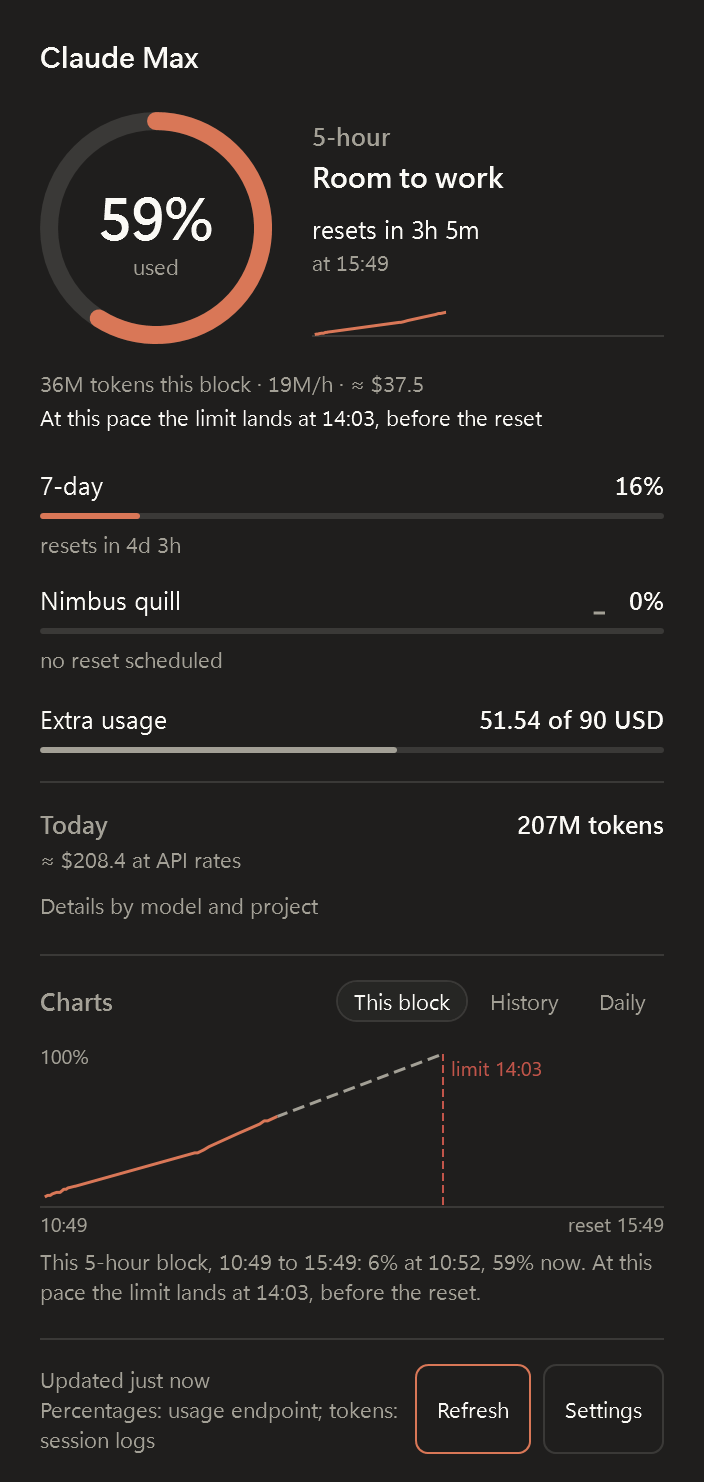
- Flyout (left-click). Plan tier and masked account email; the 5-hour window as a large ring with a sparkline
of the block so far; one compact row per other window with percent, thin bar, sparkline and "resets in 1h 26m";
extra-usage balance when present; burn rate and projection for the current five-hour block; today's tokens and
estimated cost with a per-model breakdown; and three charts, one at a time: this block (recorded percentages, the
projection and the moment the limit would land), history of every window over 24 h, 7 d or 30 d, and tokens per
day for two weeks, split by model on request. Hover a chart for the exact reading; every chart also has a
one-sentence text equivalent.
- Context menu (right-click). Refresh, Settings, Open logs, Start with Windows (checkable), About, Quit.
- Notifications (opt-in). A Windows notification when a window passes a threshold you chose, at most once per
window and period.
Requirements
- Windows 11 (Windows 10 may work but is untested).
- Claude Code installed and signed in at least once. The app reads the OAuth token Claude Code stores locally. Without
Claude Code there are no percentages; local analytics still work if session logs exist.
- No .NET installation needed. Releases are self-contained single-file executables for x64 and Arm64.
Install
-
Download the zip for your machine from the Releases page:
ClaudeUsageTray--win-x64.zip for x64 or ClaudeUsageTray--win-arm64.zip for Arm64, for
example ClaudeUsageTray-0.1.0-win-x64.zip.
-
Verify the download. Every release lists the SHA256 of each zip in its notes and attaches the same list as
SHA256SUMS.txt. Compute yours and compare:
Get-FileHash .\ClaudeUsageTray-0.1.0-win-x64.zip -Algorithm SHA256
or, in Command Prompt:
certutil -hashfile ClaudeUsageTray-0.1.0-win-x64.zip SHA256
-
Unzip anywhere and run ClaudeTrayApp.exe. The zip holds the app (one self-contained exe), pricing.json,
LICENSE.txt and a short README.txt; keep the exe and pricing.json together. There is no installer and no
admin prompt. The exe is not code-signed, so SmartScreen may ask once: choose More info, then Run anyway.
-
From now on it starts with Windows. To stop that, clear Start with Windows at the top of the
Settings window, or untick it in the tray menu; it is asked once and never turned back on.
Each release is built by the release workflow from the tagged commit; the same
zips are attached to the workflow run as an artifact.
From source (needs the .NET 9 SDK):
git clone https://github.com/mlcousek/claude_trayapp.git
cd claude_trayapp
dotnet run --project src/ClaudeTrayApp
Uninstall
There is no installer, so removing it is three steps, all optional except the first:
- Right-click the tray icon and choose Quit, then delete the folder you unzipped.
- Delete the
ClaudeUsageTray value under HKCU\Software\Microsoft\Windows\CurrentVersion\Run (the startup
entry, present unless you turned it off), and the HKCU\Software\ClaudeUsageTray key, which holds one flag
recording that the entry has been created once. Switching Start with Windows off in the app removes
the first but deliberately keeps the second, so it is not created again.
- To remove the data the app kept about your own usage, delete
%LOCALAPPDATA%\ClaudeTrayApp (cache, history
database, logs) and %APPDATA%\ClaudeTrayApp (settings). Nothing outside those two folders and the two
registry values above is ever written, and
your Claude Code files are never modified.
Code signing policy
Windows releases will be signed once the pending SignPath Foundation application is
approved: free code signing provided by SignPath.io, certificate by SignPath Foundation.
Until then, releases are unsigned and SmartScreen warns on first run; verify a download with its SHA256 instead,
as described under Install.
- Committers and reviewers: mlcousek, the repository owner.
- Approvers: mlcousek. Every signing request is approved by hand.
- Privacy policy: see Privacy below. In short, the app contacts
api.anthropic.com for your usage
figures and, unless you turn the weekly update check off, api.github.com to ask for the latest release tag. It
sends nothing about you to either, and there is no telemetry.
First run
- The app looks for
%USERPROFILE%\.claude\.credentials.json, or %CLAUDE_CONFIG_DIR%\.credentials.json if that
variable is set, and reads only the Claude OAuth section of it.
- If nothing is found, the icon shows a question mark and the flyout explains how to sign in with the Claude Code CLI.
- If the token has expired (it lives about eight hours and only the Claude Code CLI renews it, not the Claude Desktop
app), the app starts the CLI once in the background so it renews its own sign-in, then reads the file again. The
app never refreshes tokens itself. If that does not help, the flyout says "run the Claude Code CLI once".
- The first poll happens immediately, then every five minutes. The last result is cached so the flyout opens instantly
on the next launch.
Settings
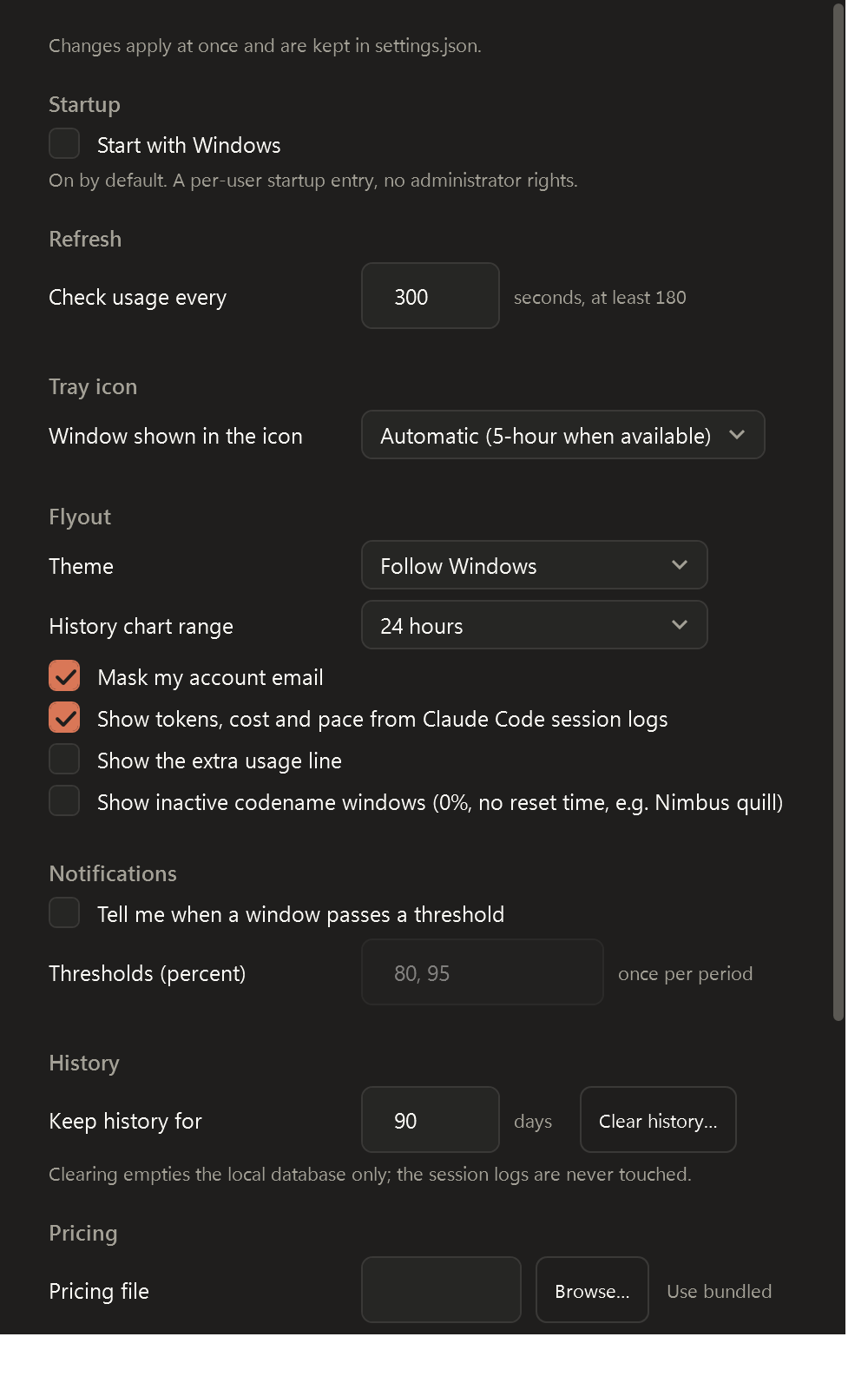
Open Settings from the tray menu or from the flyout. Every change applies at once and is written to
%APPDATA%\ClaudeTrayApp\settings.json. The file is hot-reloaded, so you can also edit it by hand while the app
runs; a file that does not parse is left untouched and reported in the Settings window.
| Key | Default | What it does |
|---|
pollIntervalSeconds | 300 | Seconds between usage checks. Values below 180 are raised to 180; a change re-times the wait in progress. |
trayWindow | "auto" | Window key that drives the tray numeral (five_hour, seven_day, ...). auto picks the 5-hour window when present. |
chartRangeHours | 24 | History chart range: 24, 168 or 720. The range pills in the flyout change it too. |
historyRetentionDays | 90 | Percentages and token totals older than this are pruned. Clear history empties the local database; the session logs are never touched. |
notifications.enabled | false | Windows notifications when a window passes a threshold. |
notifications.thresholds | [80, 95] | Percentages, each announced at most once per window and period. |
showLocalAnalytics | false | Show tokens, cost, pace and the daily chart derived from the session logs. |
showExtraUsage | false | Show the extra-usage (overage) line when the plan has it enabled. |
showInactiveWindows | false | Show codename windows the endpoint reports at 0 % with no reset time (for example "Nimbus quill"). The documented windows are always shown. |
maskEmail | true | Mask the account email in the flyout; the flyout's Show/Hide button changes it too. |
theme | "system" | system, light or dark. |
checkForUpdates | true | Ask GitHub once a week whether a newer release exists and say so in a notification. Nothing is downloaded or installed for you. |
pricingFilePath | null | Path to your own pricing.json; null means the bundled file. |
Start with Windows is not stored in the file: it is a per-user HKCU\...\Run entry, on by default and
switched off at the top of the Settings window or from the tray menu, never needing administrator rights. The
first launch creates it and records that under HKCU\Software\ClaudeUsageTray, so it is offered once: turn it off and it
stays off.
Only one instance runs per session. Launching the app again opens the running instance's flyout and exits.
How the data sources work, and their limits
- Usage endpoint. The same data Claude Code shows in its own usage view, fetched from
https://api.anthropic.com/api/oauth/usage with the Claude Code token. It is undocumented: the response shape can
change, and it rate-limits aggressively. The app polls no faster than every 180 s, backs off exponentially on 429
up to 30 minutes, and keeps showing the last good result with a "stale" marker in the meantime. Percentages are
never estimated locally; if the endpoint is unavailable the flyout says so.
- Local session logs. Claude Code writes one JSONL file per session under
~/.claude/projects. The app scans them
incrementally to derive today's tokens, per-model and per-project breakdowns, the current five-hour block's burn
rate and an estimated equivalent API cost. Cost uses a data-driven pricing.json with a visible effective date;
unknown models show "cost unknown" rather than a wrong number. This works offline.
The full probed schemas and the rules derived from them are in docs/data-sources.md.
Privacy
- No telemetry, no analytics, no crash reporting. Two kinds of request leave your machine, and nothing else:
the usage request to
api.anthropic.com, and, once a week, an update check that asks api.github.com for this
project's latest release tag. The update check sends nothing about you (no account, no usage, no identifier) and
can be turned off in Settings; with it off, api.anthropic.com is the only destination.
- The OAuth token is read from Claude Code's credential file, kept in memory, redacted from logs and never written
anywhere by this app.
- The app writes only to
%LOCALAPPDATA%\ClaudeTrayApp (cache, history database, logs) and
%APPDATA%\ClaudeTrayApp\settings.json. It never modifies anything under ~/.claude.
- Your account email is masked in the flyout by default.
Troubleshooting
| Symptom | Likely cause | What to do |
|---|
| "Not signed in" | No credential file found | Run claude once and sign in. Signing in to the Claude Desktop app does not create the file. |
| "Run the Claude Code CLI once to refresh it" | Access token expired (about eight hours) and the app could not get the CLI to renew it | Run claude once. Only the CLI renews the token; the Claude Desktop app never does. The log shows why the automatic attempt did not help. |
| "The Claude Code CLI was not found" | Token expired and no claude on PATH or bundled with Claude Desktop | Install the Claude Code CLI, or run it once from wherever it is installed. |
| "Rate limited" or a stale marker | The endpoint returned 429 | Wait. The app backs off automatically; do not lower the poll interval. |
| Percentages unavailable, tokens still shown | Endpoint or network down | Local analytics keep working; percentages return when the endpoint does. |
| "Cost unknown" | Model id missing from pricing.json | Update the pricing file or point Settings at your own. |
| Want to check the setup end to end | | Run ClaudeTrayApp.exe --probe. It fetches once, writes a redacted summary to the newest log and exits with code 0 on success or 2 on failure. |
| Anything else | See the logs | %LOCALAPPDATA%\ClaudeTrayApp\logs (tokens are redacted). |
Architecture
flowchart LR
    subgraph sources [Sources, read-only]
        CRED["Credential discovery~/.claude/.credentials.json(CLAUDE_CONFIG_DIR honoured)expired: nudge the Claude Code CLI to refresh"]
        JSONL["Session logs~/.claude/projects/**/*.jsonl"]
        PRICE["pricing.json(next to binary, overridable)"]
    end

    subgraph core [ClaudeTrayApp.Core]
        OAUTH["OAuth usage provider + pollerGET /api/oauth/usage300 s poll, 180 s floor, backoff on 429"]
        LOCAL["JSONL analytics providerincremental scan, dedupe by message id"]
        CALC["AnalyticsCalculatortoday, top projects, 5-hour block, priced"]
        AGG["UsageAggregatorpercentages from OAuth (authoritative)tokens, cost, burn rate from JSONL"]
        HIST[("history.dbSQLite: snapshot series, usage events, scan offsets")]
        CACHE[("cache.jsonlast snapshot, no token")]
    end

    subgraph app [ClaudeTrayApp, WPF]
        VM["ViewModels"]
        TRAY["Tray icongenerated ring + percent"]
        FLYOUT["Flyoutwindows, resets, burn rate, charts"]
    end

    CRED --> OAUTH
    JSONL --> LOCAL
    PRICE --> CALC
    OAUTH -->|every fresh snapshot| HIST
    OAUTH --> CACHE
    CACHE -.->|on launch| OAUTH
    LOCAL -->|events, offsets| HIST
    HIST --> CALC
    OAUTH -->|UsageSnapshot| AGG
    CALC -->|LocalAnalytics| AGG
    AGG --> VM
    HIST -->|chart series| VM
    VM --> TRAY
    VM --> FLYOUT
More in docs/architecture.md: layers, runtime folders, the polling state machine, the
component graph and the launch sequence. Contributors should also read CLAUDE.md.
Contributing and security
See CONTRIBUTING.md. Report vulnerabilities privately as described in SECURITY.md.
License
MIT. Claude is a trademark of Anthropic, PBC; this project does not ship Anthropic's logo or branding.