nostr-vpn
> Main development is on decentralized git: htree://npub1xdhnr9mrv47kkrn95k6cwecearydeh8e895990n3acntwvmgk2dsdeeycm/nostr-vpn
Downloads
Current release artifacts:
- Native apps for Apple Silicon macOS, Linux x64, Windows x64, and Android arm64
- Headless CLI archives for Apple Silicon macOS, Windows x64, Linux x86_64, and Linux arm64
- The
nvpn CLI crate on crates.io: cargo install nvpn
- iOS TestFlight beta (link exists, public access is not live yet)
Intel macOS remains source-only. iOS builds from source and simulator today;
the TestFlight link exists, but public beta access is still pending.
Overview
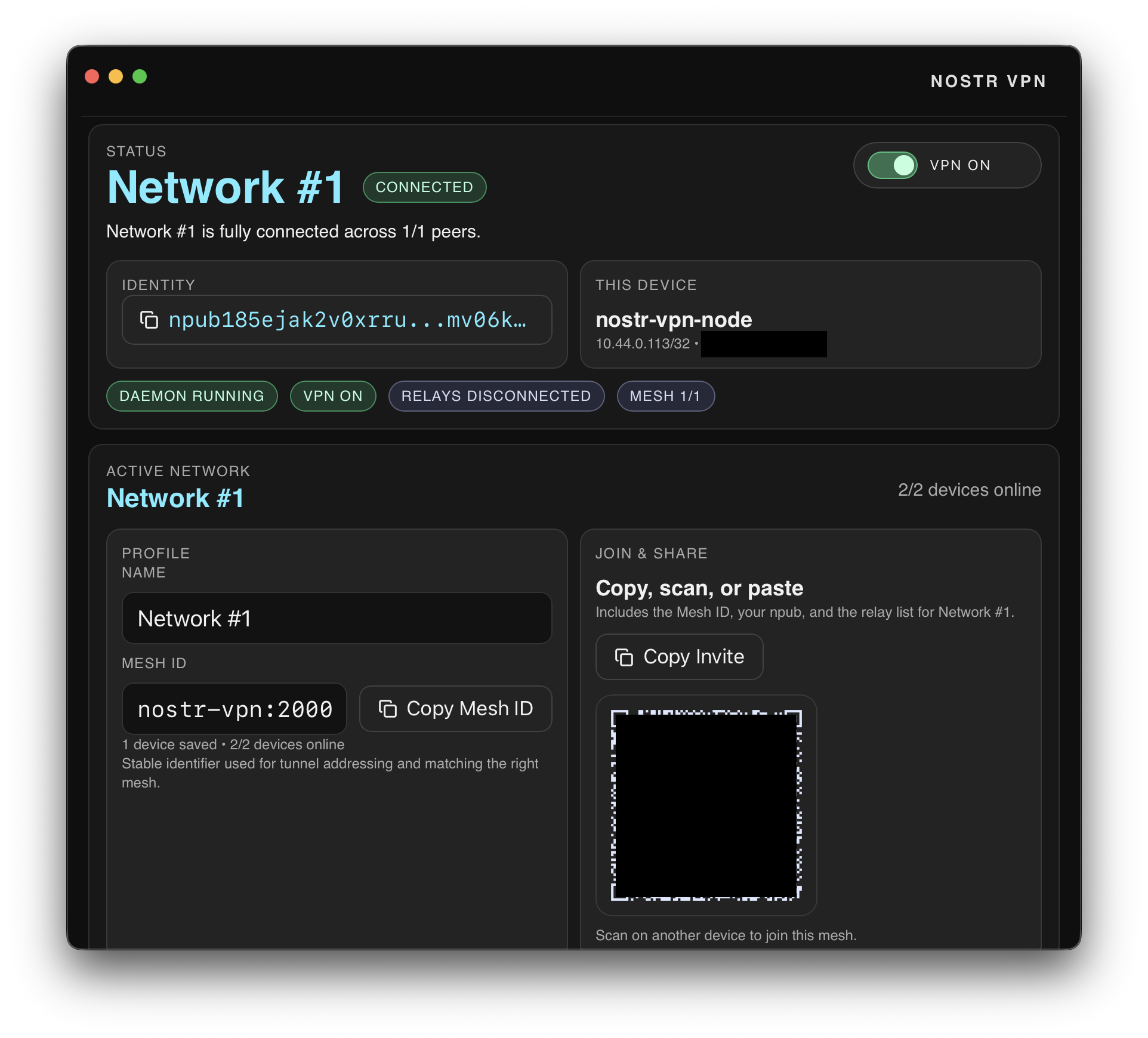
nostr-vpn is a Rust workspace for a Tailscale-style private mesh VPN built around a FIPS-backed data plane. It includes the nvpn CLI/daemon, a shared native app core, and native platform shells.
Current benchmarks put the FIPS data plane in WireGuard-level territory on
Linux and macOS: Linux Docker runs reach roughly 2.8-3.0 Gbit/s TCP and
1 Gbit/s UDP, and macOS LAN runs now match or beat Tailscale in tested
directions while the remaining known gap is a Darwin Wi-Fi sender cap. See
docs/EXPERIMENTS.md for the raw bench notes.
It currently ships:
| Component | Purpose |
|---|
nvpn | Main CLI for config, daemon lifecycle, networking, diagnostics, and tunnel sessions |
nostr-vpn-core | Shared library for config, FIPS control state, NAT helpers, diagnostics, and MagicDNS |
nostr-vpn-app-core | Native app state/action contract and UniFFI bridge used by the Rust-core/native-front rewrite |
macos | SwiftUI/AppKit native shell over nostr-vpn-app-core |
linux | GTK/libadwaita native shell over the shared app core |
windows | WPF native shell and installer over the shared app core |
android / ios | Native mobile shells with shared Rust state/action and packet-tunnel scaffolding |
Getting Started
Install the CLI from crates.io:
cargo install nvpn
Create a local identity/config, then share or import an invite:
nvpn init
nvpn create-invite
nvpn import-invite 'nvpn://invite/...'
Start a foreground tunnel session:
nvpn start --connect
For the background daemon flow used by the desktop apps:
nvpn start --daemon --connect
nvpn status
nvpn stop
For persistent startup through the OS service manager:
sudo nvpn service install
nvpn service status
On Windows, run nvpn service install from an elevated shell instead of using
sudo.
Protocol
For the current protocol-level description of invites, admin roster sync, and the FIPS mesh data plane, see docs/protocol.md.
Private mesh traffic defaults to FIPS. nvpn uses the configured VPN participants as the overlay route map, but FIPS connectivity is a separate underlay: FIPS peers can be found through Nostr discovery or supplied as configured fips_peer_endpoints, and those FIPS peers may relay packets even when they are not members of the same VPN. Direct UDP/NAT failure can fall back through established FIPS neighbors, while nvpn still only admits private traffic for the active network roster.
Platform status
| Platform | Current status |
|---|
| Apple Silicon macOS | Native SwiftUI/AppKit desktop app, signed/notarized release artifacts when credentials are configured, CLI tarball |
| Linux x64 | Native GTK/libadwaita desktop app packaged as .deb, CLI tarballs for x86_64 and arm64, Docker e2e coverage |
| Windows x64 | Native WPF desktop app installer, batched WinTun tunnel path, native WireGuard-upstream routing, CLI zip |
| Android arm64 | Native app-core UI, signed APK/AAB release artifacts when signing is configured, VPN runtime still being hardened |
| iOS | Native SwiftUI app builds/runs from source and simulator, NetworkExtension target exists, TestFlight link exists but public beta access is pending |
| Intel macOS | Source-only |
What the project does today
- Generates Nostr identity keys automatically
- Stores a single app config with one or more named networks, each with participant allowlists and its own stable mesh ID
- Brings up FIPS private mesh tunnels for private network traffic
- Routes private FIPS traffic directly when possible and through FIPS neighbors when direct discovery fails
- Tracks FIPS peer/link state and NAT-discovered public endpoints
- Supports route advertisement and exit-node selection
- Supports WireGuard upstream configs for local egress and exit-node providers on Linux, macOS, and Windows
- Exposes JSON status, network diagnostics, and doctor bundles
- Includes native macOS and Linux GUIs with service-first session control, invite QR/import flows, tray/menu-bar integration, MagicDNS controls, health reporting, and port-mapping status
- Includes a native Windows WPF shell with tray integration, installer packaging, and the same shared app-core action/state contract
- Includes LAN invite broadcast/discovery, CLI self-update, desktop updater e2e coverage, and Linux-focused Docker e2e coverage for FIPS mesh formation, NAT traversal, routed UDP, safe MTU, and WireGuard upstream egress
Config model
By default, nvpn uses the OS config directory:
- Linux:
~/.config/nvpn/config.toml
- macOS:
~/Library/Application Support/nvpn/config.toml
- Fallback when no config dir is available:
./nvpn.toml
nvpn init creates that file if it does not exist and generates keys automatically.
The config contains:
- global app settings such as autoconnect, tray behavior, and MagicDNS suffix
- Nostr settings used by FIPS discovery, including relay URLs and identity keys
- NAT settings including STUN servers and discovery timeout
- node settings including endpoint, tunnel IP, listen port, and advertised routes
- a
[[networks]] list of named participant sets with one active network at a time
Each [[networks]] entry carries its own network_id, which is the mesh identity used for roster scope and auto-derived tunnel addressing. If an older config still only has the legacy top-level default, nostr-vpn promotes it into per-network stable IDs and then stops recomputing them on participant changes.
Nodes that should talk to each other must share the same network_id and list each other as participants. Only the active network participates in the live runtime; inactive networks stay saved for later activation.
Build and validate
Prerequisites:
- Rust stable
- OS permissions to create tunnel interfaces when running real sessions
- On Linux Docker e2e: Docker with Compose and
/dev/net/tun
The normal Rust gate is:
cargo fmt --check
cargo clippy --workspace --all-targets -- -D warnings
cargo test --workspace
Additional automation:
.github/workflows/windows-smoke.yml can manually build the Windows CLI on windows-latest
.github/workflows/release.yml publishes CLI archives plus native macOS, Linux, Windows, and Android app artifacts when signing/package credentials are configured
scripts/local-release.mjs builds local release artifacts and stages a hashtree-style release directory that can be published to releases/nostr-vpn
just release-gate also runs version sync, CLI update e2e, routed-FIPS Docker e2e, and safe-MTU Docker e2e
Local release
Typical flow:
cp .env.release.example .env.release.local
$EDITOR .env.release.local
just release-publish
Notes:
.env.release.local is local-only and gitignored
- the script auto-loads
.env.release.local when present
- shell environment variables override values from those files
- on Apple Silicon macOS it can build the native macOS app/CLI locally and Windows CLI/installer artifacts through a reachable Windows VM
- Linux release artifacts include the native
.deb package and musl CLI tarball
- Windows VM selection can be forced with
NVPN_WINDOWS_VM_NAME; otherwise the script auto-detects a single running Windows guest
- by default it runs the same sync/version,
cargo fmt --check, cargo clippy, cargo test, update, and Docker release-gate steps as the release workflow
- staged local release notes include the matching
CHANGELOG.md section for the release tag, so update CHANGELOG.md before publishing
- omit
--publish if you only want staged release metadata under the local temp directory
Native macOS App
Build the native app for this machine:
just build
For macOS specifically, just build runs just macos-build.
After a successful build, it prints the app output path.
Launch the native macOS shell:
just run
If you only want the CLI and test binaries:
cargo build -p nvpn
Install nvpn
Latest releases publish CLI archives for Apple Silicon macOS, Windows x64, Linux x86_64, and Linux arm64. The quick installer below auto-detects only Apple Silicon macOS and Linux:
case "$(uname -s)/$(uname -m)" in
Darwin/arm64) ASSET=nvpn-aarch64-apple-darwin.tar.gz ;;
Linux/x86_64) ASSET=nvpn-x86_64-unknown-linux-musl.tar.gz ;;
Linux/aarch64|Linux/arm64) ASSET=nvpn-aarch64-unknown-linux-musl.tar.gz ;;
Darwin/x86_64)
echo "No prebuilt Intel macOS release is currently published. Build from source or use an older release." >&2
exit 1
;;
*)
echo "Unsupported platform: $(uname -s)/$(uname -m)" >&2
exit 1
;;
esac
curl -fsSL "https://github.com/mmalmi/nostr-vpn/releases/latest/download/${ASSET}" | tar -xz && cd nvpn && ./install.sh
That command supports Apple Silicon macOS and Linux. On Intel macOS it exits with a clear message. The installer creates the target directory when needed and defaults to /opt/homebrew/bin on Apple Silicon macOS when that location exists or is already in PATH; otherwise it uses /usr/local/bin.
The quick-install line still points at GitHub until a verified releases/nostr-vpn/latest tree is published on hashtree. htree release publish already maintains the latest alias automatically; the missing step is publishing the release tree and verifying the public upload.iris.to//releases/nostr-vpn/latest/... paths.
On Windows, download the nvpn--x86_64-pc-windows-msvc.zip release asset and run nvpn.exe, or build from source.
From crates.io:
cargo install nvpn
From source:
cargo install --path crates/nostr-vpn-cli --bin nvpn
cargo install nvpn installs the published CLI/daemon binary. The path-based
command is useful when developing from a checkout and remains the supported
route on Intel macOS until prebuilt release archives cover that target.
If you already have a release tarball, extract it and run:
./install.sh
You can also pass a custom destination directory, for example ./install.sh ~/.local/bin.
CLI quickstart
Create or refresh config and generate keys:
nvpn init \
--participant npub1...alice \
--participant npub1...bob
Adjust persisted settings if needed:
nvpn set \
--endpoint 192.0.2.10:51820 \
--listen-port 51820 \
--fips-advertise-endpoint true \
--fips-peer-endpoint npub1...bob=192.0.2.11:51820 \
--tunnel-ip 10.44.0.10/32
Run a full foreground session:
nvpn start --connect
Daemonized flow used by native desktop apps:
nvpn start --daemon --connect
nvpn pause
nvpn resume
nvpn stop
For persistent privileged startup:
sudo nvpn service install
nvpn service status
On Windows, run nvpn service install from an elevated shell instead of using sudo.
The service implementation targets:
- macOS via
launchd
- Linux via
systemd
- Windows via the Service Control Manager (
sc.exe)
nvpn service enable / nvpn service disable are currently implemented only on macOS. On Linux and Windows, install / uninstall handle the persistent service lifecycle directly.
Inspect runtime state:
nvpn status --json
nvpn doctor --json
Write a support bundle:
nvpn doctor --write-bundle /tmp/nvpn-doctor
Advertise routes or use an exit node:
nvpn set --advertise-routes 10.0.0.0/24,192.168.0.0/24
nvpn set --advertise-exit-node true
nvpn set --exit-node npub1...peer
Use a WireGuard upstream for the local device:
nvpn set --wireguard-exit-enabled true --wireguard-exit-config-file ./wg.conf
If this device should also serve as a mesh exit node, enable both:
nvpn set --advertise-exit-node true --wireguard-exit-enabled true
Members still see this as the same FIPS exit node; the provider's own default
internet route and forwarded member exit traffic both use the WireGuard
upstream.
Clear exit-node selection:
nvpn set --exit-node off
Lower-level commands:
init
version
update
install-cli
uninstall-cli
service
start
stop
repair-network
reload
pause
resume
connect
status
set
create-invite
import-invite
invite-broadcast
discover
add-participant
remove-participant
add-admin
remove-admin
ping
doctor
ip
whois
wg-upstream-test
Native Apps
Native app work is split into a Rust-owned state/action core and platform shells.
The native UI rewrite parity target is tracked in docs/native-ui-parity-matrix.md.
The shared native app contract lives in crates/nostr-vpn-app-core, with native shell targets under macos, windows, linux, android, and ios.
The local native shell can be built with just build and launched with just run.
Use just run-macos or just run-linux when you want a specific desktop target.
Notes:
- desktop shells use the installed/bundled
nvpn binary for privileged service/session work
- mobile shells share the Rust app contract and platform packet-tunnel scaffolding while the full mobile data-plane path is still being hardened
- the legacy Tauri/Svelte app was removed after the native rewrite became the canonical architecture
Docker end-to-end coverage
Run the focused security regression kit:
just security-regressions
Docker e2e scripts under scripts/:
./scripts/e2e-docker.sh
Verifies static FIPS peer configuration, mesh formation, and tunnel ping.
./scripts/e2e-connect-docker.sh
Verifies config-driven nvpn connect, FIPS mesh formation, and tunnel ping.
./scripts/e2e-active-network-docker.sh
Verifies that inactive saved networks do not change the active mesh identity, expected peer count, or auto-derived tunnel IP.
./scripts/e2e-divergent-roster-docker.sh
Verifies that peers with a shared mesh ID can still connect when one node has extra configured participants.
./scripts/e2e-fips-routed-udp-docker.sh
Verifies that peers can move tunnel payloads through a FIPS neighbor when their direct UDP path is blocked.
./scripts/e2e-fips-nat-safe-mtu-docker.sh
Verifies safe-MTU traffic across a NAT-shaped FIPS mesh path.
./scripts/e2e-exit-node-docker.sh
Verifies exit-node advertisement, selection, tunnel traffic to the chosen exit node, and default-route traffic crossing the exit path to an external target. Set NVPN_EXIT_NODE_E2E_PUBLIC_IP=9.9.9.9 (or another reachable public IP) to also prove a real internet hop routes through the tunnel.
./scripts/e2e-wireguard-exit-docker.sh
Verifies WireGuard-upstream egress and guards against upstream-initiated ingress into nvpn peers, including a hostile upstream route for the mesh tunnel range.
./scripts/e2e-wireguard-exit-userspace-docker.sh
Verifies the standalone userspace WireGuard-upstream probe, scoped-host route, and guarded default-route replacement.
These flows are Linux-oriented because they require real tunnel devices and container networking privileges.
Desktop update end-to-end coverage
Desktop updater scripts under scripts/:
./scripts/e2e-update-desktop.sh
Runs the macOS app updater path, Linux GTK updater path in Docker, and Windows WPF updater path in a Parallels VM.
./scripts/e2e-update-macos.sh
Builds the macOS app, checks a local release manifest, downloads a fake .app.tar.gz, and verifies the app bundle can be unpacked.
./scripts/e2e-update-linux.sh
Runs the Linux app in the Docker dev image, checks a local release manifest, downloads the selected AppImage, and verifies it is executable.
./scripts/e2e-update-windows-vm.sh
Runs scripts/e2e-update-windows.ps1 inside the Windows VM, builds the WPF app, checks a local release manifest, and verifies the selected setup executable downloads.
./tools/run-windows
On macOS, builds and runs the Windows app inside the running Parallels Windows VM. The macOS host is not expected to have PowerShell or .NET installed.
The update E2E scripts set NVPN_UPDATE_MANIFEST_URL to a local fixture and suppress opening installers/packages, so they test update selection and download/install preparation without touching production release storage.
Workspace layout
Cargo.toml: workspace definition
crates/nostr-vpn-core: shared config, FIPS control state, diagnostics, MagicDNS, and NAT helpers
crates/nostr-vpn-cli: nvpn CLI and daemon implementation
crates/nostr-vpn-app-core: native app state/action contract and UniFFI bridge
macos, linux, windows, android, ios: native platform shells
scripts: build, release, Docker e2e, and desktop updater e2e entrypoints
Release workflow notes
Release workflow (.github/workflows/release.yml):
- runs on pushed
v* tags or manual dispatch
- verifies sync-versions, formatting, clippy, Rust tests, CLI update e2e, routed-FIPS Docker e2e, and safe-MTU Docker e2e before publishing artifacts
- publishes CLI archives for Apple Silicon macOS, Windows x64, Linux x86_64, and Linux arm64
- publishes Apple Silicon macOS as a signed/notarized DMG plus
.app.tar.gz updater archive when signing is configured
- publishes Linux x64
.deb, Windows x64 setup .exe, and signed Android arm64 APK/AAB artifacts
- requires platform signing/package secrets before release app artifacts can publish
- generates its GitHub release notes in the workflow; local
scripts/local-release.mjs release notes include the matching CHANGELOG.md section for the tag