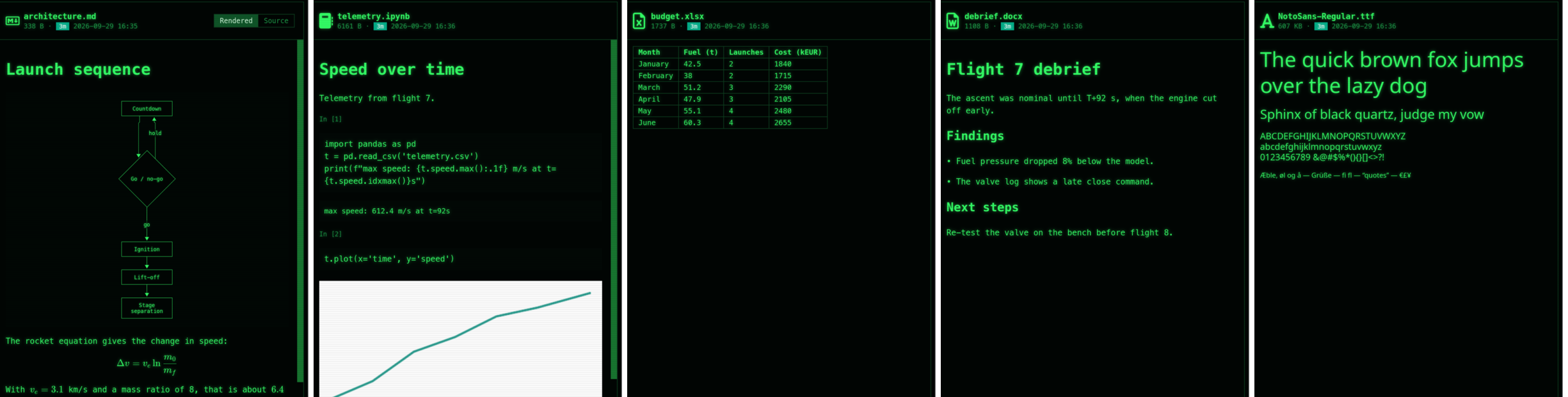
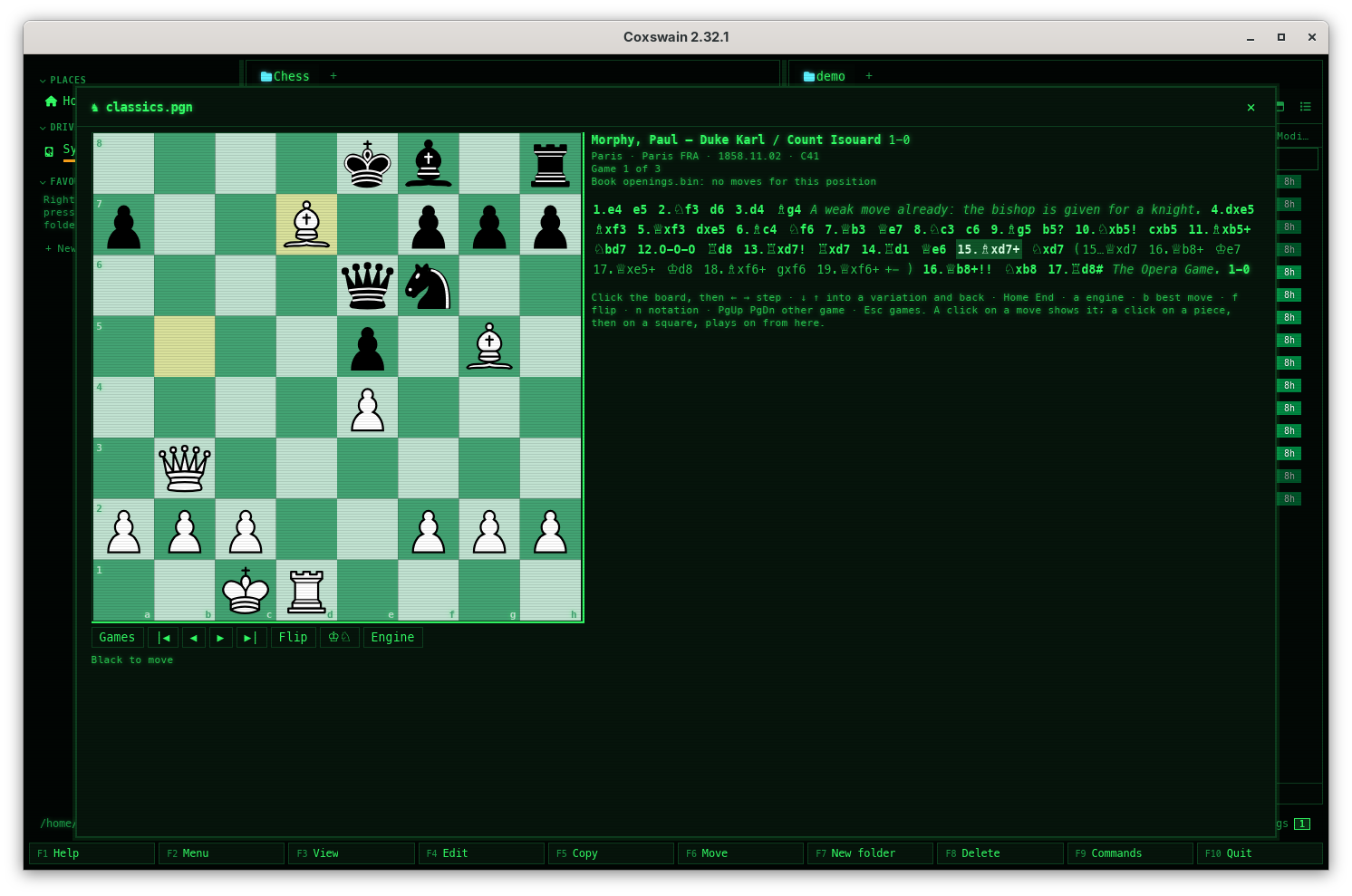
| 2.34.0 | 2026-10-26 | Large EPUB books and web pages are read with a fraction of the memory, and long ones are found by what their last chapters say. A web page and each chapter of a book are read as they come, never whole: a 60 MB chapter or page takes 11 to 12 MB to read instead of 65 to 68 MB, and a page saved with a 30 MB picture inside it 8 MB instead of 34 MB. The text found is the same (checked on 3,000 real pages). A book or page with about 3 MB of text or more gets its passages for search by meaning from all of it, read for at most 20 seconds (the time the model takes not counted): only those .epub, .html, .htm and .xhtml files get their vectors made again, once; nothing is read again for search by words. The EPUB preview shows the first megabyte of a long chapter, and F3 in the terminal app shows an .epub as its text. Documents it reads ChessBase games come with their annotations, ChessBase archives open, and comments draw on the board. A .cbh database's texts, symbols, evaluations and times show with the moves, and its coloured squares and arrows on the board, as do [%csl] and [%cal] in any PGN comment, in both apps. A .cbv archive opens as the database it holds. Chess960 games are read, a set-up position gets the castling rights its moves use, and databases past 4 GB find their games through .cbj. The search store reads each .cbv file once, for the first time; nothing else is read again (Chess960 games of a .cbh file it already has come in when that file changes). ChessBase databases Choose and tune the chess engine in Settings. Settings → Previews → Chess engines lists Stockfish, Leela Chess Zero, Berserk, Ethereal and other UCI engines, each found or with its install line; Test engine shows the engine's own options (threads, hash, Elo, Skill Level, Leela's network file) to set per engine, checked before they are sent; the engine can stop by depth or positions searched instead of time. The engine's own options Step through the chess engine's lines without playing them. The engine's lines are numbered: 1 to 5 (or a click on one of its moves in the desktop app) show a line on the board, → ← step through it like a variation, Esc goes back to the game and Enter plays it up to the move shown. The engine stays on the game's position meanwhile. A click on a line's first move now shows it instead of playing it; b still plays the best move. Both apps. In the desktop app a button clicked in a chess, Go, draughts, shogi, xiangqi or bridge view (Engine, Analyse game, a move) no longer keeps the keys: ← → ↑ ↓ step the game again at once. Stepping through an engine line DuckDB files are shown with a container too, and a kind with no image no longer offers one. DuckDB publishes no image, so Coxswain now has its own, ghcr.io/mwo-dk/coxswain-duckdb (DuckDB 2.0.0's released command line, about 25 MB to download): with no duckdb installed, Pull on the DuckDB databases row of Settings → Previews → Preview tools, or Read tables in the preview, shows a .duckdb file's tables. A kind whose image is set to none (GhostXPS's, or one you emptied) greys out Container, says Used now: nothing: install … instead of asking you to pull an image that does not exist, and has Open config.toml (terminal app: O) to name one; a Container choice made before uses the installed program and says so, and Preview with… leaves Container out. Data SCID 5 databases open like SCID 4 ones. A .si5 file (with its .sg5 and .sn5) shows its games in the table and on the board in both apps, with Find and Find this position; a game SCID marked deleted is left out (Find this position too, which opens the game of the row it names), and each game has its event date. The search store reads each .si5 file once, for the first time (a build of master from before this fix reads them once again). SCID databases .xlsb workbooks are found by all their cells, old .xls and .xlsb are read with a fraction of the memory, and long ones are found by what their last sheets say. The cells after the first of a row, which Excel writes in a short form in an .xlsb, were left out; they are read now, so every .xlsb is read again, once, and gets its vectors again. An .xls is read record by record from the file, a sheet where it lies, and an .xlsb as it is unpacked: a 75 MB .xls takes 29 MB to read instead of 162 MB, an .xlsb with a 60 MB sheet 28 MB instead of 88 MB. An .xls with about 3 MB of text or more gets its passages for search by meaning from the whole workbook: those get their vectors made again, once; no other .xls is read again. The desktop app previews .xlsb as tables too, and F3 in the terminal app shows a workbook (.xlsx, .xlsm, .xlsb, .xls, .ods) as its sheets' text. Documents it reads A 7z split into parts opens like a folder, and large 7z archives open at all. Enter on games.7z.001 shows the whole archive, its .002, .003 … parts read as one, read-only, in both apps; inside a zip too, its parts copied together into the cache. The later parts say in their facts which part they are and where the archive opens from. A 7z with up to about 900,000 files opens (before: about 250,000), and a file taken out of a 7z made of many blocks is unpacked from its own block: a game from a 7z of 400,000 Go games shows in 0.3 s instead of 5 s. In the terminal app, F3 and Alt+K on a Go or chess file inside an archive open its games on the board, as on disk. Nothing is read again. Archives as folders Subversion and CVS commits open like folders. Enter on a commit in a Subversion or CVS history shows its files as they were, F3 views one, the desktop app's Diff shows what it changed, and F5 copies a file or folder out, read-only, from the server you said yes to; the question now says so. Subversion · CVS Xiangqi games from Chinese websites open on the board. DhtmlXQ games, the format of the xiangqi sites and of community collections exported from them (one game a file, often with no ending, or .che), show in the table of games and on the xiangqi board with their variations and comments, in both apps, inside a zip too: rest the cursor on one with the preview pane open, or press F3 in the terminal app. All but 13 of the 191,234 games in one such collection play to their end. In the terminal app F3 on any games file inside an archive now opens it on its board. Xiangqi games On Windows, a renamed or moved file inside an archive no longer seems to vanish. A tar or a tar.gz written anew within a few milliseconds of the last change, at the same size, could keep its old date, and the app then showed the list of contents it had kept from before: a file moved into a folder showed an empty folder. The new archive is now always dated after the old one. Archives A ChessBase archive cannot fill the memory or the disk. A .cbv file that claims far more than it holds, more than 16 GB or more than the disk has free is refused at once; the rest are unpacked a piece at a time, closing the preview stops it, and its bar moves as it goes. ChessBase databases A game's variations stay in view, and Esc gives the arrow keys back. The move you are on keeps its variations and the other moves from its position in view in both apps, not only in a big window; in the desktop app's preview pane only the moves scroll, the board stays, and Esc on the table of games hands the keys back to the panels (the arrows seemed dead before). Chess games Chess engine lines, DhtmlXQ names and engine options behave as you expect. A line number the engine has no line for says The engine has only 1 line here, and the heading names the keys there are (1–3 step through a line). A DhtmlXQ xiangqi game whose name has a dot in it (001-1.古谱的启示) opens as a game in both apps. In the terminal app's Settings, Enter on a text or number opens it with the value selected, so typing replaces it; a refused value no longer stays in the desktop app's field; Delete on an engine's last option leaves no empty table in config.toml; the Opening or ECO filter is no longer cut in a narrow preview. Stepping through an engine line The preview cache keeps itself in bounds, and a crash leaves no half copies in your folders. Previews not shown for 30 days go by themselves, at each start and every six hours, and past 4 GB the ones shown longest ago go first. Made again: the first start after the update removes every preview not shown for 30 days, and each is made again when its file is next shown. A preview build cut short or failed is made again, never shown half made. The passing copy a copy or a save writes beside its target is removed at the next start when the app was killed or crashed half way, and a save no longer fails on such a left-over. Previews made by tools · Copy CVS history: a file, a diff or a copy out of a commit no longer fails now and then. CVS closes its output a moment before it ends (it still cleans up, its read locks among it); Coxswain stopped it at that moment, so the run read as "failed" and could leave its lock files behind. It now lets CVS finish by itself, within the same 30 seconds. The built-in models' speed estimate is never 0 or endless. The processor test that says whether a built-in model is slow here could measure nothing on a busy or coarse-clocked machine; a speed of 0 was then kept for good. It now always measures, and a kept 0 is measured again. CVS working copies, Set up smart search A replace started at the same moment in a second Coxswain keeps its undo copies. When one run cleared the kept copies of runs that had ended, it could take the folder another run was making that very moment, before that run had locked it, and with it that replace's undo; and a folder emptied halfway could be left behind for ten minutes. A run's folder is now cleared only once its lock is old and no one holds it. Find and replace A long file kept whole (Everything) that cannot be read to its end keeps the vectors it had. Before, a file whose reading stopped part way was taken as done with the passages of only its first part, and the vectors it had before were gone; now it keeps them and is not tried again until it changes (one on a disk unplugged at the next scan). A file that changes or goes while it is read gets nothing of what was read. Long files The terminal app's Settings shows each row's explanation whole. The box at the bottom grows to the lines it needs, at 80×24 and in every language, and the rows above scroll; it used to cut long explanations after two lines. Settings Settings → Looks in the terminal app names the app each row is for. Language and Icons and git glyphs come first; Theme of the terminal app stands under the heading Terminal app, and the desktop app's theme, fonts, text size and row height under Desktop app, so nothing under Language reads as part of it. The desktop app sets the themes off from the languages by a line. Settings The hint under Theme of the terminal app says when the new theme shows. Chosen in the terminal app's own Settings it shows at once; chosen in the desktop app or in config.toml, a terminal app already running takes it when it starts again. It used to say only the second, in every language. Settings Game files read by one tokeniser. PGN, PDN, xiangqi and PBN moves are cut apart by one shared reader: Find this position opens the game it names after a comment left open or a lone Event tag (files read before keep their positions until they change), a note glued to a move (d5$14) no longer hides the opening's name, and a bridge comment over several lines is kept whole. Chess games A Go collection of 100,000 games scrolls smoothly in the desktop app. The list draws only the rows in view and fetches the next ones as you scroll, as the chess table does, no longer every row it has read; the keys, the cursor and opening a game work as before. Go The search store's details count a long file with the vectors of a part among the files with vectors, and show the store's own errors in your language. Took too long, could not be read to its end and read only in part are translated; the number of files with vectors now adds up with the passages. Data files A long Word or OpenDocument text, book or web page kept whole that needs more than 20 seconds to read is found by meaning by the part read, rather than not at all. Out of time with no vectors yet, it gets the vectors of the part read, is read once more the next day, and then keeps the larger part until it changes; one that had the vectors of all of it keeps them. Only files that run out of time are read again, once, a day later. Long files Long PDFs are read a page at a time. Each page is made ready just before it is read, so a long manual gives search its first page within half a second and several times more pages in the same three seconds; a long PDF with text is no longer taken for a scan and read by OCR for a minute; the preview's scan check answers in a moment. PDFs already read keep their text until they change: nothing is read again. Documents it reads A long version under What's new is no longer cut off in the terminal app. Settings → Overview shows as much of what a version brought as fits, ending in "…", and Enter shows all of it in the built-in viewer. Notices and what's new A SCID names file that claims millions upon millions of names is refused. A .sn4 or .sn5 file holding more than 16 million names in all no longer makes the table or the search helper ask for a gigabyte or more of memory; the database is not opened, as with any other damaged file. SCID databases A 7z split into parts with a part missing says which part. Instead of unexpected end of file, it says games.7z.002 is missing. In the terminal app, Alt+Enter on a later part inside an archive says on the status line which part it is. A 7z opens with a list of contents of up to 64 MB (about 900,000 files), so it takes at most about 600 MB of memory to list. Archives as folders Long books and web pages kept whole get every passage with a slow model, and hostile workbooks and books are read in bounded time. A book or web page read for search by meaning stops after 20 seconds of reading, not counting the time the model takes; one that runs out keeps the vectors it had. A file kept whole whose reader gives up is not read again every ten minutes but when it changes, and a file that changes or goes while it is read gets nothing of what was read. An .xls with crafted small sectors no longer takes minutes to read, and a book of many large chapters is no longer unpacked twice over for each. Long files A file out of a large .tar.bz2 comes out at once. The first time a .tar.bz2 is opened, Coxswain keeps where a bzip2 block starts, one every 4 MB (about 11 KB for a 1.3 GB tar); a file taken out later is unpacked from the block before it, not from the start (the last file of a 1.3 GB .tar.bz2: 0.05 s instead of 19 s), from bzip2 and pbzip2 alike. A .tar.bz2 opened before is listed as it was until it changes; nothing is read again. Archives as folders A long message is shown whole, chess databases' side files stay out of Find, and the terminal app's Settings cuts no label. Enter or F3 on a 7z split into parts with one missing says which part on the status line, whole; in the terminal app a long status message takes up to four rows instead of being cut. The files beside a SCID or ChessBase database (.sn5, .sg4, .cbg, .cbp, .cbt and the like) are no longer read as text, so their scraps of names are no separate Find hits: what was read of them goes from the search store at once, and only files with those endings are passed over once more (a .cbt comic is read again, once). Settings in the terminal app wraps a long label onto the next line rather than cutting it, at 80×24 in every language, and ClamAV's explanation ends without a stray ·. Archives as folders · Finding games · Settings in the terminal app Making folders alike on Windows keeps encrypted files encrypted and copies every data stream. A file encrypted with EFS is copied encrypted, or not at all where the target cannot encrypt (it was written as plain data before); every alternate data stream of a file is copied, not only the mark of a download; undo on an older Windows also takes away a copy it made read-only. Compare folders The desktop app's preview no longer blinks while files change next to the one under the cursor. A download growing in the same folder, or any file saved there, made the preview read its file again each time: a big archive's list (a 340 MB zip of 200,000 files) went blank and came back every second. The preview now reads the file again only when the file itself changes. Archives |
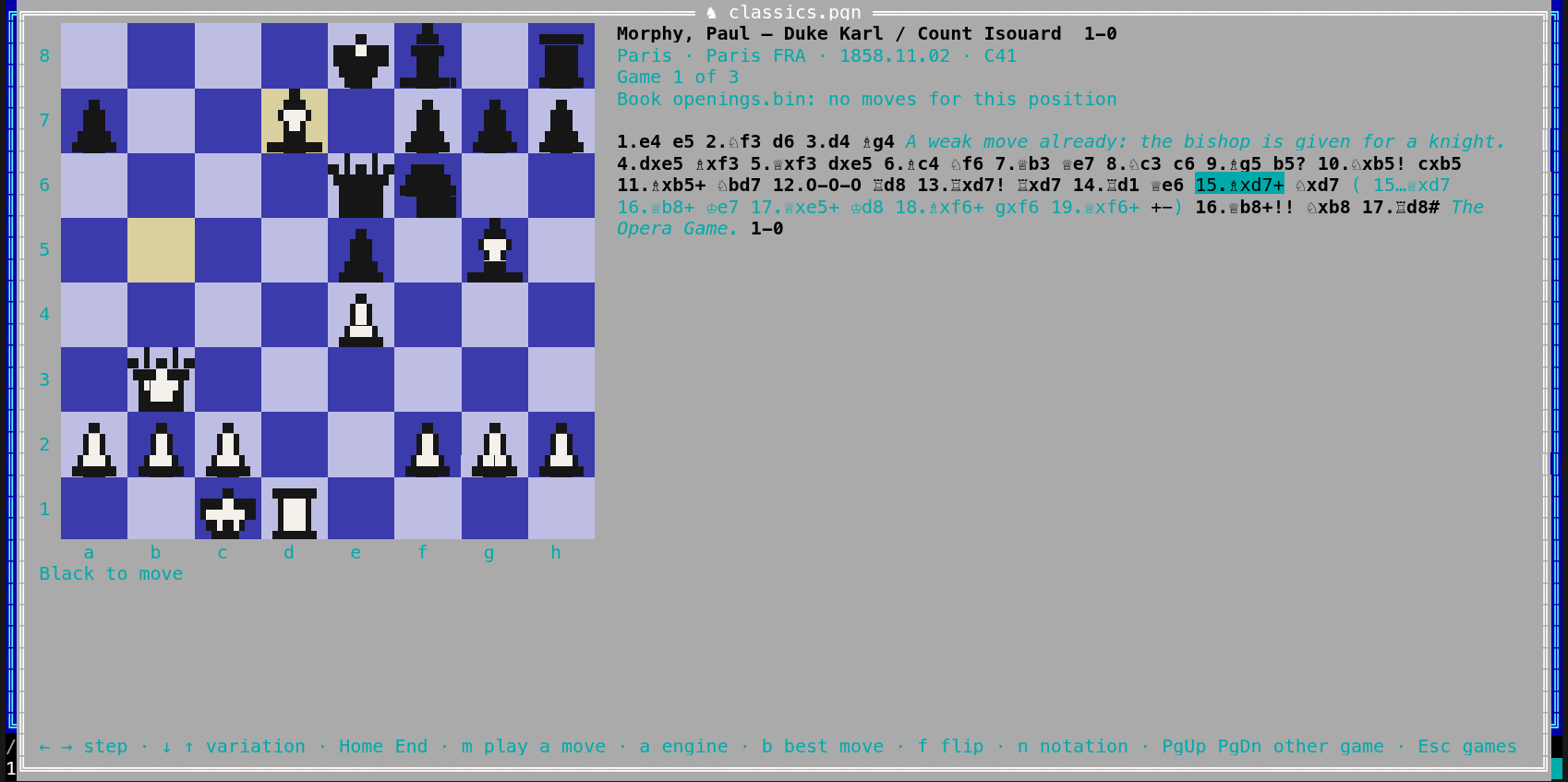
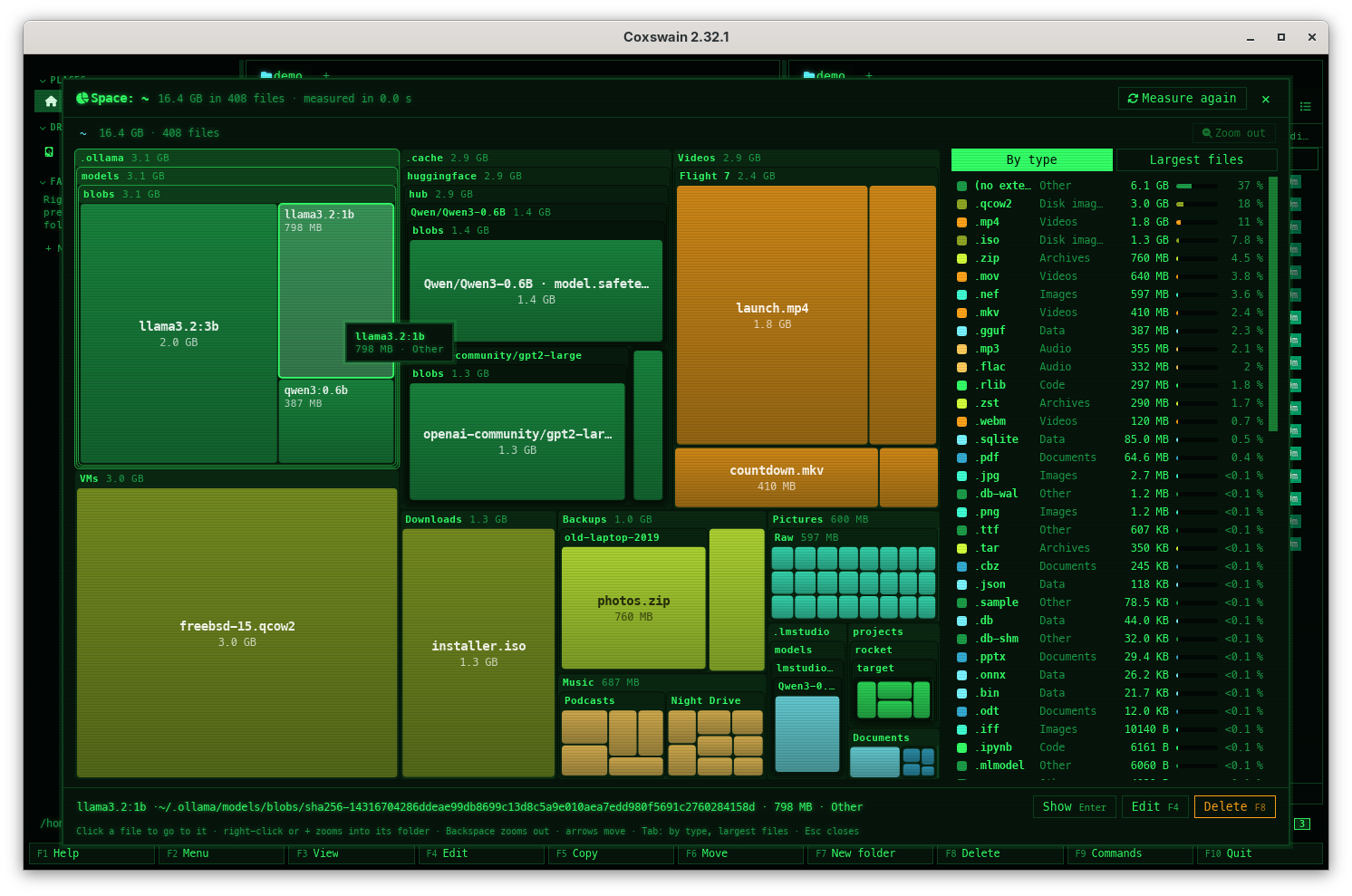
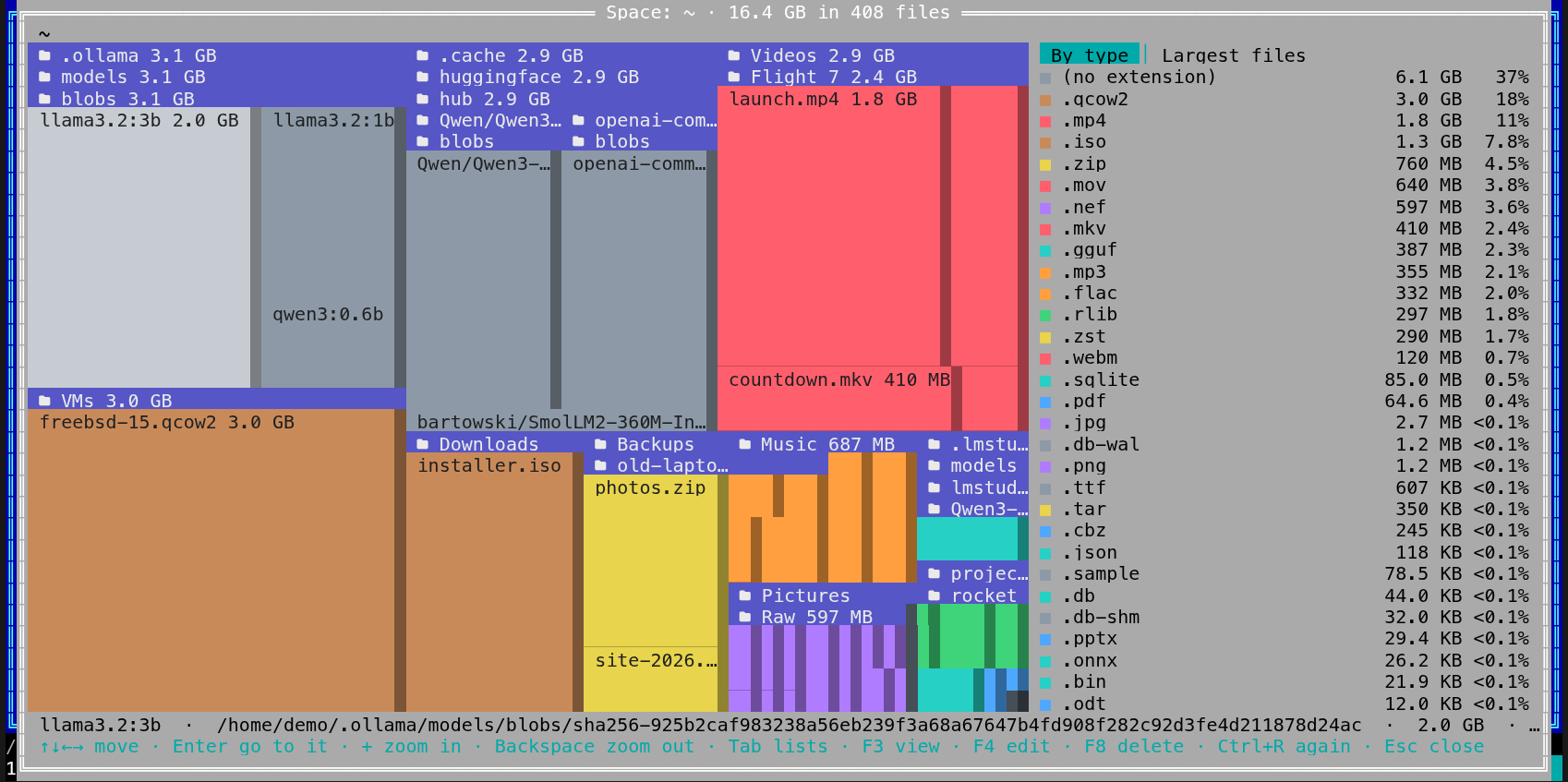
| 2.33.0 | 2026-10-25 | An archive inside an archive opens like a folder. Enter on a zip, tar or 7z inside another opens it too, eight deep: it is copied once into the cache folder and looked into there, read-only, so memory stays flat however large it is. Archives as folders Hidden text is no longer found or given to Ask. Runs marked hidden in Word and OpenDocument files, and text a PDF draws invisibly, white on a white page or smaller than 2 points, are left out of search by words, search by meaning and Ask's sources; the invisible words over a scan stay. Every PDF and Word file is read again once, and its passages for search by meaning are made again; a PDF of scanned pages is read by OCR once more too, when OCR is on (tesseract and pdftoppm installed), which takes a while for many scans; until then its old text is not found. Does Coxswain read hidden text? Near copies give Ask one source, not sixteen. Passages that are near the same in several files (copies, versions with another date or number) are folded into the closest one before Ask picks its sources, so other files get their places; that source says and 3 similar files in both apps. Nothing is read again. How much it reads · Why does a source say "and 3 similar files"? Permissions and dates in bulk. Alt+M sets the permission bits of the marked files as chmod takes them (644, u+x,go-w, a+X; on Windows read-only and hidden), and their modification date to now, a typed date or another file's date, into folders if asked. A plan lists every file before and after first; links are never followed; Ctrl+Z puts the whole batch back. Both apps. Permissions and dates Checksums in both apps. Alt+H writes a SHA256SUMS, SHA512SUMS or B3SUMS of the marked files and folders, in the lines sha256sum and b3sum read; Enter on such a list (or a .sha256, .sha512, .b3 file, in GNU or BSD form) checks every file it names and says which are OK, changed or missing, marking the entries that changed. Big files are read a piece at a time, with progress and Stop. Checksums Analyse a whole chess game with an installed engine. g (Analyse game) evaluates every move in the background: an evaluation bar beside the board, a graph of the game (a click goes to that move; a row of bars in the terminal app), and the moves that lose half a pawn, a pawn or three marked ?!, ?, ??; kept per game, so it comes back at once. w (Save as annotated PGN) writes the game with evaluations, marks and the engine's lines into a new file next to it. Analysing a whole game ChessBase databases open as games. A .cbh database (with its .cbg, .cbp and .cbt files beside it) opens like a PGN file in both apps: the table of games with players, Elo, result, date, tournament and opening, each game on the board with its variations, Find by players and events, and Find this position. Annotations, Chess960 games, the newer .2cbh format and .cbv/.cbz archives are not read yet. The search store reads each .cbh file once; no other file is read again. ChessBase databases The chess engine without installing Stockfish. With podman or docker, the chess view's engine and game analysis run Stockfish from Coxswain's own image (ghcr.io/mwo-dk/coxswain-stockfish, about 70 MB, pulled once in Settings → Previews → Container images), without network, read-only, with no capabilities and no folder of yours; built weekly from Stockfish's released source. The engine The terminal app's chess board in pictures. In kitty and Ghostty (kitty's graphics protocol, through tmux too with allow-passthrough on) and in foot, WezTerm, xterm, mlterm and Konsole (sixel), the board draws the desktop app's own chess pieces on its squares; other terminals keep block characters. [chess] pieces = "pictures" says so when the terminal shows none. Pieces as pictures in the terminal Play on from any chess position, and ask an installed engine. In a game, an EPD position or a Polyglot book, click a piece and then a square (m in the terminal app) to play your own moves, promotions too; they are kept as your line beside the game and written only to a new PGN file next to it with Save as new PGN. Engine (a) shows an installed Stockfish's (or any UCI engine's) best three lines with their evaluations, b plays its best move; nothing is downloaded and it runs on this computer. Chess: playing on and the engine Find the games that reach a chess position. Find this position (p) under any board lists the games in your PGN files that reach it, from the search store, and opens one with a click (Enter in the terminal app). Every .pgn, .pgn.gz and .pgn.zst file is read again once for this, to keep its games' positions; nothing else is redone. Finding games Compare files, in both apps. Shift+F2 shows the two files under the panels' cursors, or two marked files, side by side (one under the other in a narrow terminal): changed lines and the changed words in them, spaces or case set aside, the next change with n, a change copied to the other side and saved. A PDF, Word or OpenDocument file is compared by its text, pictures by their pixels (in the desktop app side by side, over each other with a slider, or as their difference), any other file byte by byte. Compare files Compare folders, in both apps. Ctrl+F2 compares the left panel's folder with the right one's, every file under them, by size and date or byte by byte, and marks each entry in both panels as it is found: + only here, > newer, < older, ≠ different, = the same. Ctrl+F2 again opens its menu: mark the differences for F5, or show the differences only. Archives, container images, snapshots and git histories are compared too, read-only. A link is compared as a link and never followed. Making one side like the other comes later. Fix: the terminal app's Compare files shows a control character in a file's name as ?, so a name cannot send escapes to the terminal. Compare folders Compare folders makes one side like the other. Make right like left and Make left like right in its menu (Ctrl+F2) plan every copy, replacement and deletion first; what is replaced or deleted goes to the bin as one item (deleting only when ticked), the run touches only what the plan saw, never through a link, Esc stops it and Ctrl+Z undoes it. Both apps; not on Windows yet. Compare folders AsciiDoc to PDF, draw.io exports. Build PDF of AsciiDoc writes a PDF of an .adoc document next to it, by Asciidoctor PDF installed or in its container, with its diagrams drawn here and nothing taken from the web; the preview draws an AsciiDoc document's diagram blocks, and the terminal app's F3 shows it as readable text. Export draw.io diagram (off until turned on in Settings → Previews; about 560 MB, with podman or docker) writes PNG, SVG or PDF next to a diagram with draw.io itself, only in its sealed container, and draws thumbnails in the grid view; the preview shows a diagram's pages as tabs and reads the diagram inside .drawio.svg and .drawio.png. Both apps. Build PDF of AsciiDoc, Export draw.io diagram E-books through calibre: MOBI, Kindle (AZW, AZW3), FictionBook, LIT and Palm books show their cover, title, author and first pages, Find reads their words, and Convert e-book makes an EPUB, AZW3 or PDF next to them, in both apps. Off by default (Settings → Previews → E-books with calibre); an installed calibre first, else its container image (1.3 GB, no network, none of your folders). Books locked with DRM are left alone. Turning it on reads only the MOBI, AZW, AZW3, FB2, LIT and PDB files again, once; nothing else is read or embedded anew. E-books Geodata in the preview and Convert geodata. A map of the file's own shapes (no background, nothing fetched) for GeoPackage, shapefiles, GeoJSON, KML, GPX and GeoTIFF, with their layers, coordinate system and extent and a GPX track's length and time; Convert geodata makes GeoPackage, GeoJSON, shapefile, KML, GPX, cloud-optimised GeoTIFF or PNG copies next to the original. By GDAL installed, or its small pinned image (about 40 MB) with podman or docker; a GPX file needs neither. Both apps; the map in the desktop app. Geodata KiCad schematics and boards in the preview and Export from KiCad. A schematic shows sheet by sheet and a board layer by layer as a PDF, with thumbnails (a board in 3D); Export from KiCad writes a PDF, an SVG, a bill of materials (CSV) or zipped Gerber and drill files next to it. By KiCad's kicad-cli installed, or its large pinned image (about 476 MB) with podman or docker. Both apps; the preview in the desktop app. KiCad OpenSCAD models in the preview and Export 3D model. A .scad model shows as a picture of the part OpenSCAD makes (a flat one as its outline), with Rendered / Source and thumbnails; Export 3D model writes it as STL or 3MF next to it. By OpenSCAD installed, or its pinned image with podman or docker. Both apps; the picture in the desktop app. OpenSCAD models Drag and drop that works. Files dragged out of the desktop app now arrive in GTK programs on Linux and the BSDs (a file manager, a browser upload), which got nothing before, names with spaces or % included; drops land on the right pane on HiDPI screens; files can be dragged out of archives, disk images, mailboxes and git histories (copied out first); a drop on a folder's row or a sidebar place goes into that folder; Ctrl at the drop copies and Shift moves at once; the drag shows the file's name or the count. The terminal app asks Copy here or Move here for files dropped on the terminal. Drag and drop Find and replace across files. Alt+R replaces text or a regular expression (case and whole-word options) in the marked files and folders, or in the files Find lists. Every change is shown first with its file, line, before and after, and any change or file can be unticked; each file is written safely in its own encoding (UTF-8, UTF-16, Latin-1) with its line endings and permissions; binary files, links and read-only files are left out; Ctrl+Z puts the whole batch back. Both apps; on Windows it previews only, for now. Find and replace Compare folders makes one side like the other on Windows too. Make right like left and Make left like right work there through the folders' own handles, never through a junction or link swapped in; names that differ only in case are one entry. Links, junctions and hard-linked files are left out, both folders must be on a local NTFS or ReFS disk, and what is replaced or deleted stays in a folder at the target's top instead of the bin. Compare folders Bridge deals. PBN files open like chess games (Alt+K, F3 in the terminal app): a table of deals with the pairs, contract and result to filter and sort, each deal as four hands round the table with its auction, stepped through trick by trick, each trick's winner worked out from the contract's trumps; Find finds deals by player or event. Read again once for search: every .pbn file; nothing else is redone. Bridge deals Draughts games. PDN files open like chess games (Alt+K, F3 in the terminal app): the table of games to filter and sort, each game on a numbered board stepped through move by move, captures of several pieces played square by square, men crowned, variations and comments beside it; international draughts and English draughts (checkers) by the GameType tag, Russian, Brazilian, Pool and Canadian too; Find finds games by player or event. Read again once for search: every .pdn file; nothing else is redone. Draughts games Shogi games. KIF and CSA files open like chess games (Alt+K, F3 in the terminal app): the table of games to filter and sort, each game on a 9×9 board with the pieces in hand, captures, drops and promotions, KIF's variations and comments beside it, handicaps and board diagrams; Find finds games by player or event. Read again once for search: every .kif, .kifu and .csa file; nothing else is redone. Shogi games Xiangqi (Chinese chess) games. A PGN file whose tags say Game "Chinese Chess" opens like chess games (Alt+K, F3 in the terminal app): the table of games to filter and sort, each game on a board with the river and palaces, the pieces as their characters in red and black, moves in ICCS, WXF or Chinese, comments and variations beside it; Find finds games by player or event. Nothing is read again for search. Xiangqi games A graph in the git history. Each commit in a history (Ctrl+G) has its place in a graph beside it: its lane, the lines to the commits it was made on and on top of, merges and the names of the branches and tags whose tip it is. Alt+A, or All branches next to the badge in the desktop app, lists every branch's commits, so the graph shows where they split off and were merged; Alt+A again goes back to this branch. SVG in the desktop app's Details view, box-drawing characters in the terminal app; worked out only as far down as the list is shown, so a long history opens as fast as before. The graph What is not pushed and not merged. Alt+R in a git history (or on a file or folder), or Against upstream next to the badge in the desktop app, lists only the commits on your side of the upstream (↑, not pushed) and on its side (↓, not merged), as of the last fetch, whose time the badge shows with the upstream and the counts. Coxswain never fetches for it. Against upstream Find finds a local model by its name, and F3 shows its facts. Typing llama 3b in Find puts Ollama's blob of llama3.2:3b first in Names (read from Ollama's manifests and the Hugging Face cache's links, no model file read); the terminal app's F3 on a model shows its facts card with the full chat template, and h there shows the file itself as hex, on every facts card. The terminal app's Find marks the words found again, instead of showing ? around them. Your local models, by name Chess pieces drawn in the terminal. The terminal app draws each piece from block characters after the desktop app's pictures (octants, sextants, quadrants or half blocks, as fine as the terminal draws), as large as the window allows; figurines on a small board. Settings → Previews → Game pieces in the terminal, [chess] pieces. Game pieces in the terminal The desktop app on NetBSD (experimental). NetBSD 10 now gets the desktop app as OpenBSD has it: built, tested and started under X11 in a NetBSD virtual machine on every release, in coxswain-desktop--x86_64-unknown-netbsd.tar.gz, and installed by the same install-unix.sh line with webkit-gtk41 from pkgin. The script now also recommends the Nerd Font symbols, on OpenBSD too. NetBSD Neural network models in both apps. ONNX, TensorFlow Lite, Core ML (also .mlpackage) and Keras files show their format, producer, operator set, inputs and outputs with shapes, nodes and parameters: under the preview, in Properties (Alt+Enter) and as a card in the terminal app's viewer (F3). The desktop app also draws the graph with Netron 9.3.2, bundled and offline in a sandboxed frame. Nothing runs and no pickle is read. Neural network models Preview tools: which program shows each kind of file, and a choice per kind. Settings → Previews → Preview tools (terminal app: F12 → Previews) has a row per kind (LaTeX, Office documents, Diagrams, Video and sound, Maps, 3D models …) with what is installed and its version, its container image (pulled or not, its size) with Pull and Remove, what is used now, the choice Installed program, Container or Off, and Try, which shows a sample. [preview.prefer_tool] becomes [preview.tools], per kind; a config with it is rewritten once on start. Preview tools in Settings Preview with… switches the program of a kind of file from the file itself, and a preview no tool can make says what would. Preview with… in the action menu (Shift+F10) and F9 lists the kind's choices, Installed program, Container or Off, with what each would use; the preview of a file with no program and no pulled image says Install ffmpeg, or pull its image (126 MB). with Copy and Pull its image beside it. Preview with… · Installing what is missing SCID databases open like PGN files. Put the cursor on a SCID database's .si4 file (its .sg4 and .sn4 beside it) and Alt+K, Space in the desktop app or F3 in the terminal app shows its games as a table to filter and sort, each game on the board with its variations, comments and glyphs; Find finds its games by player, event or opening, and Find this position finds them too. The search store reads every .si4 file once again for this (nothing else). SCID 5's .si5 is not read yet. Chess games Long files: sample or everything. Search keeps a sample of a long file by default (its first 4 MB of text, 256 passages spread over it); Everything keeps all its text and gives every part a passage, chosen in Settings → Meaning or per folder from the action menu, each choice saying first how many long files it touches, the room and the time. Choosing Everything reads again the text, code, CSV and log files of those folders with more than 4 MB of text and makes again the vectors of their files with more than 256 passages; going back to Sample reads nothing again and gives the room back. Long files Names sort by your language's alphabet. In both apps, the panels, archives, a comic's pages, Space, the clouds and the chess game table follow the alphabet of the language Coxswain speaks: in Danish and Norwegian Æ, Ø and Å come after Z, in Swedish and Finnish Å, Ä and Ö do, in German Ä sorts with A, in Spanish ñ after n, in Czech ch after h. Numbers still go by their value (file2 before file10) and case still does not count. Sorting Split and join in both apps. Alt+X cuts a big file into parts of a chosen size (100 MB, a CD, a FAT32 USB stick, a DVD, or any size typed) as name.001, name.002 … with name.sha256 of the whole; Enter on name.001 joins them back and checks the result. Never over a file; progress and Stop, and nothing half made is left. Split and join Stop a running copy, move, delete, extract or pack. In the desktop app a progress bar with a Stop button (or Esc on it), in the terminal app Esc on the progress line: the file it was on is removed, what was done stays and Ctrl+Z undoes it, and the status line says how far it got (Stopped: 120 of 400 copied). A move to another disk now goes file by file, each original deleted only after its copy is checked, so every file is in one place at any time; an archive is written beside itself and left untouched when stopped, with a file left by a crash removed at the next start, and the pack dialog warns when space may be short. Stopping it Go, shogi and xiangqi on real boards in the terminal app. With room in the window, Go stones are round discs drawn from block characters, shogi pieces light tiles pointing at their opponent and xiangqi pieces light discs, each with its name written on it as text; where the terminal shows pictures (kitty, Ghostty, foot, WezTerm, Konsole, Windows Terminal …) the desktop app's own stones, tiles and discs, and draughts' men and kings too. Go, shogi and xiangqi The last commit and Find's commit search for Mercurial and Jujutsu. In a Mercurial repository, and in a Jujutsu one without .git next to .jj, the Last commit column (the info line in the terminal app) shows when each file and folder was last committed and by whom, and Find finds their commits by message, author and changed path under History. Read-only: the repository's own Mercurial config, hooks and extensions never run. Find reads each such repository's newest 2000 commits once, at the helper's next scan. Git history in search · Mercurial · Jujutsu Mercurial repositories in both apps. In a folder with .hg, the line under the pane names hg and the active bookmark or branch, with the changed files marked; Ctrl+G lists a file's or folder's commits, Alt+B the bookmarks and branches, Alt+S switches with hg update --check (refused while a file is changed) and New branch here makes a bookmark. Everything runs through the hg program, never with the repository's own .hg/hgrc, so its hooks and extensions do not run. Mercurial in the panels Jujutsu repositories in both apps. In a folder with .jj, the line under the pane names jj, the working-copy change and its nearest bookmark, with the changed files marked; Ctrl+G lists a file's or folder's commits and Alt+B the bookmarks, as folders, all read through the jj program without taking a snapshot or changing anything. Where .git is next to .jj, Settings → Behaviour → Use git where Jujutsu is too shows git's view instead. Jujutsu in the panels Subversion and CVS history, on request. Ctrl+G in a Subversion or CVS working copy asks once whether Coxswain may read the history from the server it names; with yes it lists the commits from svn log or cvs log (CVS's per-file revisions joined into commits), newest first, with date and author, in both apps. Nothing is sent before that yes, nothing but the log is asked, and the answer is kept per server: Settings → Privacy and updates → History from servers forgets it. Subversion · CVS · Privacy Subversion and CVS working copies show their status. In a Subversion working copy the line names svn, the revision and the branch, and in a CVS one cvs and the branch or tag, with each changed, added, deleted, unversioned or conflicting file marked; it is read from .svn/wc.db and the CVS/Entries files alone, so no server is asked and neither program is needed. Alt+G opens a terminal in the working copy for svn update, cvs log and the rest. Subversion working copies · CVS working copies Find and replace writes on Windows, and Permissions and dates goes into folders there. Alt+R now writes its changes on Windows too (it only previewed there), and Alt+M offers Into folders, all the way down. Both go through each folder by its own handle and never through a junction, link or mount point, as on the other systems; a file with other permissions, data streams or attributes than a new one would get is left as it is. Find and replace Files out of an archive keep their dates, and a link to nothing is no program. A file copied out of a zip, 7z or tar with F5, or extracted with Ctrl+E, now keeps the modification date it has in the archive instead of taking the time of copying; a folder made inside a zip or 7z with F7 is dated now, not 1 January 1980. In the terminal app, Enter on a symbolic link whose target is gone (or two links pointing at each other) no longer tries to run it as a program. Pack and extract · Archives as folders · Opening files Ask resists files that try to steer it. Each source reaches the model fenced off, so a file can no longer end its own source, make up another or end the model's rules with a chat template's turn marks; invisible tag and bidi characters are left out; escape sequences in an answer or a server's error never reach the terminal; a server's answer stops after 1,024 tokens (4,096 when it thinks), marked …, instead of running on for up to 15 minutes, and a server that sends megabytes no longer freezes the desktop app. Can a file trick Ask? The terminal app's binary compare shows its own keys. Comparing two binary files (or two pictures) now shows the keys that work there, n p and Esc, instead of the text compare's. Compare files Smaller programs. The released terminal and desktop apps leave out their symbol table: about 11 % and 13 % smaller downloads and installs. Performance A built-in editor in both apps. Shift+F4 edits a text file inside Coxswain: colours, undo, find and replace, go to line; saving keeps the file's encoding, line endings and permissions, and asks before writing over a file that changed on the disk meanwhile. In the terminal app F4 opens it when no editor is set, instead of the first of vi, nano and the like that is installed. The built-in editor New chess pieces in the desktop app. The board draws clean, modern pieces: white with a black outline and black, with the squares showing through around them, on every theme. They are Uray M. János's set after the Wikimedia pieces, under CC BY-SA 3.0. Chess Compare files saves when the other file changed meanwhile. Saving a side with F2 no longer stops at Not saved because the file copied from changed on the disk after the copy: both files are held as they were read from the first copy on, so the side asked for is written with the lines copied, and Save over it writes a side's own lines as read, never its new bytes at old places. A file that changed before a copy says so and is not copied from. Is anything lost? A config.toml from a newer Coxswain no longer stops this one. A key given in [keys] to an action this version does not know (from a newer version on another machine, one you went back from, or misspelt) is left out, stays in the file, and a notice names it once; before, the terminal app refused to start and the desktop app silently used every default. The search helper reads your [search] settings even when another part of the file is refused (a key bound twice), instead of the defaults, which read the folders you left out and the archives you turned off. state.json keeps what a newer version wrote there when an older one saves it. Configuration A mistake in config.toml costs only its own setting. Both apps keep every setting they can read and use the default only for a broken one; the terminal app no longer refuses to start and the desktop app no longer starts with every default. A notice names the line and the problem (config.toml line 12: theme must be text): in the terminal app a dialog at start where Enter opens config.toml at that line, in the desktop app the status line and Settings → What's new, with a button that opens it there. Settings still save while such a line waits to be mended. Configuration Container images open like folders. A docker save or podman save tar, and an OCI image layout (as a tar, or a folder through its index.json), open with Enter as one read-only folder of their merged layers: whiteouts honoured, gzip and zstd layers, links resolved inside the image; F5 copies files out, the panel title shows the tag, and the preview and Properties show tags, platforms, layers, entrypoint, environment, ports and labels. Both apps. Container images Container previews in folders with a : in their name. A LaTeX, Typst, office, PlantUML, pandoc, diagram or PostScript preview, and Make PDF searchable, run in podman or docker now work in a folder such as Meeting 10:30, where they failed with incorrect volume format; the folder is mounted with --mount. Make PDF searchable in the terminal app now counts as a use of its image, so Remove images not used for 90 days no longer removes an image you use there. Containers Scan for viruses with ClamAV, only when you ask. Turn it on in Settings → Previews, then Alt+I (or the action menu) scans a file, the marked files or a folder in a container with no network and your files read-only; the virus database comes from database.clamav.net when it is more than a day old. What it finds is marked and listed, and for each file you choose: leave it, the bin, or quarantine; nothing is deleted by itself. Both apps. Scan for viruses ffmpeg and ImageMagick: videos, sound and photos the app could not show, and conversions. Videos and sound the player cannot play (AVI, WMV, MPG, WMA, APE …) show a frame or their waveform, every video gets its length, size and tracks and a thumbnail, songs a waveform, and HEIC, GIMP and RAW photos show in the preview and as thumbnails. Convert video or audio makes MP4, MP3 or FLAC copies, the sound alone or a clip, and Convert or edit pictures JPEG, PNG or WebP copies, smaller ones, ones without their location, or turned ones, next to the originals, never over them, with progress and Stop, in both apps. An installed ffmpeg is used first, else its container image (about 126 MB); ImageMagick runs in its sealed container first (about 60 MB), else installed under a strict policy. Each image says in Settings what it gives, its size and its cost; containers do not run on the BSDs or illumos, where the installed programs do it. Convert video or audio, Convert or edit pictures, Media, Containers Other formats with Apache Tika. Turn on Read other formats with Apache Tika (container) under Settings → Finding files and Find finds the words in OneNote, XPS, CHM, Outlook .pst and .ost, MHTML, Hangul and Access files, and in old Word, PowerPoint, Publisher and Visio files when LibreOffice is not installed. Off by default; turning it on pulls docker.io/apache/tika:4.1.0 (about 190 MB) for podman or docker; the server has no network, no folder and no port, and stops after 5 idle minutes. Not on the BSDs or illumos. Read again: only the files of those kinds, once, when you turn it on; nothing else. Other formats with Apache Tika Transcripts of speech with Whisper. Turn on Transcribe speech with Whisper under Settings → Finding files, then Transcribe speech in the action menu (Shift+F10) or F9 on a recording, a video or a folder: it says how many hours of sound and how long they take here, then transcribes in the background, never on battery, pausable from the Speech line. Find finds what was said; the desktop app's preview shows the transcript with its times, the terminal app's F3. The model is chosen for this machine and downloaded from Hugging Face (checked by its SHA-256) when you turn it on; an installed whisper.cpp runs first, else ghcr.io/ggml-org/whisper.cpp:main (about 505 MB) without network. Read again: nothing; only the files you ask for are transcribed, and again only when they change. Transcripts of speech Long Word, OpenDocument, spreadsheet and presentation files are found by what their last pages are about. A .docx, .odt, .xlsx, .ods, .pptx or .odp with about 3 MB of text or more gets its 256 passages for search by meaning from the whole file, read twice as it is unpacked and never held whole, not only from its first 4 MB; with Long files set to Everything every part of the whole file gets a passage. Search by words still keeps the first 4 MB. Only those files get their vectors made again, once; nothing else is read again. Search by meaning Large Word, OpenDocument, spreadsheet and presentation files are read with a fraction of the memory. A .docx, .odt, .xlsx, .ods, .pptx or .odp is read as it is unpacked, never a whole part in memory: one with a 60 MB part takes 11 to 21 MB to read instead of 25 to 94 MB. The text found is the same; nothing is read again. Documents it reads Files dragged out of an archive stay while another program reads them. Closing the desktop app no longer deletes the copies it made for a drag out of an archive or a git history, which the program they were dropped on may still have open; they go once they are a day old. Out of archives and histories The old ImageMagick image can go. docker.io/dstmodders/imagemagick, ImageMagick's default image before Coxswain made its own, is listed in Disk use as a former default to clear, and Keep images up to date, when on, replaces it with today's and removes it. Nothing is removed without one of those. Containers Vectors for many short files are made about a quarter faster. The built-in model now gets the passages of several files together, shortest first, so its batches are full and padded only to about their own length; a few files' passages are made ahead while it works, and each file's vectors are still written whole or not at all. The vectors are the same as before: nothing is made again. Search by meaning Esc then F10 quits on macOS too. When Esc and the next key arrived together (macOS Terminal, the app busy), the key was lost and typed as [21~; the terminal app now puts it back together. The terminal app Settings opens Finding files when config.toml lists something twice. A folder or pattern written twice in a list of [search] (name_roots, text_roots, text_exclude …) stopped Finding files in the desktop app's Settings from opening: a click on it left the area before on show. Both entries now show, each with its Remove. The same had stopped Previews opening since coxswain 2.32.1 when two tools share a container image; Previews now lists images per kind of file. Settings: Finding files Big Go collections open at once. An SGF file is read game by game as it streams by, no longer up to 64 MB in one piece: its list fills while you look, in both apps, whatever the file's size; every game file (PGN, PDN, SGF, KIF, CSA, PBN) is read by one shared reader. Go Folders of a million files in the desktop app. The app keeps each tab's listing and the window gets only the rows in view, so a folder of a million files opens in about a second instead of four, with no frozen window, and the web view stays near 200 MB instead of growing past 2 GB (7 GB after Ctrl+A). Sorting, marking, quick search and the marked count work on the whole folder as before; tabs in the background are read when you switch to them. Performance Desktop app fixes from the 2.32.1 test round. In a git history, F6, Shift+F6, F7, F8, Shift+F8, Ctrl+X, Ctrl+V and Ctrl+M are refused at once instead of after a question; F1 → Features and questions lists every feature before you type; after one Alt+N, opening the preview pane no longer puts the cursor in the notes field, where arrows and typing went into the note; the chess window's buttons take the theme's colours. Git history Safer with hostile archives and files. A 7z that unpacks to gigabytes is unpacked as it is read, no longer into memory, so it cannot take the app down; a zip whose files share their packed bytes (a few kilobytes that unpack to gigabytes) is not extracted whole, one file of it can still be copied out. Files and folders from a zip or a tar never come out writable by other users. An archive entry, a name index or a commit dated far in the future no longer ends the app, a VMDK whose extents add up past what a number holds shows the largest size instead of a wrong one, and a LaTeX file in Latin-1 is no longer mistaken for a part of another document. Archives Container images pinned to the builds Coxswain was tried with; HEIC and RAW photos in ImageMagick's image. Every default image is named by its tag and digest, so a pull fetches exactly that build, never whatever the tag points at that day; a new version of Coxswain moves the pins, and Keep images up to date then pulls the new pin and removes the old copy. An image you set in config.toml is never changed. ImageMagick's image is now Coxswain's own (Alpine's ImageMagick with libheif and LibRaw, about 21 MB), so HEIC and RAW photos show and convert without an installed ImageMagick. Pulled again once: a default image whose pulled copy is not the pinned build is pulled again by the next round of updates, or after a click by the next preview that needs it. Pinned images · Convert or edit pictures · Media Every container runs held tight. LaTeX, LibreOffice, PlantUML, pandoc, Typst, Kroki and OCRmyPDF now run as ffmpeg, ImageMagick, Whisper, Tika, calibre and the chess engine do: on a read-only root with a small /tmp, bounded memory and processes, no capabilities and no way to gain privileges. What a container may do Arch and the BSD install script, fixed. makepkg -si in packaging/aur/coxswain-bin or packaging/aur/coxswain of a clone installs the clone's release again, where it fetched 1.0.0 and failed, and leaves no -debug package behind after removal; install-unix.sh on NetBSD, OpenBSD and illumos links to its system's guide, which was a missing page, and its --help no longer ends in set -eu. Linux on ARM Tidier screens in every language. In the terminal app at 80 columns, short F-key labels lend their room to long ones, so far fewer are cut (German, Greek, Czech, Lithuanian, …); Persian words with لا no longer push a column's border along; Japanese and Korean answers in F1 → Features wrap without short lines; Alt Gr letters (@, {, €, ą) sent by Windows terminals as Ctrl+Alt are typed in Find, rename and the command line. In the desktop app, F-key labels too long for a small window end in … (whole in the tooltip), a long area name in Settings breaks inside the list, a long Latin file name under Hebrew or Persian keeps its start and ends in …. Languages Translation fixes. The action menu's title reads right in Czech, Ukrainian, Lithuanian, Latvian and German for a folder and for several items; git's staged and core dump are translated where they were left in English (Danish, Norwegian, Persian, Armenian, Georgian, Greek, Hebrew); British, Australian and New Zealand English say bin everywhere, and Canadian English trash and -ize everywhere. Languages "New" on a language lasts about a month. Settings marks a fresh translation new for four weekly releases after the one that brought it, then the mark goes by itself; Czech, Polish, Ukrainian, Greek, Persian, Armenian, Georgian, Japanese and Korean are no longer marked, Norwegian is until 15 November 2026. Languages Your local models, by name. Ollama's sha256-… blobs show the model they are (llama3.2:3b) and Hugging Face cache folders show org/name, in the panels and in Space; a GGUF or safetensors file's facts (architecture, parameters, quantisation, context, layers) say how much memory it needs and whether it fits this machine, in the preview and in Properties in both apps. Only headers are read; PyTorch pickles are named, never opened. Your local models, by name Long logs, CSV, text and code get their passages for search by meaning from the whole file, not only its first 4 MB. The 256 passages a file gets are spread from its start to its end (search by words still keeps the first 4 MB of text). Only text, code, CSV and log files with more than 4 MB of text get their vectors made again, once. Search by meaning Model files with huge headers are refused, not read. A GGUF header is read up to 64 MB (was 256 MB) and a safetensors one up to 16 MB (64 MB for all the shards of a model; was up to 100 MB each), and past that the facts say header over 64 MB, not read; an xz archive's list of blocks is read up to 16 MB and a million blocks. Naming the files in Ollama's store no longer downloads its manifests from the cloud, nor holds up other folders while it reads. The facts Draughts pieces drawn in the terminal. The terminal app draws draughts men and kings from block characters after the desktop app's pictures, as it does chess pieces; ● and ♚ on a small board. Game pieces in the terminal · Draughts games A PDF can no longer guess its way past the hidden-text filter, and a form drawn twice keeps its text. The marks that say where hidden text starts and ends now carry 128 random bits drawn for each file read, so a file that draws many guesses cannot match one; and a form drawn once in white on an empty page and again in black is read where it is seen, with the text after it, instead of losing both. Nothing is read again. Does Coxswain read hidden text? A PDF cannot switch off its own hidden-text filter. The marks Coxswain sets in a PDF's drawing to say where hidden text starts and ends, and where a span's spoken text goes, are new for each file read, so a file that draws such marks itself no longer turns hiding off for words meant for Ask, hides real text or slips in words. Does Coxswain read hidden text? Find and replace and Permissions and dates keep to the very files they planned on OpenBSD too. A file or folder renamed away after the plan is left, even where the clock ticks too coarsely to show the rename. Find and replace The branch stays readable on ZFS, and more install hints on the BSDs and illumos. In the terminal app, a git repository on ZFS (FreeBSD, illumos) showed the dataset line over the branch in the panel's bottom border; the dataset line is now cut short instead. Where a tool is missing, the hint now names OpenBSD's and NetBSD's typst, OpenBSD's ocrmypdf, and OmniOS's compress/7zip and ooce/application/tig. ZFS snapshots · Preview tools Fixes for the BSD and illumos installs. The install script's last line on OpenBSD, NetBSD and illumos linked to a page that does not exist; it now names the system's guide. On OpenBSD man coxswain no longer warns about an outdated mandoc.db after an install, and the rc.d script, when started without a user, now says in /var/log/daemon how to name one (rcctl only showed failed). On illumos the SMF service's message says to clear it after naming the user, and the guide says so too. Uninstalling finds the autostart entry under XDG_CONFIG_HOME too. OpenBSD · illumos Pull and Remove stay side by side. In Settings → Previews → Preview tools a long image name (LaTeX's) wraps its own words, and Pull and Remove stay together at the end of its line instead of Remove dropping to a line of its own. Containers F1 names the git graph and its keys, and the Flatpak page says how Whisper runs there. F1's help and Git history as folders in F1 → Features now say that the history has a graph of branches and merges, with the keys for all branches and against the upstream. The Flatpak page says that transcripts use the host's whisper-cli in /usr/bin or /usr/local/bin, else whisper.cpp's container image through the host's podman or docker. Git history as folders · Flatpak Container results are never taken through a link, and maps and GeoJSON come out right. What a container writes back (a preview, a converted video, picture, map, model, KiCad or draw.io export, a searchable PDF) is now read only as a plain file of its own: a link to another of your files, a hard link or a FIFO left in its folder is refused. A reprojected map is no longer drawn stretched, To GeoJSON of a GPX file of waypoints alone (or a GeoPackage beside empty tables) works, and an installed GDAL older than 3.7 gives way to its container or says it is too old. Safety · Geodata Saving in the editor and in Compare files keeps the file whole and as it was. A full disk or quota no longer leaves half a file: the save is refused and the file left as it was. The new text is private to you until it has the file's permissions and group; a read-only file is refused rather than replaced, and another user's file, or one with an ACL or extended attributes, is written in place so it keeps them. Replace all no longer cuts the wrong text after ẞ, the Kelvin sign or İ. In Compare files, N and P in two binary files look on a thread (Esc stops it), hex rows put the right side under the left below 110 columns instead of cutting it off, and Compare folders no longer says the folders are the same when a file stands against a folder. Editor · Compare files · Compare folders A move to another disk never loses a file. A move across disks that fails half way (a full disk, an unreadable file, a pipe in the folder) now moves back what had gone over, so the source is whole again; if that fails too, the error names both places and Ctrl+Z takes back the rest. A target that is the source itself under another path (a bind mount) is refused instead of being emptied, and in the terminal app an accented letter typed right after Esc no longer crashes it. Move and rename Scan for viruses never calls a file clean it did not fully read. Files past ClamAV's size or depth limits are listed as read only in part, files it could not read are listed and no longer counted as scanned, a scan that read nothing says so instead of No viruses found, a marked folder that is a link is scanned as the folder it points to, and quarantine no longer fails on a file in a linked folder or leaves a file moved but unlogged. Apache Tika that will not start is tried again only after 10 minutes, so indexing no longer stalls on it. Scan for viruses Compare files saves both sides when changes were copied both ways. Before, the left file was written and the right one refused as "changed on the disk", its copied changes lost; and a side that cannot take a copied letter in its encoding now stops the save before either file is written. Splitting a file into more than 100,000 parts (a size typed as 1, one byte) is refused instead of filling the memory, and in the desktop app a sort that a newer listing overtook no longer moves rows under the marks. Compare files · Split and join Games and the terminal app hold up to hostile files and silent engines. A chess engine that never answers no longer leaves a "thinking" line and a running process behind: it is stopped when you step on or after its time, in both apps, and an engine is never looked for in the working folder through an empty PATH entry. Looking for an opening book no longer downloads online-only .bin files of a cloud folder. A crafted Go file (millions of values, a board of one huge group) no longer takes gigabytes or freezes the terminal app's board, and a CSA line P0 is read without fault. In the terminal app, a background job that ends while the editor is open waits for it to close instead of putting it away with your unsaved text, the editor scrolls sideways correctly in a very narrow window, and F4 in a text copy (a PDF's text, a transcript) edits the file it was made of, not the throwaway copy. Play and analyse · Opening books · View and edit Search inside files is safer with files made to harm it, and keeps what it read of a disk that is away. The search helper no longer drops the text of the files on an unplugged disk or share when a reader asks for them again: they keep their text and are read once the disk is back. A Word document of runs never closed, or a PDF of forms sharing their resources, is read for seconds at most instead of for hours; a text file of blank space or zero bytes (a sparse file of a terabyte) is read no further than 256 MB, and a longer log gets its passages from its first gigabyte; a line of one endless word no longer takes gigabytes while its passages are made; a tar of very long names keeps no list of gigabytes in the cache. A container runtime that starts late (Tika, calibre) no longer makes its files be read and given vectors again. Find this position leaves out a PGN file text_exclude names, and a file stopped part way is read again. Ask makes an earlier answer as inert as a source in the next prompt, an embedding server's error page is shown in one short line, and a model download stops when it is longer than the file expected. Documents it reads · Search by meaning The container images list in Settings is back. Settings → Previews → Container images, with what each image gives, its size, Pull and Remove, shows again in the desktop app; with the default images, where OCRmyPDF's image also serves Ghostscript, the whole list was missing. Containers Opening a Find hit in a large SGF file no longer freezes the terminal app. The hit's game is looked for on a thread of its own while the list of games shows, with Finding the game of the hit… Esc stops under it; Esc stops the looking. Go Go games and chess opening books. SGF files open like chess games (Alt+K, F3 in the terminal app): a list of games with players, ranks, komi, handicap and result, each game on a board stepped through move by move, captured stones taken off, variations marked A, B, … and comments beside it; Find finds games by player or event. A Polyglot opening book (.bin) next to your PGN files, or the one Settings → Previews → Opening book names, lists its moves for every position on the chess board, and a book on its own shows its moves from the start position, to play through. Read again once for search: every .sgf file; nothing else is redone. Go games · Opening books Plainer errors, and a few rough edges gone. The status line says an error in plain words in your language (No permission, Not found, The disk is full) instead of (os error 13), and for a file that would not open only the first line of what the opener said; the whole text goes to helper.log. Properties of a folder you may not list says Could not be read: No permission instead of 0 B in 0 files. The git tool's notice says what really opened: a terminal, a shell in the terminal app, or nothing when no terminal was found. A .h5 file opens in Netron only when its bytes hold a Keras model; other HDF5 files are shown as before. Removing a container image in Disk use reports only the space really freed, not the layers other images still share. Settings → Keys names Undo as Undo, not the operation it would undo. The chess filter's year and rating fields are as wide as their labels. The .deb, .rpm and AppImage menu entry lists Coxswain as a file manager and hands it the files and folders it is opened with. Each system's page says how to uninstall. Properties · Disk use · Neural network models · Linux on ARM LibreOffice is stopped at its time limit. Reading an older Office file (.doc, .ppt, Visio …) for search stopped only LibreOffice's launcher after two minutes, and its soffice.bin could go on at full speed for days; now it ends with everything it started, as do OCR, calibre, ffmpeg, whisper and the other programs the helper and conversions run. A file that took too long is not tried again until it changes. Scans, pictures and older Office files Sorting by size puts folders in the order of their sizes. Ctrl+F6 and the desktop app's Size header now sort folders by the measured size the Size column shows, largest first, instead of by the folder entry's own few kilobytes, which put them in an order that contradicted the sizes on screen; folders not measured yet (or all, with folder sizes off) come after, by name, and the list sorts itself again as sizes arrive, the cursor staying put. The terminal app's marked total now counts a marked folder's measured size too, not its entry's 4 KB. Sorting · Marking Space looks its best. In the desktop app each file is a soft gradient in the theme's own colours (Cyber's greens, cyans and ambers first), with thin gaps, rounded corners and darker frames for deeper folders; names show only where they fit, centred in big rectangles; tiny files are one grey block that says how many; the cursor is framed in the accent colour and lights the folders it is in; a zoom grows or shrinks the map; By type shows <0.1 % instead of 0. The terminal app draws flat colours with a darker edge between files, lighter folder rows and no half-block banding. Space Split says when a size makes too many parts. A size that would cut a file into more than 100,000 parts (1 is one byte) is refused with how many parts it would make and the limit, instead of asking for a size again. Split and join The terminal app draws at once when it starts in a huge folder. Its first panels were read before anything was drawn, so a folder of a million files showed a blank terminal for seconds; now the panels show .. and Working on … at once, the keys answer, and the files fill in when read. Performance Searching no longer waits on Find this position or the once-only look at long texts. Find this position takes only the games it shows of a position millions of games reach, instead of sorting all of them while the search store waits; a big PGN file's old positions go a part at a time; and the one-time look for long logs after an update goes through the store 2,000 files at a time, letting searches in between. Finding games An older Coxswain no longer throws away a newer one's search store. Going back to an older version left text search empty and read every file again; now it leaves search.db as the newer version made it, reads nothing, and a notice and Settings say why. Updating again finds everything, nothing read again. I went back to an older Coxswain Going back to an older Coxswain and forward again reads nothing again. With Ghostscript or LibreOffice installed, each return from a version before this one read every .ps, .eps, .wri, .wk1, .wks, .123, .sxc, .abw, .cwk and .numbers file again, text and meaning, as if its program had just been installed. The helper now keeps its own list of the programs it found. Nothing is read or made again. Scans, pictures and older Office files Logs, CSV, text and code of any size are read for search. They are read line by line until 4 MB of text is kept, so a 300 MB log costs a few megabytes of memory instead of 300; before, files over 20 MB (text_max_size) were found by name only. Those files, and only those left unread for their size, are read once when this version starts. Documents it reads A marked Polyglot book offers Open games again in the desktop app. With one .bin opening book marked (Insert), the action menu (Shift+F10) offers its games as it does with the cursor on it; the menu and the hints count marked files the same way in both apps, disk images known by their first bytes. Chess games Rename never changes a name you left alone, and failures are counted. A newline, a tab or another control character in a name shows in Rename and Batch rename as its picture (␊, ␉, ␛) and is kept; text left as shown renames nothing, and a typed ␊ writes a newline. When a copy, move, delete, extract or pack of several items fails in part, its dialog says how many went through and how many did not: 3 of 4 copied; 1 could not be copied. Both apps. Move and rename, When something goes wrong The terminal app shows the whole explanation when making one folder like the other. It is wrapped over as many lines as it needs instead of being cut at the window's edge. Compare folders Compare folders keeps what a run did on the status line. After Make right like left or Make left like right, the run's result (Copied 3, replaced 1, to the bin 1) stays in front of the compare's summary instead of being replaced by it, in both apps. Compare folders A file out of a large .tar.gz or .tar.zst comes out at once. The first time a .tar.gz is opened, Coxswain keeps a place to unpack it from every 4 MB, and for a .tar.zst of several frames where each frame starts; a file taken out later is unpacked from the place before it, not from the start (the last file of a 1.3 GB .tar.gz: 0.05 s instead of 2 s). A .tar.zst made by pzstd, or of several frames, now opens whole: before, only its first frame was read, or none. A .tar.gz opened before is listed as it was until it changes. Archives as folders A big compressed tar opens at once the second time. What a .tar.gz, .tar.xz, .tar.bz2 or .tar.zst holds is kept in the cache after the first look, also for later runs, and a file of a .tar.xz made in blocks is unpacked from its block, not from the start of the archive. Archives as folders A folder of broken files no longer restarts Apache Tika for each one. A file Tika answers it cannot parse now counts as ten files toward a fresh server, instead of stopping the server at once, and a server that crashes on file after file is started at most three times a minute. What the container may do Tokio 1.54.1. The async library under the update check, model downloads and the desktop app moves past a race in its timers (RUSTSEC-2026-0384); 1.54.0 was withdrawn. Privacy and updates A sound file that claims to be far longer than it is no longer keeps Whisper busy. Transcripts stop at the real end of the sound: a part shorter than ten minutes ends the file, and its length is cut to it, instead of going on ten minutes at a time over silence until the length its header claims (ten hours of nothing for a five-second file). Pausing, the battery and changed files The terminal app no longer freezes on a huge folder. A folder that takes longer than a moment to read (hundreds of thousands of files) is read in the background: the panel shows .., the status line says it is being read, and the keys keep working. Performance The docs match the terminal app again. They now say that its panels follow changes on disk by themselves, why Ctrl+F3 never reaches it from xterm-style terminals (use F9 → Sort by name), how the extract and pack boxes read, and Open games (Alt+K) is listed under Viewing and editing, where F1 and F9 have it. Moving around · Sorting · Every default key Terminal app fixes from a user-test round. F3 on a Find hit opens it in the viewer (and Esc comes back to Find), and Ctrl+U clears Find's field; a name with a newline or an escape in it is shown with ?, so the panel stays straight and nothing in a name reaches the terminal; F6, F7 and F8 in a git history say it is read-only at once instead of asking first; a wrong archive password is asked again with That password did not open it; F4 with no editor installed takes the first one there (vim, nano …) or says which is missing; ? in + / - matches one letter such as "ø"; the info line keeps the file's name in a narrow panel; What's new in Settings shows the start of a version's notes. Find · View and edit · Marking files · The screen Small fixes found by trying the apps. Compare folders keeps its summary on the status line when Show the differences only is chosen, in both apps; removing a folder or pattern named twice in config.toml from Settings → Finding files removes that one entry, not both, so the folders read do not fall back to the whole home; a cleared container image is named without its digest, so the space freed shows on a terminal's line; Alt+G with a terminal git tool and no terminal names the tool instead of saying none is installed. Compare folders The Subversion and CVS history question names Settings → Privacy and updates, the area where its answer is forgotten, by its full name. Subversion The terminal app's viewer finds what is far down a big file it has just opened. A search started while the viewer was still finding the lines stopped with Not found yet: the file is still being read; it now goes on over the lines as they are found. View and edit Safer update check. The library that checks the update server's certificate no longer accepts certificates that lead to a distrusted intermediate (RUSTSEC-2026-0382). Privacy and updates Let the rest go while transcribing. The Speech line in Settings shows Let the rest go beside Pause and Go on, so the files waiting can be dropped while one is under way or paused (terminal app: Delete on the line). Transcripts of speech Chess pieces as pictures in Windows Terminal. The terminal app asks Windows Terminal (1.22 and later) whether it draws sixel, through the console, and draws the desktop app's pieces on the board there; the old console keeps block characters. Pictures, where the terminal shows them |

![The desktop app: Ctrl+F opens Find, rocket fuel cost is typed and Ctrl+Enter asks; the answer appears in place, The rocket fuel costs 2,105 kEUR in April and 2,655 kEUR in June [1], with the sources budget.txt and budget-da.txt numbered under it](https://raw.githubusercontent.com/mwo-dk/coxswain/main/docs/screenshots/ask.png)