LLM Wiki is a cross-platform desktop application that turns your documents into an organized, interlinked knowledge base — automatically. Instead of traditional RAG (retrieve-and-answer from scratch every time), the LLM incrementally builds and maintains a persistent wiki from your sources. Knowledge is compiled once and kept current, not re-derived on every query.
This project is based on Karpathy's LLM Wiki pattern — a methodology for building personal knowledge bases using LLMs. We implemented the core ideas as a full desktop application with significant enhancements.
Features
- Two-Step Chain-of-Thought Ingest — LLM analyzes first, then generates wiki pages with source traceability and incremental cache
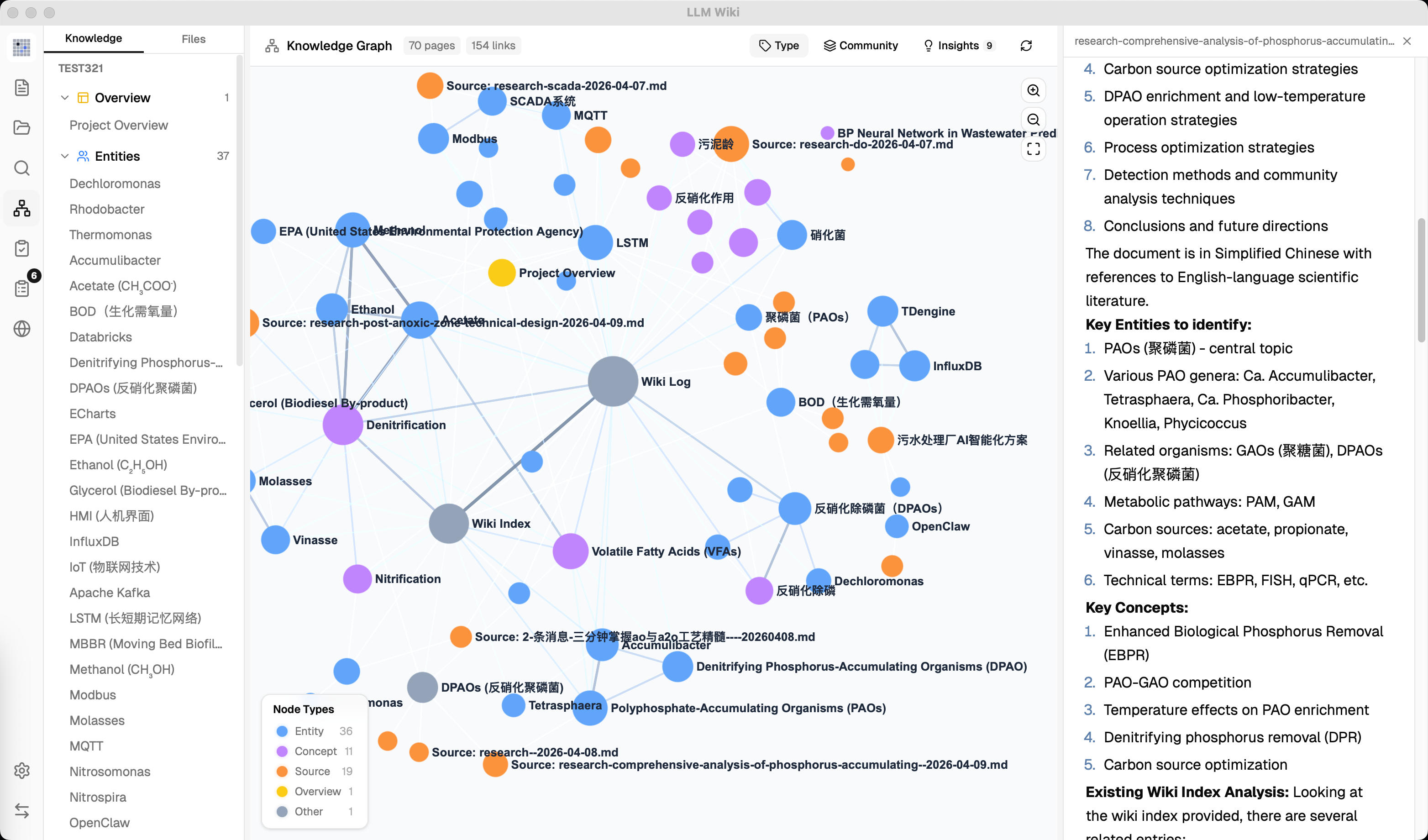
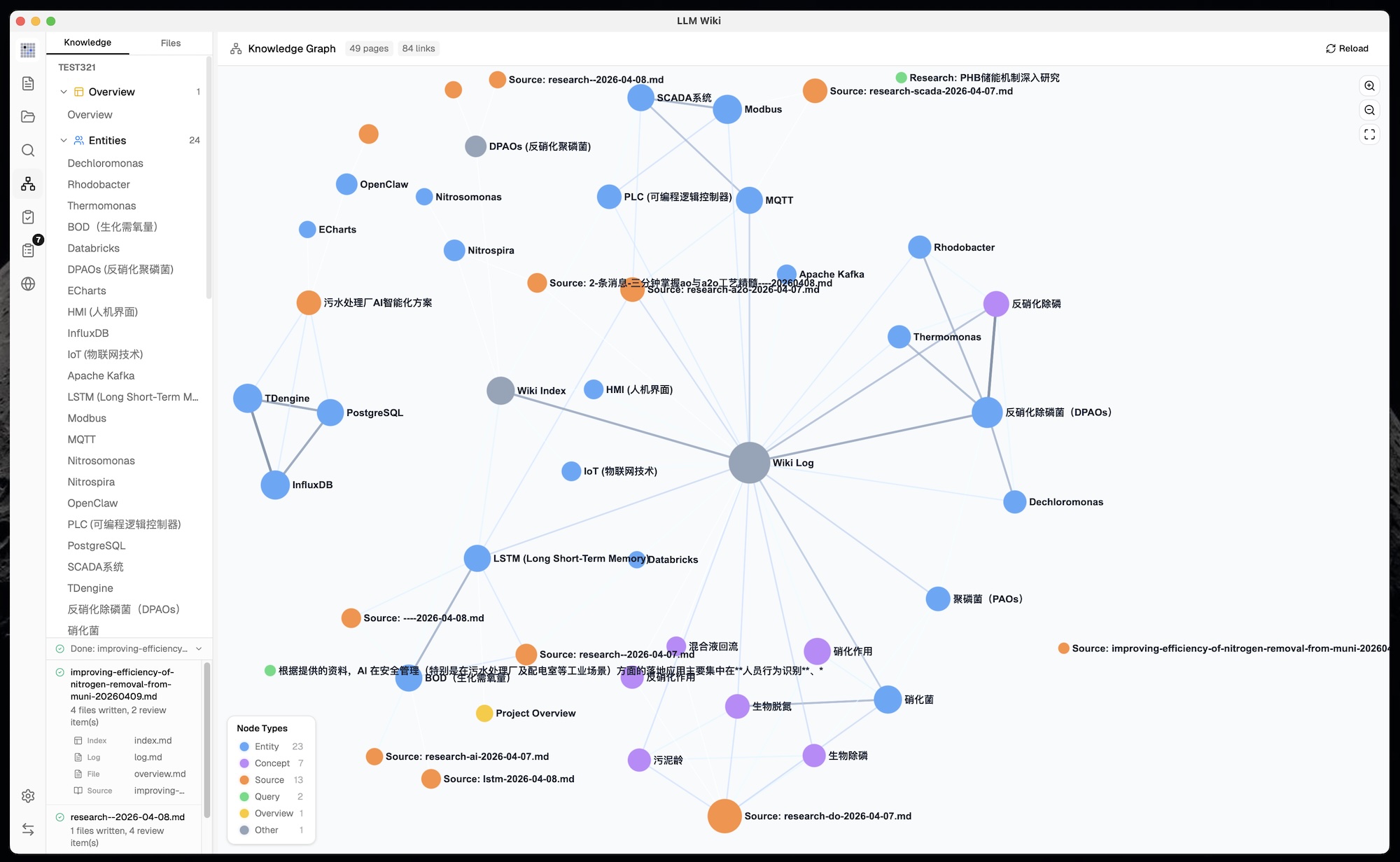
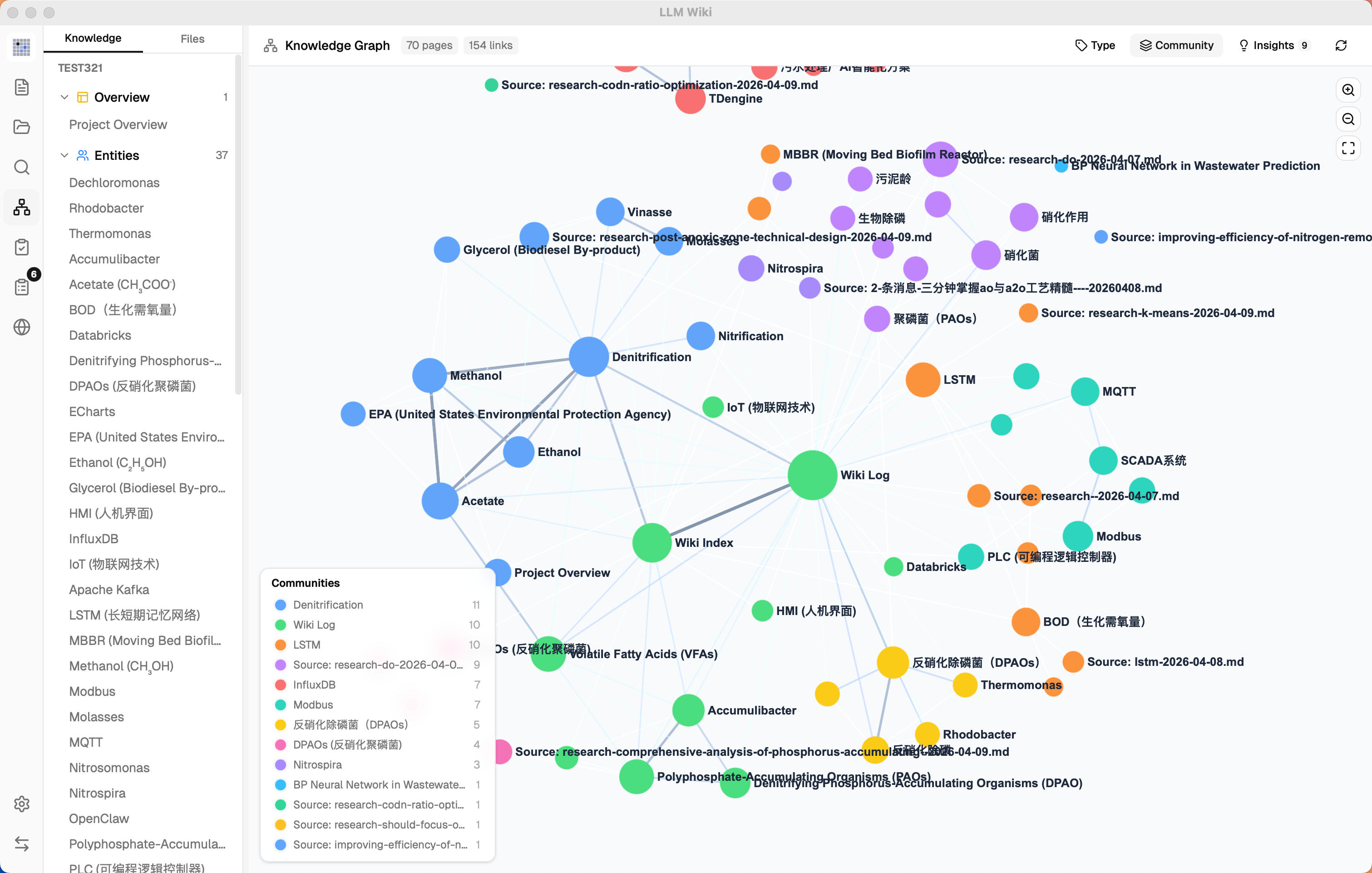
- 4-Signal Knowledge Graph — relevance model with direct links, source overlap, Adamic-Adar, and type affinity
- Louvain Community Detection — automatic knowledge cluster discovery with cohesion scoring
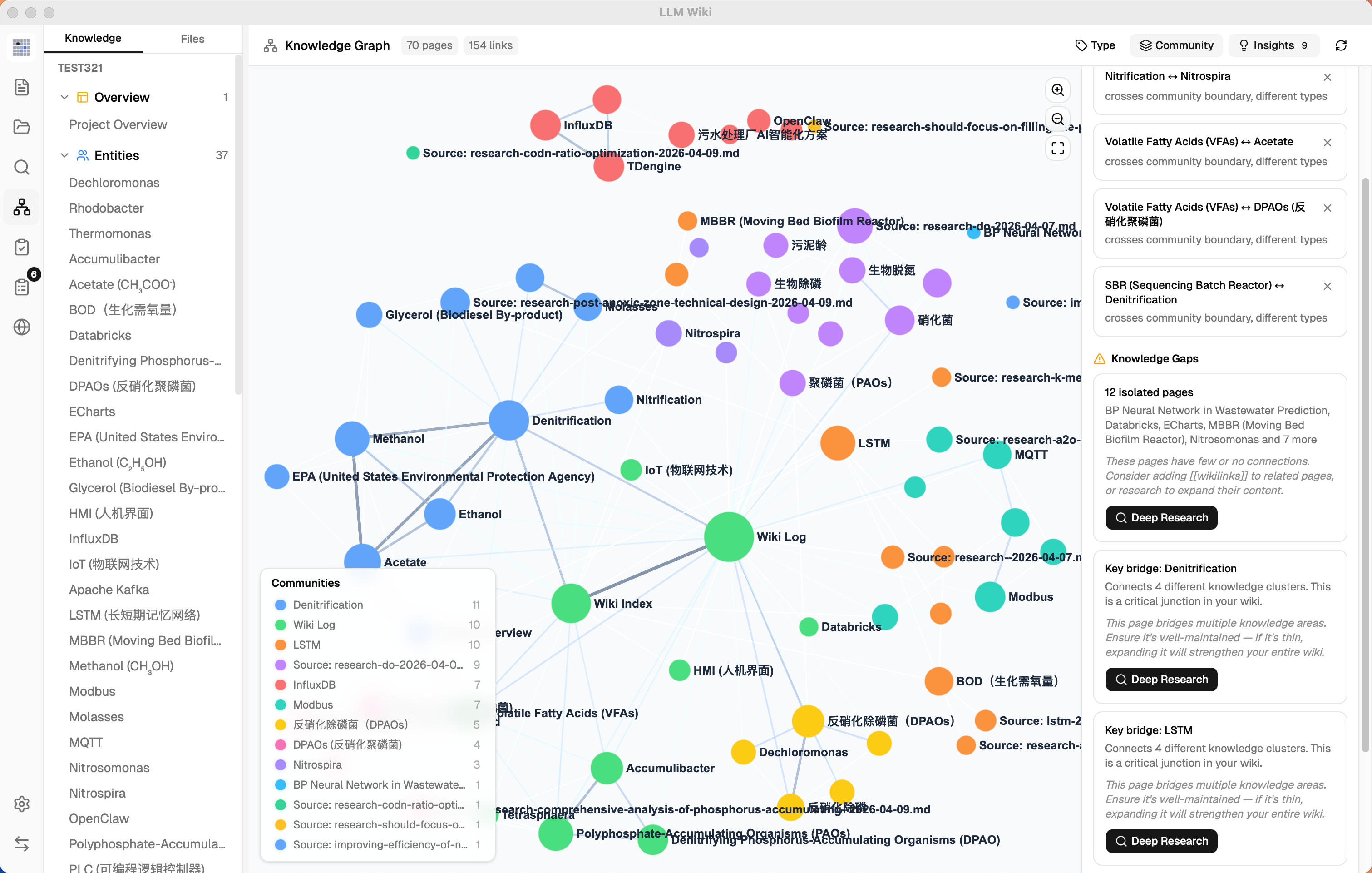
- Graph Insights — surprising connections and knowledge gaps with one-click Deep Research
- Vector Semantic Search — optional embedding-based retrieval via LanceDB, supports any OpenAI-compatible endpoint
- Persistent Ingest Queue — serial processing with crash recovery, cancel, retry, and progress visualization
- Folder Import — recursive folder import preserving directory structure, folder context as LLM classification hint
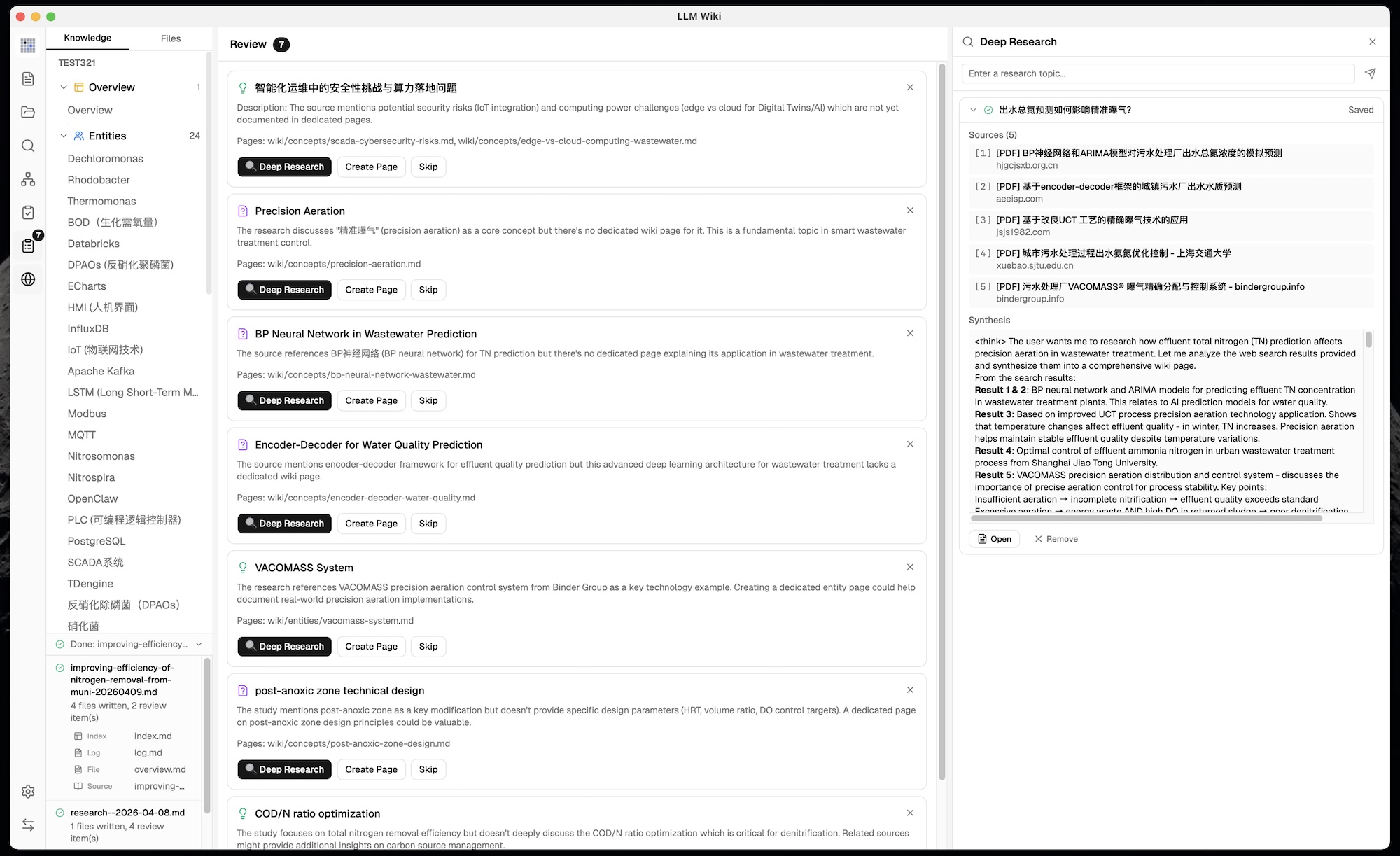
- Deep Research — LLM-optimized search topics, multi-query web search, auto-ingest results into wiki
- Async Review System — LLM flags items for human judgment, predefined actions, pre-generated search queries
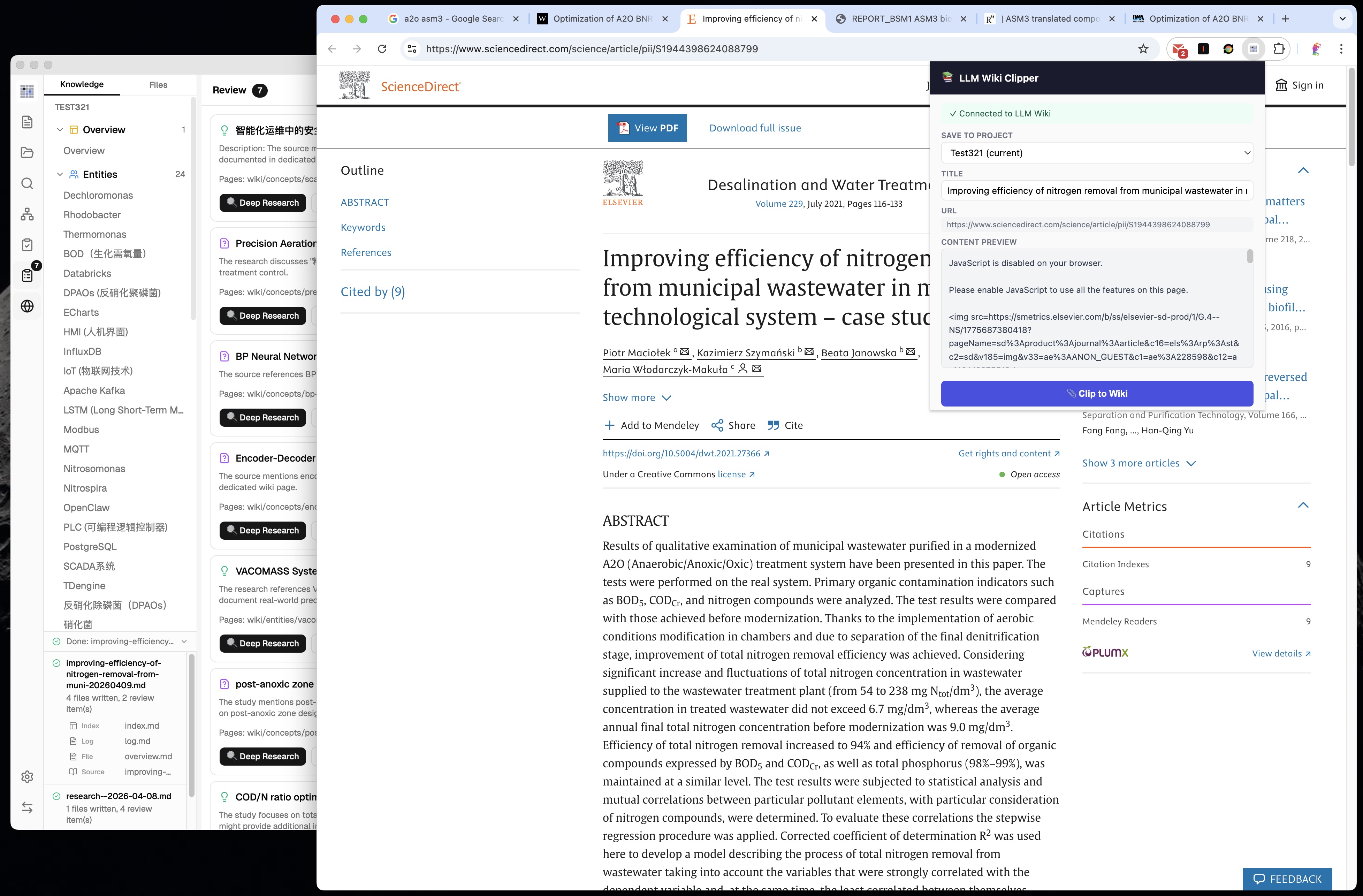
- Chrome Web Clipper — one-click web page capture with auto-ingest into knowledge base
README
LLM Wiki
A personal knowledge base that builds itself.
LLM reads your documents, builds a structured wiki, and keeps it current.
Two-Step Chain-of-Thought Ingest — LLM analyzes first, then generates wiki pages with source traceability and incremental cache
Multimodal Image Ingestion — extract embedded images from PDFs, generate factual captions with a vision LLM, surface them in image-aware search results with lightbox preview and jump-to-source
Multi-format Document Parsing — ingest PDF, Office documents, EPUB/MOBI, Org mode, images, media, web clips, and batches of URLs, with built-in, cloud, or local MinerU PDF processing
Flexible Model Configuration — configure models per project, route Chat and Ingest independently, and manage custom providers, headers, and streaming output
Source-grounded Retrieval — use Read Sources Only mode to answer exclusively from original imported material
Project Management & Migration — export and import complete project archives across devices, and rebuild the Wiki index from existing pages
4-Signal Knowledge Graph — relevance model with direct links, source overlap, Adamic-Adar, and type affinity
Louvain Community Detection — automatic knowledge cluster discovery with cohesion scoring
Graph Insights — surprising connections and knowledge gaps with one-click Deep Research
Vector Semantic Search — optional embedding-based retrieval via LanceDB, supports any OpenAI-compatible endpoint
Persistent Ingest Queue — serial processing with crash recovery, cancel, retry, and progress visualization
Folder Import — recursive folder import preserving directory structure, folder context as LLM classification hint
Source Folder Auto-Watch — detects external changes in raw/sources/ and keeps ingest/delete cleanup in sync
Deep Research — LLM-optimized search topics, multi-query web search via Tavily, SerpApi, or SearXNG, auto-ingest results into wiki
Agent Skills — scan and enable local SKILL.md folders, select skills with /skill, and let the Agent read skill instructions on demand
Generated Outputs Preview — Agent-created Markdown, HTML, images, and other workspace files appear as outputs with preview and quick folder access
Mermaid Diagram Rendering — render Mermaid code blocks directly in chat and preview, with compact syntax-error cards instead of raw parser output
Async Review System — LLM flags items for human judgment, predefined actions, pre-generated search queries
Chrome Web Clipper — one-click web page capture with auto-ingest into knowledge base
Local HTTP API + MCP Server + AI Agent Skill — built-in 127.0.0.1:19828 JSON API and bundled MCP server for hybrid search, file read, graph traversal, and source rescan; ready-made agent skill installs into Claude Code / Codex with one command (npx skills add …)
What is this?
LLM Wiki is a cross-platform desktop application that turns your documents into an organized, interlinked knowledge base — automatically. Instead of traditional RAG (retrieve-and-answer from scratch every time), the LLM incrementally builds and maintains a persistent wiki from your sources. Knowledge is compiled once and kept current, not re-derived on every query.
This project is based on Karpathy's LLM Wiki pattern — a methodology for building personal knowledge bases using LLMs. llm_wiki is created and maintained by nash_su, who implemented the core ideas as a full desktop application with significant enhancements.
Credits
The foundational methodology comes from Andrej Karpathy's llm-wiki.md, which describes the pattern of using LLMs to incrementally build and maintain a personal wiki. The original document is an abstract design pattern; this project is a concrete implementation with substantial extensions.
What We Kept from the Original
The core architecture follows Karpathy's design faithfully:
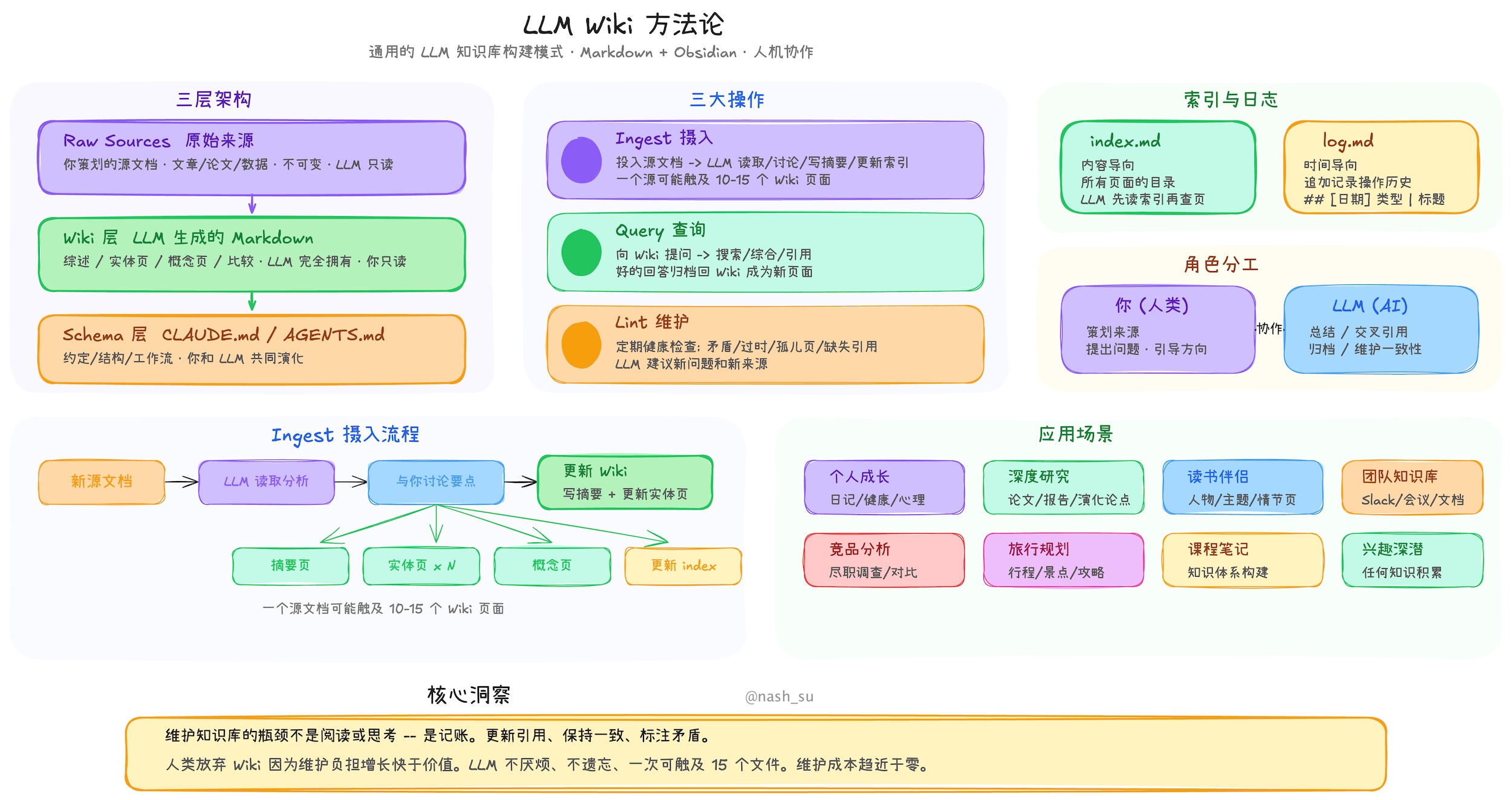
Three-layer architecture: Raw Sources (immutable) → Wiki (LLM-generated) → Schema (rules & config)
Three core operations: Ingest, Query, Lint
index.md as the content catalog and LLM navigation entry point
log.md as the chronological operation record with parseable format
[[wikilink]] syntax for cross-references
YAML frontmatter on every wiki page
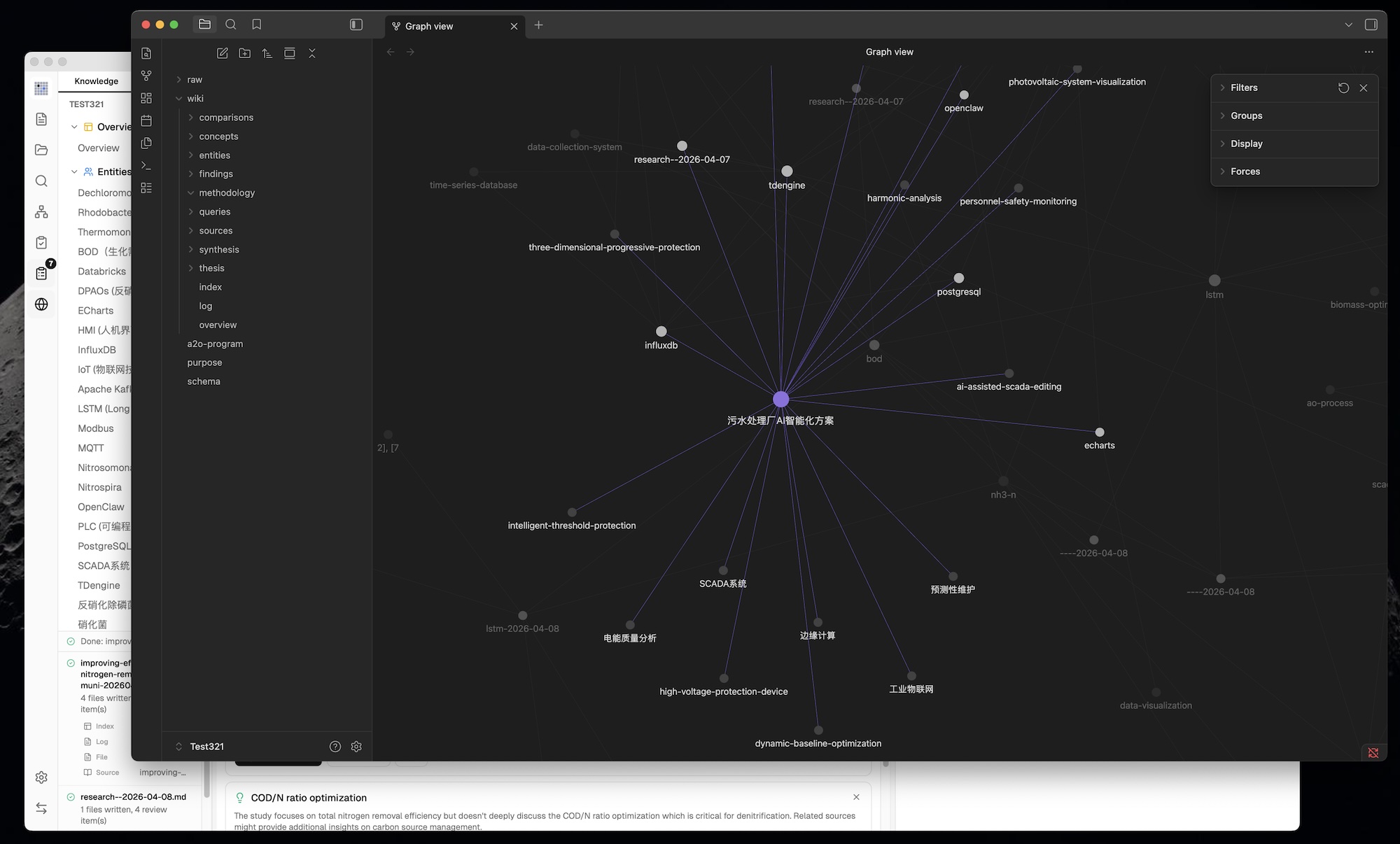
Obsidian compatibility — the wiki directory works as an Obsidian vault
Human curates, LLM maintains — the fundamental role division
What We Changed & Added
1. From CLI to Desktop Application
The original is an abstract pattern document designed to be copy-pasted to an LLM agent. We built it into a full cross-platform desktop application with:
Three-column layout: Knowledge Tree / File Tree (left) + Chat (center) + Preview (right)
Icon sidebar for switching between Wiki, Sources, Search, Graph, Lint, Review, Deep Research, Settings
Custom resizable panels — drag-to-resize left and right panels with min/max constraints
Activity panel — real-time processing status showing file-by-file ingest progress
All state persisted — conversations, settings, review items, project config survive restarts
Scenario templates — Research, Reading, Personal Growth, Business, General — each pre-configures purpose.md and schema.md
2. Purpose.md — The Wiki's Soul
The original has Schema (how the wiki works) but no formal place for why the wiki exists. We added purpose.md:
Defines goals, key questions, research scope, evolving thesis
LLM reads it during every ingest and query for context
LLM can suggest updates based on usage patterns
Different from schema — schema is structural rules, purpose is directional intent
3. Two-Step Chain-of-Thought Ingest
The original describes a single-step ingest where the LLM reads and writes simultaneously. We split it into two sequential LLM calls for significantly better quality:
Step 1 (Analysis): LLM reads source → structured analysis
  - Key entities, concepts, arguments
  - Connections to existing wiki content
  - Contradictions & tensions with existing knowledge
  - Recommendations for wiki structure

Step 2 (Generation): LLM takes analysis → generates wiki files
  - Source summary with frontmatter (type, title, sources[])
  - Entity pages, concept pages with cross-references
  - Updated index.md, log.md, overview.md
  - Review items for human judgment
  - Search queries for Deep Research
Additional ingest enhancements beyond the original:
SHA256 incremental cache — source file content is hashed before ingest; unchanged files are skipped automatically, saving LLM tokens and time
Persistent ingest queue — serial processing prevents concurrent LLM calls; queue persisted to disk, survives app restart; failed tasks auto-retry up to 3 times
Source folder auto-watch — files added, edited, or deleted in raw/sources/ outside the app are picked up automatically and reuse the same ingest/delete lifecycle as in-app actions
Queue visualization — Activity Panel shows progress bar, pending/processing/failed tasks with cancel and retry buttons
Auto-embedding — when vector search is enabled, new pages are automatically embedded after ingest
Source traceability — every generated wiki page includes a sources: [] field in YAML frontmatter, linking back to the raw source files that contributed to it
overview.md auto-update — global summary page regenerated on every ingest to reflect the latest state of the wiki
Guaranteed source summary — fallback ensures a source summary page is always created, even if the LLM omits it
Language-aware generation — LLM responds in the user's configured language (English or Chinese)
Progressive Sources view — large source folders render progressively while scrolling, keeping big source collections responsive
4. Knowledge Graph with Relevance Model
The original mentions [[wikilinks]] for cross-references but has no graph analysis. We built a full knowledge graph visualization and relevance engine:
4-Signal Relevance Model:
Signal
Weight
Description
Direct link
×3.0
Pages linked via [[wikilinks]]
Source overlap
×4.0
Pages sharing the same raw source (via frontmatter sources[])
Adamic-Adar
×1.5
Pages sharing common neighbors (weighted by neighbor degree)
Type affinity
×1.0
Bonus for same page type (entity↔entity, concept↔concept)
Composite surprise score ranks the most noteworthy connections
Dismissable — mark connections as reviewed so they don't reappear
Knowledge Gaps:
Isolated pages (degree ≤ 1) — pages with few or no connections to the rest of the wiki
Sparse communities (cohesion < 0.15, ≥ 3 pages) — knowledge areas with weak internal cross-references
Bridge nodes (connecting 3+ clusters) — critical junction pages that hold multiple knowledge areas together
Interactive:
Click any insight card to highlight corresponding nodes and edges in the graph; click again to deselect
Knowledge gaps and bridge nodes have a Deep Research button — triggers LLM-optimized research with domain-aware topics (reads overview.md + purpose.md for context)
Research topic shown in editable confirmation dialog before starting — user can refine topic and search queries
7. Optimized Query Retrieval Pipeline
The original describes a simple query where the LLM reads relevant pages. We built a multi-phase retrieval pipeline with optional vector search and budget control:
Phase 1: Tokenized Search
  - English: word splitting + stop word removal
  - Chinese: CJK bigram tokenization (每个 → [每个, 个…])
  - Title match bonus (+10 score)
  - Searches both wiki/ and raw/sources/

Phase 1.5: Vector Semantic Search (optional)
  - Embedding via any OpenAI-compatible /v1/embeddings endpoint
  - Stored in LanceDB (Rust backend) for fast ANN retrieval
  - Cosine similarity finds semantically related pages even without keyword overlap
  - Results merged into search: boosts existing matches + adds new discoveries

Phase 2: Graph Expansion
  - Top search results used as seed nodes
  - 4-signal relevance model finds related pages
  - 2-hop traversal with decay for deeper connections

Phase 3: Budget Control
  - Configurable context window: 4K → 1M tokens
  - Proportional allocation: 60% wiki pages, 20% chat history, 5% index, 15% system
  - Pages prioritized by combined search + graph relevance score

Phase 4: Context Assembly
  - Numbered pages with full content (not just summaries)
  - System prompt includes: purpose.md, language rules, citation format, index.md
  - LLM instructed to cite pages by number: [1], [2], etc.
Vector Search is fully optional — disabled by default, enabled in Settings with independent endpoint, API key, and model configuration. When disabled, the pipeline falls back to tokenized search + graph expansion. Benchmark: overall recall improved from 58.2% to 71.4% with vector search enabled.
8. Multi-Conversation Chat with Persistence
The original has a single query interface. We built full multi-conversation support:
Conversation sidebar — quick switching between topics
Per-conversation persistence — each conversation saved to .llm-wiki/chats/{id}.json
Configurable history depth — limit how many messages are sent as context (default: 10)
Cited references panel — collapsible section on each response showing which wiki pages were used, grouped by type with icons
Reference persistence — cited pages stored directly in message data, stable across restarts
Regenerate — re-generate the last response with one click (removes last assistant + user message pair, re-sends)
Save to Wiki — archive valuable answers to wiki/queries/, then auto-ingest to extract entities/concepts into the knowledge network
9. Rust Backend Chat Agent & Skills
Not in the original. Chat now runs through a Rust backend Agent runtime rather than a browser-only TypeScript loop:
Tool-using Agent — can choose wiki search, source search, graph search, web search, AnyTXT, workspace file tools, approved shell commands, and skill file reads
Skill management — scan project and user skill folders, enable or disable skills, and pick a skill per conversation with /skill completion
Generated workspace outputs — files produced by Agent tools are kept under agent-workspace/, shown as generated outputs, and can be previewed or opened from the chat
User interaction forms — skills can ask for structured user input such as single choice, multiple choice, or free text without hardcoding skill-specific UI
Safer execution model — project workspace commands can continue smoothly, while external shell commands still require explicit approval
10. Thinking / Reasoning Display
Not in the original. For LLMs that emit `` blocks (DeepSeek, QwQ, etc.):
Streaming thinking — rolling 5-line display with opacity fade during generation
Collapsed by default — thinking blocks hidden after completion, click to expand
Visual separation — thinking content shown in distinct style, separate from the main response
11. Markdown Rendering: KaTeX Math & Mermaid Diagrams
Not in the original. Rich Markdown rendering across chat and preview:
KaTeX rendering — inline $...$ and block $$...$$ formulas rendered via remark-math + rehype-katex
Milkdown math plugin — preview editor renders math natively via @milkdown/plugin-math
Auto-detection — bare \begin{aligned} and other LaTeX environments automatically wrapped with $$ delimiters
Unicode fallback — 100+ symbol mappings (α, ∑, →, ≤, etc.) for simple inline notation outside math blocks
Mermaid code blocks — fenced mermaid diagrams render directly as flowcharts, sequence diagrams, and other Mermaid-supported visuals
Compact Mermaid errors — syntax failures are captured inside a small error card instead of spilling raw parser output into the chat
12. Review System (Async Human-in-the-Loop)
The original suggests staying involved during ingest. We added an asynchronous review queue:
LLM flags items needing human judgment during ingest
Predefined action types: Create Page, Deep Research, Skip — constrained to prevent LLM hallucination of arbitrary actions
Search queries generated at ingest time — LLM pre-generates optimized web search queries for each review item
User handles reviews at their convenience — doesn't block ingest
13. Deep Research
Not in the original. When the LLM identifies knowledge gaps:
Web search via Tavily, SerpApi, or SearXNG finds relevant sources with full content extraction (no truncation)
Provider-specific configuration — Tavily and SerpApi use independent API keys; SerpApi supports selectable engines, while SearXNG uses a configured instance URL and search categories
Multiple search queries per topic — LLM-generated at ingest time, optimized for search engines
LLM-optimized research topics — when triggered from Graph Insights, LLM reads overview.md + purpose.md to generate domain-specific topics and queries (not generic keywords)
User confirmation dialog — editable topic and search queries shown for review before research starts
LLM synthesizes findings into a wiki research page with cross-references to existing wiki
Thinking display — `` blocks shown as collapsible sections during synthesis, auto-scroll to latest content
Auto-ingest — research results automatically processed to extract entities/concepts into the wiki
Task queue with 3 concurrent tasks
Research Panel — dedicated sidebar panel with dynamic height, real-time streaming progress
14. Browser Extension (Web Clipper)
The original mentions Obsidian Web Clipper. We built a dedicated Chrome Extension (Manifest V3):
Mozilla Readability.js for accurate article extraction (strips ads, nav, sidebars)
Turndown.js for HTML → Markdown conversion with table support
Project picker — choose which wiki to clip into (supports multi-project)
Local HTTP API (port 19827, tiny_http) — Extension ↔ App communication
Auto-ingest — clipped content automatically triggers the two-step ingest pipeline
Clip watcher — polls every 3 seconds for new clips, processes automatically
Offline preview — shows extracted content even when app is not running
15. Multi-format Document Support
The original focuses on text/markdown. We support structured extraction preserving document semantics:
Format
Method
PDF
Built-in pdf-extract (Rust) with file caching; optional MinerU Cloud, Local API, or Pipeline parsing for complex layouts
Electronic book metadata, chapters, and body text → ingest-ready content
Images
Native preview (png, jpg, gif, webp, svg, etc.)
Video/Audio
Built-in player
Web clips
Readability.js + Turndown.js → clean Markdown
> MinerU is optional. Use MinerU Cloud, an official Local API endpoint, or Local Pipeline mode for complex PDFs. Local modes keep processing on your machine, and extracted images are stored in the project-managed wiki/media directory. If MinerU fails, LLM Wiki falls back to the built-in parser.
16. File Deletion with Cascade Cleanup
The original has no deletion mechanism. We added intelligent cascade deletion:
Deleting a source file removes its wiki summary page
3-method matching finds related wiki pages: frontmatter sources[] field, source summary page name, frontmatter section references
Shared entity preservation — entity/concept pages linked to multiple sources only have the deleted source removed from their sources[] array, not deleted entirely
Index cleanup — removed pages are purged from index.md
Wikilink cleanup — dead [[wikilinks]] to deleted pages are removed from remaining wiki pages
17. Configurable Context Window
Not in the original. Users can configure how much context the LLM receives:
Slider from 4K to 1M tokens — adapts to different LLM capabilities
Proportional budget allocation — larger windows get proportionally more wiki content
60/20/5/15 split — wiki pages / chat history / index / system prompt
18. Cross-Platform Compatibility
The original is platform-agnostic (abstract pattern). We handle concrete cross-platform concerns:
Path normalization — unified normalizePath() used across 22+ files, backslash → forward slash
Unicode-safe string handling — char-based slicing instead of byte-based (prevents crashes on CJK filenames)
macOS close-to-hide — close button hides window (app stays running in background), click dock icon to restore, Cmd+Q to quit
Windows/Linux close confirmation — confirmation dialog before quitting to prevent accidental data loss
Tauri v2 — native desktop on macOS, Windows, Linux
GitHub Actions CI/CD — automated builds for macOS (Apple Silicon), Windows (.msi), Linux (.deb / .AppImage)
19. Other Additions
i18n — English + Chinese interface (react-i18next)
Settings persistence — LLM provider, API key, model, context size, language saved via Tauri Store
Obsidian config — auto-generated .obsidian/ directory with recommended settings
Markdown rendering — GFM tables with borders, proper code blocks, wikilink processing in chat and preview
Multi-provider LLM support — OpenAI, Anthropic, Google, Ollama, Custom — each with provider-specific streaming and headers
Configurable LLM timeout — adjust request timeouts for slow local models and long-running operations
Configurable Firecrawl — optional API key and custom Base URL for hosted or self-hosted services
Collapsible file sidebar — collapse Knowledge/Files navigation while preserving its state
Project maintenance — ZIP export/import for migration and deterministic wiki/index.md rebuilding
dataVersion signaling — graph and UI automatically refresh when wiki content changes
# Prerequisites: Node.js 20+, Rust 1.88+, protoc
#   macOS:  brew install protobuf
#   Linux:  sudo apt install protobuf-compiler
#   Windows: choco install protoc
git clone https://github.com/nashsu/llm_wiki.git
cd llm_wiki
npm install
npm --prefix mcp-server ci && npm run mcp:build   # mcp-server/dist is bundled as a Tauri resource
npm run tauri dev      # Development
npm run tauri build    # Production build
Chrome Extension
Open chrome://extensions
Enable "Developer mode"
Click "Load unpacked"
Select the extension/ directory
Clip the current page with Alt+Shift+L (Command+Shift+L on macOS). Customize it at chrome://extensions/shortcuts.
Quick Start
Launch the app → Create a new project (choose a template)
Go to Settings → Configure your LLM provider (API key + model)
Optional: configure Web Search providers and source folder auto-watch in Settings
Go to Sources → Import documents (PDF, DOCX, MD, etc.)
Watch the Activity Panel — LLM automatically builds wiki pages
Use Chat to query your knowledge base
Browse the Knowledge Graph to see connections
Check Review for items needing your attention
Run Lint periodically to maintain wiki health
Local HTTP API + MCP Server + AI Agent Skill
LLM Wiki ships a built-in local HTTP API at http://127.0.0.1:19828 (token-protected, 127.0.0.1-only) so external tools — including AI agents like Claude Code, Codex, or any HTTP-capable script — can query your wiki:
GET /api/v1/health — server status (no auth)
GET /api/v1/projects — list projects
GET /api/v1/projects/{id}/files / files/content — read files and content
GET /api/v1/projects/{id}/reviews?status=unresolved — export Review tab items for wiki maintenance (status: unresolved, resolved, or all; optional type and limit)
PATCH /api/v1/projects/{id}/reviews/{reviewId} — update one Review item (JSON body { "resolved": true, "action": "label" }; resolved defaults to true, pass false to reopen)
POST /api/v1/projects/{id}/reviews/resolve — bulk-resolve Review items (JSON body { "ids": [...], "action": "label" }), returns { resolved, notFound, count }; the Review tab's Refresh button re-reads the result from disk
POST /api/v1/projects/{id}/chat — backend Agent chat endpoint for wiki/source/web/AnyTXT retrieval. JSON requests remain non-streaming by default; send "stream": true or Accept: text/event-stream for SSE events (meta, incremental agent, then done, cancelled, or error). The terminal done frame contains the complete aggregate response, so clients should not render both message deltas and the final message as separate answers. mode: "deep" broadens evidence collection, while the full Deep Research workspace remains available in the desktop UI
GET /api/v1/projects/{id}/graph — wikilinks graph; supports q, nodeType, limit (max 1000), offset, and edgeScope=page|filtered, and returns totalCount / hasMore for large projects
POST /api/v1/projects/{id}/sources/rescan — trigger a backend rescan
POST /api/v1/projects/{id}/pages/embed — index one externally created or updated wiki/*.md page without rebuilding the whole vector database
Enable the API, generate a token, and choose whether local unauthenticated access is allowed in Settings → API + MCP.
For MCP-compatible clients, LLM Wiki also includes a local MCP server in mcp-server/. After building it with npm run mcp:build, Settings → API + MCP shows a copyable MCP client configuration with the correct local path for your machine. The MCP tools call the same API surface, so agent clients can list projects, read files, export unresolved Review items, run hybrid search, inspect the graph, trigger source rescans, and call the same Rust backend Agent chat endpoint without custom HTTP glue code.
Plug your AI agent in with one command
A ready-made agent skill for LLM Wiki lives in its own repo. Install it into Claude Code / Codex / any skills-compatible runtime:
After install, the agent can answer prompts like "what does my LLM Wiki say about X", "search my 知识库 for Y", "show the neighborhood of node Z in my wiki graph", and "rescan my wiki sources" by talking to your locally-running app — read-only by default, citing wiki page paths so you can verify in-app.
Skill repo:
Trigger discipline: it intentionally does not trigger on generic "search my notes" / "check my Obsidian / Notion / Logseq" — only when you explicitly name LLM Wiki / my wiki / 知识库.