Lockbox Local Bleriot Noguia
Use this command to install Lockbox Local with WinGet:
winget install --id=noguia.lockbox -e Secure, delay-based password and information storage application
winget install --id=noguia.lockbox -e Secure, delay-based password and information storage application
> 🇫🇷 Version française | 🇬🇧 English version
A secure desktop application for storing sensitive information with access delay, built with React 19, TypeScript and Tauri 2.0.



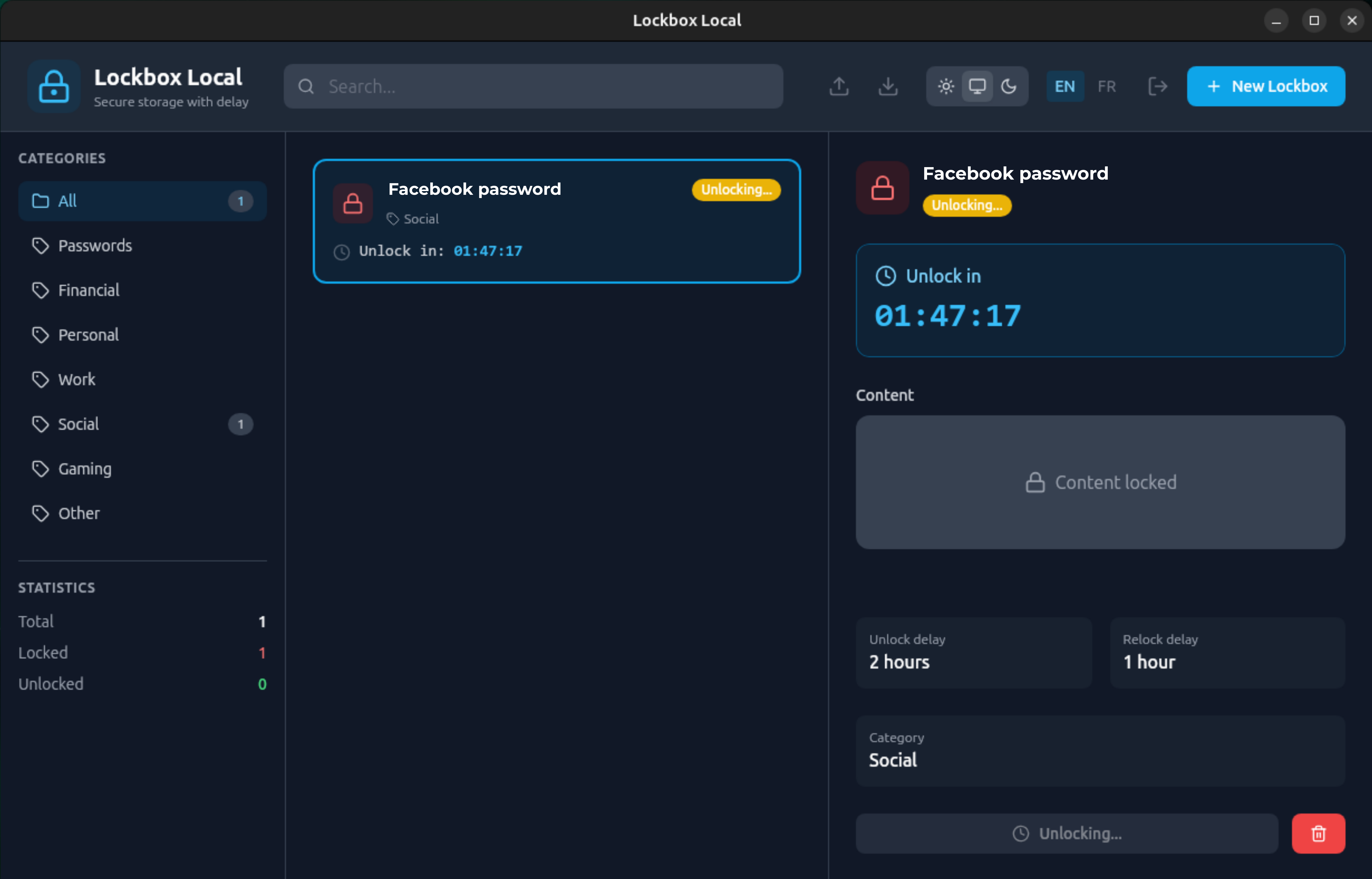
Lockbox Local is inspired by Pluckeye Lockbox, a web application that lets you store information in "boxes" which can only be accessed after a delay period. This is useful if you need to hide a password from yourself, for help with self-control.
Pluckeye Lockbox has been around for years, but it's a free service run by a single person. As the author warns:
> "[Pluckeye Lockbox boxes] threaten to destruct mainly so that users do not assume the service will be around forever. You should not assume your data will be kept longer than 1 year, because the service is 100% free and run by one person." — (Source)
If you stored a critical password in Pluckeye Lockbox and the server crashed with all data lost, you'd be permanently locked out. Lockbox Local solves this by keeping everything on your own machine — no cloud dependency, no risk of service shutdown, and boxes never self-destruct.
> Mobile version also available — see github.com/bleriotnoguia/lockbox-local-mobile for Android and iOS.
Download the latest version for your platform:
| Platform | Download |
|---|---|
| Windows (.msi) | Download |
| Linux (.deb) | Download |
| Linux (.AppImage) | Download |
| macOS (.dmg) | Download |
> All releases are available on the Releases page.
.deb file from the Releases pagesudo dpkg -i Lockbox-Local_*.deb
If dependencies are missing:
sudo apt-get install -f
.msi file from the Releases page.dmg file from the Releases page.dmg file> Note: If macOS shows a message saying the app "is damaged and can't be opened", this is because the app is not yet notarized by Apple. To fix this, open Terminal and run:
>
> bash > xattr -cr /Applications/Lockbox\ Local.app >
>
> Then try launching the app again.
.AppImage file from the Releases pagechmod +x Lockbox-Local_*.AppImage
./Lockbox-Local_*.AppImage
No installation required — the AppImage runs as a portable application.
sudo apt remove lockbox-local
To also remove config and data:
sudo apt remove lockbox-local
rm -rf ~/.local/share/com.lockbox.local
rm -rf ~/.config/com.lockbox.local
Or via PowerShell:
Get-Package -Name "Lockbox Local" | Uninstall-Package
If you ran the AppImage directly (no install step):
.AppImage filerm -rf ~/.local/share/com.lockbox.local
rm -rf ~/.config/com.lockbox.local
# Node.js (via nvm)
curl -o- https://raw.githubusercontent.com/nvm-sh/nvm/v0.39.0/install.sh | bash
source ~/.bashrc
nvm install 18
nvm use 18

# Rust
curl --proto '=https' --tlsv1.2 -sSf https://sh.rustup.rs | sh
source ~/.cargo/env

# System dependencies for Tauri
sudo apt update
sudo apt install -y libwebkit2gtk-4.1-dev \
    build-essential \
    curl \
    wget \
    libssl-dev \
    libgtk-3-dev \
    libayatana-appindicator3-dev \
    librsvg2-dev
# Clone the project (if needed)
cd new-lockbox-local

# Install npm dependencies
npm install

# Run in development mode
npm run tauri:dev

# Build for production
npm run tauri:build
new-lockbox-local/
├── src/                          # Frontend React/TypeScript
│   ├── components/               # React components
│   │   ├── ui/                   # Reusable UI components
│   │   ├── LockboxCard.tsx       # Lockbox card
│   │   ├── LockboxList.tsx       # Lockbox list
│   │   ├── LockboxDetail.tsx     # Lockbox detail
│   │   ├── CreateLockboxModal.tsx# Creation modal
│   │   ├── Header.tsx            # Header
│   │   ├── Sidebar.tsx           # Sidebar
│   │   └── LoginScreen.tsx       # Login screen
│   ├── hooks/                    # Custom hooks
│   │   ├── useCountdown.ts       # Countdown timer
│   │   ├── useLockboxStatus.ts   # Lockbox status
│   │   └── useExportImport.ts    # Import/Export
│   ├── store/                    # Global state (Zustand)
│   │   ├── lockboxStore.ts       # Lockbox store
│   │   ├── authStore.ts          # Authentication store
│   │   └── themeStore.ts         # Theme store
│   ├── types/                    # TypeScript types
│   ├── styles/                   # CSS/Tailwind
│   ├── App.tsx                   # Main component
│   └── main.tsx                  # Entry point
│
├── src-tauri/                    # Backend Rust/Tauri
│   ├── src/
│   │   ├── main.rs               # Tauri entry point
│   │   ├── db.rs                 # SQLite operations
│   │   ├── crypto.rs             # AES encryption
│   │   └── commands.rs           # Tauri commands
│   ├── Cargo.toml                # Rust dependencies
│   └── tauri.conf.json           # Tauri configuration
│
├── package.json                  # npm dependencies
├── vite.config.ts                # Vite configuration
├── tailwind.config.js            # Tailwind configuration
└── tsconfig.json                 # TypeScript configuration
While a lockbox is counting down, the detail panel shows additional actions:
If you set a panic code when creating a lockbox, an emergency section appears in the lockbox detail while it is locked. Enter the code to instantly bypass the unlock delay. The code can only be used once — a new one can be set only by editing the lockbox and entering a new code.
When a lockbox has a scheduled date, its status shows as Scheduled with a calendar icon and a countdown to the scheduled time. At that time, the lockbox automatically transitions to the normal unlock countdown. You can still cancel or extend from the detail panel.
Click the download icon (↓) in the header. A native dialog lets you choose where to save the .json file.
After saving, a notice reminds you:
> "If you import this file on a different machine or with a different master password, you will be asked for the source password so the data can be re-encrypted for the new device."
Click the upload icon (↑) in the header. A dialog asks whether the file was exported from a different machine:
Lockboxes with the same name as an existing one are silently skipped (no overwrite).
| Field | Exported | Imported |
|---|---|---|
| Name | ✓ | ✓ |
| Content (encrypted) | ✓ | ✓ (re-encrypted if needed) |
| Unlock & relock delays | ✓ | ✓ |
| Category & tags | ✓ | ✓ |
| Reflection settings | ✓ | ✓ |
| Penalty settings | ✓ | ✓ |
| Panic code | — | — |
| Scheduled unlock date | — | — |
> Panic codes cannot be transferred because only the hash is stored — the original code is never saved. Scheduled dates are intentionally not restored since a past date would be meaningless.
The export file contains the content in encrypted form (AES-256-GCM). It is unreadable without the master password. Each lockbox entry is signed with HMAC-SHA256 using the master password hash.
At import, the signature is verified before any data is written. If the file has been tampered with (e.g., delays reduced, content substituted), the import will be rejected with an integrity error. This prevents using export/import as a way to bypass the unlock delay.
> Self-control note: The unlock delay is a deliberate friction mechanism. Exporting does not reveal content in plaintext, and manipulated files are rejected — the delay cannot be circumvented via the import/export flow.
Export files are signed with HMAC-SHA256 using the master password hash. Any modification to the file (delays, content, names) invalidates the signature and causes the import to be rejected. This prevents using export/import to bypass the unlock delay.
The unlock delay is a deliberate friction mechanism, not a cryptographic lock. The app is designed to resist impulsive attempts to access content, not adversarial attacks by a determined user who knows the master password. For stronger guarantees, consider a longer delay or enabling the penalty mode.
# Development
npm run dev          # Runs Vite (frontend only)
npm run tauri:dev    # Runs Tauri + Vite

# Build
npm run build        # Builds the frontend
npm run tauri:build  # Builds the complete application

# Lint
npm run lint         # Checks TypeScript code
# Rust tests
cd src-tauri
cargo test
To create a .deb package on Ubuntu, Tauri automatically generates the package during build:
# Ensure all dependencies are installed
sudo apt update
sudo apt install -y libwebkit2gtk-4.1-dev \
    build-essential \
    curl \
    wget \
    libssl-dev \
    libgtk-3-dev \
    libayatana-appindicator3-dev \
    librsvg2-dev \
    patchelf

# Install project dependencies
npm install

# Build the application (automatically generates .deb)
npm run tauri:build
The .deb package will be generated in:
src-tauri/target/release/bundle/deb/lockbox-local_2.0.0_amd64.deb
Installing the .deb package:
sudo dpkg -i src-tauri/target/release/bundle/deb/lockbox-local_2.0.0_amd64.deb

# If dependencies are missing, install with:
sudo apt-get install -f
On a Windows machine with prerequisites installed:
# Install Windows prerequisites
# - Node.js (v20+)
# - Rust (via rustup)
# - Microsoft Visual C++ Build Tools

# Install dependencies
npm install

# Build the application
npm run tauri:build
The .exe file will be generated in:
src-tauri/target/release/lockbox-local.exe
An MSI installer will also be created in:
src-tauri/target/release/bundle/msi/lockbox-local_2.0.0_x64_en-US.msi
The project uses GitHub Actions to build Windows, Linux, and macOS and to create releases on tag push. See .github/workflows/build.yml for the workflow.
To customize package metadata, edit src-tauri/tauri.conf.json (see the bundle section, and optionally bundle.linux.deb or bundle.windows).
> Note: By default, Tauri automatically detects the required system dependencies. Only specify the depends field if you need to add extra dependencies.
You can add these scripts to package.json:
{
  "scripts": {
    "build:linux": "tauri build --target x86_64-unknown-linux-gnu",
    "build:windows": "tauri build --target x86_64-pc-windows-msvc",
    "build:all": "npm run build:linux && npm run build:windows"
  }
}
| Feature | v1 (Java) | v2 (Tauri) |
|---|---|---|
| Bundle size | ~100 MB | ~15 MB |
| RAM | ~150 MB | ~50 MB |
| Encryption | No | AES-256-GCM |
| Master password | No | Yes |
| Categories | No | Yes |
| Free tags | No | Yes |
| Search | No | Yes |
| Dark theme | No | Yes |
| Cancel countdown | No | Yes |
| Extend delay | No | Yes |
| Reflection modal | No | Yes |
| Penalty mode | No | Yes |
| Panic code | No | Yes |
| Scheduled unlock | No | Yes |
| Access log | No | Yes |
| Self-control stats | No | Yes |
| Export format | .lbf (text) | .json (HMAC-signed) |
| EN/FR localisation | No | Yes |
Lockbox Local is also available as a native mobile app for iOS and Android.
| Repository | github.com/bleriotnoguia/lockbox-local-mobile |
| Releases | Latest release |
The mobile version shares the same encryption format, HMAC signatures, and data schema as this desktop version — export files are fully cross-platform compatible between the two.
Additional features in the mobile version:
This project is licensed under the MIT License - See the LICENSE file for details.
Contributions are welcome! Feel free to open an issue or a pull request.
