nteract
nteract is a local-first notebook environment where humans, kernels, and AI agents can work with the same live document. It ships as a native desktop app with realtime sync across windows and programmatic clients, and managed local environments.
Built on jupyter-zmq-client and jupyter-protocol.
Install
Download the latest release from GitHub Releases.
On Linux (x64 or ARM64) and macOS (Apple silicon or Intel), this command installs the
AppImage or signed .app bundle, CLI/daemon, and per-user service
(systemd or launchd):
curl --proto '=https' --tlsv1.2 -sSf https://sh.nteract.io | bash
macOS users can equally drag the DMG from GitHub Releases. DEB/RPM/APT
installs are not currently supported because runtimed is a per-user daemon
managed by the app and CLI, not by system package-manager scripts.
For remote workstations (Outerbounds, JupyterHub) that offer compute to
hosted notebooks, use the headless installer. See
Remote workstations for details:
curl --proto '=https' --tlsv1.2 -sSf https://sh.nteract.io | bash -s -- --cli
Use nteract for notebook, workstation, and MCP operations. CLI-only installation does not configure or start a local daemon service. The desktop app bundles the same CLI. Existing runt, runt-nightly, and nteract-mcp commands remain compatible. See the CLI guide for runtime startup, channel selection, and scripting behavior.
What's in here
| Component | Description |
|---|
| nteract Desktop | Notebook editor (Tauri + React) |
runtimed | Background daemon for environment pools, notebook sync, and kernel execution |
nteract command | CLI for notebooks, workstations, runtime operations, and supervised MCP |
runtimed (Python) | Python bindings for the daemon (ships with the app) |
Runtime model
nteract stores notebook content in an Automerge-backed document and keeps live kernel state in an explicit runtime state document. The daemon owns kernel processes, execution queues, output capture, and the write path for execution results.
Execution requests name a synced cell_id; the daemon reads the cell source from the shared document, records queue and status changes in runtime state, and writes outputs through the same model. The desktop app, CLI, MCP server, and agent clients use that path, so programmatic control observes the same notebook state a human is editing.
MCP Server
Run nteract mcp to connect AI assistants to notebooks. Local notebooks use the runtime daemon; direct hosted connections use WebSockets without a local daemon. Agents can run code, read and write cells, manage dependencies, and collaborate with humans on the same live notebook.
Install the Codex plugin
codex plugin marketplace add nteract/agent-plugins
Restart Codex, then open the plugin directory, choose the nteract marketplace, and install nteract.
The distribution repository also includes a nightly plugin entry for pre-release builds.
If Codex still does not show notebook tools after restarting, refresh the marketplace and reinstall the selected plugin:
codex plugin marketplace upgrade nteract-plugins
codex plugin remove nteract@nteract-plugins      # or nightly@nteract-plugins
codex plugin add nteract@nteract-plugins         # or nightly@nteract-plugins
codex mcp list
Start a new Codex session after reinstalling; running sessions do not hot-load newly installed MCP tools.
Install the Claude Code plugin
/plugin marketplace add nteract/agent-plugins
/plugin install nteract@nteract
Pin a specific version:
/plugin install nteract@nteract --ref v2.3.0
The plugin ships the nteract-mcp binary for your platform (macOS arm64/x64, Linux x64/arm64, Windows x64), so no separate install is needed. main of nteract/agent-plugins always points at the latest stable release.
For pre-release builds (updated daily):
/plugin install nightly@nteract
Install in Claude Desktop
If you use the nteract desktop app with Claude Desktop, there's a one-click install path. In the menu bar, choose nteract → Install Extension for Claude...
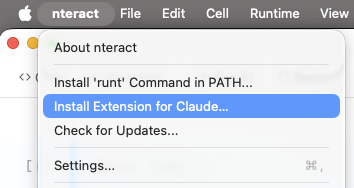
The nteract desktop app is required: it builds a .mcpb bundle at runtime (manifest, icons, nteract-mcp binary) and hands it to Claude Desktop, which prompts you to confirm the install.
Usage
# Open a notebook
nteract open path/to/notebook.ipynb

# MCP server for notebook automation
nteract mcp

# Daemon management
nteract daemon status
nteract daemon logs -f
List open notebooks with kernel and environment info:
$ nteract notebooks
╭──────────────────────────────────────┬────────┬──────────────┬────────┬───────╮
│ NOTEBOOK                             │ KERNEL │ ENV          │ STATUS │ PEERS │
├──────────────────────────────────────┼────────┼──────────────┼────────┼───────┤
│ ~/notebooks/blobstore.ipynb          │ python │ uv:inline    │ idle   │ 1     │
│ d4c441d3-d862-4ab0-afe6-ff9145cc2f3d │ python │ uv:prewarmed │ idle   │ 1     │
╰──────────────────────────────────────┴────────┴──────────────┴────────┴───────╯
Project structure
nteract/nteract
├── src/                    # Shared UI code (React components, hooks, utilities)
│   ├── bindings/          # TypeScript types generated from Rust (ts-rs)
│   ├── components/
│   │   ├── ui/            # shadcn primitives (button, dialog, etc.)
│   │   ├── cell/          # Notebook cell components
│   │   ├── outputs/       # Output renderers (stream, error, display data)
│   │   ├── editor/        # CodeMirror editor
│   │   ├── isolated/      # Iframe security isolation (IsolatedFrame, CommBridgeManager)
│   │   └── widgets/       # ipywidgets controls
│   ├── hooks/             # Shared hooks (useSyncedSettings, useTheme)
│   ├── isolated-renderer/ # Code that runs inside isolated iframes
│   ├── lib/               # Shared utilities (cn(), dark-mode, error-boundary)
│   └── styles/            # Global stylesheets
├── apps/                   # App entry points
│   ├── notebook/          # Desktop notebook Tauri app
│   ├── notebook-cloud/    # Hosted notebook worker (Cloudflare)
│   ├── elements/          # Elements design system catalog
│   ├── mcp-app/           # MCP widget dev app
│   └── renderer-test/     # Isolated renderer test harness
├── packages/               # Shared npm packages
│   ├── notebook-host/     # Notebook host shell
│   ├── runtimed/          # Node/NAPI daemon client
│   ├── runtimed-node/     # Node bindings for daemon
│   ├── sift/              # Sift visualization renderer
│   └── odometer/          # Odometer component
├── crates/                 # Rust code
│   ├── runt/              # Shared CLI; nteract-cli and legacy runt entrypoints
│   ├── runtimed/          # Background daemon
│   ├── runtimed-py/       # Python bindings for the daemon
│   ├── runtimed-wasm/     # WASM Automerge bindings for frontend
│   ├── notebook/          # Notebook Tauri app crate
│   ├── notebook-doc/      # Automerge document operations
│   ├── notebook-protocol/ # Notebook wire protocol types
│   ├── notebook-sync/     # Notebook sync layer
│   ├── kernel-launch/     # Shared kernel launching API
│   ├── kernel-env/        # Environment progress reporting
│   ├── runt-mcp/          # Rust-native MCP server
│   ├── runt-trust/        # Notebook trust extraction
│   ├── runt-workspace/    # Workspace detection utilities
│   ├── runtimed-client/   # Shared client library for daemon
│   ├── repr-llm/          # LLM-friendly text summaries of visualizations
│   ├── xtask/             # Build automation tasks
│   └── mcp-supervisor/    # nteract-dev MCP server (proxies runt mcp + dev tools)
├── python/                 # Python workspace (uv)
│   ├── runtimed/          # PyPI: runtimed (Python bindings)
│   ├── nteract/           # PyPI: nteract (thin launcher for `runt mcp`)
│   ├── gremlin/           # Stress-testing agent
│   ├── prewarm/           # Environment prewarm script
│   ├── dx/                # Developer utilities
│   ├── nteract-kernel-launcher/ # Kernel launcher for hosted notebooks
│   └── safari-timeline/   # Safari timeline parser
├── plugins/                # Agent plugin distribution
│   └── nteract/           # Codex plugin package
Development
Prerequisites
Linux only: Install GTK/WebKit dev libraries:
sudo apt-get install -y libgtk-3-dev libwebkit2gtk-4.1-dev libxdo-dev \
  libssl-dev libayatana-appindicator3-dev librsvg2-dev
Quick start
cargo xtask dev
Development workflows
| Workflow | Command | Use when |
|---|
| Full dev loop | cargo xtask dev | Setup plus the per-worktree daemon and hot-reload app |
| Clean dev restart | cargo xtask dev --fresh | Recover from stale Tauri listeners, bootstrap, or daemon state |
| Dev status | cargo xtask dev status | Show the exact app identity, PID, executable, Vite URL, and daemon socket |
| Focus dev app | cargo xtask dev focus | Activate this worktree's exact macOS app process |
| Reset dev state | cargo xtask dev reset | Stop this worktree's app and daemon without affecting installed apps |
| App-only hot reload | cargo xtask notebook | Run the app when the per-worktree daemon is already managed separately |
| Standalone Vite | cargo xtask vite | Multi-window testing (Vite survives window closes) |
| Attach to Vite | cargo xtask notebook --attach | Connect Tauri to already-running Vite |
| Debug build | cargo xtask build | Full debug build (frontend + rust) |
| E2E debug build | cargo xtask e2e build | Debug build with built-in WebDriver server |
| Rust-only build | cargo xtask build --rust-only | Rebuild rust, reuse existing frontend |
| Run bundled | cargo xtask run notebook.ipynb | Run standalone binary |
| Lint (check) | cargo xtask lint | Check formatting and linting across Rust, JS/TS, Python |
| Lint (fix) | cargo xtask lint --fix | Auto-fix formatting and linting |
| Dev daemon | cargo xtask dev-daemon | Run per-worktree dev daemon |
| Artifact status | cargo xtask artifacts status | Check generated WASM, renderer, and MCP widget artifacts |
| Install nightly (Linux/headless) | ./scripts/install-nightly | Build + install runtimed + runt + nteract-mcp as the local nightly. Refuses on macOS and when an app bundle is installed. |
| Release .app | cargo xtask build-app | Testing app bundle locally |
| Release DMG | cargo xtask build-dmg | Distribution (usually CI) |
| Generate icons | cargo xtask icons [source.png] | Generate icon variants from source image |
cargo xtask dev installs dependencies, ensures generated artifacts, starts the
per-worktree dev daemon, waits for it to be ready, and then launches the notebook
app with hot reload. It stops the daemon it started when the app exits. For repeat
launches, use cargo xtask dev --skip-install --skip-build.
On macOS, every worktree gets a cached app wrapper with a distinct name and bundle
identifier, such as nteract Dev f0f9d9 and
org.nteract.desktop.dev.f0f9d99b161f. This keeps unsigned source builds separate
from installed stable and Nightly apps without changing release packaging or
claiming .ipynb file associations. Use cargo xtask dev status to obtain the
live automation PID. Accessibility scripts should select the System Events process
by that PID instead of asking LaunchServices for an app named nteract:
set devPid to 12345 -- copy Automation PID from `cargo xtask dev status`
tell application "System Events"
  tell first application process whose unix id is devPid
    -- perform UI automation here
  end tell
end tell
Frontend edits continue through Vite hot reload. After changes to Tauri bootstrap
or event-listener setup, use cargo xtask dev --fresh to terminate only this
worktree's exact app process, stop its daemon, and relaunch both cleanly. The
equivalent manual sequence is cargo xtask dev reset followed by
cargo xtask dev.
Build order
The UI must be built before Rust because crates/notebook embeds assets from apps/notebook/dist/ via Tauri.
Common commands
pnpm build                          # Build notebook UI
cargo test                          # Run Rust tests
pnpm test:run                       # Run JS tests
cargo xtask artifacts status         # Check generated artifact readiness
cargo xtask artifacts ensure runtime # Rebuild only runtimed-wasm when needed
cargo fmt                           # Format Rust
vp check --fix                      # Lint + format JS/TS
cargo clippy --all-targets -- -D warnings               # Lint Rust
Library crates
The underlying Rust libraries are published to crates.io:
Contributing
See AGENTS.md for the subsystem map and development guidance. Key entry points:
crates/runtimed/AGENTS.md: architecture, daemon, state ownershipapps/notebook/src/AGENTS.md: frontend architecturecrates/notebook-wire/AGENTS.md: wire protocolcargo xtask help: all build commands
License
BSD-3-Clause