Author: Paolo Salvatori (@babosbird)
Collaborators: Sean Feldman (@sfeldman) and Erik Mogensen (@koltrast)
Contributors: Many
Service Bus Explorer
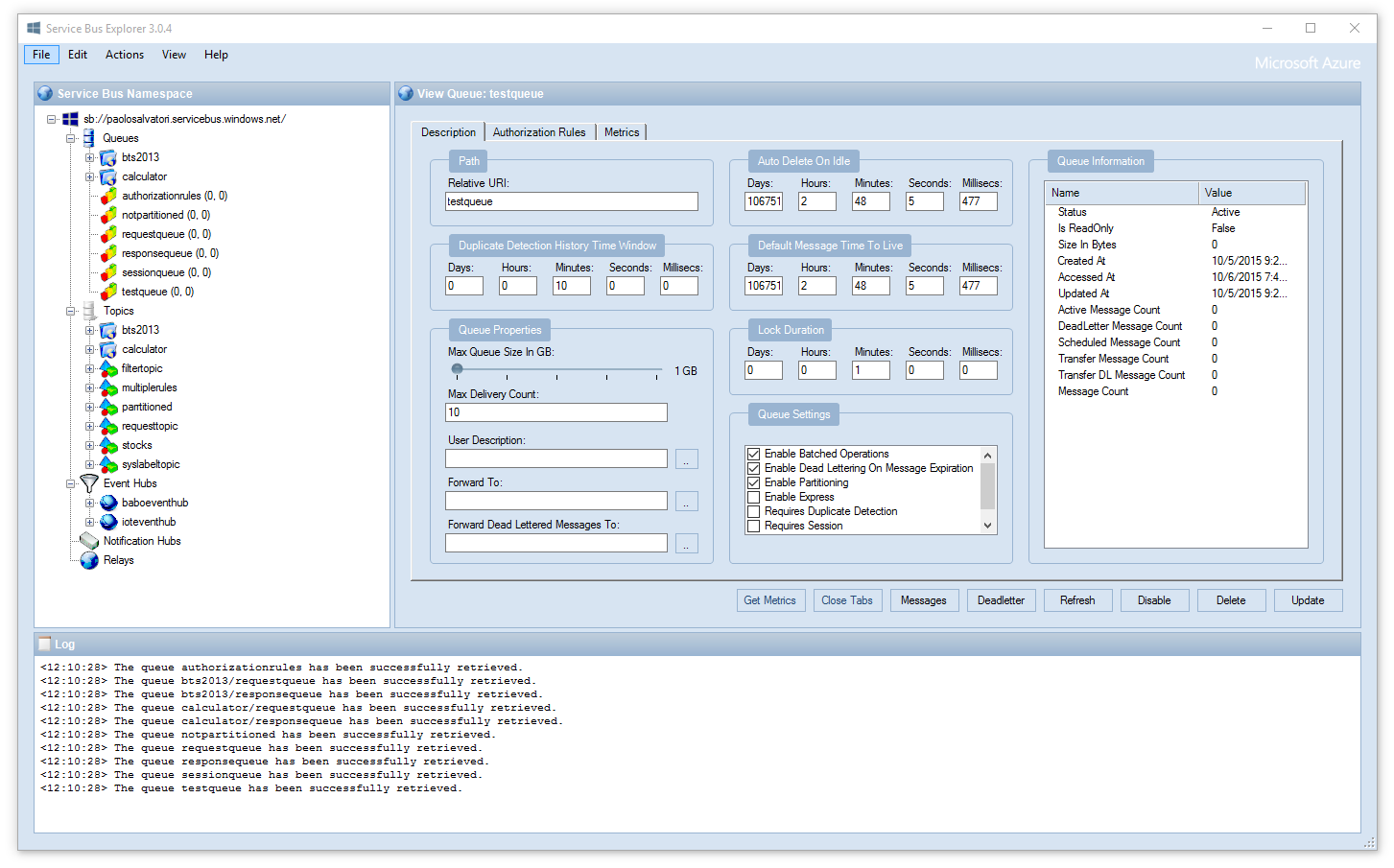
The Service Bus Explorer allows users to efficiently administer messaging entities. The tool provides advanced features like import/export functionality and the ability to test topic, queues, subscriptions, relay services, notification hubs and events hubs.
Features
- Dashboard tab — live overview of message counts (Active, Dead Letter, Scheduled, Total) for all queues and subscriptions, with auto-refresh and color-coded dead-letter alerts
- TreeView search/filter — real-time filtering of queues, topics and subscriptions; press Ctrl+F to focus
- Copy message body — one-click clipboard copy from the message preview pane
- Microsoft Entra ID sign-in — interactive browser authentication for Azure Service Bus namespaces without storing SAS secrets locally
- Import/export of namespace configuration
- Send, receive and peek messages for queues, topics and subscriptions
- Dead-letter message management
- Relay services, Notification Hubs and Event Hubs support
Software requirements
The following software is required to run ServiceBusExplorer. It may run on other versions.
- Windows 10 or later
- .NET Framework 4.6.2
Installation
It is strongly recommended to set Configuration File for Settings and Connection Strings to User Configuration File as shown in the figure below to reduce problems when upgrading.

> Note: The ServiceBusExplorer.exe.config in the application directory will get overwritten during the upgrade.
>
> If you have made changes to it, you should back it up before upgrading. If you follow the recommendation above then only advanced changes such as WCF configuration modifications cause this.
>
> Do not overwite the new configuration file with the old file since the runtime section in the new must file not be modified.
Installing for the first time
choco install ServiceBusExplorer
Upgrading
choco upgrade ServiceBusExplorer
The default location of the executable is C:\ProgramData\chocolatey\lib\ServiceBusExplorer\tools\ServiceBusExplorer.exe.
More information on our Chocolatey page.
> _Warning The scoop package is not maintained by the ServiceBusExplorer project so carefully check the package and the URLs it uses before using it. Also, the current package keeps the old version of ServiceBusExplorer.exe.config. That may cause assembly loading issues so do not use it for upgrading.
scoop install extras/servicebusexplorer
The default location of the executable is %USERPROFILE%\scoop\apps\servicebusexplorer\current\tools\ServiceBusExplorer.exe.
Using GitHub
curl -s https://api.github.com/repos/paolosalvatori/ServiceBusExplorer/releases/latest | grep browser_download_url | cut -d '"' -f 4
winget install --id paolosalvatori.ServiceBusExplorer --source winget
Microsoft Entra ID / Azure AD sign-in
Service Bus Explorer supports interactive browser sign-in for Azure Service Bus namespaces on the public Azure cloud. Sovereign clouds (Azure Government, Azure China, etc.) are not currently supported.
How to connect
- Open the regular Service Bus connection dialog.
- Select
Select a service bus namespace... for a manual connection, or edit an existing saved connection.
- Change
Authentication to Entra.
- Enter the namespace endpoint as either
sb://.servicebus.windows.net/ or .servicebus.windows.net.
- Optionally enter
Tenant ID and Entity Path. If Tenant ID is left blank, Service Bus Explorer uses the organizations endpoint. In that case the sign-in flow accepts work or school accounts only. To sign in with a personal Microsoft account, enter the target tenant ID; note that the account must already have been invited into that tenant as a guest and been granted a Service Bus data role, otherwise sign-in succeeds but every operation is refused.
- Click
OK and complete the browser sign-in flow.
> Note
>
> The File -> Connect to Event Grid menu entry is for Event Grid, not Azure Service Bus. For Service Bus, use the normal connection dialog and switch the Authentication selector to Entra.
>
Cached credentials
The logged-in user's credentials are cached. In some scenarios it may be necessary to log out from Entra to switch users. Use the menu item "Log out from Entra" for that. This clears the credentials cached by Service Bus Explorer only; it does not sign you out of Entra in your browser, so a new sign-in may still pick the same account automatically unless you also sign out there.
Screenshots
Use the regular Service Bus connection flow, not the Event Grid-specific menu entry:
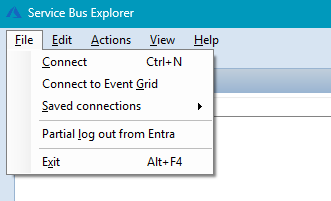
Open the normal connection dialog:
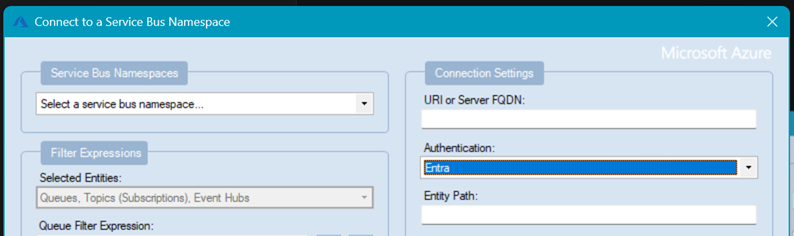
Switch Authentication to Entra:
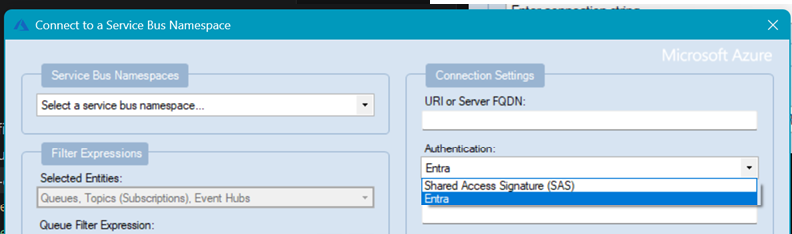
Enter the namespace endpoint and optionally select an Entra Tenant ID from the list. You may also enter a Tenant ID that is not in the list. If you save the connection it will store the Tenant ID with the connection:
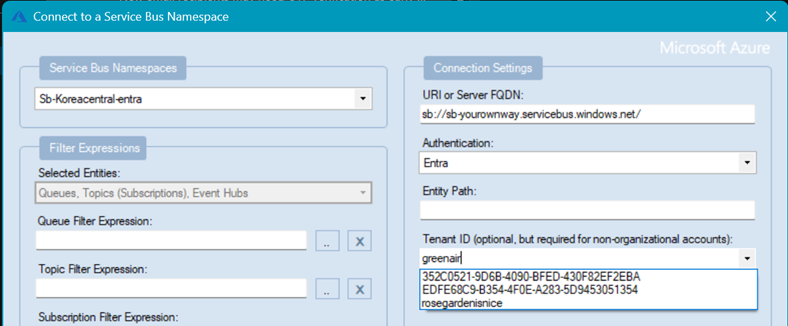
The list of Entra Tenant IDs is managed in the Options | Authentication dialog:
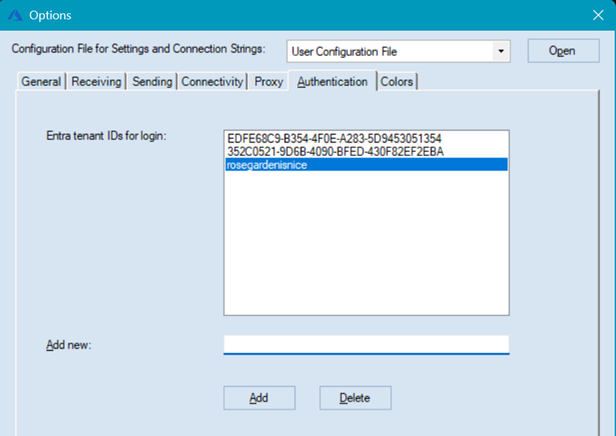
After sign-in, the namespace can be browsed without storing SAS keys locally:
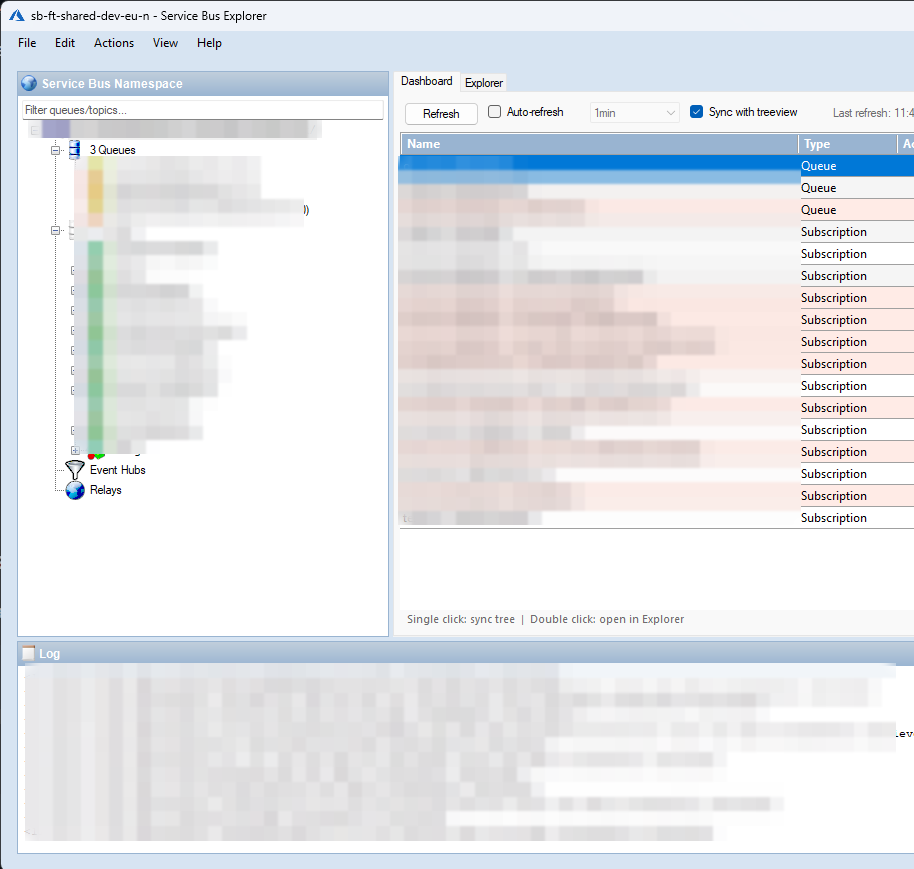
Saved Entra-based connections use the following format:
Endpoint=sb://.servicebus.windows.net/;AuthMode=AAD;TenantId=;TransportType=Amqp;EntityPath=
Minimal example:
Endpoint=sb://.servicebus.windows.net/;AuthMode=AAD
Current scope
- Interactive browser sign-in only
- Entra mode currently loads Service Bus queues and topics (with subscriptions), plus Event Hubs when the namespace is detected as an Event Hubs namespace
- Notification Hubs and Relay are not loaded when Entra authentication is selected
- Local persistence stores metadata only, not passwords or SAS keys
- Managed identity, Azure CLI auth and service principal auth are not included in this feature
Contributions
There are no dedicated developers so development is entirely based on voluntary effort.
Here are some guidelines concerning contributions:
- All contributions should be done on
main.
- Every pull request is built by GitHub Actions and should preferably be linked to a GitHub issue.
- Write unit tests, if applicable.
- We have started to migrate from the old SDK to the latest SDKs for Service Bus, Event Hubs, Relay and Notification Hubs. Therefore, new classes should not depend on the old SDK unless absolutely necessary.
Development Environment
Visual Studio 2022 17.8.0 or later is required to build the solution.
When editing UI elements Visual Studio should run as a DPI-unaware process.
For more information about this, see the
Visual Studio documentation.
In Visual Studio 2022 the informational bar looks like this  when it is running as a DPI-unaware process.
Azure Service Bus
Microsoft Azure Service Bus is a reliable information delivery service. The purpose of this service is to make communication easier. When two or more parties want to exchange information, they need a communication facilitator. Service Bus is a brokered, or third-party communication mechanism. This is similar to a postal service in the physical world. Postal services make it very easy to send different kinds of letters and packages with a variety of delivery guarantees, anywhere in the world.
Similar to the postal service delivering letters, Service Bus is flexible information delivery from both the sender and the recipient. The messaging service ensures that the information is delivered even if the two parties are never both online at the same time, or if they aren't available at the exact same time. In this way, messaging is similar to sending a letter, while non-brokered communication is similar to placing a phone call (or how a phone call used to be - before call waiting and caller ID, which are much more like brokered messaging).
The message sender can also require a variety of delivery characteristics including transactions, duplicate detection, time-based expiration, and batching. These patterns have postal analogies as well: repeat delivery, required signature, address change, or recall.
For more information, feel free to read the official documentation here.
Service Bus Explorer for Windows Server
The Service Bus Explorer 2.1.0 can be used with the Service Bus for Windows Server 1.1. The Service Bus Explorer 2.1.0 uses a version of the Microsoft.ServiceBus.dll client library which is compatible with the Service Bus for Windows Server 1.1 RTM version. You can download the source code of the Service Bus Explorer 2.1.0 here.
Documentation
Here you can find the tool documentation and a log of the features implemented over time.
Service Bus Explorer is only one of the management tools available for Azure Service Bus.
Here are a couple of alternatives. We do not take responsibility for them though:
| Tool | Description |
|---|
| Microsoft Azure Management Portal | SaaS, web based, extremely basic |
| Serverless360 | paid with free trial, SaaS, web based |
| PowerShell | free, open source, cross platform |
| Purple Explorer (active fork) | free, open source, cross platform |
| Superbus | paid with a free trial, macOS |
| Service Bus Cloud Explorer | paid with a free basic plan, SaaS, web based |
| Service Bus TUI | free, open source, cross platform, terminal based |
| bussin | free, source-available, browser based PWA, no installation required |
| Queue Studio for Service Bus | free with a paid Pro tier, VS Code extension, works with the Service Bus emulator |