sshforward


A cross-platform CLI tool for managing SSH local port forwarding tunnels as background processes.
Define your services once, connect with a single command.
Demo
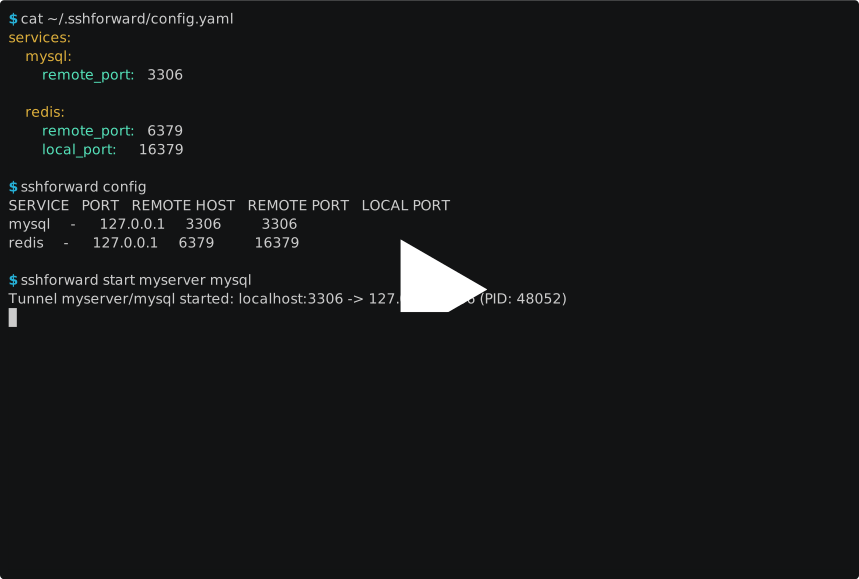
Basic usage
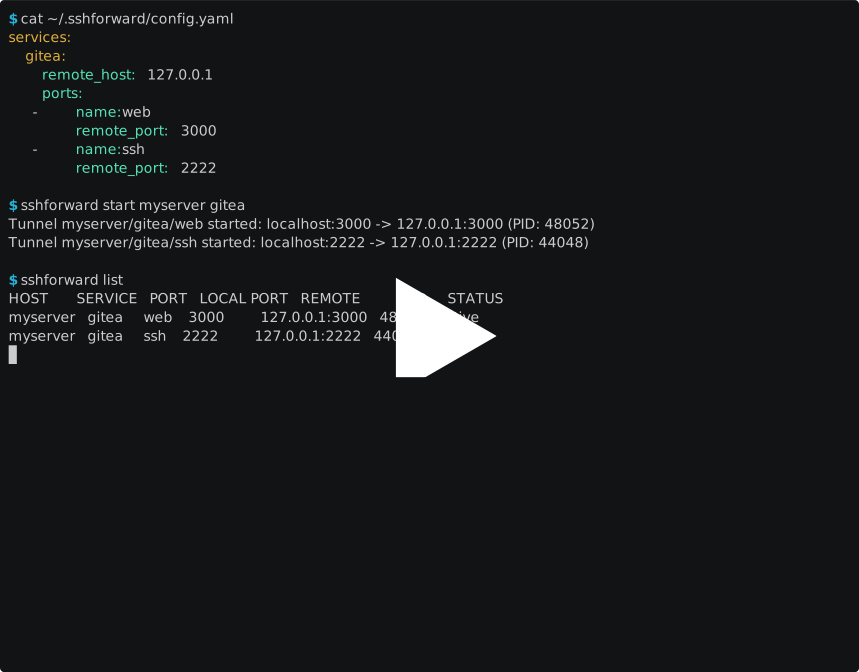
Multi-port services
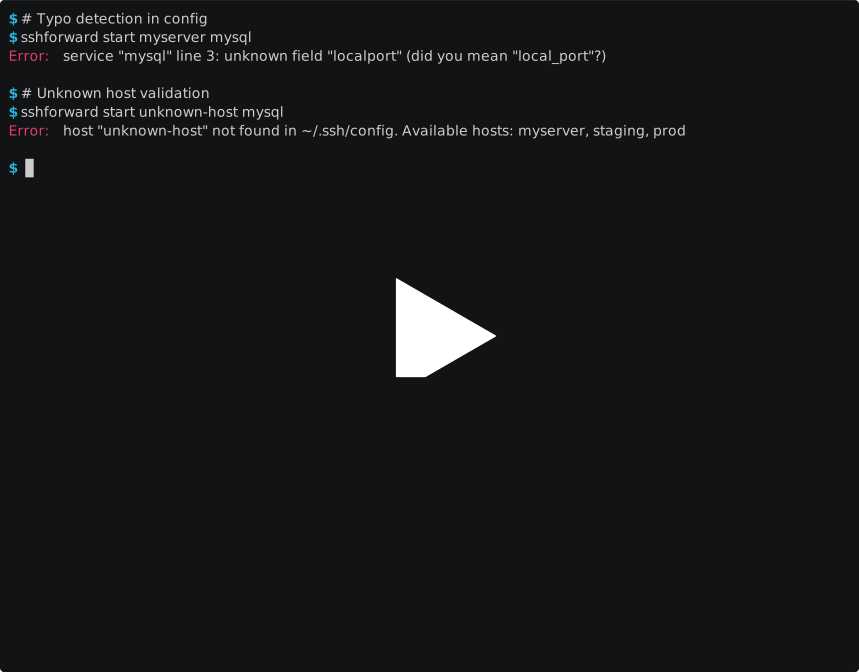
Troubleshooting and error handling
The raw recordings live in docs/demo/ and play offline with
asciinema:
asciinema play docs/demo/demo-basic.cast
Features
- Background tunnels — start tunnels that persist after the terminal closes
- Multi-port services — forward multiple ports per service (e.g. Gitea web + SSH)
- Automatic port selection — defaults to matching the remote port, or picks a free
unprivileged one
- SSH config integration — validates hosts against your
~/.ssh/config
- Config validation — port ranges are range-checked and typos like
localport
are caught with a suggestion
- Tunnel monitoring — list active tunnels, view SSH logs, auto-cleanup dead processes
- Update checks — tells you when a newer release exists, and can install it
itself when you did not use a package manager
- Cross-platform — Windows, Linux, macOS
Requirements
ssh client available in PATH (OpenSSH).- Non-interactive authentication. Tunnels run detached with no terminal,
so SSH cannot prompt. This means:
- Use key-based auth with a key that has no passphrase, or an agent
(
ssh-agent / Pageant) already unlocked.
- The target host must be resolvable via your
~/.ssh/config.
BatchMode=yes is enforced — any prompt becomes an immediate, logged
failure instead of a hung process. Check sshforward logs .- New host keys are accepted automatically (
accept-new); a changed
host key still aborts the connection.
Installation
macOS
Homebrew:
brew install pcpl2lab/tap/sshforward
Or download sshforward__macos.pkg from the
Releases page. It installs a
single universal binary into /usr/local/bin, which is already on your PATH,
and runs natively on both Intel and Apple Silicon.
The package is not notarised, so macOS refuses it on first open: right-click it
in Finder and choose Open, then confirm. Homebrew avoids that entirely.
Windows
WinGet:
winget install pcpl2lab.sshforward
Scoop:
scoop bucket add pcpl2lab https://github.com/pcpl2lab/scoop-bucket
scoop install sshforward
Or download sshforward__windows_setup.exe from the
Releases page. One installer
covers x64, ARM64 and 32-bit — it picks the right binary itself, installs
per-user so it never asks for administrator rights, and offers to add itself to
your PATH.
The installer is not code-signed, so SmartScreen shows a warning on first run:
choose More info → Run anyway. Scoop avoids that prompt entirely.
Linux — APT repository
Debian and Ubuntu, with apt upgrade working from then on:
curl -fsSL https://apt.pcpl2lab.ovh/pcpl2lab.gpg |
  sudo tee /usr/share/keyrings/pcpl2lab.gpg >/dev/null

echo "deb [signed-by=/usr/share/keyrings/pcpl2lab.gpg] https://apt.pcpl2lab.ovh stable main" |
  sudo tee /etc/apt/sources.list.d/pcpl2lab.list

sudo apt update
sudo apt install sshforward
Built for amd64, arm64, armhf and i386.
Linux — RPM repository
Fedora and RHEL:
sudo curl -fsSL -o /etc/yum.repos.d/pcpl2lab.repo https://rpm.pcpl2lab.ovh/pcpl2lab.repo
sudo dnf install sshforward
openSUSE:
sudo zypper addrepo -f https://rpm.pcpl2lab.ovh pcpl2lab
sudo zypper install sshforward
Packages and repository metadata are both signed, so this works with
gpgcheck=1 and repo_gpgcheck=1.
Linux — Alpine repository
curl -fsSL https://apk.pcpl2lab.ovh/pcpl2lab.rsa.pub |
  sudo tee /etc/apk/keys/pcpl2lab.rsa.pub >/dev/null

echo "https://apk.pcpl2lab.ovh" | sudo tee -a /etc/apk/repositories

sudo apk update
sudo apk add sshforward
Alpine signs with RSA rather than PGP, which is why this key differs from the
one used by the APT and RPM repositories.
All Linux packages install to /usr/bin/sshforward and depend on the OpenSSH
client. Homebrew on Linux is not an option here: Homebrew serves this project as
a cask, and casks install only on macOS.
Prebuilt binaries
Download an archive for your platform from the
Releases page, together with
checksums.txt. Archives are published for:
| OS | Architectures |
|---|
| Linux | amd64, arm64, arm (v6), 386 |
| Windows | amd64, arm64, 386 |
| macOS | amd64, arm64 |
From source
go install github.com/pcpl2lab/sshforward@latest
Build manually
git clone https://github.com/pcpl2lab/sshforward.git
cd sshforward
go build -o sshforward .        # sshforward.exe on Windows
Check the version:
sshforward version
Prerequisites (building from source)
- Go 1.27+ (see the
go directive in go.mod)
- OpenSSH client (
ssh) in PATH
Quick Start
1. Create a config file at ~/.sshforward/config.yaml
(sshforward edit creates it for you with a commented template):
services:
  mysql:
    remote_port: 3306

  gitea:
    remote_host: 127.0.0.1
    ports:
      - name: web
        remote_port: 3000
      - name: ssh
        remote_port: 2222
2. Start a tunnel:
$ sshforward start myserver gitea
Tunnel myserver/gitea/web started: localhost:3000 -> 127.0.0.1:3000 (PID: 48052)
Tunnel myserver/gitea/ssh started: localhost:2222 -> 127.0.0.1:2222 (PID: 44048)
3. Check status:
$ sshforward list
HOST       SERVICE   PORT   LOCAL PORT   REMOTE           PID     STATUS
myserver   gitea     web    3000         127.0.0.1:3000   48052   active
myserver   gitea     ssh    2222         127.0.0.1:2222   44048   active
4. Stop when done:
$ sshforward stop myserver gitea
Tunnel myserver/gitea stopped
Configuration
Config file location:
| Platform | Path |
|---|
| Linux / macOS | ~/.sshforward/config.yaml |
| Windows | %USERPROFILE%\.sshforward\config.yaml |
The directory is created with 0700 and the config file with 0600.
Top-level keys
| Key | Default | Meaning |
|---|
services | — | The service definitions, described below |
update_check | true | Whether to check daily for a newer release |
Single-port service
services:
  mysql:
    remote_host: 127.0.0.1   # optional, defaults to 127.0.0.1
    remote_port: 3306         # required
    local_port: 13306         # optional, defaults to remote_port
Multi-port service
services:
  gitea:
    remote_host: 10.0.0.5    # shared default for all ports
    ports:
      - name: web             # required on every entry
        remote_port: 3000
      - name: ssh
        remote_port: 2222
        remote_host: 10.0.0.6  # override per port
        local_port: 12222       # override per port
Rules for ports:
- At least two entries — use
remote_port directly for a single port.
- Every entry needs a unique
name; the name becomes part of the state file,
the log file and the list output.
remote_port and ports are mutually exclusive within one service.
Port selection behavior
| Config | Behavior |
|---|
| (omitted) | Use same port as remote_port |
local_port: 8080 | Use port 8080 |
local_port: auto | Pick a random free port (always ≥ 1024) |
local_port: 0 | Pick a random free port (always ≥ 1024) |
Automatic selection never hands out a port from the reserved system range
(1–1023): those are assigned to standard services and binding them requires
elevated privileges on Unix. An explicit local_port below 1024 is still
accepted — you are then responsible for having the rights to bind it.
remote_port and local_port are validated to be within 1–65535 while the
config is read, so a typo is reported up front instead of surfacing later as a
confusing "port is already in use".
Validation errors
Unknown keys are rejected with a suggestion:
$ sshforward config
Error: service "mysql" line 4: unknown field "localport" (did you mean "local_port"?)
$ sshforward config
Error: service "mysql": local_port: 99999 is out of range: must be 1-65535
Commands
| Command | Description |
|---|
sshforward start | Start tunnel(s) in background |
sshforward stop | Stop all ports for a service |
sshforward stop --all | Stop all active tunnels |
sshforward list | List tunnels with status (auto-cleans dead ones) |
sshforward logs [ ] | View SSH logs for debugging |
sshforward config | Display loaded configuration |
sshforward edit | Open the config file in $VISUAL / $EDITOR |
sshforward update | Install the newest release, or say how to update |
sshforward update --check | Report whether a newer release exists, change nothing |
sshforward version | Print version, commit, build date and os/arch |
Notes:
stop always stops all ports of a service; there is no per-port stop.list prints dead tunnels once with status DEAD, dumps their SSH log to
stderr, and then removes their state file. The log stays behind.logs without arguments shows the logs of every known tunnel, followed by
the logs of runs that have ended: failed starts, dead tunnels and earlier
runs of a tunnel started again.- SSH logs are kept for 14 days after their tunnel ends, so the reason a
tunnel failed or dropped can still be looked up later.
list removes the
expired ones. stop deletes the log of a tunnel it stops, but keeps the log
of one that had already died on its own.
edit falls back to notepad.exe on Windows and to nano, vim or vi
elsewhere when neither $VISUAL nor $EDITOR is set.sshforward --version is equivalent to sshforward version for the version
string alone.- Every command exits
0 on success and 1 on failure, printing a single
Error: … line to stderr.
Updates
Checking
Once a day, at most, sshforward asks the GitHub API for the newest release and
remembers the answer in ~/.sshforward/update-check.json. When a newer version
exists, one line goes to stderr after the command finishes:
A newer sshforward is available: v1.5.0 (you have v1.4.0). Run 'sshforward update'.
The check runs in the background and is abandoned if the command finishes first,
so it never delays anything. Every failure is silent: being offline, behind a
proxy or rate-limited is not something an unrelated command should complain
about. Development builds never check, and the notice never touches stdout, so
list and config stay parsable.
Turn it off permanently in the config:
update_check: false
or per invocation with SSHFORWARD_NO_UPDATE_CHECK=1. GITHUB_TOKEN, if set,
is used to raise the anonymous rate limit — useful behind a shared office IP.
Updating
sshforward update           # install the newest release
sshforward update --check   # report only, change nothing
When a package manager installed sshforward, update refuses to touch the
binary and prints that manager's own command instead — overwriting a file
apt, brew, scoop or winget owns breaks its manifest and is undone by the
next upgrade:
$ sshforward update
A newer release is available: v1.5.0 (you have v1.4.0)

This copy was installed with homebrew. Update it with:
  brew upgrade sshforward
Otherwise sshforward downloads the release archive for your platform, verifies
it against the release's checksums.txt, and replaces its own binary through
renames. A digest that does not match aborts the update with the original binary
untouched. Detection is by path, so it can be wrong; two things keep that safe:
a binary the current user cannot write is never replaced, and
SSHFORWARD_INSTALL_SOURCE (homebrew, scoop, winget, deb, manual)
overrides the guess outright.
How It Works
- Reads the service definition from
~/.sshforward/config.yaml
- Validates the host exists in
~/.ssh/config (exact match; wildcard
patterns such as Host * are ignored)
- Resolves local ports (default = remote port, or finds a free one ≥ 1024)
- Launches
ssh -N -L :: as a detached
background process
- Saves tunnel state (PID, ports, timestamps) to
~/.sshforward/tunnels/
- Uses file locking to prevent race conditions on concurrent start/stop
Files on disk
All under ~/.sshforward/ (%USERPROFILE%\.sshforward\ on Windows):
| Path | Purpose |
|---|
config.yaml | Service definitions |
tunnels/-[-].json | Tunnel state (PID, ports, started at) |
tunnels/-[-].log | SSH stderr, written by ssh -E |
tunnels/-[-]..log | Log of an earlier run, kept 14 days |
tunnels/-[-].lock | Lock held during start/stop |
update-check.json | Last release lookup, refreshed daily |
Process handling
- Detached:
CREATE_NEW_PROCESS_GROUP | DETACHED_PROCESS on Windows,
setpgid on Unix, so the tunnel survives the terminal that started it.
- Logging: SSH writes its own log via
-E, so no file handles are
inherited — required for a fully detached process on Windows.
- Liveness: a stored PID counts as a live tunnel only when the process
exists, its image is
ssh, and it was created no later than the tunnel's
recorded start time. After a reboot the OS can hand a stored PID to another
ssh — an interactive session, git, an editor's remote helper, or a tunnel
started after the reboot. That process is necessarily newer than the state
file, so it is never mistaken for the old tunnel, and stop never kills it.
An exited-but-unreaped process counts as dead.
- Port reservation: a chosen local port is held open by sshforward from the
moment it is picked until the instant
ssh is spawned, so a concurrent
sshforward run — or another port of the same service — cannot take it in
between.
- Stopping:
stop signals the process and waits for it to actually exit,
escalating to a forced kill after a grace period. The state file is removed
only once the process is gone, so a successful stop means the local port is
free.
- Locking:
LockFileEx on Windows, flock on Unix.
SSH options applied automatically
BatchMode=yes — never prompt; any prompt becomes a logged failureStrictHostKeyChecking=accept-new — trust new hosts, reject changed keysExitOnForwardFailure=yes — fail fast if the port forward can't be establishedConnectTimeout=10 — don't hang on unreachable hostsServerAliveInterval=15 / ServerAliveCountMax=3 — detect dead connections
Host names and remote_host values are restricted to [a-zA-Z0-9._-] and port
numbers to 1–65535 before they reach exec.Command. Arguments are passed as
an argv slice, never through a shell.
Troubleshooting
Tunnel starts but shows as DEAD in list:
sshforward logs myserver mysql
Common causes:
- Host unreachable — check
ssh myserver manually
- Port already in use — another process is binding the local port
- Authentication failure — the key needs a passphrase, or the agent is locked;
remember that
BatchMode=yes turns any prompt into an immediate failure
The log stays readable through logs for 14 days after the tunnel ends, also
after list has cleaned the tunnel up.
All tunnels are DEAD after a reboot:
Expected — tunnels are plain ssh processes and do not survive a restart of
the machine. Run sshforward list to clean them up and start the ones you need
again. Their state files are recognised as stale even when the OS has since
reused a stored PID for another process.
host "…" not found in …/.ssh/config. Available hosts: …:
The host must be defined as a literal Host entry. Wildcard patterns are
skipped, so Host *.example.com does not make web.example.com usable — add an
explicit entry.
no config file at …:
Run sshforward edit to create the file from a commented template.
cannot acquire lock (another operation in progress?):
Another sshforward process is starting or stopping the same service. If no
such process exists, remove the stale
~/.sshforward/tunnels/-.lock file.
Limitations
stop operates per service, not per port of a multi-port service.- State files are plain JSON in your home directory and are trusted as written
by
sshforward itself; editing them by hand is not supported.
- A local port is held reserved until
ssh is spawned, but the microseconds
between handing it over and SSH's own bind() cannot be closed from the
outside. If another process wins that race, ExitOnForwardFailure=yes makes
SSH fail immediately and start reports it — retry.
Development
go generate ./...               # Windows version resource (see winres/)
go build -o sshforward .        # build
go test ./... -count=1          # tests
go vet ./...                    # static analysis
golangci-lint run ./...         # lint (v2.13.2, see .golangci.yml)
On Windows the binary carries a full version resource — product name,
description, company, copyright and version — plus an icon and an application
manifest declaring asInvoker (so it never triggers a UAC prompt) and long-path
awareness. It is built from winres/winres.json; release builds get the real
tag, local builds are stamped 0.0.0.0.
Contributing
Setup, conventions and the pull request checklist live in
CONTRIBUTING.md.
Security
Please report vulnerabilities privately — see SECURITY.md, which
also documents the security properties sshforward relies on.
License
BSD 2-Clause License — see LICENSE.