TroubleScout
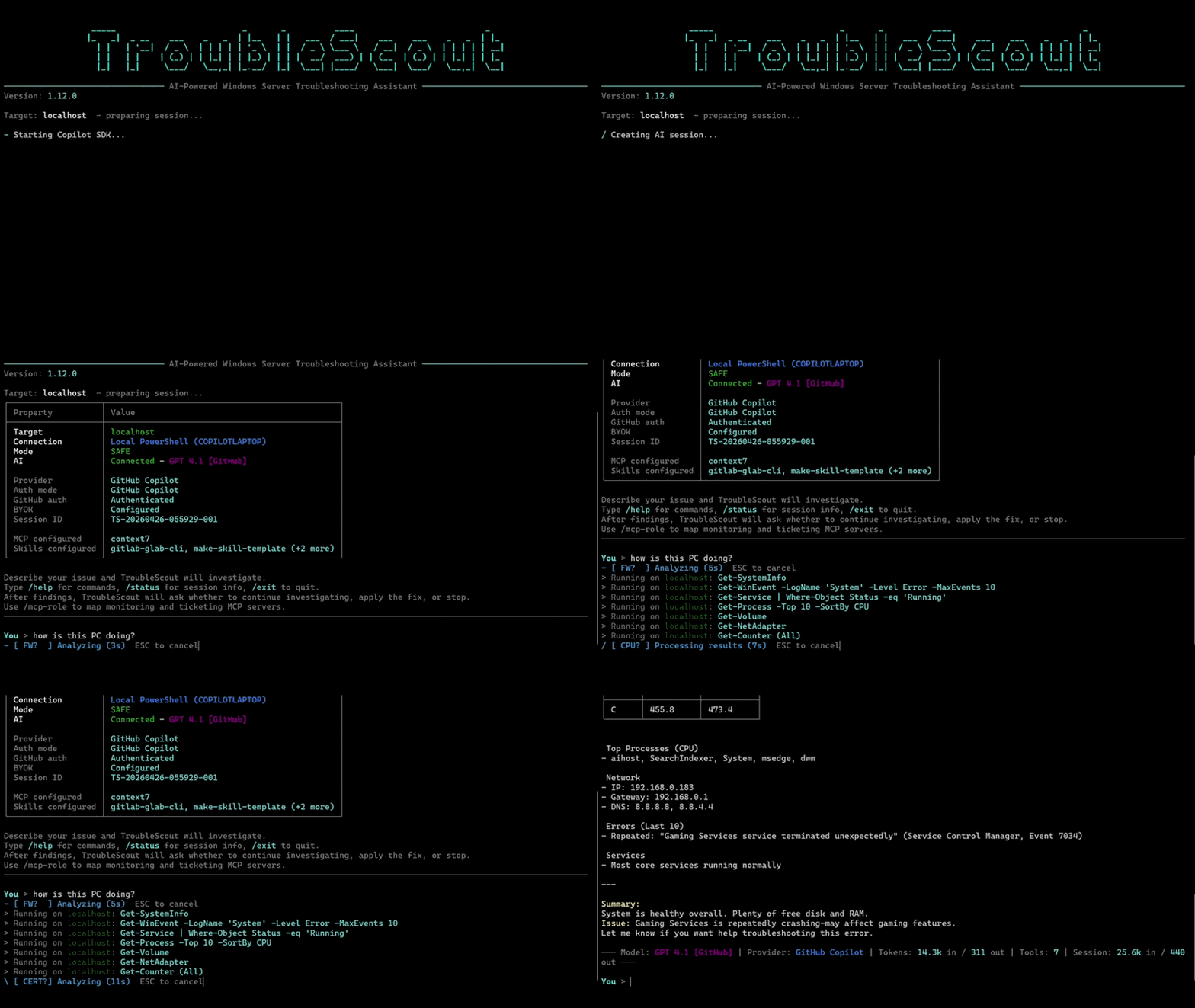


Description
TroubleScout is an AI-powered troubleshooting assistant for Windows. It was originally designed for Windows Server, but it also works well on regular Windows clients. It uses the GitHub Copilot SDK to investigate issues with safe PowerShell-based diagnostics.
If you just want to get started, jump to Installation.
Prompt Examples
| Prompt | Description |
|---|
| How is this computer doing? | Get a general health check for the local machine or target server. |
| Find out why the server restarted unexpectedly last night. | Review recent shutdown and restart events to identify the likely cause. |
| D volume is getting full. Is this normal growth? | Check disk usage, recent growth, and the most likely sources of storage pressure. |
| Why are users complaining that logons are slow? | Investigate authentication, profile, service, and performance issues affecting sign-in speed. |
| Check why the SQL Server service is stopped. | Inspect service state, recent failures, dependencies, and related event log entries. |
| What changed on this machine after the last patch window? | Correlate updates, restarts, and new warnings or errors after maintenance. |
| CPU usage is high. What is driving it? | Identify the busiest processes, services, and counters behind sustained CPU pressure. |
| Compare the health of these two servers and tell me what stands out. | Use a multi-server session to spot differences across systems quickly. |
Main Features
- Natural language troubleshooting: Ask questions in plain English instead of building diagnostic command sequences yourself.
- Safe by default: Read-only commands run automatically, while system-changing actions require approval.
- Local or remote troubleshooting: Work against the current machine or connect to remote systems over WinRM.
- Multi-server sessions: Start with several servers at once or add more during the session.
- JEA support: Connect to constrained PowerShell remoting endpoints with Just Enough Administration.
- HTML report: Generate a session report with
/report when you want a shareable troubleshooting summary.
- Opt-in transcripts: Save and load redacted session transcript JSON files with
/transcript when you want replayable context.
- Interactive terminal UI: Streamed responses, session status, prompt history, and cancellation are built into the console experience.
- Model and provider flexibility: Use GitHub Copilot by default or switch to OpenAI-compatible BYOK mode if needed.
- Cost-aware subagent delegation: Use a lower-cost subagent for high-volume evidence collection while keeping small diagnostics in the main session.
- Reasoning visibility: Supported reasoning models can show their thinking output and let you adjust reasoning effort.
- MCP and skills support: Load MCP servers and Copilot skills to extend what TroubleScout can access and automate.
Installation
Recommended: WinGet
Install TroubleScout:
winget install sasler.TroubleScout
Start TroubleScout:
troublescout
That is the main path most users need. If you need to sign in to GitHub Copilot, you can do it from inside TroubleScout with /login.
Manual installation
If you do not want to use WinGet, download the latest release from Releases, extract TroubleScout.exe and the runtimes/ folder when it is included, then run:
TroubleScout.exe
Usage
Start an interactive session
troublescout
By default, TroubleScout starts locally, so you can immediately ask questions such as How is this computer doing?.
Connect to a remote server from the start
troublescout --server myserver.domain.com
Ask one question in headless mode
troublescout --server myserver.domain.com --prompt "Check why the SQL Server service is stopped"
Start with more than one server
troublescout --server dc01 --server files01 --server sql01
You can also pass a comma-separated list such as --server dc01,files01,sql01.
Start with a JEA session
troublescout --server server1 --jea server2 JEA-Admins
These are useful once you are already in TroubleScout:
/status shows the current connection, model, execution mode, and session details./history shows PowerShell command history./report generates and opens an HTML session report./clear starts a fresh AI session.
Safety Model
TroubleScout is designed to investigate first and change things only with your approval.
- Read-only commands such as
Get-* run automatically.
- Mutating commands such as
Set-*, Start-*, Stop-*, Restart-*, Remove-*, and similar actions require confirmation.
- Sensitive commands such as
Get-Credential and Get-Secret are blocked.
When approval is required, TroubleScout offers a Yes, No, or Explain choice so you can review the action before allowing it.
Authentication And Models
GitHub mode
GitHub Copilot is the default path. If you are not authenticated yet, start TroubleScout and use /login.
BYOK mode
If you want to use an OpenAI-compatible provider instead, configure it from inside TroubleScout with /byok.
Useful related options:
--model selects a specific model.--subagent-model selects the model used for delegated evidence collection.--openai-base-url points to a compatible endpoint.--openai-api-key passes the API key directly./model selects the primary model and then a same-provider sub-agent model; a faster or lower-cost delegated model is usually appropriate./reasoning sets the reasoning effort for supported models./byok configures or switches BYOK mode from inside the app.
Subagent delegation
TroubleScout can use a dedicated troubleshooting subagent for evidence collection that is likely to return a lot of data. This is mainly a cost and context-control feature: the primary agent writes the exact PowerShell command or staged script, then delegates high-volume work such as broad event-log review, large inventories, multi-server sweeps, MCP lookups, or web research to the subagent so it can summarize only the findings that matter.
Small, bounded reads stay in the primary session. For example, quick health checks such as system info, disk space, top processes, or a small recent event sample run directly and are shown in the terminal as concise command notices. Full command output is kept in /report, not dumped into the chat. If the primary agent accidentally asks for the same direct diagnostic again in a turn, TroubleScout reuses the earlier result instead of collecting the same data repeatedly.
Choose the subagent model with /model, /agent-model, or --subagent-model. A faster or lower-cost model is usually enough because the subagent is expected to collect and summarize evidence, not own the final diagnosis.
Remote Troubleshooting
For remote troubleshooting, WinRM must be enabled on the target machine and reachable from the system running TroubleScout. Windows Integrated Authentication is used for standard remote sessions.
Useful remote workflows:
troublescout --server myserver.domain.com starts on a remote server./server srv1 srv2 or /server srv1,srv2 adds more servers during an interactive session./jea walks you through connecting to a JEA endpoint.
MCP Servers And Skills
TroubleScout can load MCP servers and Copilot skills through session configuration.
- Default MCP config path:
%USERPROFILE%\\.copilot\\mcp-config.json
- Default skills path:
%USERPROFILE%\\.copilot\\skills
/capabilities shows configured and runtime-used MCP servers and skills, which are also visible in /status./mcp-role assigns optional monitoring and ticketing MCP role mappings.- MCP and URL approvals can be remembered for the current TroubleScout session.
Interactive Commands
A short reference is shown below. The full per-command documentation lives in
docs/slash-commands.md.
| Command | Description |
|---|
/help | Show the interactive command reference. |
/status | Show connection, model, mode, usage, and capability details. |
/clear | Start a new AI session. |
/settings | Open settings.json, then reload prompt and safety configuration. |
/mcp-role | Configure monitoring and ticketing MCP role mappings. |
/model | Choose the primary model followed by the delegated evidence model; changes start a clean session. |
/reasoning [auto or effort] | Set reasoning effort for the current model when supported. |
/mode | Change the PowerShell execution mode. auto reviews only unknown read-only command candidates in a no-tools safety session using the selected subagent model. |
/agent-model [model or inherit] | Backward-compatible shortcut for the delegated model used by investigation and Auto safety review. |
/server server1 [server2 ...] | Connect to one or more additional servers, using spaces or commas. |
/jea [server] [configurationName] | Connect to a JEA constrained endpoint. |
/login | Run GitHub Copilot login inside TroubleScout. |
/byok env or [base-url] [model] | Enable OpenAI-compatible BYOK mode. |
/byok clear | Clear saved BYOK settings for this profile. |
/capabilities | Show configured and used MCP servers and skills. |
/history | Show PowerShell command history. |
/report | Generate and open the HTML session report. |
/transcript save or load | Save or load a redacted transcript for reporting. |
/exit or /quit | End the session. |
Command-Line Reference
| Option | Description |
|---|
--server, -s | Target server name or IP. Repeat it or use a comma-separated list for multi-server startup. |
--prompt, -p | Run a single prompt in headless mode. |
--jea | Preconnect one JEA session at startup. |
--model, -m | Select a model such as gpt-4.1. |
--subagent-model | Select the same-provider model used for delegated evidence collection. |
--mode | Set the PowerShell execution mode (default: strict). |
--mcp-config | Set a custom MCP config path. |
--skills-dir | Add an extra skills directory. |
--disable-skill | Disable a loaded skill by name. |
--debug, -d | Show technical diagnostics and exception details. |
--byok-openai | Use an OpenAI-compatible provider instead of GitHub authentication. |
--no-byok | Force GitHub Copilot even if BYOK is saved in settings. |
--openai-base-url | Override the OpenAI-compatible endpoint URL. |
--openai-api-key | Provide the OpenAI-compatible API key directly. |
--version, -v | Show the app version and exit. |
--help, -h | Show command-line help. |
Manual Build From Source
Most users do not need this section. It is for contributors and advanced users.
git clone https://github.com/sasler/TroubleScout.git
cd TroubleScout
dotnet build
To publish a self-contained executable:
dotnet publish -c Release -r win-x64 --self-contained true -p:PublishSingleFile=true
dotnet publish -c Release -r win-arm64 --self-contained true -p:PublishSingleFile=true
Troubleshooting
Most users can ignore this section. If you installed with WinGet and troublescout starts normally, you do not need to install anything else.
Copilot login or startup problems
If TroubleScout cannot reach GitHub Copilot, first try /login inside the app. Only if startup still fails should you check the underlying Copilot CLI installation:
copilot --version
Official setup guide for advanced troubleshooting: Install Copilot CLI
Remote server connectivity problems
If remote sessions fail, confirm that WinRM is enabled on the target system and reachable from your machine.
Enable-PSRemoting -Force
SDK or CLI compatibility issues
This usually matters only for advanced setups where you manage the Copilot CLI separately instead of relying on the normal app installation path.
winget install --id OpenJS.NodeJS.LTS -e --accept-package-agreements --accept-source-agreements
Architecture
Program.cs (CLI entry) -> TroubleshootingSession (Copilot integration)
                                   |
        +--------------------------+--------------------------+
        |                          |                          |
  UI/ConsoleUI.cs         Tools/DiagnosticTools.cs   Services/PowerShellExecutor.cs
For a deeper component map, request flow, and the approval pipeline, see
docs/architecture.md.
Environment Variables
| Variable | Description |
|---|
COPILOT_CLI_PATH | Custom path to the Copilot CLI executable. |
OPENAI_API_KEY | API key for OpenAI-compatible BYOK mode. |
Configuration Reference
TroubleScout stores per-user settings in %APPDATA%\TroubleScout\settings.json.
The file is created with defaults on first run and is also editable from inside
the app with /settings, which reloads after you save.
settings.json keys
| Key | Type | Description |
|---|
LastModel | string | Last model selected in /model; restored on startup. |
ReasoningEffort | string | Active reasoning effort (auto, low, medium, high) for models that support it. |
UseByokOpenAi | bool | When true, start in BYOK mode instead of GitHub Copilot. |
ByokOpenAiBaseUrl | string | Override OpenAI-compatible endpoint URL. |
ByokOpenAiApiKey | string | Plain API key (only when DPAPI encryption is unavailable). Avoid hand-editing. |
ByokOpenAiApiKeyEncrypted | string | DPAPI-encrypted API key, set automatically by /byok. |
SafeCommands | string[] | PowerShell command patterns proven read-only in Strict and Auto modes (defaults include Get-*, Select-*, Sort-*, Where-*, Measure-*, and output-only Format-* commands). Replace, don't append. |
AgentModelProfiles | object | Per-provider (github/byok) selected subagent model for delegated investigation and Auto safety review. |
GitHubBillingDisplayMode | string | ai-credits or premium-requests-legacy; unset profiles default to AI Credits on and after June 1, 2026. |
SystemPromptOverrides | object | Replace specific system-prompt sections by key. |
SystemPromptAppend | string | Free-form text appended to the end of the system prompt. |
MonitoringMcpServer | string | MCP server mapped to the monitoring role. Manage with /mcp-role. |
TicketingMcpServer | string | MCP server mapped to the ticketing role. Manage with /mcp-role. |
PersistedApprovedMcpServers | string[] | MCP servers approved across sessions. Only servers with a monitoring/ticketing role mapping can be persisted. Manage with /mcp-approvals. |
MCP and skills paths
| Path | Default | Override |
|---|
| MCP config | %USERPROFILE%\.copilot\mcp-config.json | --mcp-config |
| Skills directory | %USERPROFILE%\.copilot\skills | --skills-dir (additive) |
| Disabled skills | n/a | --disable-skill (repeatable) |
See docs/slash-commands.md for /mcp-role,
/mcp-approvals, and /byok syntax, and
docs/architecture.md for the approval pipeline.