SourceGit sourcegit-scm
Use this command to install SourceGit with WinGet:
winget install --id=sourcegit-scm.SourceGit -e Open-source GUI client for git users
winget install --id=sourcegit-scm.SourceGit -e Open-source GUI client for git users



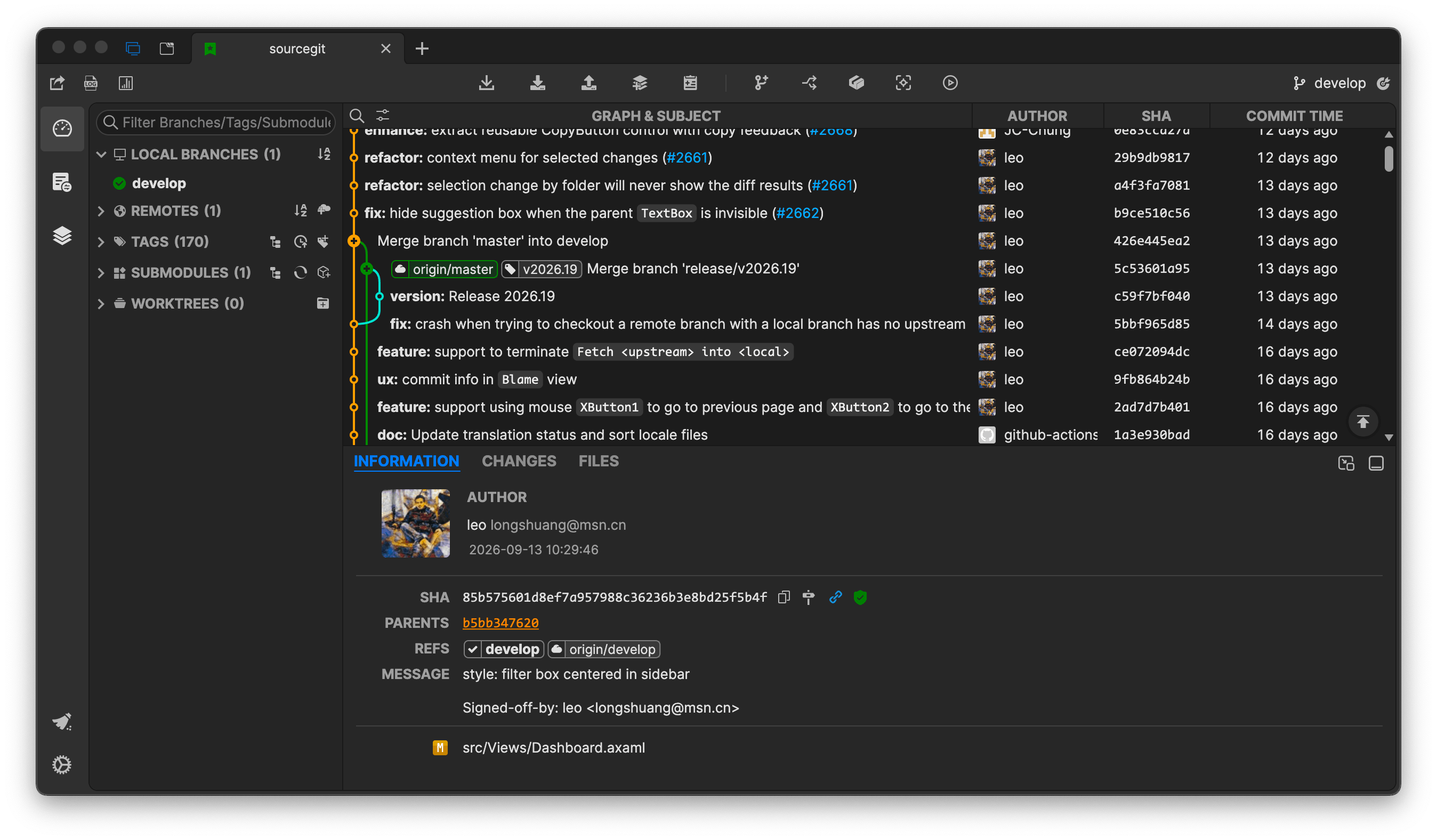
Dark Theme
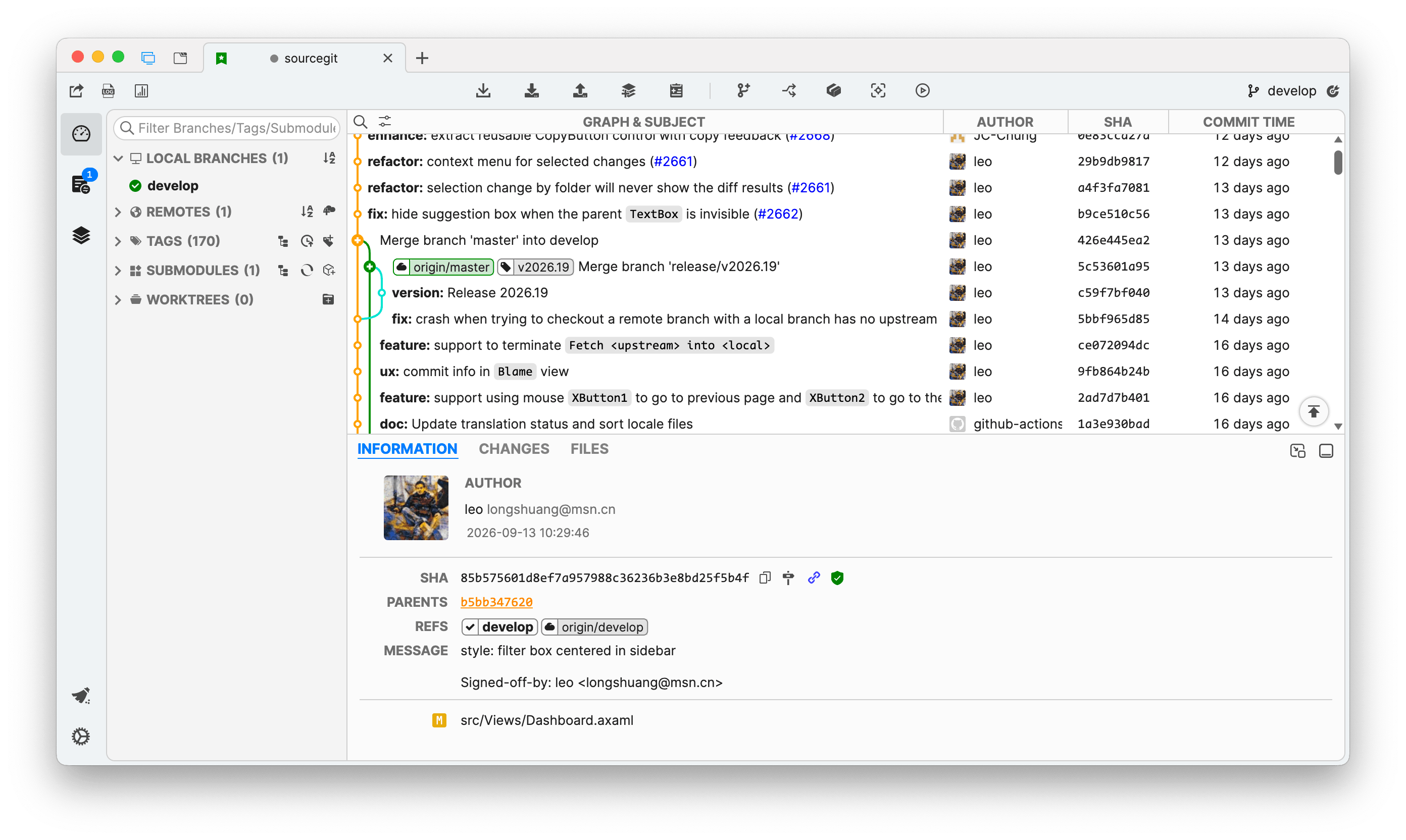
Light Theme
Custom
You can find custom themes from sourcegit-theme. And welcome to share your own themes.
> [!WARNING] > Linux only tested on Debian 12 on both X11 & Wayland.
To use this tool, you need to install Git(>=2.25.1) first.
You can download the latest stable from Releases or download workflow artifacts from GitHub Actions to try this app based on latest commits.
This software creates a folder, which is platform-dependent, to store user settings, downloaded avatars and crash logs.
| OS | PATH |
|---|---|
| Windows | %APPDATA%\SourceGit |
| Linux | ${XDG_CONFIG_HOME}/SourceGit (preference.json) ${XDG_CACHE_HOME}/SourceGit (avatars & logs) |
| macOS | ~/Library/Application Support/SourceGit |
> [!TIP]
> * You can open this data storage directory from the main menu Open Data Storage Directory.
> * You can create a data folder next to the SourceGit executable to force this app to store data (user settings, downloaded avatars and crash logs) into it (Portable-Mode). Only works with Windows packages and Linux AppImages.
For Windows users:
scoop with follow commands:
scoop bucket add extras
scoop install sourcegit
> [!NOTE]
> git-flow is no longer shipped with Git for Windows since 2.51.1. You can use it by following these steps:
> * Download git-flow-next
> * Unzip & Rename the git-flow-next to git-flow
> * Copy to $GIT_INSTALL_DIR/cmd or just add its path to you PATH directly
For macOS users:
SourceGit available on Homebrew:
brew install --cask sourcegit
SourceGit.app from GitHub Release manually, you need run following command to make sure it works:
sudo xattr -cr /Applications/SourceGit.app
> [!NOTE]
> macOS packages in the Release page of this project are all unsigned. If you are worried about potential security issues with the above command, you can download the signed package from the distribution repository provided by @ybeapps (there is no need to execute the above command while installing SourceGit).
echo $PATH > ~/Library/Application\ Support/SourceGit/PATH to generate a custom PATH env file to introduce PATH env to SourceGit.For Linux users:
Thanks @aikawayataro for providing rpm and deb repositories, hosted on Codeberg.
deb how to:
sudo mkdir -p /etc/apt/keyrings
curl https://codeberg.org/api/packages/yataro/debian/repository.key | sudo tee /etc/apt/keyrings/sourcegit.asc
echo "deb [signed-by=/etc/apt/keyrings/sourcegit.asc, arch=amd64,arm64] https://codeberg.org/api/packages/yataro/debian generic main" | sudo tee /etc/apt/sources.list.d/sourcegit.list
sudo apt update
sudo apt install sourcegit
rpm how to:
curl https://codeberg.org/api/packages/yataro/rpm.repo | sed -e 's/gpgcheck=1/gpgcheck=0/' > sourcegit.repo

# Fedora 41 and newer
sudo dnf config-manager addrepo --from-repofile=./sourcegit.repo
# Fedora 40 and earlier
sudo dnf config-manager --add-repo ./sourcegit.repo

sudo dnf install sourcegit
If your distribution isn't using dnf, please refer to the documentation of your distribution on how to add an rpm repository.
Thanks @gadfly3173 for providing deb repository, hosted on https://deb-repo.gadfly.vip
# Import GPG key
curl -fsSL https://deb-repo.gadfly.vip/public.key | sudo gpg --dearmor -o /usr/share/keyrings/deb-repo.gpg

# Add repository (DEB822 format, recommended for Bookworm+ / 22.04+)
echo "Types: deb
URIs: https://deb-repo.gadfly.vip
Suites: stable
Components: main
Architectures: $(dpkg --print-architecture)
Signed-By: /usr/share/keyrings/deb-repo.gpg" | sudo tee /etc/apt/sources.list.d/deb-repo.sources

# Or use one‑line format for older releases:
# echo "deb [arch=$(dpkg --print-architecture) signed-by=/usr/share/keyrings/deb-repo.gpg] https://deb-repo.gadfly.vip stable main" | sudo tee /  etc/apt/sources.list.d/deb-repo.list

# Update and install
sudo apt update
sudo apt install sourcegit
AOSC OS: In addition to AMD64 and ARM64, support for LoongArch and RISC-V has been added.
sudo oma install sourcegit
> [!NOTE] > RISC-V support is untested.
AppImage files can be found on AppImage hub, xdg-open (xdg-utils) must be installed to support open native file manager.AVALONIA_SCREEN_SCALE_FACTORS. See https://github.com/AvaloniaUI/Avalonia/wiki/Configuring-X11-per-monitor-DPI.ê, ó, try to set the environment variable AVALONIA_IM_MODULE to none.Users can also launcher SourceGit from commandline. Usage:
                        // Open repository in existing `SourceGit` instance or a new one
 --history      // Launch `SourceGit` to see the history of a file or dir
 --blame          // Launch `SourceGit` to blame a file (HEAD version only)
This software supports using OpenAI or other AI service that has an OpenAI compatible HTTP API to generate commit message. You need configurate the service in Preference window.
For OpenAI:
Server must be https://api.openai.com/v1For OrcaRouter:
Server should be https://api.orcarouter.ai/v1API Key should be an OrcaRouter API key (prefixed with sk-orca-)Model is orcarouter/auto, which routes each request to the best available modelFor other AI service:
Server should fill in a URL equivalent to OpenAI's https://api.openai.com/v1. For example, when using Ollama, it should be http://localhost:11434/v1 instead of http://localhost:11434/api/generateAPI Key is optional that depends on the serviceThis app supports open repository in external tools listed in the table below.
| Tool | Windows | macOS | Linux |
|---|---|---|---|
| Visual Studio Code | YES | YES | YES |
| Visual Studio Code - Insiders | YES | YES | YES |
| VSCodium | YES | YES | YES |
| Cursor | YES | YES | YES |
| Sublime Text | YES | YES | YES |
| Zed | YES | YES | YES |
| Visual Studio | YES | NO | NO |
> [!NOTE]
> This app will try to find those tools based on some pre-defined or expected locations automatically. If you are using one portable version of these tools, it will not be detected by this app.
> To solve this problem you can add a file named external_editors.json in app data storage directory (config dir for Linux) and provide the path directly.
> User can also exclude some editors by using external_editors.json.
The format of external_editors.json:
{
    "tools": {
        "Visual Studio Code": "D:\\VSCode\\Code.exe"
    },
    "excludes": [
        "Visual Studio Community 2019"
    ]
}
> [!NOTE]
> This app also supports a lot of JetBrains IDEs, installing JetBrains Toolbox will help this app to find them.
You can define your own conventional commit types (per-repository) by following steps:
[
  {
    "Name": "New Feature",
    "Type": "Feature",
    "Description": "Adding a new feature",
    "PrefillShortDesc": "this is a test"
  },
  {
    "Name": "Bug Fixes",
    "Type": "Fix",
    "Description": "Fixing a bug"
  }
]
Conventional Commit Types in repository configuration window.Everyone is welcome to submit a PR. Please make sure your PR is based on the latest develop branch and the target branch of PR is develop.
This project has a submodule in depends/AvaloniaEdit which is a custom fork of Official AvaloniaEdit.
Please make sure it is initialized - enable --recurse-submodules option while cloning or run git submodule update --init after cloned.
In short, here are the commands to get started once .NET tools are installed:
dotnet nuget add source https://api.nuget.org/v3/index.json -n nuget.org
dotnet restore
dotnet build
dotnet run --project src/SourceGit.csproj
Thanks to all the people who contribute.
You can find the current translation status in TRANSLATION.md
A script that assists with translations by reading the target language, comparing it with the base language, and going through missing keys one by one, so the translator can provide the translations interactively without needing to check each key manually.
Check for a given language (e.g., pt_BR) and optionally check for missing translations:
python translate_helper.py pt_BR [--check]
pt_BR is the target language code (change as needed), it should correspond to a file named pt_BR.axaml in the src/Resources/Locales/ directory, so you can replace it with any other language code you want to translate, e.g., de_DE, es_ES, etc.--check is an optional flag used to only check for missing keys without prompting for translations, useful for getting a list of missing translations.The script will read the base language file (en_US.axaml) and the target language file (e.g., pt_BR.axaml), identify missing keys, and prompt you to provide translations for those keys. If the --check flag is used, it will only list the missing keys without prompting for translations.
For detailed license information, see THIRD-PARTY-LICENSES.md.
