WSL USB Identity Manager
English | 日本語
Track which physical device is which when forwarding USB devices to WSL with
usbipd-win.
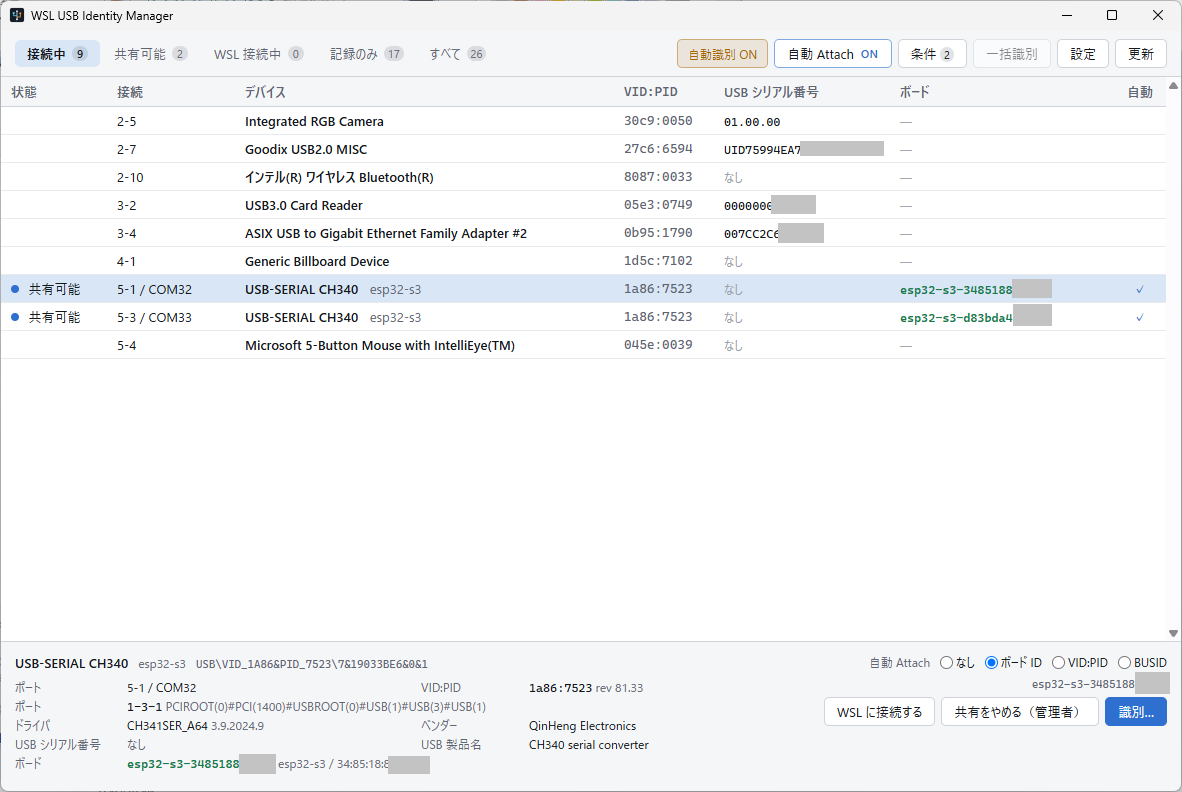
Two CH340s that report no serial number, told apart by the board on the end of
each one. The interface follows the OS language; this is the Japanese one.
The problem
Forwarding USB devices to WSL works, until you have more than one of the same adapter.
- A CH340 reports no serial number. With three of them plugged in, nothing in the
USB descriptors tells them apart. Windows can only say which port each one sits in.
- The bus ID is not a stable name.
usbipd's bus ID is Hub_#NNNN plus
Port_#MMMM, and the hub number is assigned in the order Windows happens to
enumerate hubs. Plug a dock in later and every device behind it gets a different
bus ID — the same bus ID now points at a different device.
- COM numbers and
/dev/ttyUSB* move too, for the same reason.
- An adapter or a probe names itself, not what is behind it. A CH340's serial
number — when it has one — belongs to the adapter, not to the board it is wired to.
A WCH-LinkE's serial number belongs to the probe; swap the board on its debug pins
and that serial does not change.
So "attach the CH340 to Ubuntu" is not a question this tooling can answer today.
When you say "that device", you usually mean the board — not the adapter in front of
it. There are up to three separate things on one cable:
| Example | How it is identified |
|---|
| Port | bus ID, COM8, /dev/ttyUSB2 | physical topology path — never persisted |
| Transport | CH340, CH343, WCH-LinkE | USB descriptors, when a serial number exists |
| Target | ESP32-S3, CH32X035 | by asking the board itself |
Identifying the target — the board behind the adapter or probe — is the point of
this tool. For a board with native USB the transport and the target are the same
thing, and its serial number is already enough. For everything else, the board has to
be asked.
Currently supported targets
| Family | Identified by |
|---|
| ESP32 (behind a CH340, CP210x, …) | eFuse MAC and chip type |
| CH32 RISC-V (behind a WCH-Link / WCH-LinkE) | factory UUID and chip signature, via ch32rv |
Anything else — Arduino, RP2040, STM32, or a bare adapter with an unknown board on it
— is identified down to the transport only, and says so rather than pretending
otherwise. Adding a family is meant to be additive.
What it does
Shares and attaches. usbipd has to be sharing a device before WSL can take it, so
a row offers share, attach, detach and stop sharing in the order they are used. Sharing
needs administrator rights; the prompt appears at that moment and nowhere else, so the
application itself runs unelevated. A device that is only a bind record — shared once,
now unplugged — can still be un-shared.
Identifies. Press identify on a row to ask the board what it is. A device with no
serial number is identified on its own in the seconds after it is plugged in, before
anything has opened it; that can be switched off, or a VID:PID excluded from it. An
adapter that reports a serial number is left alone by that rule, so identify-all is
there for the rest.
Attaches automatically. A rule names a device by its board ID, its USB serial
number, its VID:PID or its bus id, and matching devices are handed to WSL as soon as
usbipd is sharing them. The switch is in the toolbar, not buried in a dialog.
Two things it deliberately will not do on your behalf: it never shares a device
automatically, because that needs administrator rights and an automatic action should
not raise a UAC prompt, and it never identifies a board in order to decide whether to
attach it — a board-ID rule waits until the board has been identified for its own
reasons.
The approach
Separate where a device is plugged in from what device it is.
| Examples | Kept |
|---|
| Runtime connection | bus ID, COM number, /dev/ttyUSB0, attach state | shown, never used as a name |
| USB identity | VID/PID, USB serial, port path | read from Windows every time |
| Target identity | the board ID read from the target itself | for as long as the device stays plugged in |
| What it was last time | the name and board ID a device last had | saved, shown greyed, never acted on |
| Your own settings | auto-attach rules, what to leave alone | saved |
Anything that cannot be pinned down from USB descriptors is identified by asking the
target board itself — the same conclusion
board-identify reached on the Linux
side.
Asking the board disturbs it: reading an ESP32's eFuse MAC restarts the firmware, and
attaching to a WCH-Link halts the target core. So probing is not something this tool
does on a timer. It probes when you press the button, or in a short window right after
a device is plugged in, when nothing is using it yet.
What a probe found is dropped when the device is unplugged. Nothing in USB says
whether the board on the end of a CH340 was swapped while it was out, so a remembered
answer would be a guess wearing the clothes of a fact. Unplug it, plug it back in, and
it is an unidentified device again — press identify, or let the automatic window do it.
A device that has not been identified says so, rather than showing a name that might
belong to something else.
Scope
This tool owns the Windows side: enumeration, identification, usbipd state and
operations, and the rules for attaching to WSL automatically.
It does not manage anything inside WSL — no udev rules, no device node permissions,
no symlinks. Those stay with the existing Linux-side tooling. When the information is
available, it is displayed, never modified.
Requirements
- Windows 10 or 11 (x64)
- usbipd-win 5.x
- WSL 2
- WebView2 Runtime — included in Windows 11, and already present on the vast majority
of Windows 10 machines
Installation
Download the installer or the portable ZIP from the
latest release.
| |
|---|
wsl-usb-identity-manager__x64_setup.exe | Installs for the current user. No administrator rights. |
wsl-usb-identity-manager__x64_portable.zip | Unpack and run. Keeps its settings and log beside the executable. |
Builds are not code-signed, so Windows SmartScreen warns on first run until the
download has built up a reputation.
Documentation
Every document is kept in English and Japanese, linked to each other at the top.
- board-identify — the Linux-side
counterpart, publishing stable symlinks inside WSL
- ch32rv — WCH-Link probe implementation
- usbipd-win — the USB/IP host this tool drives
License
MIT. See LICENSE.