What it does
Windows hides installed software in at least six unrelated places. cwico
reads all of them, classifies everything it finds, and lets you remove what you
do not need - without breaking the operating system.
| Pass | What it reads | Win32 / WinRT API |
|---|
| Programs | DisplayName, DisplayVersion, Publisher, UninstallString, QuietUninstallString, InstallLocation, EstimatedSize, InstallDate | RegOpenKeyExW over HKLM/HKCU …\Uninstall, both the 64-bit and WOW6432Node views |
| UWP / AppX | Package full name, family name, publisher, architecture, install path, framework and system flags | Windows.Management.Deployment.PackageManager |
| Provisioned packages | Packages staged on the image that reinstall for every new user | FindProvisionedPackages |
| Services | Display name, state, start type, ImagePath | EnumServicesStatusExW, QueryServiceConfigW |
| Scheduled tasks | Full path, enabled state, run state | ITaskService / ITaskFolder COM |
| Autostart | Run, RunOnce (both hives, both views) and the Startup folders | Registry + filesystem |
Removal runs a four-step flow per item:
- Terminate the software's processes -
CreateToolhelp32Snapshot,
OpenProcess, TerminateProcess. Shared hosts (svchost.exe) and
boot-critical processes are never touched.
- Run the vendor's uninstaller, silently.
QuietUninstallString is
preferred; otherwise the silent switches are inferred for MSI, Inno Setup
and NSIS, and only for those.
- Remove the package -
RemovePackageWithOptionsAsync with
RemoveForAllUsers, then DeprovisionPackageForAllUsersAsync so it does
not come back for the next user account.
- Deep clean - leftover folders and registry keys, each one validated
against the deletion guard first.
What it looks like
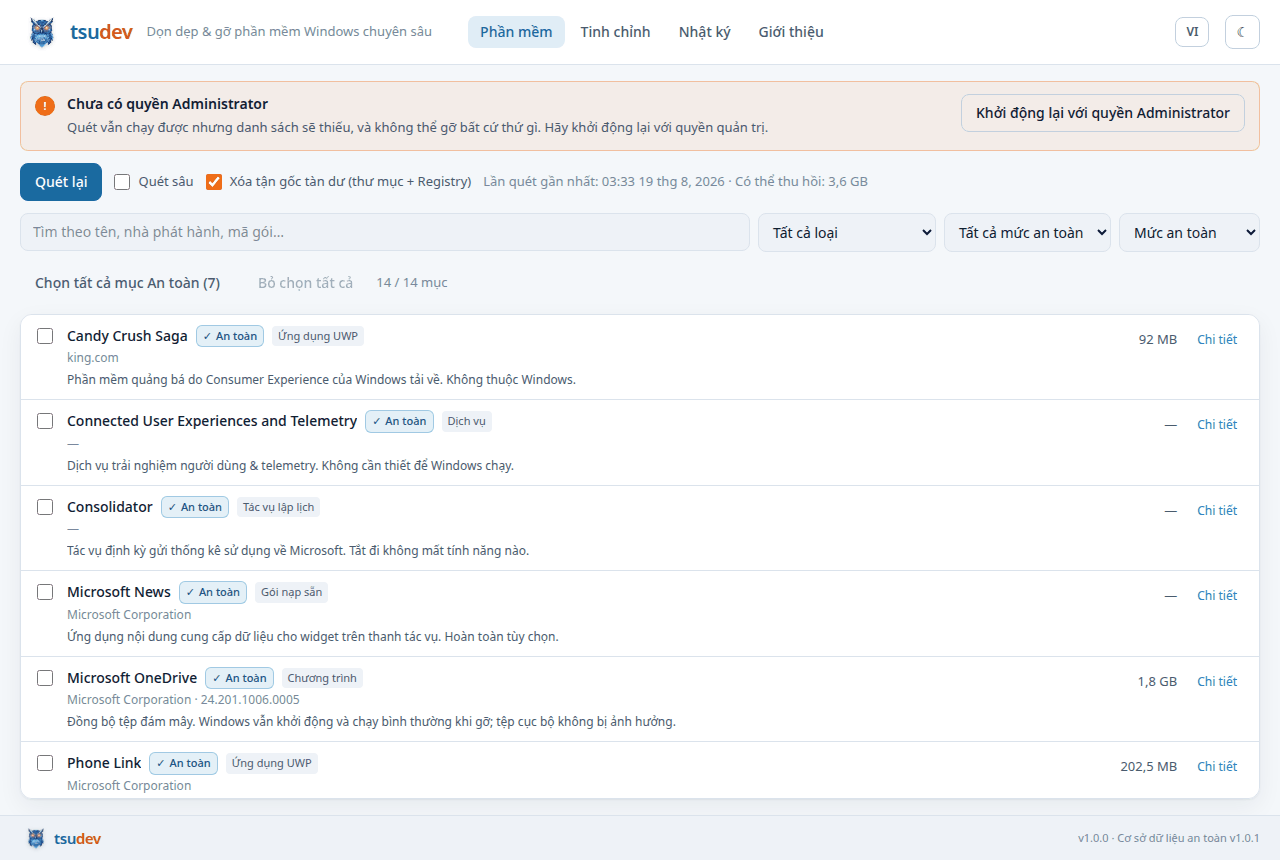
Every row carries its classification and why. A user deciding about
Microsoft Edge should not have to hover to learn that Windows renders PDF
previews with it.
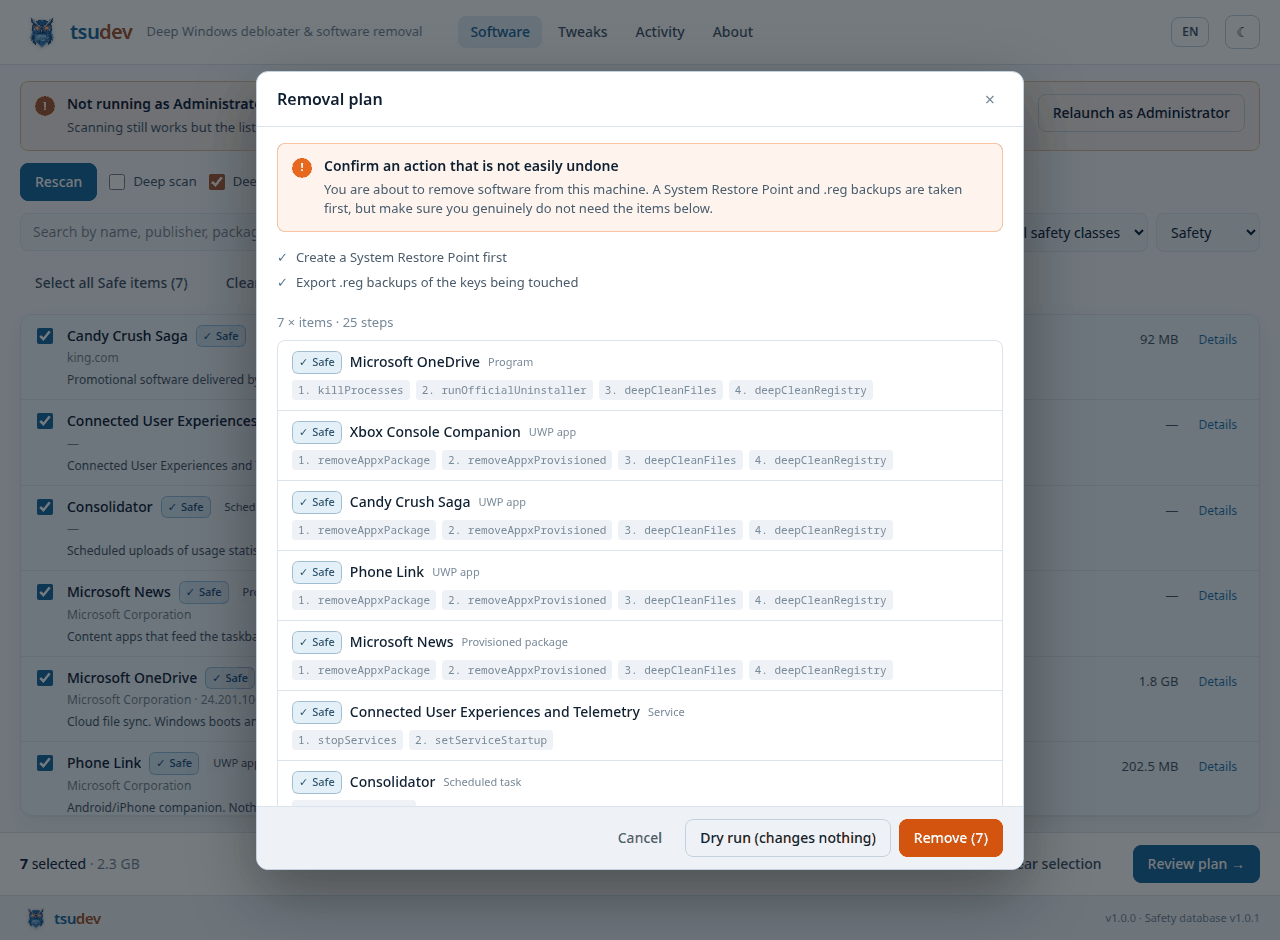
Nothing happens until you have seen the plan: the restore point and .reg
export that run first, then the exact steps for each item - and anything the
engine refused, with the reason.
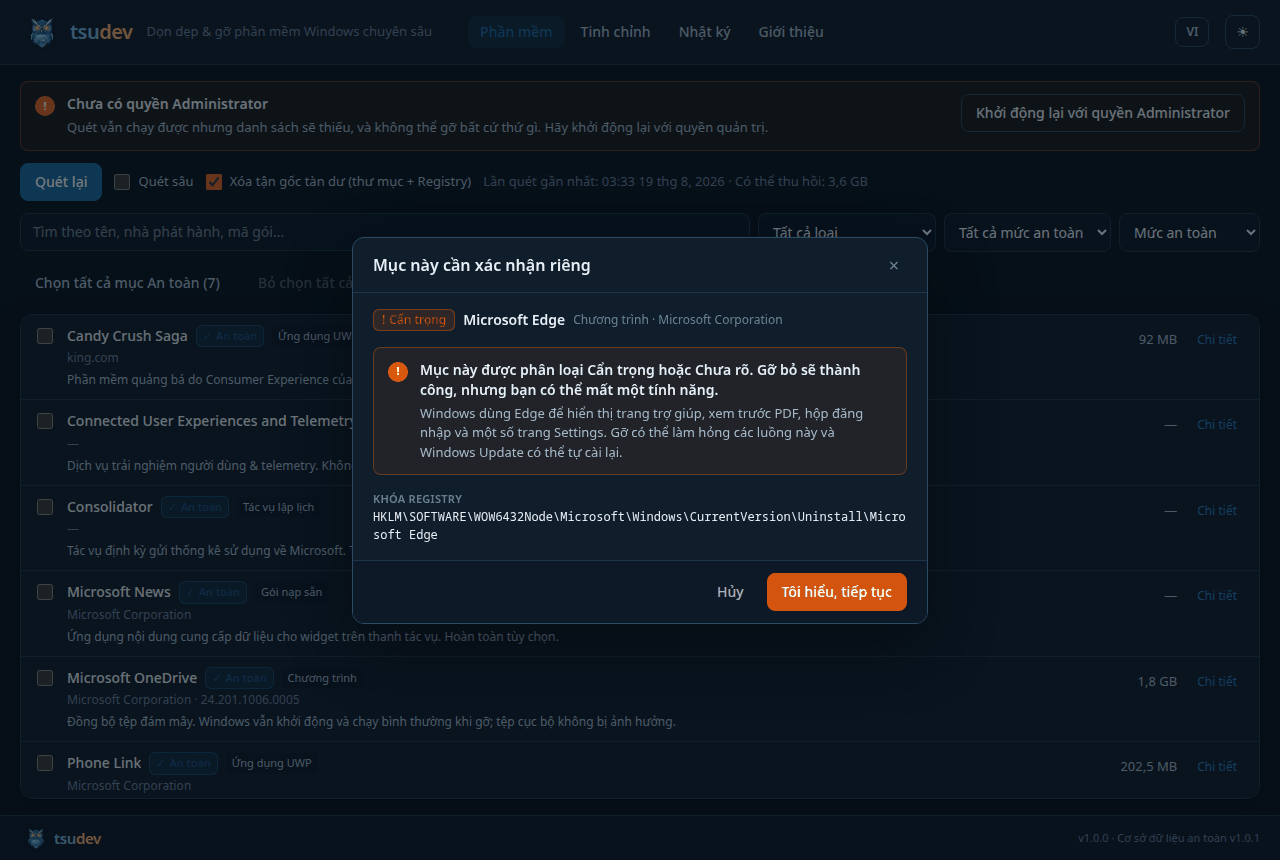
Ticking a checkbox is not the acknowledgement. Caution and Unknown items
open this, and it is the only thing in the interface that sets the confirmed
flag the engine requires.
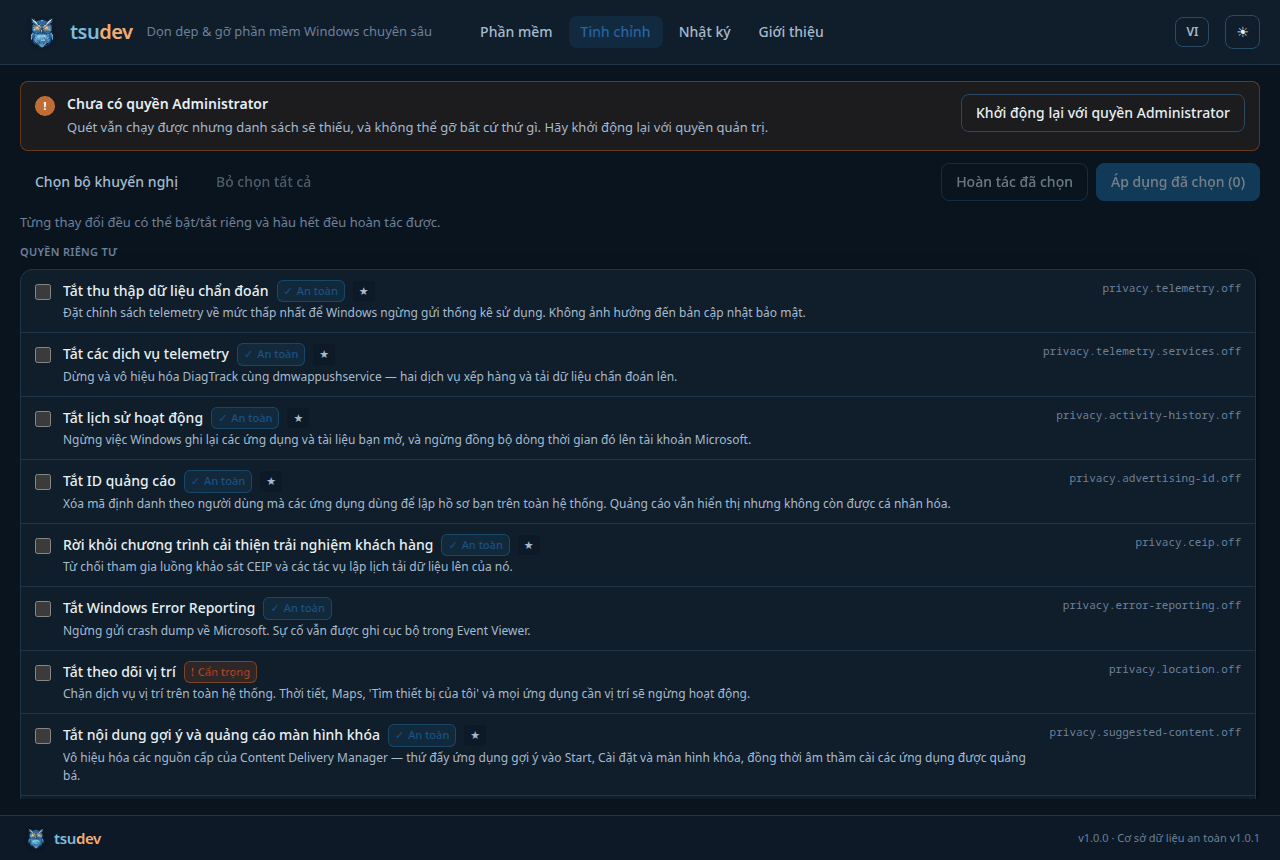
The old PowerShell script's twelve fixed steps, now 36 individually
selectable changes - each with a safety class, a revert path and an
explanation of what it costs.
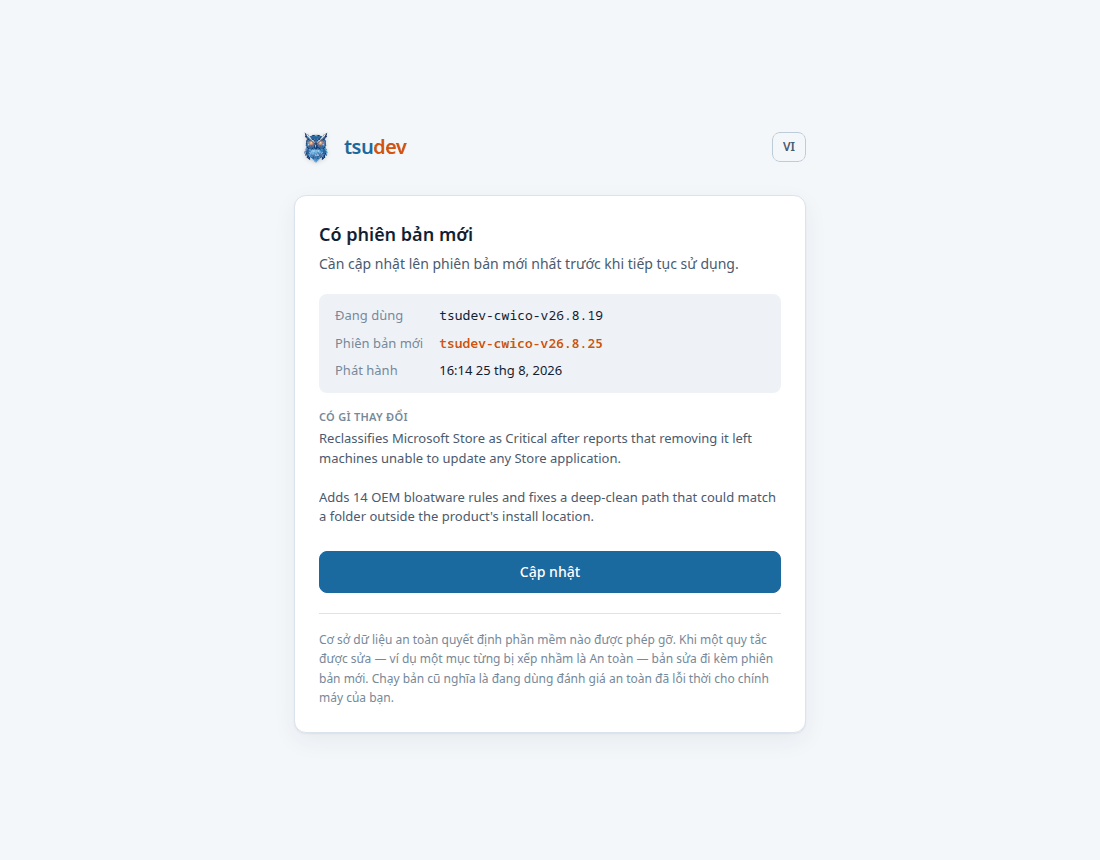
Publishing a release pushes a mandatory update. There is no dismiss and no
"later" - only Update - because a user on an old build is running an old idea
of what is safe to delete on their machine. A check that fails, though, lets
the app start normally: an outage must not lock everyone out at once.
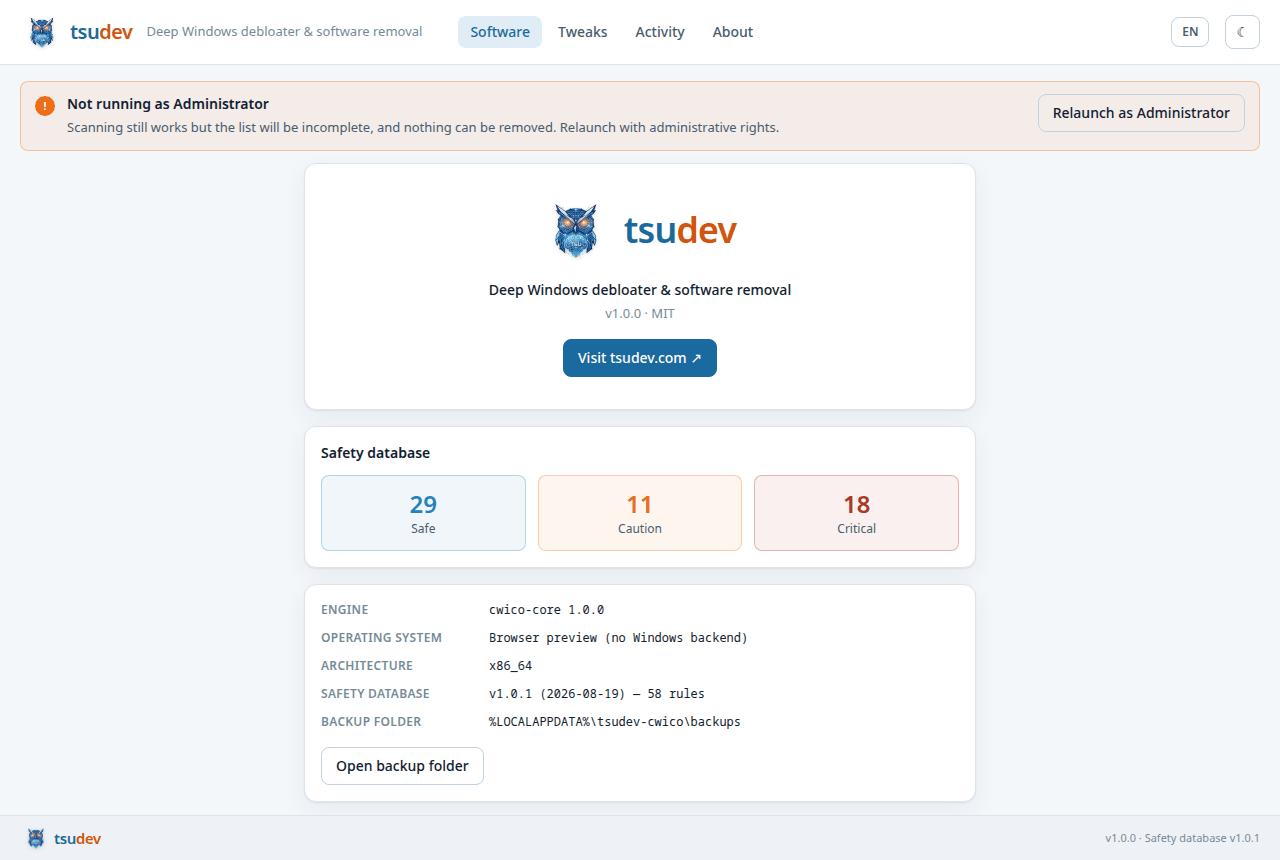
How much protection is actually loaded, and where your rollback artefacts go.
Rendered from the fixture backend (cwico-core's MockBackend), not a
live scan - which is also how the interface is developed and reviewed without a
Windows machine in the loop.
The safety model
A debloater's failure mode is an unbootable machine, so three independent
layers stand between a user and that outcome.
1. Classification - data/safety-db.json
Every discovered item is matched against a rule set of 58 rules:
| Class | Meaning | Count | Examples |
|---|
| Safe | No functional impact on Windows | 29 | OneDrive, Xbox app, Candy Crush, Bing News, Skype, telemetry services |
| Caution | Removal works, but costs a secondary feature | 11 | Microsoft Edge, Windows Camera, Photos, Media Player, Cortana, Microsoft Store |
| Critical | Removal breaks boot, logon, security or the shell | 18 | Defender, File Explorer, Settings, RPC/DCOM/WMI, VC++ and .NET runtimes, device drivers, licensing |
| Unknown | Matched no rule | - | Any third-party software the database has not seen |
An item that matches nothing is Unknown, never Safe - the database
fails closed. When an item matches both a Safe and a Critical rule,
Critical wins: severity beats specificity.
2. The planning gate - RemovalPlan::build
Critical items cannot be planned at all. Not with a flag, not with a
confirmation, not from the CLI. The plan type's constructor drops them and
records why, and the engine re-checks the invariant before executing.Caution and Unknown items need an explicit per-item confirmation.
A bulk "select all safe" action cannot supply one.- Everything refused is reported back with a reason. Nothing is dropped
silently.
3. The deletion guard - cwico_core::guard
Every filesystem path and registry key is validated immediately before
deletion, because residue paths come from the registry and vendors get them
wrong. Rejected outright:
- drive roots,
C:\Windows, System32, WinSxS, Program Files,
ProgramData, and anything that is a parent of a protected directory
- user profile roots and the user's own folders -
Documents, Desktop,
Downloads, OneDrive
- shared containers -
AppData, AppData\Local, Packages, Temp,
Start Menu\Programs
- every registry hive root,
HKLM\SOFTWARE, HKLM\SYSTEM\CurrentControlSet,
the services database
- any path still containing an unexpanded
%VARIABLE%, a .. traversal, or a
wildcard
The distinction the guard is careful about: C:\Users\me\OneDrive is the
user's synced files and is untouchable, while
C:\Users\me\AppData\Local\Microsoft\OneDrive is the client's own state
folder and is exactly what deep clean is for.
Rollback
Before the first destructive step of any run:
- a System Restore Point via
SRSetRestorePointW
(APPLICATION_UNINSTALL, bracketed by BEGIN_/END_SYSTEM_CHANGE). If it
cannot be created, the run aborts rather than proceeding unprotected -
a rollback you cannot perform is not a rollback.
- a
.reg export of every key the run will touch, in both registry views,
plus a generated restore-registry.cmd the user can run without this tool
installed.
- a transaction log (JSON) recording every step, its outcome and its
artefacts.
Quick start
Use it
Download the installer from releases,
or:
winget install tsudev.cwico
Run it as Administrator. Without elevation the scan is incomplete and nothing
can be removed.
Build it
git clone https://github.com/tsudev-tsudev/tsudev-cwico
cd tsudev-cwico

# Engine tests - run on any host, no flags needed
cargo test

# Type-check the Windows backend from Linux/macOS
rustup target add x86_64-pc-windows-gnu
cargo check -p cwico-win --target x86_64-pc-windows-gnu

# Desktop app (on Windows)
npm --prefix ui install
cargo tauri dev

# Ship it
cargo tauri build            # -> MSI + NSIS installers
Command line
cwico info                                   # platform, elevation, rule counts
cwico scan --safety safe --locale en         # what is safe to remove
cwico scan --json > inventory.json           # machine-readable audit
cwico plan --safe-only --deep-clean          # what would happen
cwico remove --name OneDrive --deep-clean --apply
Everything is a dry run until --apply. --name matches at word boundaries,
so --name Edge selects Microsoft Edge and not Acme Ledger Desktop.
Architecture
tsudev-cwico/
├── crates/
│   ├── cwico-core/          Platform-independent engine. No OS calls at all.
│   │   ├── model.rs           SoftwareItem, SafetyClass, Action
│   │   ├── safety.rs          The classifier
│   │   ├── plan.rs            The planning gate  ← Critical items die here
│   │   ├── guard.rs           The deletion guard ← unsafe paths die here
│   │   ├── engine.rs          The executor
│   │   ├── tweaks.rs          System tweak catalogue
│   │   └── mock.rs            Fixture backend for CI on any host
│   ├── cwico-win/           Windows backend
│   │   ├── registry.rs        RAII RegKey, both 32/64-bit views
│   │   ├── appx.rs            WinRT PackageManager
│   │   ├── services.rs        Service control manager
│   │   ├── tasks.rs           Task Scheduler COM
│   │   ├── process.rs         Toolhelp32 + TerminateProcess
│   │   ├── restore.rs         SRSetRestorePointW
│   │   ├── regbackup.rs       .reg export + rollback script
│   │   ├── deepclean.rs       Guarded deletion
│   │   ├── cmdline.rs         UninstallString parsing   (host-independent)
│   │   ├── naming.rs          Package/task name transforms (host-independent)
│   │   └── protected.rs       Process deny-list          (host-independent)
│   └── cwico-cli/           Headless interface
├── app/src-tauri/           Tauri v2 shell - a thin IPC layer, no logic
├── ui/                      React 19 + TypeScript + Tailwind 4
├── data/
│   ├── safety-db.json         58 classification rules
│   └── tweaks.json            36 system tweaks
└── assets/brand/            Logo and generated icon sets
Why the split. Everything that decides whether an action is safe lives in
cwico-core, which makes no OS calls and therefore runs its full test suite on
a Linux CI runner. The Windows crate is adapters. The Tauri layer is transport.
A bug in the UI cannot talk the engine into doing something dangerous, because
the UI does not get a say.
The three host-independent modules inside cwico-win are there for the same
reason: UninstallString parsing and package-name derivation are where the
subtle bugs live, so they are pure std and covered by tests that run
everywhere.
Tests
cargo test
136 tests. The ones that matter most:
selecting_everything_still_cannot_remove_a_critical_component - ticks every
row, confirms every prompt, presses go, and asserts Defender and RPC survive.a_required_restore_point_that_fails_aborts_before_anything_is_toucheda_failing_uninstaller_stops_that_item_but_not_the_run - and specifically
that deep clean does not run after a failed uninstall.a_folder_named_like_a_known_folder_is_still_residue_when_deep_in_appdatashared_host_processes_are_never_terminatedan_unquoted_program_path_containing_spaces_is_not_splitnsis_uninstall_exe_is_not_mistaken_for_inno_setup
Roadmap
Auto-update is in place: installed copies check GitHub Releases on startup and
block until a confirmed newer release is installed - see
docs/SIGNING.md for how update payloads are signed.
Ready, but waiting on something only a human can supply:
Genuinely future work:
The PlatformBackend trait is the seam the other platforms plug into; the
engine, the safety model and the entire UI are already portable.
Documentation
| |
|---|
docs/SAFETY.md | The design rationale for everything that stops this tool breaking a machine. Read before changing the safety layer. |
docs/RELEASING.md | Cutting a release. Publishing pushes a mandatory update to every installed copy, so this one matters. |
docs/SIGNING.md | The two signatures people conflate - update signing (done) and Authenticode (needs a certificate). |
docs/CODE-SIGNING-POLICY.md | Team roles, what gets signed, and what the software collects - nothing. |
docs/sessions/STATE.md | Where the project is right now, and what to do next. |
CONTRIBUTING.md | Where code belongs, and how to run everything. |
SECURITY.md | What counts as a security bug here, and six design commitments. |
docs/README.vi.md | Tiếng Việt |
Contributing to the safety database
data/safety-db.json is the most valuable file in this repository, and the
easiest to contribute to. A rule looks like:
{
  "id": "vendor.product",
  "class": "safe",
  "match": { "exact": ["product name"], "kinds": ["registry_uninstall"] },
  "reason": { "en": "Why it is this class.", "vi": "Lý do bằng tiếng Việt." },
  "processes": ["Product.exe"],
  "leftovers": {
    "paths": ["%LOCALAPPDATA%\\Vendor\\Product"],
    "registry": ["HKCU\\Software\\Vendor\\Product"]
  }
}
Both reason translations are required - a test enforces it. Classify
conservatively: Caution costs a user one confirmation click, while a wrong
Safe costs them a feature they did not agree to lose.
Licence
MIT © tsudev


