gitwink
English · 한국어 · 日本語


> Tray-resident, read-only git glance for the AI-agent era.
Status: Actively developed and ready for daily use.
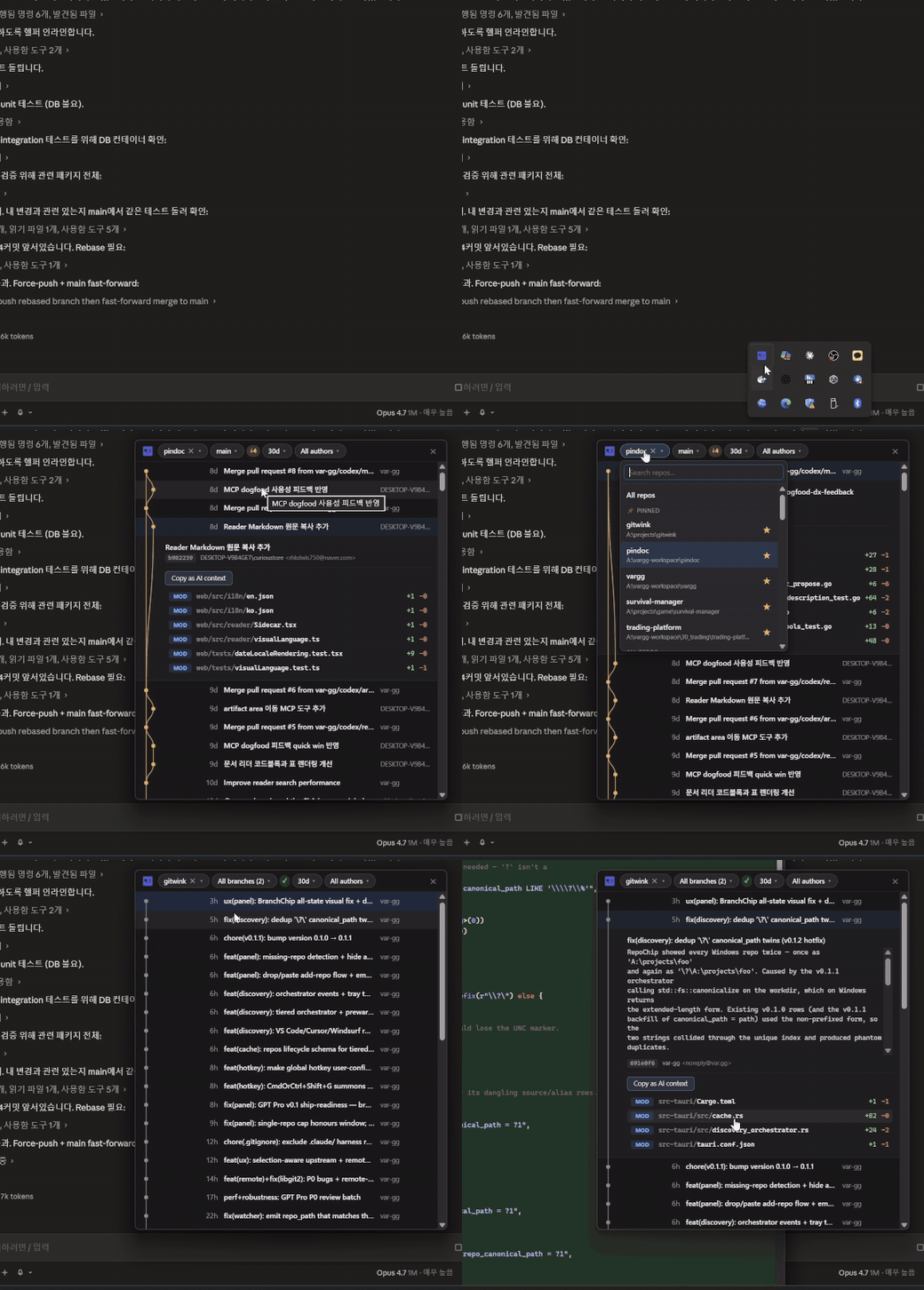
gitwink lives in your system tray. Click it to glance at recent commit
activity across all your local repos. It is not a git client — it
cannot commit, push, merge, or modify anything. Read-only by design.
Download
Windows — Microsoft Store:
Get gitwink on the Microsoft Store →
Or via WinGet:
winget install gitwink
WinGet installs the same standalone NSIS artifact as a direct download. It
therefore checks verified GitHub Releases and can update in-app; it is not the
Microsoft Store package.
The Store build is signed by Microsoft during certification, so no
SmartScreen prompt appears. Microsoft Store remains the source of truth for
updates; when a certified package is available to this device, gitwink can
download and install it in-app through the native Store update service.
Windows — Scoop:
scoop bucket add var-gg https://github.com/var-gg/scoop-bucket
scoop install gitwink
Update later with scoop update gitwink. Scoop installs the build by
extraction, so the SmartScreen prompt never appears.
Or download directly:
Download the latest release →
- Windows —
.exe (NSIS installer) or .msi
- macOS —
.dmg (universal)
Direct downloads are unsigned for now, so Windows SmartScreen / macOS
Gatekeeper will warn on first launch — the release notes have the
bypass steps. Prefer to build it yourself? See Development.
Code signing
Different install channels carry their own trust path:
- Microsoft Store — packages are automatically re-signed by
Microsoft during certification; SmartScreen stays silent.
- Scoop — installs by extraction, no SmartScreen prompt either.
- Direct downloads (
.exe / .msi) — currently unsigned. gitwink
participates in the SignPath Foundation free
code-signing program for open-source software (see the
Code signing policy); the SignPath
certificate will sign these artefacts once approved.
Origin
I used to live in VS Code with GitLens pinned. The branch graph,
heat-mapped blame, the lens annotations — that was my git workflow.
Then 2025 happened. With Cursor, Claude Code, and Codex doing the
actual editing, the editor itself became optional. The only thing
dragging me back was GitLens.
That felt wasteful — booting an entire IDE just to peek at commit
history. The agent runs the git commands now; I only need to
sanity-check the result, occasionally, when something looks off.
gitwink is the smallest possible tool for that loop — a tray icon
that expands into a glance, hands the commit off as AI context, and
gets out of the way.
No commit. No push. No merge. If I need git surgery, I tell the agent.
For the longer argument behind this design — what a git tool should even
be once the agent writes the code — see the essay
The agent writes the code now — what should a git tool be?.
The loop
The 0.5-second confirm loop:
agent commits  →  tray click  →  inline expand  →  "Copy as AI context"
                                                   →  paste into Claude/Codex
                                                   →  "did the agent do this right?"
Features
- System tray icon (Windows tray / macOS menu bar) with click-to-toggle
and right-click Check for updates / Settings / Reset panel position / Quit.
- Global hotkey
Ctrl+Shift+G (Windows) / Cmd+Shift+G (macOS) to
summon or dismiss the panel from anywhere. Change it live in
Settings → Shortcuts to any supported modifier + key combination.
- First-run discovery walks default user dirs (
source, Documents,
Projects, Code, Dev, repos, Desktop, every non-system drive on
Windows / ~/Projects, ~/Code, ~/Documents, ~/Developer on macOS).
Results are cached in SQLite at %APPDATA%\gg.var.gitwink\cache.db; later
panel summons recheck learned workspace roots so repositories created while
the tray process stays alive appear without an app restart.
- Unified commit timeline across all repos, with composable Repo, Time,
Author, and (in single-repo mode) Branch filters. Search stays inside
the active filter combination instead of becoming a separate view.
- Per-row markers —
● commit · ◆ merge · ★ tagged. Branch label
badges for commits that aren't on the currently checked-out branch.
- Single-repo mode: pick a repo and the panel switches to a per-branch
view with a custom SVG DAG lane drawer (eight-colour palette, hashed
from branch name; main / master / develop neutral).
- Resize the panel from any edge or corner, switch between default and wide
presets, or maximise for deeper reading. The preferred normal size is
remembered independently from UI scale.
- Inline expansion on click: commit message body + changed-file list
with NEW/MOD/REN/DEL badges,
+/− line counts, bin + size for
binaries, GitLens-style filename emphasis.
- Open a changed file's history from its clock button, then move between the
commits that touched that file, expand any revision, and open it in diff.
- Exclude a repository from gitwink via its context menu without touching the
folder, then restore it later from Settings with its preferences intact.
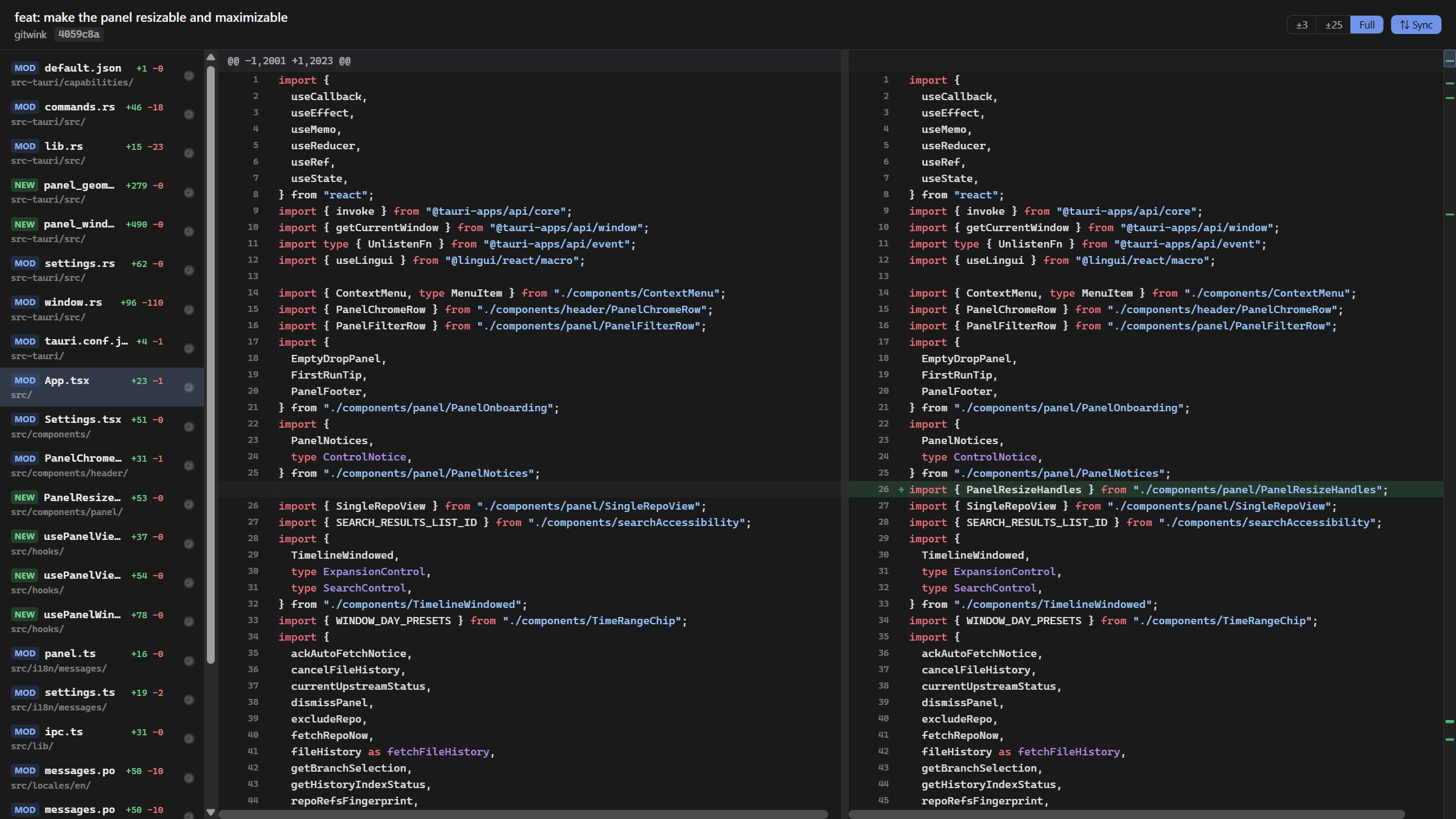
- Separate diff window (singleton, reused, position/size + maximised
persisted) for full reading: file sidebar + side-by-side diff with
synchronised horizontal scroll. PNG / JPG / GIF / WebP / SVG image
preview built in (before / after, with checker background). Local
Git LFS objects are looked up automatically; missing ones are
explained inline.
- Copy as AI context —
c key or button — produces a markdown block
with the commit, file list, and (if small enough) full diff, ready
to paste into Claude / Codex / Cursor.
- Agent control surface —
gitwinkctl capabilities --json, exact commit
landing, and single-file history landing. It is read-only and works without
MCP or a vendor-specific skill. See Agent control.
Diff window
For the "wait, did the agent actually do that?" moments. Expand a commit,
then select a changed file to open a separate window — full file sidebar,
side-by-side diff with synchronised scroll, inline image preview for binary
assets, and a singleton that remembers position, size, and maximised state.
Tech
Tauri 2 · Rust · React + TypeScript · git2 · SQLite · custom SVG DAG
drawer · read-only (never merges, pushes, or rewrites) · no telemetry or
analytics — network use is limited: an app-update check (GitHub for standalone
and Scoop installs, Microsoft Store for Store installs) and an origin fetch of
the repo you're viewing — automatic on panel open (on by default, switchable
off) or explicit via the ↻ button.
Development
pnpm install
pnpm tauri dev
Requires: Node 20+, Rust stable (msvc toolchain on Windows), Visual C++
Build Tools (Windows) or Xcode CLT (macOS).
- Windows 10/11 — primary target, tested on dev hardware
- macOS 13+ — should work, less battle-tested
- Linux — later
License
MIT