Moor Johan Walles
Use this command to install Moor:
winget install --id=walles.moor -e Moor is a pager. It's designed to just do the right thing without any configuration.
winget install --id=walles.moor -e Moor is a pager. It's designed to just do the right thing without any configuration.
Note: :warning: As of version 2.0.0, moar has been renamed to
moor, but is otherwise
the same tool.


Moor is a pager. It reads and displays UTF-8 encoded text from files or pipes.
moor is designed to just do the right thing without any configuration:
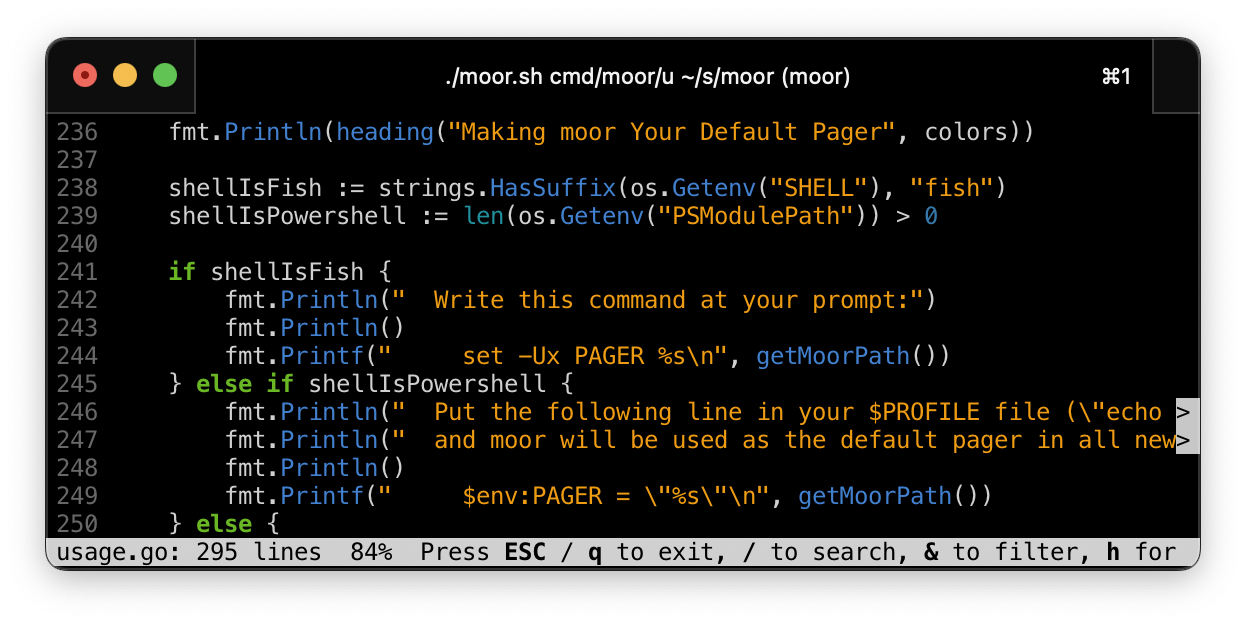
The intention is that Moor should be trivial to get into if you have previously been using Less. If you come from Less and find Moor confusing or hard to migrate to, please report it!
Doing the right thing includes:
moor invocationsgit diff | riff for example).gz, .bz2, .xz, .zst, .zstd) or streams--wrap or by pressing wtail -fFor compatibility reasons, moor
uses the formats declared in these environment variables if present:
LESS_TERMCAP_md: Man page boldLESS_TERMCAP_us: Man page underlineLESS_TERMCAP_so: Status bar and search hitsIn LESS_TERMCAP_* values, both actual escape characters and the word ESC in
caps are interpreted as escape characters. Example value: ESC[1m.
Setting LESSSECURE to 1 will prevent moor from launching external programs
or opening new files as required by systemctl(1). In
secure mode, the v command for opening the current file in an editor
is disabled.
For configurability reasons, moor reads extra command line options from the
MOOR environment variable.
Moor is used as the default pager by:
riff, a diff filter highlighting which line parts have changedpx / ptop, ps and top for human beingsftop, a top implementation which actually embeds
moor
using the embedding APIBoth macOS and Linux users can use Homebrew to install. See below for distro specific instructions.
brew install moor
Then whenever you want to upgrade to the latest release:
brew upgrade
On Debian Forky and newer, as well as on Ubuntu 26.04 Resolute and newer:
sudo apt install moor
sudo port install moor
More info here.
emerge --ask --verbose sys-apps/moor
More info here.
pacman -S moor
More info here.
goThis will install
moor into $GOPATH/bin
:
go install github.com/walles/moor/v2/cmd/moor@latest
NOTE: If you got here because there is no binary for your platform,
please consider packaging moor.
Download moor for your platform from
chmod a+x moor-*-*-*
sudo mv moor-*-*-* /usr/local/bin/moor
And now you can just invoke moor from the prompt!
Try moor --help to see options.
Do moor --help for an up to date list of options.
Environment variable MOOR can be used to set default options.
For example:
export MOOR='--statusbar=bold --no-linenumbers'
moor as your default pagerSet it as your default pager by adding...
export PAGER=/usr/local/bin/moor
... to your .bashrc.
Issues are tracked here, or you can send questions to .
If you package moor, do include the man page in your package.
batmoor and bat do different things. moor is a pager. bat is a file
preprocessor that sometimes pipes to a pager (like moor). So comparing them
directly is not possible.
What bat does is:
moor or something else.Some of bat's preprocessing overlaps with what moor provides internally
(like syntax highlighting and JSON formatting).
But some moor features like fast interactive search is moor specific and not
something bat can simulate through preprocessing.
To use moor as your bat pager, set BAT_PAGER=moor in your environment.
Or, to use moor instead of bat, set PAGER=moor.
moor in your appAPI Reference: https://pkg.go.dev/github.com/walles/moor/v2/pkg/moor
For a quick start, first fetch your dependency:
go get github.com/walles/moor/v2
Then, here's how you can use the API:
package main

import (
	"github.com/walles/moor/v2/pkg/moor"
)

func main() {
	err := moor.PageFromString("Hello, world!", moor.Options{})
	if err != nil {
		// Handle paging problems
		panic(err)
	}
}
After both go get is done and you have calls to moor in your code, you may
have to:
go mod tidy
You can also PageFromStream() or PageFromFile().
The twin directory contains the library used by moor for drawing to the
terminal screen. See its README for details.
You need the go tools.
Run tests:
./test.sh
Launch the manual test suite:
./manual-test.sh
To run tests in 32 bit mode, either do GOARCH=386 ./test.sh if you're on
Linux, or docker build . -f Dockerfile-test-386 (tested on macOS).
Run microbenchmarks:
go test -benchmem -run='^$' -bench=. ./...
Profiling BenchmarkPlainTextSearch(). Try replacing -alloc_objects with
-alloc_space or change the -focus function:
go test -memprofilerate=1 -memprofile=profile.out -benchmem -run='^$' -bench '^BenchmarkPlainTextSearch$' ./internal && go tool pprof -alloc_objects -focus findFirstHit -relative_percentages -web profile.out
Or to get a CPU profile:
go test -cpuprofile=profile.out -benchmem -run='^$' -bench '^BenchmarkRenderLines$' ./internal && go tool pprof -focus renderLines -relative_percentages -web profile.out
Build + run:
./moor.sh ...
Install (into /usr/local/bin) from source:
./install.sh
Make sure that screenshot.png matches moor's current UI. If it doesn't, scale a window to 81x16 characters and make a new one.
Execute release.sh and follow instructions.
Enable exiting using ^c (without restoring the screen).
Enable suspending using ^z, followed by resuming using fg.
Underline the file name in the status bar while viewing. The point is to make it more obvious where this name ends in case it contains whitespace.
Retain the search string when pressing / to search a second time.
Add > markers at the end of lines being cut because they are too long
Doing moor on an arbitrary binary (like /bin/ls) should put all
line-continuation markers at the rightmost column. This really means our
truncation code must work even with things like tabs and various control
characters.
Make sure search hits are highlighted even when we have to scroll right to see them
Change out-of-file visualization to writing --- after the end of the file
and leaving the rest of the screen blank.
Exit search on pressing up / down / pageup / pagedown keys and scroll. I attempted to do that spontaneously, so it's probably a good idea.
Remedy all FIXMEs in this README file
Release the go version as the new moor, replacing the previous Ruby
implementation
Add licensing information (same as for the Ruby branch)
Make sure git grep output gets highlighted properly.
Handle all kinds of line endings.
Make sure version information is printed if there are warnings.
Add spinners while file is still loading
Make tail -f /dev/null exit properly, fix
.
Showing unicode search hits should highlight the correct chars
Arrow keys up / down while in line wrapping mode should scroll by screen line, not by input file line.
Define 'g' to prompt for a line number to go to.
Handle search hits to the right of the right screen edge when searching forwards. Searching forwards now moves first right, then to the left edge and down.
Handle search hits to the right of the right screen edge when searching backwards. Searching backwards should move first left, then up and to the rightmost hit.