Dotsider
A TUI for analyzing .NET assemblies — structure, metadata, IL, strings, dependencies, and more. Inspired by binsider for ELF binaries, built for the .NET ecosystem.
dotsider RichLibrary.dll
Installation
dotnet tool install -g dotsider
On supported platforms, the .NET SDK installs the Native AOT build automatically.
Homebrew (macOS / Linux)
brew install willibrandon/tap/dotsider
WinGet (Windows)
winget install willibrandon.dotsider
Scoop (Windows)
scoop bucket add dotsider https://github.com/willibrandon/scoop-bucket
scoop install dotsider
Download binary
Grab a Native AOT archive from Releases. Static analysis is self-contained; the Dynamic tab requires a .NET 10-or-later runtime for the bundled trace host. Keep the archive's tracehost directory beside the executable. Native symbols are published separately.
What it does
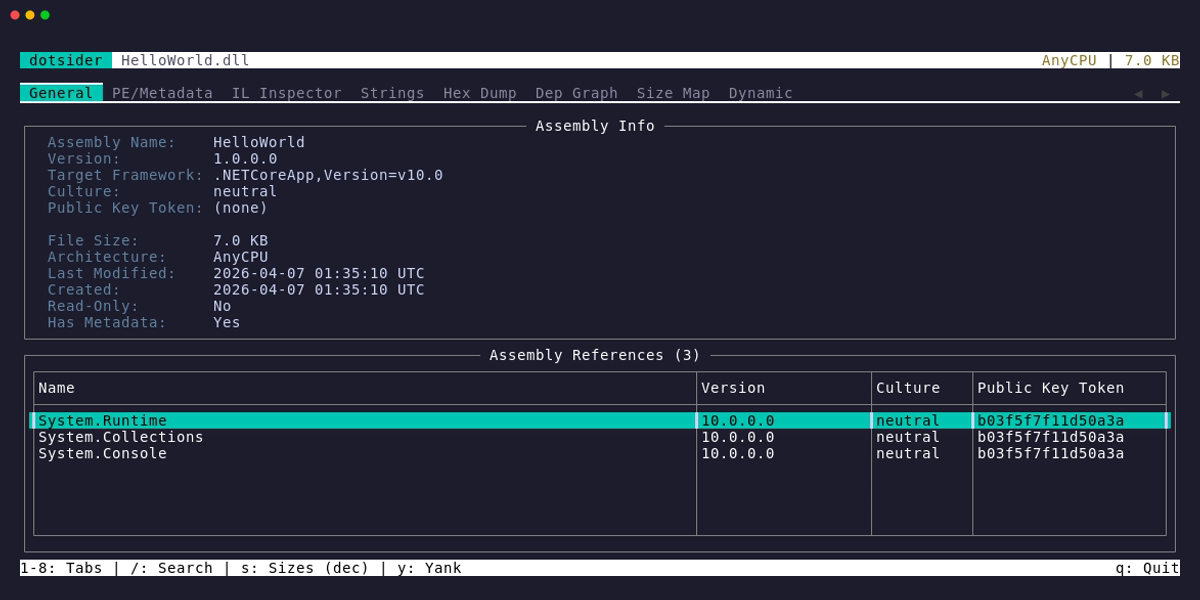
dotsider opens .NET DLLs, EXEs, and supported .wasm outputs and lets you explore them across 8 tabs. Apphost executables are handled as first-class inputs: when an .exe has no .NET metadata, dotsider offers to open the companion managed .dll. Self-contained single-file apps work too — dotsider reads the bundle, extracts the entry assembly, and analyzes it directly.
Native AOT binaries get native treatment instead of an empty metadata view. dotsider validates the embedded ReadyToRun header, walks the runtime sections, surfaces imports, exports, load config, recovered AOT types, recovered methods, and frozen string literals, then renders native disassembly for every .NET architecture it recognizes: x64, Arm64, x86, Arm32/Thumb-2, RISC-V64, LoongArch64, and Wasm32.
When the Native AOT build tree is available, dotsider can attach the pre-ILC managed assemblies plus their mstat/DGML sidecars. That fills the metadata tabs from the original managed inputs and shows each method's IL beside its native code.
ReadyToRun (crossgen2) images keep their full managed metadata, and dotsider joins that metadata to the precompiled method bodies in the same file or composite image. You can see IL beside native code, named call targets from import tables, and component assemblies followed in both directions.
Browser-wasm outputs split into two useful views. Point dotsider at dotnet.native.wasm and it parses the runtime module's Wasm sections, type/table/memory/global declarations, imports, exports, element and data segments, function bodies, and dotnet.native.js.symbols, then renders Wasm32 disassembly with direct-call targets and typed operands named from the same indexes the runtime uses. Structured vectors are bounded by their containing section and a shared 1,048,576-item decoding budget; malformed standard data retains the safely decoded prefix and reports a diagnostic instead of driving count-sized allocations. Point dotsider at a Webcil app assembly such as WasmConsole.wasm and it unwraps the managed metadata and IL instead of treating the container as runtime code.
| Tab | What you see |
|---|
| 1 General | Assembly identity, target framework, architecture, dependency table. Press Enter on a reference to drill into it. |
| 2 PE/Metadata | COFF headers, CLR header, PE/Wasm sections, TypeDefs, MethodDefs, AssemblyRefs, custom attributes, resources, debug directory, native imports, exports, load config, ReadyToRun sections, recovered AOT types, and native/Wasm symbols. Press g on a TypeDef or MethodDef to jump to its IL. |
| 3 IL / Native | The label reflects the loaded image: IL Inspector for managed IL, Disassembly for native-only views, and IL + Native when IL is paired with native code. Managed assemblies show a namespace/type/method tree with IL disassembly, PDB source spans, Source Link markers, locals, go-to-definition, and hex jumps. Native AOT binaries and raw Wasm modules list recovered functions and render real disassembly for x64, Arm64, x86, Arm32/Thumb-2, RISC-V64, LoongArch64, and Wasm32 with named call/branch/data targets, Foo+0x12, loc_… labels, MODULE!Function imports, and Wasm function-index calls. ReadyToRun images keep the managed tree, mark precompiled methods, and show IL beside native ranges (hot, funclets, cold). Attached pre-ILC sidecars do the same for Native AOT methods. |
| 4 Strings | User strings, metadata strings, raw ASCII and UTF-16 binary scans, and frozen AOT string literals, with configurable minimum length. |
| 5 Hex Dump | Hex editor with vi-style modal editing (read-only by default), byte category coloring, data interpretation panel, jump-to-offset, and vim navigation. |
| 6 Dep Graph | Visual dependency graph — your assembly at the root, references as nodes, edge weights by TypeRef count. Press Enter on a node to open that assembly. |
| 7 Size Map | Treemap of code size — Assembly > Namespace > Type > Method, sized by IL byte count. Click to drill in; Enter on a method leaf jumps to its IL. |
| 8 Dynamic | Launch the assembly and trace it live via EventPipe — GC events, JIT compilations, exceptions, performance counters, stdout. Press a to edit literal process arguments; press Enter on a JIT event to jump to that method's IL. |
Additional modes
dotsider diff v1.dll v2.dll             # side-by-side assembly comparison
dotsider diff before.mstat after.mstat  # Native AOT size diff — delta treemap of two builds
dotsider package.nupkg                  # browse NuGet package contents, inspect any DLL inside
Building
Requires .NET 10 SDK.
dotnet build
The binary lands at src/Dotsider/bin/Debug/net10.0/dotsider. The build also places the framework-dependent EventPipe helper in tracehost; keep that directory with the executable when using the Dynamic tab.
Usage
dotsider  # TUI mode — interactive assembly/native module explorer
dotsider         # TUI mode — browse NuGet package contents
dotsider diff      # TUI mode — assembly comparison; AOT size diff for mstat inputs

dotsider analyze  [opts]  # CLI mode — headless analysis to stdout or file
dotsider size-check     # CLI mode — AOT size regression report and CI budget gate
dotsider sessions      # CLI mode — interact with running dotsider instances
dotsider agent init [opts]      # CLI mode — generate an agent skill file
dotsider agent mcp              # CLI mode — launch the dotsider MCP server

TUI options:
  -t, --tab <1-8>               start on a specific tab
  -n, --min-len              minimum raw string length (default: 4)
  -v, --version                 show version
  -h, --help                    show help
CLI: dotsider analyze
Run analysis without the TUI — pipe to other tools, write to files, or output JSON for scripting.
Human-readable TUI, terminal, redirected, and -o text escapes control and Unicode formatting
characters recovered from analyzed files. Use --json when exact string values are required.
dotsider analyze MyLib.dll                      # assembly info (default)
dotsider analyze MyLib.dll --types              # list type definitions
dotsider analyze MyLib.dll --methods            # list method definitions
dotsider analyze MyLib.dll --il Type.Method     # disassemble a method
dotsider analyze MyAotApp.exe --symbols         # list native symbols (Native AOT / native binaries)
dotsider analyze MyAotApp.exe --disasm 'Program.$'  # disassemble a native function (name or 0xVA)
dotsider analyze MyAotApp.exe --correlate       # correlate with pre-ILC assembly (counts)
dotsider analyze MyAotApp.exe --correlate Type.Method  # IL and native code side by side (name or 0xVA)
dotsider analyze MyR2RApp.dll --r2r-correlate   # ReadyToRun stats (precompiled methods, composite)
dotsider analyze MyR2RApp.dll --r2r-correlate Type.Method  # IL beside precompiled native (name or 0xVA)
dotsider analyze dotnet.native.wasm --symbols   # list SDK Wasm function symbols
dotsider analyze dotnet.native.wasm --disasm 0x1234  # disassemble a Wasm function body
dotsider analyze MyLib.dll --embedded-source Type.Method # print embedded source
dotsider analyze MyLib.dll --deps               # assembly references
dotsider analyze MyLib.dll --strings            # extract strings
dotsider analyze MyLib.dll --fields             # list field definitions
dotsider analyze MyLib.dll --size               # size breakdown
dotsider analyze MyLib.dll --bundle             # show single-file bundle manifest
dotsider analyze MyLib.dll --json               # any of the above as JSON
dotsider analyze MyLib.dll --types -o out.txt   # write to file
dotsider analyze MyApp.exe                      # apphost .exe → auto-redirects to MyApp.dll
dotsider analyze MyApp                          # single-file bundle → extracts and analyzes entry assembly
CLI: dotsider size-check
Native AOT size-regression checking for CI: compare a build against a baseline via their
mstat size reports (IlcGenerateMstatFile), enforce size budgets, and exit non-zero when one
breaks. Inputs are bare .mstat files or AOT binaries with the sidecar beside them.
dotsider size-check out/pr/app --baseline baseline/app.mstat            # delta report, exit 0
dotsider size-check out/pr/app --baseline baseline/app.mstat \
  --budget total:growth=1% --budget ns=MyApp.Generated:growth=0         # gate: exit 2 on breach
dotsider size-check out/pr/app --baseline baseline/app.mstat \
  --format markdown --summary-file "$GITHUB_STEP_SUMMARY"               # GitHub step summary
dotsider size-check out/pr/app --budget max=25mb                        # absolute cap, no baseline
Run the action or task on pull requests and the target branch. The first successful branch
run enforces absolute limits and stores a managed baseline; later pull requests compare with
the newest successful target-branch run:
- name: Check NativeAOT size
  uses: willibrandon/dotsider@v0
  with:
    target: out/pr/App
    budgets: |
      max=25mb
      growth=1%
Azure Pipelines provides the same contract through DotsiderSizeCheck@1:
- task: DotsiderSizeCheck@1
  inputs:
    target: '$(Build.ArtifactStagingDirectory)/current/App'
    budgets: max=25mb
For a pull request, Dotsider warns when the managed baseline comes from a different
target-branch commit. The warning shows both commits and the source run, then asks for a
successful size check on the target branch. The size check and budgets still run. The status
is current when the commits match, mismatched when they differ, and unknown when commit
details are unavailable.
When no baseline exists yet, absolute limits run and growth limits are clearly deferred; a
successful branch build establishes it. Set baseline only as an explicit override. See the
size-regression guide for that workflow,
stable provenance outputs, optional /aot-size reports, and the offline dotsider-path
option.
Budgets: [scope:]limit(,limit)* — scope total / ns= (covers sub-namespaces) /
asm=; limits max=SIZE and growth=SIZE|PERCENT (25mb, 10kb, 1%).
--budget-file adds a JSON document whose object entries carry names, descriptions,
severity: "warning" (reported, never fails), and per-budget contributor counts. --why
attaches the ILC dependency chain for top added contributors. Exit codes: 0 pass, 1 error,
2 budget exceeded.
CLI: dotsider sessions
Interact with running dotsider TUI instances. Each instance exposes a Unix domain socket for programmatic access.
dotsider sessions list                          # list running instances
dotsider sessions info                     # assembly info + current view
dotsider sessions view                     # current tab and view state
dotsider sessions navigate            # switch to tab (1-8)
dotsider sessions capture                  # capture screen as plain text
dotsider sessions trace start              # start tracing the loaded assembly
dotsider sessions trace start  -- --flag "two words"
dotsider sessions trace events             # get JIT, GC, exception events
dotsider sessions trace counters           # get performance counters
dotsider sessions trace output             # get stdout/stderr from traced process
dotsider sessions trace stop               # stop the active trace
CLI: dotsider agent
MCP server management and agent skill file generation.
dotsider agent mcp                                      # launch the dotsider MCP server
dotsider agent init                                     # write ./SKILL.md
dotsider agent init --path ./dotsider/SKILL.md              # write to an explicit path
dotsider agent init --stdout                            # print skill content to stdout
By default, init writes SKILL.md in the current directory. Use --path when your agent expects skills in a specific directory.
Keyboard
| Key | Action |
|---|
1-8 | Switch tabs |
Enter | Drill into selected item (assembly ref, method, DLL in package) |
Esc | Go back (assembly stack, breadcrumb, or cross-view jump) |
y | Yank (copy) — selected text in editors, or focused row in tables |
yy | Yank entire line under cursor |
V | Select entire line under cursor |
iw | Select inner word (vim text object) |
iW | Select inner WORD (whitespace-delimited — grabs fully-qualified names) |
yiw / yiW | Select + yank word/WORD in one motion |
Tab | Cycle focus between info panels and tables |
Enter / gd | Go to definition (tab 3 IL/native view, cursor on a token-bearing instruction) |
g | Go to tab 3 for the focused TypeDef/MethodDef (PE/Metadata tab) |
u | Copy Source Link URL from a [source link] marker in tab 3's IL view |
x | Jump to method body in Hex Dump (tab 3, when a file-backed method or symbol is selected) |
/ | Search (highlights matches inline) |
n / N | Next / previous search match |
s | Toggle human-readable sizes |
q | Quit |
Info panels (Assembly Info, PE Headers, CLR Header, detail popups, string details) are selectable read-only editors. Click or Tab into them, select text with Shift + arrow keys, and press y to copy. For word-level selection without the mouse, iw selects the word under the cursor and iW selects the full whitespace-delimited token — yiw copies it in one keystroke. V selects the entire line and yy copies the entire line in one motion.
Hex Dump tab uses vi-style modal editing — the editor starts in normal mode (read-only) to prevent accidental writes:
| Key | Mode | Action |
|---|
i | Normal | Enter insert mode (enables byte editing) |
Esc | Insert | Return to normal mode |
h j k l | Normal | Vim-style cursor movement |
g | Normal | Jump to hex offset |
e | Normal | Toggle endianness (LE/BE) |
Ctrl+T | Any | Toggle text/hex search mode |
Ctrl+S | Normal | Save edited bytes (only when modified) |
In insert mode, type two hex digits (0-9, a-f) to overwrite one byte. The first digit sets the high nibble; the second commits the edit. Saving validates the PE image before writing — invalid edits are rejected.
Diff mode adds f to cycle filters (All / Added / Removed / Changed). The size-diff view (mstat inputs) adds Grown and Shrunk to the filter cycle, Enter/Esc to drill and back out of the delta treemap, w for the dependency chain that keeps an entry in the binary (aggregate tiles show representative child chains; press again to flip sides on a changed entry), and d to disassemble a method's native body. NuGet mode uses Esc to return from DLL inspection to the package browser.
How it works
dotsider starts with the low-level APIs that ship with .NET, then layers its own readers on top for the binary formats the runtime libraries do not expose directly:
System.Reflection.Metadata provides MetadataReader for traversing ECMA-335 metadata tables (types, methods, references, custom attributes, string heaps)System.Reflection.PortableExecutable provides PEReader for PE structure (COFF header, sections, CLR header, method bodies)- Custom Native AOT, ReadyToRun, WebAssembly, and Webcil readers parse RTR section tables, recovered NativeFormat metadata, frozen objects, mstat/DGML sidecars, native symbols, precompiled method maps, Wasm standard/custom sections, function bodies, SDK symbol maps, and managed
.wasm app payloads
- From-scratch native decoders render AOT, R2R, native, and Wasm code for x64, Arm64, x86, Arm32/Thumb-2, RISC-V64, LoongArch64, and Wasm32
System.IO.Compression handles NuGet packages (which are just ZIP files containing a .nuspec manifest and DLLs)
The dynamic analysis tab uses Microsoft.Diagnostics.NETCore.Client to connect to a running .NET process via EventPipe — the same diagnostic infrastructure that powers dotnet-trace and dotnet-counters. It launches your assembly with a reverse-connect diagnostic port, so events are captured from the very first instruction.
The TUI is built on Hex1b, a .NET terminal UI library with a React-inspired declarative API, constraint-based layout, theming, and efficient widget reconciliation.
MCP server
dotsider-mcp is a standalone Model Context Protocol server that exposes dotsider's analysis engine to AI coding assistants like Claude Code, VS Code Copilot, and others.
Install
dotnet tool install -g Dotsider.Mcp
The .NET SDK selects the Native AOT package for supported Windows, Linux, and macOS runtime identifiers. Other supported environments use the framework-dependent any package.
Homebrew (macOS / Linux)
brew install willibrandon/tap/dotsider-mcp
WinGet (Windows)
winget install willibrandon.dotsider-mcp
Scoop (Windows)
scoop install dotsider-mcp
Download binary
Grab a self-contained Native AOT binary from Releases. Native symbols are published separately.
Add to your MCP client configuration (e.g. .mcp.json for Claude Code):
{
  "mcpServers": {
    "dotsider": {
      "command": "dotsider-mcp"
    }
  }
}
What it provides
52 tools across assembly analysis, IL disassembly, native disassembly, Native AOT analysis, WebAssembly inspection, portable PDB debug info, metadata inspection, dependency graphs, size analysis, size diffing and budget gating, string extraction, diffing, NuGet package analysis, single-file bundle reading, and runtime tracing. Tools work in two modes:
- Direct mode — pass an assembly path, get results (no TUI needed)
- Session mode — connect to a running dotsider TUI instance via Unix domain socket for live state, tracing, and navigation
5 guided prompts for common workflows: security audit, API surface review, breaking change detection, dependency health analysis, and single-file bundle inspection.
Project structure
src/Dotsider.Core/
  Analysis/           PE reading, metadata extraction, IL disassembly, diffing,
                      dependency graphs, size analysis, runtime tracing,
                      single-file bundle reading, .NET shared framework discovery
  Analysis/Disasm/    Native instruction decoders
  Analysis/Dwarf/     DWARF symbols, line programs, and unwind data
  Analysis/Models/    Data types for analysis results
  Analysis/NativePdb/ Native PDB/MSF readers
  Analysis/ReadyToRun/ ReadyToRun metadata, signatures, and method maps
  Analysis/Signatures/ Bounded ECMA-335 signature validation and decoding
  Analysis/Wasm/      WebAssembly, Webcil, and SDK symbol readers
  Protocol/           Request/response types and JSON options for the UDS protocol

src/Dotsider/
  Commands/           CLI subcommands (analyze, diff, size-check, sessions, agent)
  Diagnostics/        Unix domain socket listener for TUI state access
  Infrastructure/     Output formatting, terminal escaping, and session discovery
  Views/              TUI widget trees, renderers, and view helpers
  DotsiderApp.cs      Main app shell (tab panel, key bindings, hints bar)
  DotsiderState.cs    Standard analysis-mode state
  DiffApp.cs          Diff mode shell
  SizeDiffApp.cs      Size-diff mode shell (Native AOT mstat pairs)
  NuGetApp.cs         NuGet mode shell
  Program.cs          CLI entry point and mode routing

src/Dotsider.Mcp/
  Tools/              MCP tool classes (assembly, IL, metadata, deps, size, etc.)
  Prompts/            Guided analysis prompts (security, API review, breaking changes)
  Program.cs          MCP server entry point (stdio transport)

src/Dotsider.TraceHost/
  EventPipeRuntimeTracer.cs Framework-dependent EventPipe collection
  Program.cs          NDJSON transport used by the Native AOT front end

src/Dotsider.Website/
  Program.cs          Hosted interactive demo and WebSocket session endpoint

src/Dotsider.DocGenerator/
  Program.cs          DocFX-to-Starlight API reference generator

src/Dotsider.DeployHost/
  Program.cs          Native AOT host provisioning, validation, and maintenance helper

samples/
  HelloWorld/               Minimal console app
  ComplexApp/               Async pipeline with embedded resources
  RichLibrary*/             NuGet-backed library pair with deliberate API changes
  MinimalApi/               ASP.NET Core hosted entry point
  NativeLib/                Unsafe code, P/Invoke, and pointer operations
  EmptyLib/                 Minimal-library edge cases
  EmbeddedSourceLib/        Embedded portable PDB source
  TerminalControlLib/       Compiler-emitted hostile terminal-control strings
  Dotted.Name.App/          Dotted assembly name for apphost detection
  AppLocalRollForward/      App-local runtime roll-forward resolution
  SelfContainedConsole/     Self-contained single-file bundle
  NativeAotConsole*/        NativeAOT tracing and size-diff pair
  NativeAotArtifactsConsole/ NativeAOT sidecar and symbol artifacts
  NativeAotLibrary/         NativeAOT shared-library exports
  HardwareIntrinsics/       NativeAOT hardware-intrinsic code generation
  ReadyToRunConsole/        Cross-RID ReadyToRun and Webcil publishing
  ReadyToRunComponentLib/   ReadyToRun composite component
  ReadyToRunComposite/      Composite ReadyToRun image
  WasmConsole/              Browser-Wasm and Wasm-AOT publishing
  MultiModule*/             Manifest/netmodule resolution pair
  NetFxConsole/             .NET Framework 4.8 Dynamic-tab guard
  NetFxBindingRedirects*/   CLR 4 and CLR 2 binding, GAC, codeBase, privatePath,
                            version, and satellite-culture fixture families

tests/Dotsider.Tests/
  SampleAssemblyFixture.cs   Builds and publishes shared real artifacts once per test run
  Synthetic*                 Malformed and boundary-format fixture builders
  *Tests.cs                  Unit, real-artifact, CLI, and headless-TUI tests

tests/Dotsider.Mcp.Tests/
  McpServerTestBase.cs       In-memory MCP server setup for testing
  *Tests.cs                  MCP tool and prompt integration tests

tests/Dotsider.Website.Tests/
  *Tests.cs                  Demo admission and WebSocket limit tests

tests/Dotsider.Deploy.Tests/
  *Tests.cs                  Deployment unit and Debian 13 container tests

tests/Shared/                 Shared MSTest settings, assertions, and socket identifiers
scripts/                      Test, deployment, and native-disassembly utilities
.devcontainer/                Reproducible Linux contributor environment
benchmarks/Dotsider.Benchmarks/ BenchmarkDotNet performance suite
docs/                         Starlight documentation site
deploy/                       Hosted-demo deployment and monitoring configuration
wix/                         Windows installer definitions
Testing
dotnet test
The suite combines unit tests, synthetic malformed-format fixtures, real compiler and publisher
artifacts, CLI subprocesses, and headless TUI scenarios. The shared fixture builds the required
sample projects automatically, including cross-RID ReadyToRun publishes for architecture-specific
native decoder coverage when the SDK has the required packs. First run takes longer due to NuGet
restore; subsequent runs use the cache.
Native-disassembly goldens are regenerated explicitly with the .NET file-based oracle tool:
dotnet run --file ./scripts/Capture-DisasmOracle.cs -- -Architecture riscv64 -Fixture path/to/blob.bin -OraclePath llvm-objdump -OutputDirectory artifacts/oracles/disasm -- -D -b binary -m riscv:rv64 path/to/blob.bin
Pass -RuntimeRoot path/to/runtime or set DOTSIDER_RUNTIME_ROOT when the oracle input comes from a local runtime clone. The tool records the oracle command, SDK version, runtime provenance when supplied, and normalized output beside the golden so decoder changes stay reviewable. See scripts/README.md for the build-first form used by automation.
Samples
Build the sample assemblies to have something to analyze:
dotnet build samples/RichLibrary
dotsider samples/RichLibrary/bin/Debug/net10.0/RichLibrary.dll
Try diff mode with the two library versions:
dotnet build samples/RichLibraryV2
dotsider diff \
  samples/RichLibrary/bin/Debug/net10.0/RichLibrary.dll \
  samples/RichLibraryV2/bin/Debug/net10.0/RichLibrary.dll
Try the Native AOT size diff with the two AOT builds (publishes with ILC — takes a minute):
dotnet publish samples/NativeAotConsole -c Release
dotnet publish samples/NativeAotConsoleV2 -c Release
dotsider diff \
  samples/NativeAotConsole/bin/Release/net10.0//publish/NativeAotConsole.mstat \
  samples/NativeAotConsoleV2/bin/Release/net10.0//publish/NativeAotConsole.mstat
License
MIT