🧿 nazar-tray
Your Claude Code and Codex quota, in the system tray. Zero credentials, zero network. The tray face of Nazar.
A pixel bead sits in your tray. Hover it for your most-constrained window and what this week has cost; click it for the full picture: every window, its percentage, when it resets, and where your tokens went. Orange at 60 %, red at 85 %, a notification before you hit the wall.
> Status: 0.3.0, released. 0.1.0 brought both readers, the refresh loop inside the tray
> process, ~/.nazar/limits.json written atomically by one process and only when the numbers
> have moved, the icon and the panel, notifications, autostart, settings, six languages, the
> installer, the winget manifests and the release pipeline. 0.2.0 added the usage history:
> what you actually spent, per model, per day, per week and for all time, for both providers,
> off files that were already on your disk. Windows is the daily driver and Linux ships
> beside it: the same codebase, built by the same pipeline, with a .deb and an .rpm on
> every release from 0.3.0 onwards. macOS waits for a signing certificate.
>
> winget takes a day or two to catch up. The package is submitted as a pull request
> against microsoft/winget-pkgs once the release is out, and a reviewer there merges it. The
> package's first pull request, for 0.2.0, is still in review and 0.3.0 follows it, so until
> winget install xfurqan0.nazar-tray resolves, take the installer from
> Releases — the same file, with its hash
> and its attestation.
>
> docs/PROJECT.md has the v1 plan, CHANGELOG.md what has
> landed, and docs/RELEASE.md how a release is made.
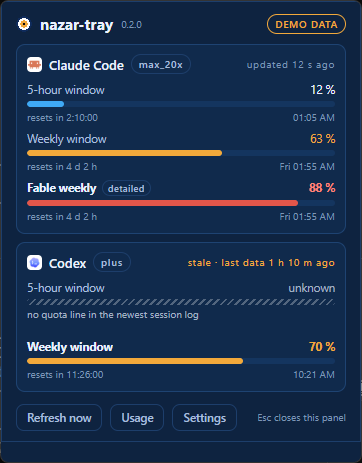
Demo data, so the picture shows the states that are hard to arrange on purpose: a window
over the amber threshold, one over the red threshold that only the opt-in detailed mode can
see, and one nobody could read — which says so rather than showing a reassuring zero. The
bead at every scale, and the grey it turns when nothing could be read:
docs/design/bead-states.png, with both states one file each
beside it.
Install
winget install xfurqan0.nazar-tray
Windows 10 1809 or newer. It installs per user, into %LOCALAPPDATA%\nazar-tray, and asks
for no administrator rights. About 2 MB down, one Start Menu entry, and the tray icon
appears; nothing is added to Claude Code or to Codex, and nothing starts with Windows until
you switch it on.
Or take the installer from Releases and run
it. Every release carries a SHA256SUMS file and a GitHub build attestation:
Get-FileHash .\nazar-tray_0.3.0_x64-setup.exe -Algorithm SHA256
gh attestation verify .\nazar-tray_0.3.0_x64-setup.exe --repo xfurqan0/nazar-tray
It is not code-signed, so a browser download raises SmartScreen — "Windows protected your
PC", More info → Run anyway. winget install does not go through the browser and does not
raise it, which is why it is first on this page. The plan for a real certificate, why the
application to SignPath Foundation comes after the first release, and what you can verify in
the meantime: docs/CODE_SIGNING.md.
Uninstalling removes the program, the Start Menu entry, the startup entry and the
StartupApproved record Windows keeps beside it, and puts your status line back before it
deletes the wrapper. It keeps ~/.nazar — limits.json is read by Nazar and the captures are
yours — and keeps %APPDATA%\nazar unless you tick delete application data, which a silent
uninstall never asks. Both are one Remove-Item away.
On Linux, take the .deb or the .rpm from
Releases. There is no winget equivalent
yet — no COPR, no AUR, no Flatpak — so this is the only route, and it is the same file with
the same SHA256SUMS line and the same attestation:
sudo apt install ./nazar-tray_0.3.0_amd64.deb      # Debian 12+, Ubuntu 22.04+
sudo dnf install ./nazar-tray-0.3.0-1.x86_64.rpm   # Fedora

gh attestation verify ./nazar-tray_0.3.0_amd64.deb --repo xfurqan0/nazar-tray
Built on ubuntu-22.04 against glibc 2.35, so it runs on Debian 12 and anything newer. It
installs /usr/bin/nazar-tray, /usr/bin/nazar-statusline, a .desktop entry and the
icons; removing the package leaves ~/.nazar and ~/.config/nazar alone, for the same
reasons the Windows uninstaller leaves %APPDATA%\nazar.
What the tray does on a desktop that has no tray. On KDE, XFCE, Cinnamon, Budgie and
Ubuntu's GNOME the bead is drawn, and its menu carries the numbers and opens the panel. A stock
GNOME runs no StatusNotifier host, so nazar-tray asks the session bus before it builds an
icon and, when the answer is no, says so once in a desktop notification and keeps running
as the engine — the refresh loop, the advisory lock, the threshold notifications and
~/.nazar/limits.json are all still there. Two faces read that file:
nazar-gnome puts the bead in the GNOME panel, and
faces/waybar/ is sixty lines of shell for a Waybar module.
Nothing starts at login until you switch it on, as on Windows: Start with the desktop
session on the settings page — nazar-gnome's gear opens it on a stock GNOME — or
nazar-tray --autostart on writes ~/.config/autostart/nazar-tray.desktop. The entry starts
the binary the way you are running it: switched on from nazar-tray --headless it stays the
engine, and otherwise it asks the session bus again at every login, so it is the tray where
a host is running and the engine where none is.
Why another quota tray
There are many. This one is built on one rule:
By default, nazar-tray never reads your sign-in tokens and never talks to the network.
Every other quota tool reads your OAuth token, or even your browser cookies, from inside an unsigned binary, then calls an undocumented endpoint that rate-limits them. nazar-tray does neither by default, because the numbers are already on your disk:
- Codex writes its server-reported usage into every session log (
~/.codex/sessions/…/rollout-*.jsonl).
- Claude Code hands the same numbers to your status line on every refresh. A tiny wrapper (
nazar-statusline) records them and then runs whatever status line you already had, unchanged. It ships beside the tray and installs itself into nothing: you press a button in the settings page, it shows you the diff first, it takes a copy of settings.json before it writes, and removing it puts your own status line back exactly — the section below.
That is the whole default quota path: two local files in, one local limits.json out. The same file feeds the quota strip on the Nazar canvas.
What it reads, and what it never reads
Quota comes from two files, and the fields are countable. From a Codex session log: the rate_limits block Codex writes into it — two percentages, two window lengths, two reset times and the plan name. From Claude Code: the same kind of numbers, handed to your status line on every redraw and recorded by the wrapper — two percentages and two reset times. Eleven values in total reach limits.json, and nothing else does.
Usage history reads your session transcripts, and takes nine fields out of them. To answer how many tokens did I spend, and on which model, nazar-tray reads ~/.claude/projects/**/*.jsonl (subagent transcripts included) and the token_count events in the Codex logs it already opens. From a Claude record it takes the record type, the timestamp, the model id, the four token counters the server itself reported, and two ids that exist only to drop duplicate records and are never written anywhere. From a Codex event: the timestamp, four counters, and the model name from the turn. That is the whole of it, and none of it is an estimate — these are the numbers the provider reported, added up.
The number it shows is what you spent, which is not the number /usage shows. Claude Code
writes a message once per content block and every one of those lines carries the whole usage
object, so adding the lines up counts one reply several times — 1.667× the real spend on the
machine this was measured on, and not a constant you could divide back out
(anthropics/claude-code#91775).
nazar-tray counts a message once, and that is the default. If you would rather the two windows
agreed, Count like Claude Code in settings shows the per-line numbers instead, labelled as
/usage counts so you always know which of the two you are looking at — the store keeps both,
and the tray tooltip follows the same switch.
And history older than your transcripts, if you ask for it. Claude Code prunes transcripts
and keeps a statistics cache, which on this machine reached back twenty-two days against six.
Fill history from Claude Code's stats copies those older days in — totals only, no
breakdown, per-line as that file counts them — and draws them apart from the days nazar-tray
counted itself, marked reported by Claude Code everywhere they appear. Off by default,
because a history that quietly mixes two kinds of number is worse than a shorter one.
Your prompts and the replies to them are never read. Not the message content, not the reasoning, not tool input or tool output, not file contents or command output — and not the paths, project names, branch names or session ids that sit beside them in the same file. The reader does not filter a line and hope: it builds a new record out of the fields named above, so everything else is gone with the parse.
A test is what makes that a fact rather than a promise. A transcript whose every text field carries a sentinel string is run through the whole scan, and the build fails if that string appears in the result, in the totals, or in the file they are written to. It is the gate the Codex reader has been through since the first release, and the usage readers ship with it or they do not ship. The complete inventory, field by field, including everything deliberately not read, is docs/pinned-internal-formats.md; what comes out the other end is docs/usage-contract.md — hourly totals per model in %APPDATA%\nazar\usage\, which no other program reads, and which goes nowhere, because by default nothing here talks to the network at all.
Detailed windows (opt-in). Claude's status line only reports the 5-hour and the global weekly window. If you are on a Max plan, your real constraint may be a model-specific weekly window that only the official usage endpoint reports. Turn on Detailed windows in settings and nazar-tray will read the token Claude Code already stores, keep it in memory for a single request, and never write or log it. Off by default, and asked once: the passive path carries no plan name at all, so nazar-tray cannot tell whether you are on Max — which is why the banner is a question rather than an announcement, and why answering it either way settles it for good.
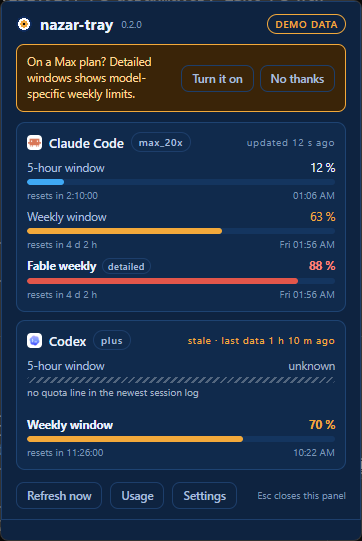
Asked once, answered for good either way. In this picture the weekly window the account
is actually constrained by is Fable weekly, 88 % — the one the passive path cannot see.
With the mode off — which is how it ships — nothing in nazar-tray opens a credential file or a socket, and a test poisons that file to prove it. With it on, this is the whole of it: claudeAiOauth.accessToken is read out of ~/.claude/.credentials.json (which is never written), held in a wrapper that wipes itself and prints ``, and sent as one Authorization header on a single 20-second GET to api.anthropic.com/api/oauth/usage — the endpoint your own /usage command calls. The answer becomes your model-scoped weekly windows, marked detailed in limits.json. The token is never written to a file, never logged and never put in an error message, and no response body reaches one either; a test runs the entire flow with a sentinel in place of the token and fails if it turns up anywhere but that header. When the endpoint says no, the last known numbers stay with a stale flag and the next attempt backs off — 1 s, 2 s, 4 s and so on to half an hour, or whatever Retry-After asked for. Your refreshToken is never read: refreshing is Claude Code's job. nazar-tray --print --detailed runs the mode once without switching it on. The full account, including where this sits against Anthropic's terms and why it is your call rather than the default, is in docs/detailed-windows.md.
What you get
- Tray bead icon whose tooltip carries two lines: your most-constrained window with its
reset, and this week's tokens with the model that spent most of them. The bead turns grey
when nothing could be read, never a false zero, and it says nothing about usage
- Popup panel with both providers, all windows, reset countdowns
- Notifications at 60 / 85 / 100 %, once per window per reset
- Themes (
nazar, graphite), autostart, six UI languages (English, Türkçe, 中文, 한국어, Русский, Español)
nazar-tray --print for scripts and for Linux, and --print --write to refresh
~/.nazar/limits.json once without a tray running- Usage history: what you actually spent, by week, by day and for all time, one row per
model, for both providers, from the numbers the providers already reported — deduplicated
by default, with a switch for the per-line count
/usage shows (the section
below)
- A per-user installer — no administrator rights, no service, no scheduled task — and an
uninstaller that removes the startup entry, the record Windows keeps beside it, and the
status-line wrapper's edit to Claude Code's settings
Usage history
Quota says how much of your window is gone. This says where it went. Usage in the panel
footer opens four tabs over the same history, and every number in them is one a provider
reported — nothing here is an estimate, and there is no price anywhere, because a number this
product cannot source is a number it does not print.
| |
|---|
| Week | this week, Monday to today where you are: the headline, its four counters, and a bar per day |
| Weeks | one row per calendar week, newest first, each against the busiest in the list |
| All | a calendar heat-map, up to twelve months, shaded in five steps from the theme's own accent |
| Models | tokens per day, one line per model, over all time, the last 7 days or the last 30 |
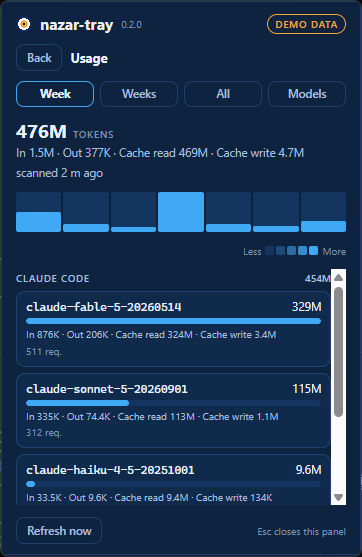
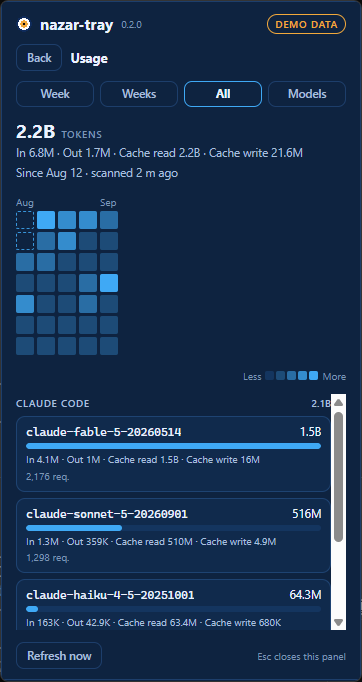
Demo data. The headline is input + output + cache_read + cache_create, which is the
same definition Claude Code's /usage prints as total tokens; underneath it, and underneath
every model row, is that total taken apart in four, because cache reads were 98.5 % of the raw
total over six days of real work and that is a fact the reader should be able to see rather
than one the headline quietly decides for them. The outlined cells are days reported by Claude
Code rather than measured here — see the second switch below. Model ids are printed exactly as
the provider spelled them, never merged and never translated.
Every day and every week opens. Click a day, in the Week strip or anywhere in the
heat-map, or a row of Weeks, and you get what that day or week went on: the four counters
over it, then one row per model with its own four, under a provider heading when both worked
in it. Back — and Esc — closes it again.
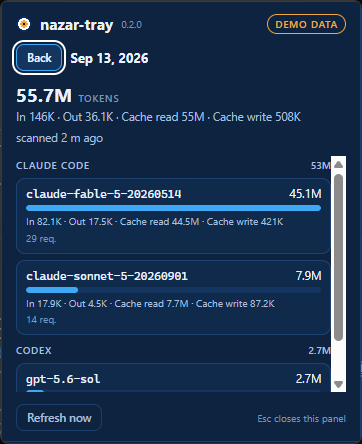
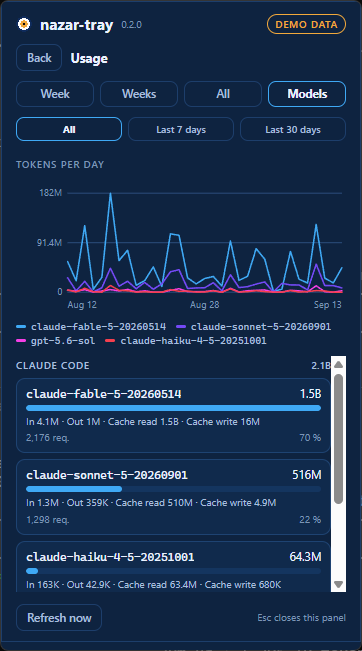
By default the number is what you spent. One message counted once, however many lines
Claude Code wrote it on — which is not the number /usage shows, because Claude Code writes a
line per content block and every copy carries the whole usage object. On the machine this was
measured on that is 1.667× the real spend, and it is not a constant you could divide back
out (anthropics/claude-code#91775).
Two switches in settings, both off by default:
| |
|---|
| Count like Claude Code | show the per-line numbers instead, so the two windows agree. Labelled as /usage counts under the headline, and the tray tooltip follows the same switch. The store keeps both counts, so turning it on and off changes what is drawn and never what was recorded. |
| Fill history from Claude Code's stats | copy in the days older than your transcripts, as Claude Code reported them — totals only, no breakdown, because that file holds one number and a guess at how it splits into four would be four invented numbers. Drawn apart from the days nazar-tray measured, and a day your transcripts cover is never reported. |
The scan is never on the quota path. Quota is why this application exists and it reads two
small files in milliseconds; a walk of hundreds of megabytes must not queue in front of that.
So nothing scans on the refresh loop — it runs when you open this view, at most once every
five minutes, and Refresh now is the only thing that overrides it. The hourly totals it
writes live in %APPDATA%\nazar\usage\, beside your settings rather than in ~/.nazar,
because a month of hourly token counts is a usage profile and no other program reads it
(docs/usage-contract.md).
Notifications
The reason a quota tray exists is to warn you before you hit the wall, and this is the
one thing the two Windows leaders do not do at all.
A toast when a window crosses 60 %, 85 % or 100 % — whatever you set the thresholds to —
once per window per reset period:
> Claude Code · weekly window 85 %
> Resets in 2 h 10 m
Five rules, so it is a warning rather than a nuisance:
- It fires on the crossing, not while you are above it. A window that sits at 90 % for
four days says nothing more.
- A restart does not repeat it. The key is written to
alerts.json before the toast is
shown, so a tray that is closed and reopened stays quiet.
- Starting up already above a threshold says so once, and then stops — waiting for a
crossing that has already happened would be silence exactly when it matters.
- A window nobody could read never notifies. No number, no warning: the icon goes grey
and says so instead.
- One toast per crossing. A jump from 10 % to 91 % passes two thresholds; you get one
sentence, and it says 85 %.
Quiet hours stop the interruption without stopping the tray: the crossing is still
recorded and the panel still shows it in red, you just are not told about it at three in the
morning. Times are your own wall clock, and the range may wrap midnight.
Clicking a toast does not open the panel. Tauri's notification plugin does not hand an
application the click, so there is nothing to hook — the toast names the window it is about,
and the tray icon is one click away.
Settings
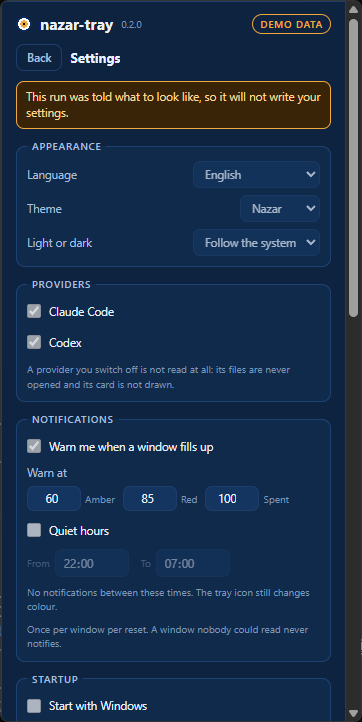
In the panel — the gear in the top-right corner of the header — and from the tray menu's
Settings…:
| |
|---|
| Language | Follow the system, or pick one. Applies to the panel, the tray tooltip, the menu and the notifications without a restart. |
| Theme | nazar or graphite, and light / dark / follow the system. |
| Providers | Claude Code and Codex, each on or off. A provider you switch off is not read at all — its files are never opened and its card is not drawn. |
| Notifications | On or off, the three thresholds, and quiet hours. |
| Start with Windows / Start with the desktop session | Adds a startup entry for your account; nazar-tray starts hidden in the tray. The row is named after the desktop you are on — on Windows the switch reads the registry back, so it agrees with Task Manager's Startup tab; on Linux it writes ~/.config/autostart/nazar-tray.desktop, which is what an XDG session reads. |
| Status line | Whether the wrapper is Claude Code's status line, and the button that installs or removes it. It shows the diff first and writes nothing until you press again — the section below. |
| Detailed windows | The opt-in mode described above, off by default, with the whole of what it reads written out beside the switch. |
| This desktop (Linux only) | Two switches that only a Linux shell can need, and that are not drawn anywhere else. Show the percentage beside the tray icon is the label GNOME and KDE draw next to the bead, which is where the number goes on a desktop with no tooltip. Open the panel beside the tray icon runs the application through XWayland so the compositor honours a position — the whole application, web view included — and takes effect at the next start. |
| Files | Where limits.json, the status-line captures, your settings and the notification history live. |
| About | The version, and a button that brings the first-run tray-icon tip back. |
Everything is written to config.json — in %APPDATA%\nazar on Windows, ~/.config/nazar
on Linux — atomically, and a form that does not make sense is refused as a whole —
thresholds that do not climb get an error and your old settings, not an error and a
half-changed tray. Keys a newer version of nazar-tray wrote are preserved when an older one
saves. There is no separate switch for the startup entry in that file: it lives in the
registry on Windows and in ~/.config/autostart on Linux, which is the thing that actually
decides.
nazar-tray --autostart on|off|status does the startup entry from a terminal, for when the
panel will not open.
Open panel · Settings… · Usage history · Refresh now · Quit. The two screens first, then
the verb, then the way out under a separator. On Linux a live row per provider sits above all
of it — see the Linux notes — and both mouse buttons open the same
menu there, because libappindicator owns the click and tray-icon's GTK backend never hands
one to the application. On Windows the left button opens the panel and the right opens the
menu.
Everything is read and written by one process: no scheduled task, no launch agent, no
systemd timer, and no second copy of the app fighting the first one for the same file. The
tray refreshes itself every minute, notices a new reading within five seconds, notices that
your laptop has been asleep, and writes the file only when something changed — so a consumer
watching it is woken by news rather than by a timer.
The status-line wrapper
Codex's numbers are already in a file on your disk. Claude Code's are not — they arrive in the
payload it hands your status line, on every refresh, and then they are gone. So there is a
second binary in the package, nazar-statusline.exe, which records that payload and then runs
the status line you already had, unchanged.
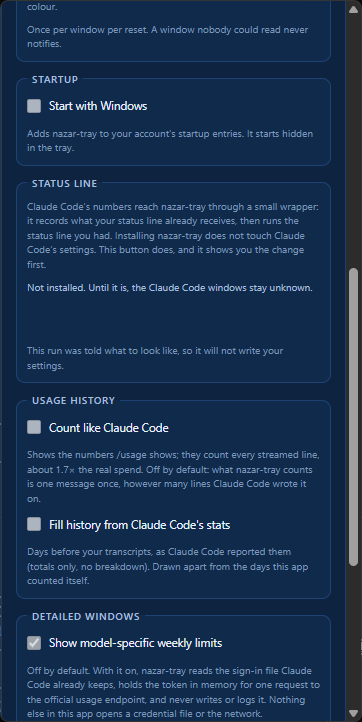
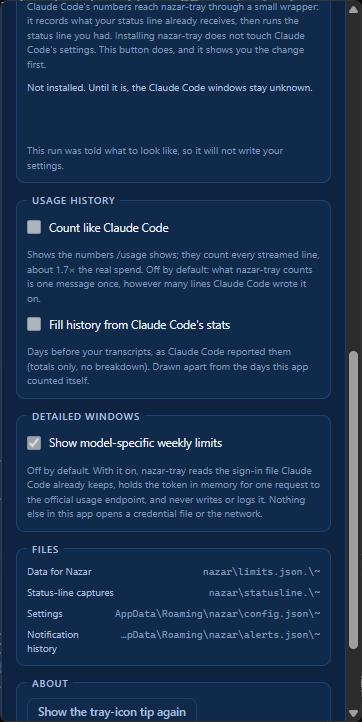
The settings page, scrolled to the status-line section. "Not installed" is what a fresh
machine says, and it is why the Claude Code windows read unknown until you install the
wrapper. The button that does it is not in this picture: every screenshot is taken with
--demo, a run that may not write your settings, and the page says so where the button would
be rather than offering one that would refuse.
Installing nazar-tray does not install it. Claude Code's settings.json belongs to Claude
Code and to you, and an installer that edited it would be editing a file you never mentioned,
on a machine where a broken statusLine is a broken prompt. Instead the settings page has a
button:
- Install status-line wrapper runs
nazar-statusline install --dry-run and prints the
exact diff it would make — one key, statusLine.command, with padding, refreshInterval
and everything else on the object kept.
- Write this change does it, after taking a whole-file backup beside
settings.json that
it will never write over, and recording the command it replaced in
~/.nazar/statusline/chain.json.
- Remove status-line wrapper puts the previous
statusLine object back byte for byte, or
removes the key if there was none, and checks the result against that backup before writing.
It refuses, changing nothing, on invalid JSON, on a settings file whose top level is not an
object, and when it is already installed. Median cost measured on a real machine: 9.6 ms
against a 50 ms budget.
Until it is installed, Claude Code's windows read unknown — grey, with a question mark, never
a reassuring zero.
By hand, if the binary is gone. Open ~/.nazar/statusline/chain.json, copy the previous
object over statusLine in ~/.claude/settings.json, or delete the statusLine key if
previous is absent. The backup beside the settings file
(settings.json.nazar-bak-) is the same thing in whole-file form. The Windows
uninstaller does this for you, before it deletes the wrapper. The Linux packages do not
yet: run nazar-statusline uninstall before apt remove or dnf remove, or this
paragraph is the way back.
The whole contract — what a capture holds, where it lives, why it is keyed by session id, and
what is deliberately not in limits.json — is in
docs/statusline-wrapper.md.
Faces
~/.nazar/limits.json has one writer and any number of readers, and a reader does not have to
be this application. faces/ holds the small ones — no build step, no package, no
store listing:
- Waybar —
nazar 70% in the bar and every window in the tooltip, from a
60-line POSIX script and jq. It reads limits.json, writes nothing, opens no socket and
runs no other program. Most useful on a desktop where nazar-tray has no tray to draw in; on
one where it does, it goes beside the bead rather than instead of it, and gives you the
number without hovering.
One face is large enough to have left: nazar-gnome
is a GNOME Shell extension in a repository of its own, and it is the answer on a stock GNOME —
the desktop with no system tray, where this application's icon is registered and never drawn
unless somebody else's AppIndicator bridge is installed. Run the engine there:
nazar-tray --headless
and the extension puts the bead and the binding window in the top bar, with every window in
its menu. It reads the same limits.json and the same lock file, in the same order, and not
a line of the contract changed to admit it. On a desktop that already draws the tray icon,
do not install it — two indicators of one number are noise, not redundancy.
The tray is the only writer. A face reads: it does not fetch, does not cache a "last good
value" and does not notify, because a second source of threshold warnings would double every
one of them. It is also why the small ones live in this repository rather than in one of
their own — a face in faces/ is checked against fixtures/limits.sample.json in the same
CI run as the code that writes that shape, so the two cannot drift. The test for the other
direction is whether a face has a store listing, a review queue and a version number of its
own; one that does gets a repository, which is why nazar-gnome has one.
The contract a face reads is docs/limits-contract.md, frozen at v1.
Known limits
Written down rather than discovered. Every one of these is a consequence of a decision that is
explained somewhere in this repository.
- Claude numbers move only while a Claude Code session refreshes its status line. Between
sessions the tray shows the last value with its age and a countdown computed locally from
resets_at. Quota does not burn while you are not using it, so this is honest rather than
stale — but a number that is six hours old says so.
- Model-scoped weekly windows need the opt-in mode. The status-line payload carries the
5-hour and the global weekly window and nothing else; verified live on a machine whose
global weekly read 18 % while its Fable-only weekly was 23 %. If a model-specific cap is what
actually constrains you, turn on detailed windows — and read
docs/detailed-windows.md first, because it reads a token.
- The passive path carries no plan name, so nazar-tray cannot tell a Max account from a Pro
one. That is why the detailed-windows offer is a question asked once rather than a banner
that knows.
- Codex's log format is not a documented contract.
rollout-*.jsonl is an internal file
that can change without notice. The reader is schema-tolerant, keeps the last good value, and
reports unknown rather than guessing; docs/pinned-internal-formats.md records every shape
it has been seen in, with the version it was seen under.
- Unsigned. SmartScreen warns on a browser download. See
Install and docs/CODE_SIGNING.md.
- Windows 11 hides new tray icons in the
^ overflow. The first run says so and asks you
to drag the bead onto the taskbar; the tip can be brought back from the settings page. It is
shown on Windows only — no other desktop has an overflow flyout to be behind or a
taskbar to be dragged onto, and the settings row that brings it back is hidden there too.
- Clicking a notification does not open the panel. Tauri's notification plugin does not
hand the application the click, so there is nothing to hook. The toast names the window it is
about, and the icon is one click away.
- On Linux the tray icon needs a desktop that speaks StatusNotifier. KDE, XFCE, Cinnamon,
Budgie and Ubuntu's GNOME do; a stock GNOME does not, and wants the
AppIndicator extension.
nazar-tray asks the session bus before it builds an icon, so it never registers one that
goes nowhere: with no host it says so once in a desktop notification and keeps running as
the engine — the refresh loop, the advisory lock, the threshold notifications and
~/.nazar/limits.json are exactly what they are with an icon. --headless asks for that
mode on purpose. A host that turns up later is noticed: nazar-tray keeps one
NameOwnerChanged subscription on that bus name and builds the icon when one appears. So a
tray that started while the screen was locked — GNOME switches its extensions off there and
the watcher's name goes with them — draws its icon as soon as the session is unlocked, with
no restart and no second notification. One thing it still does not do: with no icon there is
nothing to click, so the panel opens only by running nazar-tray a second time, which asks
the instance that holds the lock to show it — wherever the compositor puts it, since a
Wayland client may not place its own window.
- On Linux the menu is the tray, and the panel is an ordinary window.
tray-icon's GTK
backend sends no click event, reports no icon rectangle and shows no tooltip — the left
button belongs to libappindicator, which opens the menu — so the menu is where the numbers
are: a live row per provider above Open, rewritten on every refresh, positioned beside the
bead by the desktop rather than by us. Open then shows the panel wherever the compositor
decides, because a Wayland client can neither read the pointer nor move its own window
(both calls succeed and do nothing). If you would rather have the popup beside the cursor,
the settings page's Open the panel beside the tray icon — window.x11Positioning in
config.json — puts GTK on XWayland, where the position is honoured — at the price of running the whole application, webview included,
through an X11 translation layer. It is ignored on a session that is already X11, and
ignored with no DISPLAY. On GNOME the closer answer is
nazar-gnome, which the first run points at:
the shell places a panel indicator, and no window of ours can get nearer than that.
- On Linux the number is on the panel, beside the bead, with no click at all.
set_title
is the one call tray-icon's GTK backend passes through — it becomes libappindicator's
XAyatanaLabel, which GNOME's AppIndicator extension draws as a label next to the icon — so
the binding window's percentage is readable without opening anything. One number, the one
closest to running out, written the way your language writes a percentage, and ? rather
than a reassuring 0 % when nothing could be read. The settings page's Show the
percentage beside the tray icon — tray.showLabel — leaves you the bead alone. Windows and macOS ignore the setting: they have the
tooltip, which on GTK does not exist — set_tooltip there is a no-op, which is why this
exists at all.
- Closing the panel does not close nazar-tray, on any platform. The panel is the only
window this process has, and the window a desktop closes with Alt+F4 or GNOME's Super+Q is
that one — so it is hidden rather than closed, like every other way out of it. The way to
end the run is the menu's Quit, which releases the advisory lock first; killing the
process instead leaves
~/.nazar/limits.lock behind and the next launch waits out a grace
period as a reader.
- Claude Code's quota needs the wrapper, on every platform. Claude Code reports its rate
limits to its status-line command and to the usage endpoint, and writes them nowhere else on
disk — measured across 71 transcript files and
stats-cache.json in
docs/pinned-internal-formats.md. So a machine without
nazar-statusline install shows Claude Code as status line wrapper not installed rather
than at zero. The installer chains: whatever status line you had keeps running after ours.
- One account.
~/.nazar/limits.json is a single file by design, frozen at v1 so that
Nazar can depend on it. Multiple profiles are a v2 shape (~/.nazar/limits/.json)
and are deliberately not squeezed into v1.
Languages
English · Türkçe · 中文 · 한국어 · Русский · Español. nazar-tray follows your Windows
display language on the first run and can be set to any of the six in the settings — the
panel, the tray tooltip, the context menu and the notifications all change without a
restart.
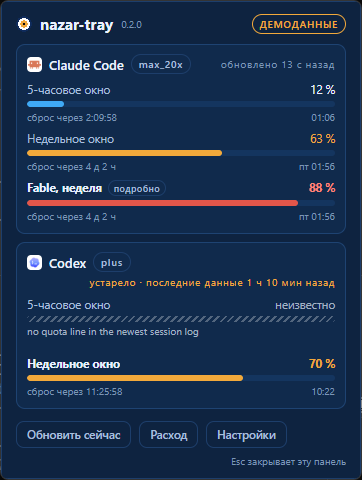
The panel measures itself after every render and asks for a window that fits, so a
translation longer than the English original moves the layout rather than clipping it. One
picture per language: docs/screenshots/wp6-100-*.png.
Corrections are welcome as pull requests. English and Turkish were written by hand;
Chinese, Korean, Russian and Spanish were machine-translated first and none has been
reviewed by a native speaker yet. Every string in the product lives in one flat JSON file per
language under ui/locales/ — the panel bundles them and the Rust
side compiles the same files in, so there is no second copy of a word to keep in step. That
README has the review table, the rules a locale file has to keep, and what is deliberately
left in English.
Roadmap
- 0.1.0: Windows (winget + GitHub Releases), Claude Code + Codex — done
- 0.2.0: usage history — per week, per day and for all time, one row per model, both
providers — done. Planned as work packages in docs/PROJECT.md §7,
with what it reads above and the file it writes in
docs/usage-contract.md
- Next: a code-signing certificate through SignPath Foundation, which asks that a project
already be released — docs/CODE_SIGNING.md
- v2: macOS build, multiple accounts, more providers
- Linux: shipped from 0.3.0 — the engine on every desktop, the tray where the desktop
runs a StatusNotifier host, and faces (nazar-gnome,
faces/waybar/) where it does not. Packaged as .deb and .rpm; a COPR
or an AUR package is wanted and not scheduled
- Anything else that is wanted but not scheduled is docs/FUTURE.md
Development
Windows and Linux, both of which CI builds the whole application on. nazar-core and
nazar-statusline are pure Rust and are tested on macOS as well, which is what keeps that
build a step rather than a rewrite.
Prerequisites
| Tool | Version | Why |
|---|
| Rust | stable, ≥ 1.87 | rust-toolchain.toml pins the channel and pulls clippy and rustfmt |
| Node | 22 | builds the panel and runs its tests |
tauri-cli | 2.x | cargo install tauri-cli --locked — only needed for tauri build. Not for the icons: see below |
On Windows: MSVC Build Tools 2022 with the C++ workload (there is no linker without it),
and WebView2, which is already part of Windows 10 1803+ and Windows 11.
On Linux: the GTK and WebKitGTK development packages, plus patchelf for the bundler.
sudo apt install libwebkit2gtk-4.1-dev libgtk-3-dev libayatana-appindicator3-dev \
                 librsvg2-dev libdbus-1-dev patchelf
libayatana-appindicator3-dev looks optional and is not. Without it the tray icon has no
library to dlopen, and — the half that leaves the machine — the packages ask for the
2018-era libappindicator3 names, which no longer exist in Debian 12 or Ubuntu 24.04.
scripts/build-installer.mjs refuses to build a package without it and names it.
Layout
crates/nazar-core       the limits.json contract, its writer and reader. No Tauri.
                        `--no-default-features` drops the opt-in detailed-windows mode
crates/nazar-statusline the status-line wrapper and its installer. Three dependencies,
                        no Tauri: it runs on every status-line refresh
crates/nazar-tray       the Tauri v2 app: tray icon, panel window, and the engine mode
                        it falls back to on a desktop with no tray. Windows and Linux
ui/                     the panel: plain TypeScript, HTML and CSS, bundled by esbuild
fixtures/               limits.sample.json, the file consumers copy into their tests
packaging/winget/       the three manifests the winget package is submitted as
scripts/                the build, the licence gate, the notices, the bead rasteriser,
                        the application icon set and the screenshot runner
docs/                   the plan, the contracts, the release checklist, screenshots
Everyday commands
cd ui; npm ci; npm test          # builds ui/dist, then runs the panel tests
cd ..
node scripts/sidecar.mjs --debug # the second binary, where tauri-build looks for it
cargo test --workspace
cargo clippy --workspace --all-targets -- -D warnings
cargo fmt --all
node scripts/check-licenses.mjs
node scripts/third-party-notices.mjs --check
Two of those are easy to skip and both fail confusingly. The panel is built before the Rust
side, because tauri::generate_context! reads ui/dist at compile time. The sidecar is
prepared before anything compiles nazar-tray, because bundle.externalBin names
nazar-statusline and tauri-build checks the file is there — so a missing sidecar fails
cargo clippy and cargo test, not only the bundler.
No test in this repository writes outside a directory it made itself, reads sign-in
material, or reaches the network. NAZAR_HOME moves the whole data directory, which is what
makes the first of those true rather than merely intended. (nazar-tray --print's own tests
do read whatever this machine has under ~/.codex and ~/.nazar/statusline, because their
whole point is that the output is a valid document on a real computer — which is also why
none of them asserts a number.)
Running it
ui/dist must exist before the Rust side builds, and nothing builds it implicitly:
cd ui; npm run build; cd ..
node scripts/sidecar.mjs --debug
cd crates/nazar-tray
cargo tauri dev
Building the installer — one command, because the order of the four things it does
matters: the panel, then THIRD-PARTY-NOTICES.md from the lock file, then the sidecar, then
the bundler. It prints the artefacts with their sizes and SHA-256 at the end.
node scripts/build-installer.mjs # release; --debug for a quick check
The NSIS toolchain is downloaded by the Tauri bundler on first use; nothing else has to be
installed. What comes out is target/release/bundle/nsis/nazar-tray__x64-setup.exe:
a per-user installer, no elevation, carrying the two binaries, LICENSE.txt and
THIRD-PARTY-NOTICES.md. docs/RELEASE.md is the checklist that turns one
of those into a release.
Regenerating the icons — after editing ui/assets/bead.svg:
node scripts/render-app-icons.mjs      # crates/nazar-tray/icons: PNGs, .ico, .icns
node scripts/render-bead-png.mjs       # ui/assets/bead-1024.png, the 1024 px master
That is the application icon: the installer, the taskbar, the Store logos.
Not cargo tauri icon. The CLI takes one large PNG and resamples it down with a smooth
filter, which is right for a vector mark and wrong for this one — the bead is authored on a
16-cell grid so that no resampler is ever involved, and a smooth downscale of 8-bit art is a
blur of it. render-app-icons.mjs renders every size from the grid instead, nearest
neighbour, and packs the same containers the CLI produced: PNG-in-ICO at 16/24/32/48/64/256
and an .icns of the PNG-carrying types. The nine Store logos are not multiples of 16, so
the bead is drawn at the largest whole cell size that fits and centred with transparent
padding. Zero dependencies, no browser, no network.
The tray icon is not a file at all — it is drawn at run time by
crates/nazar-tray/src/icon.rs for the current scale factor, from the hexes in
ui/theme.nazar.json. Everything in docs/design/ comes from that same code:
cargo run -p nazar-tray -- --icons docs/design
Regenerating the screenshots
cargo build -p nazar-tray
powershell -File scripts/screenshot.ps1
Every picture in docs/screenshots comes from that one command, and
docs/screenshots/README.md says what each file is. It runs the tray with
--demo, which uses synthetic numbers, opens the panel at start-up, never takes the
advisory lock and writes nothing — so a screenshot session cannot overwrite the real
~/.nazar/limits.json or change your settings, and since 0.2.0 it answers the usage view out
of a fixture of its own rather than out of your store, so no picture here carries anybody's
real model use. Quit a running nazar-tray first: two processes cannot share one WebView2
user-data folder with different browser arguments, --scale passes one, and the script
refuses to start rather than let every scaled shot time out. 150 % and 200 % are rendered at
those scales rather than upscaled: WebView2 is passed --force-device-scale-factor and the
window is multiplied to match, so no display setting has to be touched. -Theme, -Mode,
-Hint, -Offer, -View, -UsageTab, -Scroll, -Locale and -Out take one picture of
one state. -Hint and -Offer exist because the first-run tip and the Max-plan offer are
each shown once per machine, which makes them the states a screenshot cannot otherwise reach
twice; -UsageTab day is the one state of the usage view no tab name reaches. The documented
set ends with the same panel in all six languages (wp6-100-*.png), which is how a
translation that no longer fits the layout gets noticed.
Watching a threshold being crossed
cargo run -p nazar-tray -- --demo-cross
Steps one window through 80 → 86 → 86 → reset → 86 a few seconds apart. What should appear
is one toast at 60 %, one at 85 %, nothing for the repeat, and one more at 85 % after the
reset. It implies --demo: it takes no lock, writes nothing, and its notification history is
in memory, so it cannot consume a real warning you have not been shown yet.
Credits
The original panel layout was inspired by
Win-CodexBar — the idea, not the code, and none of
its Apple-grey styling survived the redraw. Provider icons from
@lobehub/icons (MIT,
ui/assets/LICENSE-lobehub.txt); the Claude Code and Codex
marks belong to their owners and are used to identify the two products whose numbers the panel
shows, with no endorsement implied. Built with Tauri.
Every other dependency, with its licence and its copyright holders, is in
THIRD-PARTY-NOTICES.md, generated from the lock file and shipped
inside the installer.
Contributing
CONTRIBUTING.md has the rules; the shortest useful one is that translations
are welcome and need no issue first — four of the six languages were machine-translated and
none has been reviewed by a native speaker. Security reports go through
GitHub's private reporting,
not a public issue: SECURITY.md.
License
MIT — LICENSE. Copyright (c) 2026 Furkan Yıldız.