NextAI Translator yetone
Use this command to install NextAI Translator with WinGet:
winget install --id=yetone.NextAITranslator -e Cross-platform desktop application for translation based on ChatGPT API.
winget install --id=yetone.NextAITranslator -e Cross-platform desktop application for translation based on ChatGPT API.
English | 中文
The translator that does more than just translation






I have developed a Bob plugin that utilizes ChatGPT API to provide global word translation on macOS. However, since not all users have access to macOS to benefit from the plugin, I have created this project!
What began as a Chrome extension has now evolved into a multi-platform desktop app that I am currently developing.

What began as a translation tool has now evolved to include surprisingly effective word polishing and summarization capabilities, accidentally.

.exe from the Latest Release page.More Info -> Run Anyway to proceed with the installation..dmg installation package. Note: Use aarch64 version for Apple Silicon machines and run xattr command below."NextAI Translator" can’t be opened because the developer cannot be verified.

Click the Cancel button, then go to the Settings -> Privacy and Security page, click the Still Open button, and then click the Open button in the pop-up window. After that, there will be no more pop-up warnings when opening NextAI Translator. 🎉


If you cannot find the above options in Privacy & Security, or get error prompts such as broken files with Apple Silicon machines. Open Terminal.app and enter the following command (you may need to enter a password halfway through), then restart NextAI Translator:
sudo xattr -d com.apple.quarantine /Applications/NextAI\ Translator.app
If you encounter a permission prompt every time you open it, or if you cannot perform a shortcut translation, please go to Settings -> Privacy & Security -> Supporting Features to remove NextAI Translator, and then re-add NextAI Translator.

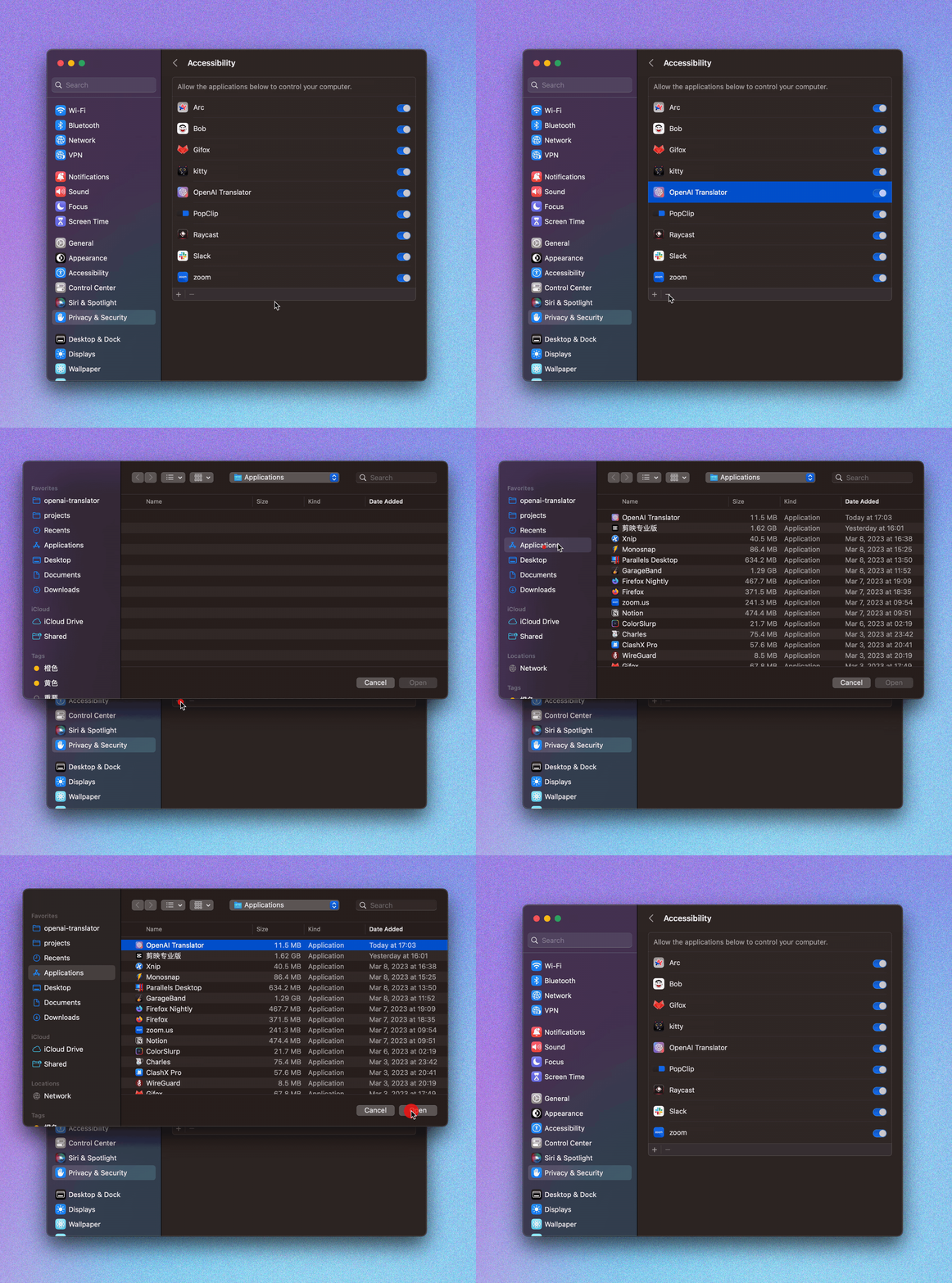
For details, see Desktop Clip Extension

Visit your Browser Extension Store to install this plugin:


Click on the NextAI Translator icon in the browser plugin list, and enter the obtained API KEY into the configuration interface that pops up from this plugin.

Refresh the page in the browser to enjoy the smooth translation experience 🎉!
const API_URL = `https://${resourceName}.openai.azure.com`
const API_URL_PATH = `/openai/deployments/${deployName}/chat/completions?api-version=${apiVersion}`