DevSetup zaidbharde
Use this command to install DevSetup with WinGet:
winget install --id=zaidbharde.DevSetup -e Interactive developer environment setup tool for Windows
winget install --id=zaidbharde.DevSetup -e Interactive developer environment setup tool for Windows
> Developer environment setup tool for Windows — powered by Rust and winget.
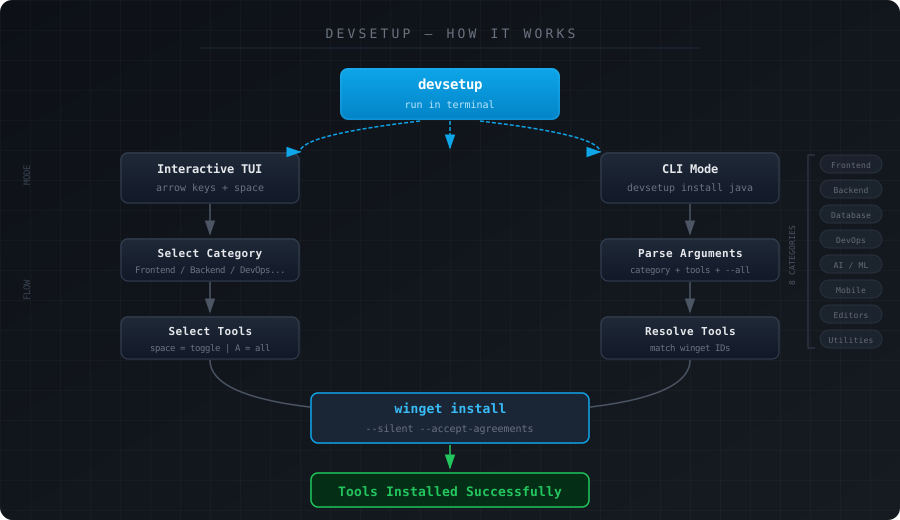
devsetup helps developers set up a fresh Windows machine without hunting for installers. It provides an interactive terminal UI to browse categories, select tools, and install everything in one go via winget.
winget install zaidbharde.DevSetup
devsetup.exe from ReleasesC:\tools\Restart your terminal and run:
devsetup
devsetup                               Launch interactive TUI
devsetup list                          List all categories and tools
devsetup list frontend                 List tools in a specific category
devsetup install frontend              Install from Frontend category interactively
devsetup install frontend --all        Install all Frontend tools
devsetup install backend nodejs vscode Install specific tools
devsetup help                          Show help
devsetup --version                     Show version
devsetup| Category | Tools |
|---|---|
| Frontend | Node.js, Bun, pnpm, Yarn, VS Code, Figma, Chrome, Firefox |
| Backend | Python, Java JDK 21/17, Go, Rust, .NET, PHP, Maven, Gradle, Postman |
| Database | MySQL, PostgreSQL, MongoDB, Redis, SQLite, DBeaver, TablePlus |
| DevOps | Git, Docker, kubectl, Helm, Terraform, AWS CLI, Azure CLI, GitHub CLI, WSL |
| AI-ML | Anaconda, Ollama, JupyterLab, CUDA Toolkit |
| Mobile | Android Studio, Flutter, Dart |
| Editors | VS Code, VSCodium, IntelliJ IDEA, PyCharm, WebStorm, Neovim, Sublime Text |
| Utilities | 7-Zip, Windows Terminal, PowerToys, Everything, Notepad++, Obsidian |
Requirements: Rust
git clone https://github.com/zaidbharde/devsetup.git
cd devsetup\files
cargo build --release
Binary output:
files\target\release\devsetup.exe
Setting up a new Windows machine as a developer is slow. You open a browser, search for each tool, download installers, click through setup wizards, and repeat.
devsetup removes that entirely. One command, pick what you need, done.
devsetup/
└── files/
    ├── src/
    │   └── main.rs
    ├── Cargo.toml
    ├── Cargo.lock
    └── README.md
MIT — built by zaidbharde