Nexa MemKeeper is a lightweight utility designed to monitor and optimize memory usage on Windows systems. Running from the system tray, it efficiently reclaims unused RAM, ensuring optimal performance without consuming significant resources.
Key Features:
Watches memory in real time, displaying current usage with color-coded thresholds for easy tracking.
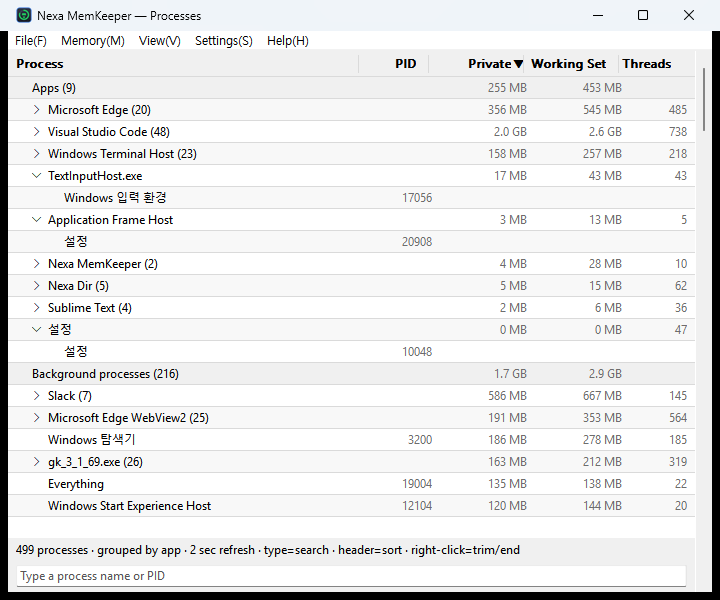
Includes a detailed process list that allows users to manage applications and background tasks, including termination options.
Automatically cleans up unused RAM based on scheduled intervals or system resource thresholds.
Consumes minimal resources itself, keeping the system tray light and responsive.
Supports English and Korean interfaces, with automatic language detection.
Target Audience and Benefits:
Ideal for system administrators, IT professionals, and general users seeking efficient memory management. Nexa MemKeeper provides increased system performance, easier process management, and reduced resource usage, making it a valuable tool for maintaining optimal Windows functionality. Available via WinGet, installation is quick and straightforward.
README
Nexa MemKeeper — 트레이 상주 초경량 메모리 최적화 도구
> Ultra-lightweight tray-resident memory optimizer for Windows.
Nexa MemKeeper는 시스템 트레이에 상주하며 메모리를 지속 관찰하고, 필요 없어진 메모리를 회수해 여유분을 늘려주는 Windows 도구입니다.
도구 자신의 점유 최소화가 정체성 — 상주부는 최소로, 기능(Top 5 점유 팝업·프로세스 트리 뷰·선택 종료/회수)은 수행 시에만 점유하고 종료 시 스스로 회수합니다.
설계 원칙
성능·동작 안정성 우선 — 개발·배포 편의보다 앞선다(DR-4). 관리 런타임·GC 없는 올 러스트 + Win32 직접 호출.
예산이 정체성 — 유휴 상주 RSS ≤5MB · 단일 exe ≤3MB · 외부 DLL 0(OS 인박스 제외). 마일스톤마다 실측 게이트.
상주 셸 / 온디맨드 워커 분리 — 무거운 기능은 별도 프로세스에서 수행하고 종료 시 OS가 전량 회수.
안전한 회수 우선 — 시스템·보호 프로세스는 건드리지 않고, 캐시를 버리는 공격적 정리는 기본 off(부작용 명시 후 opt-in).
현재 상태
단계: M0~M4 완료(트레이 상주 셸 + 정리 엔진 + Top 5 팝업 + 메인 화면 + 설정) — 실기 QA 후 0.5.0 승격 예정. 상세 → docs/STATUS.md.
실측: exe 0.55MB ≤3 · 상주 유휴 RSS 2.22MB ≤5 · 임포트 OS 인박스만 · 정리 1회 +847MB 회수(관리자 권한·트림 466 프로세스) · 프로세스 열거 500개 7.5ms · 테스트 50 green.
지금 할 수 있는 것
위치
기능
트레이 아이콘
사용률 % 실시간 표시(색 단계 80/90%) · 툴팁(사용량·마지막 정리)
좌클릭
Top 5 점유 팝업(2초 자동 갱신) · [지금 정리] [목록 보기…] · 항목 우클릭으로 회수/종료
우클릭
지금 정리 · 목록 보기 · 설정 · 관리자 권한으로 재시작 · 종료
메인 화면
작업 관리자식 목록(앱/백그라운드/Windows + 프로그램 묶음, 기본) · 프로세스 트리·평면 전환 · 하단 실시간 검색(이름·PID) · 헤더 클릭 정렬 · 쓰레드 표시 옵션 · 프로세스/트리/쓰레드 종료 · 자동 실행 토글
설정 창
임계값 자동 정리(기본 90%·쿨다운 300000ms) · 주기 정리 · 정리 영역 ①~⑤ 선택 · 전역 핫키 · 언어(기본 영어/한국어/자동) · 알림·표시 옵션. 저장 즉시 반영, data\settings.ini(포터블)
> ⏱ 설정의 시간 값은 모두 밀리초(ms) 입니다. 🌐 UI 기본 언어는 영어이며 설정에서 한국어로 바꿀 수 있습니다.