Merge360 Volko61
Install Merge360 with WinGet
winget install --id=Volko61.Merge360 -e Parametric 3D CAD application modeled on the Fusion 360 workflow.
winget install --id=Volko61.Merge360 -e Parametric 3D CAD application modeled on the Fusion 360 workflow.
A parametric 3D CAD application written in Rust, modeled on the Autodesk Fusion 360 user interface and workflow (offline only, no cloud features).
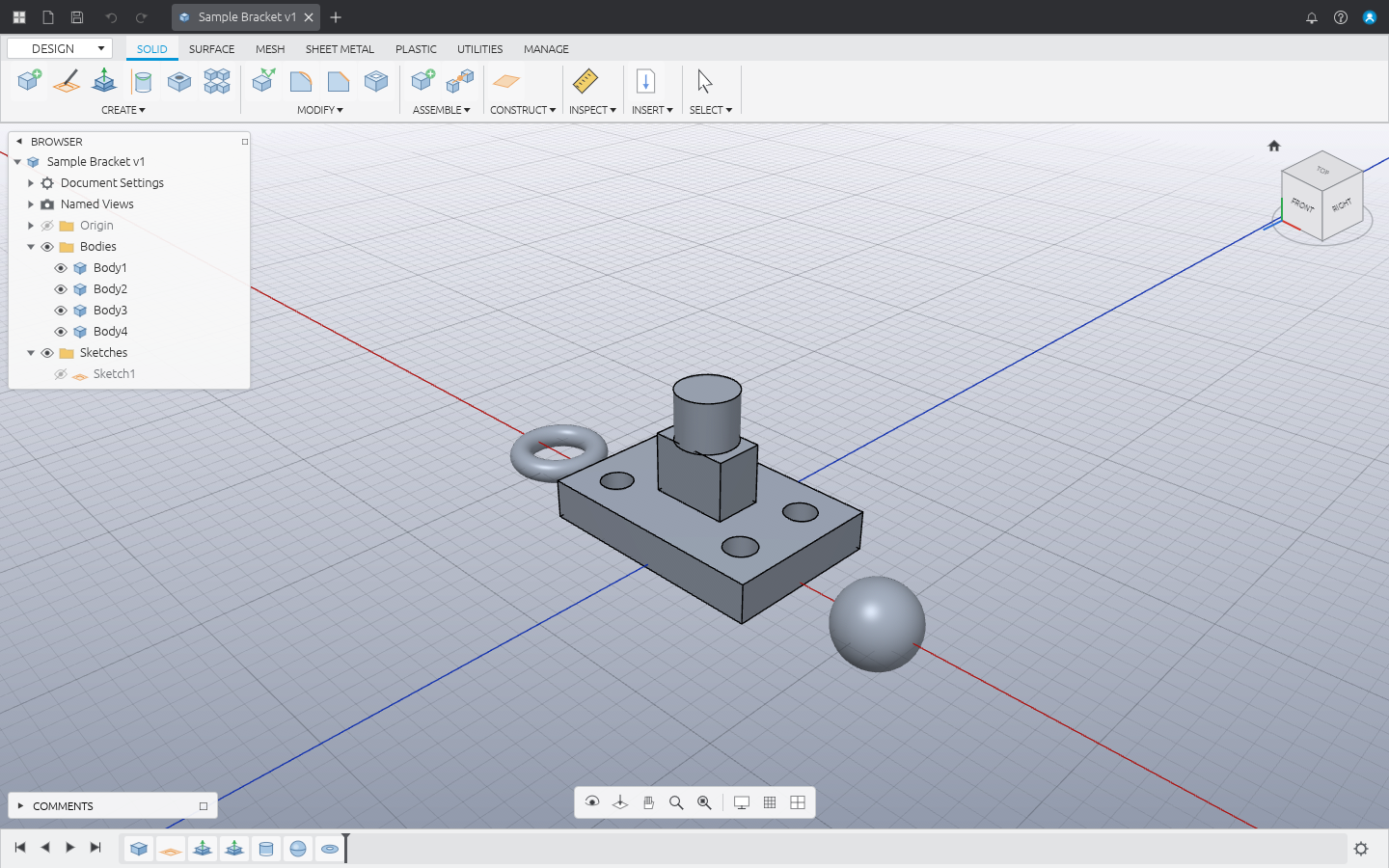
Windows (x64 / ARM64):
winget install Volko61.Merge360
winget upgrade Volko61.Merge360   # update
Linux (x86_64 / aarch64): installs to ~/.local/bin (or /usr/local/bin as root),
verifies the SHA-256 checksum and adds a desktop entry.
curl -fsSL https://raw.githubusercontent.com/Volko61/Merge360-Vibecoded-Inspired-Fusion360/main/install.sh | sh
# or
wget -qO- https://raw.githubusercontent.com/Volko61/Merge360-Vibecoded-Inspired-Fusion360/main/install.sh | sh
Updating: run merge360 --update (uses winget on Windows, the install script on Linux),
or re-run the command above. MERGE360_VERSION=0.3.0 pins a version and
MERGE360_UNINSTALL=1 removes it. Archives are also on the
releases page.
cargo run --release -p merge360            # empty design
cargo run --release -p merge360 -- part.m360   # open a design
Help ▸ Open Sample Design loads a demo part.
Linux needs a Vulkan (or OpenGL) driver. Under WSL without GPU drivers Merge360 runs on
Mesa's CPU rasterizer (llvmpipe): it then disables MSAA and caps the 3D render resolution
so that fullscreen stays interactive. Set WGPU_BACKEND=gl or vulkan to force a backend.
| Area | What it does |
|---|---|
| Application bar | Data Panel, File menu (New/Open/Recent/Save/Save As/Export STL·STEP), Save, Undo/Redo, document tabs |
| Toolbar | Workspace switcher (DESIGN), tabs SOLID · SURFACE · MESH · SHEET METAL · PLASTIC · UTILITIES · MANAGE, panels with dropdown menus listing every Fusion tool |
| SKETCH contextual tab | Line, 2‑point / center rectangle, circle, point, constraints palette, FINISH SKETCH |
| Browser | Document Settings (units), Named Views, Origin (planes/axes), Bodies, Sketches, visibility eyes, rename, context menus |
| Canvas | Shaded + edges rendering (wgpu, MSAA), adaptive grid, origin planes, hover/selection highlight, window selection (left→right contained, right→left crossing) |
| ViewCube | Click faces/edges/corners to snap views, drag to orbit, Home, perspective/orthographic |
| Navigation bar | Orbit, Look At, Pan, Zoom, Fit, Display Settings (visual style, environment, camera), Grid & Snaps |
| Timeline | Feature history with rollback marker (drag it), playback buttons, double‑click to edit, suppress, rename, delete, error highlighting |
| Marking menu | Right‑click radial menu + overflow list |
| Toolbox | Press S and type to search any tool |
width * 2 + 5 mm) for any feature value..nc, generic Fanuc/GRBL dialect).~/.config/merge360/preferences.ron):
language (English, Français, Deutsch, Español — extra or corrected strings can be added in
~/.config/merge360/lang/.txt), keyboard shortcut presets (Fusion 360, Blender,
SolidWorks) with per-action rebinding, mouse navigation presets (Fusion 360, Blender,
SolidWorks, Inventor, Tinkercad) with zoom/orbit/pan speed and reversed zoom, interface scale,
default units, grid/snap defaults, ViewCube, frame-rate display and auto-saved recovery copies..m360 (RON, full parametric history), STL import, STL and STEP export.Tools that are not implemented yet (modeled threads, the Generative Design workspace, …) are present in the UI and report “not available yet”. Kernel limitations (truck): fillets meeting three at a corner, shells of non-prismatic bodies and booleans of exactly coplanar faces may fail; such features turn red in the timeline with an explanation.
| Input | Action |
|---|---|
| Middle drag / Shift + middle drag / wheel | Pan / Orbit / Zoom at cursor |
| Left click / double click | Select face or profile / select body |
| Right click | Marking menu |
| S | Toolbox |
| E, M, I, A | Extrude, Move, Measure, Appearance |
| L, R, C, P (in sketch) | Line, Rectangle, Circle, Point |
| Enter / Esc / Delete | Repeat last command / cancel / delete |
| F6 | Fit |
| Ctrl+Z / Ctrl+Y / Ctrl+S / Ctrl+O / Ctrl+N | Undo / Redo / Save / Open / New |
crates/
  m360-kernel   B-rep geometry on the pure-Rust `truck` kernel: primitives, profile
                extrusion, booleans, tessellation (with smooth/seam edge filtering), STL/STEP
  m360-core     Document model: features, timeline + marker, incremental regeneration
                cache, undo/redo, units, sketch profile detection, .m360 persistence
  m360-render   wgpu offscreen renderer: shaded meshes, screen-space thick edges, grid,
                overlays, orbit camera
  m360-ui       egui application (Fusion-style layout, commands, sketching, picking)
app/            `merge360` binary
cargo test            # kernel, document, and sample-design tests
cargo clippy --all-targets
Dev hooks (environment variables) used for automated visual checks:
M360_SAMPLE=1 — open the sample designM360_SCREENSHOT=out.png — save a screenshot after 40 frames and exitM360_FULLSCREEN=1 — start fullscreen; M360_FPS=1 — print frame rateM360_WAYLAND=1 — use native Wayland under WSLg (by default Merge360 uses XWayland there:
WSLg's Weston crashes on native Wayland windows when hi-DPI scaling is enabled)M360_CAMERA="yaw,pitch,dist,tx,ty,tz" — set the initial cameraM360_SCRIPT=file — replay scripted input (see crates/m360-ui/src/script.rs)M360_STYLE=wire — start in wireframe