Use this command to install Mini Diarium with WinGet:
winget install --id=fjrevoredo.MiniDiarium -e
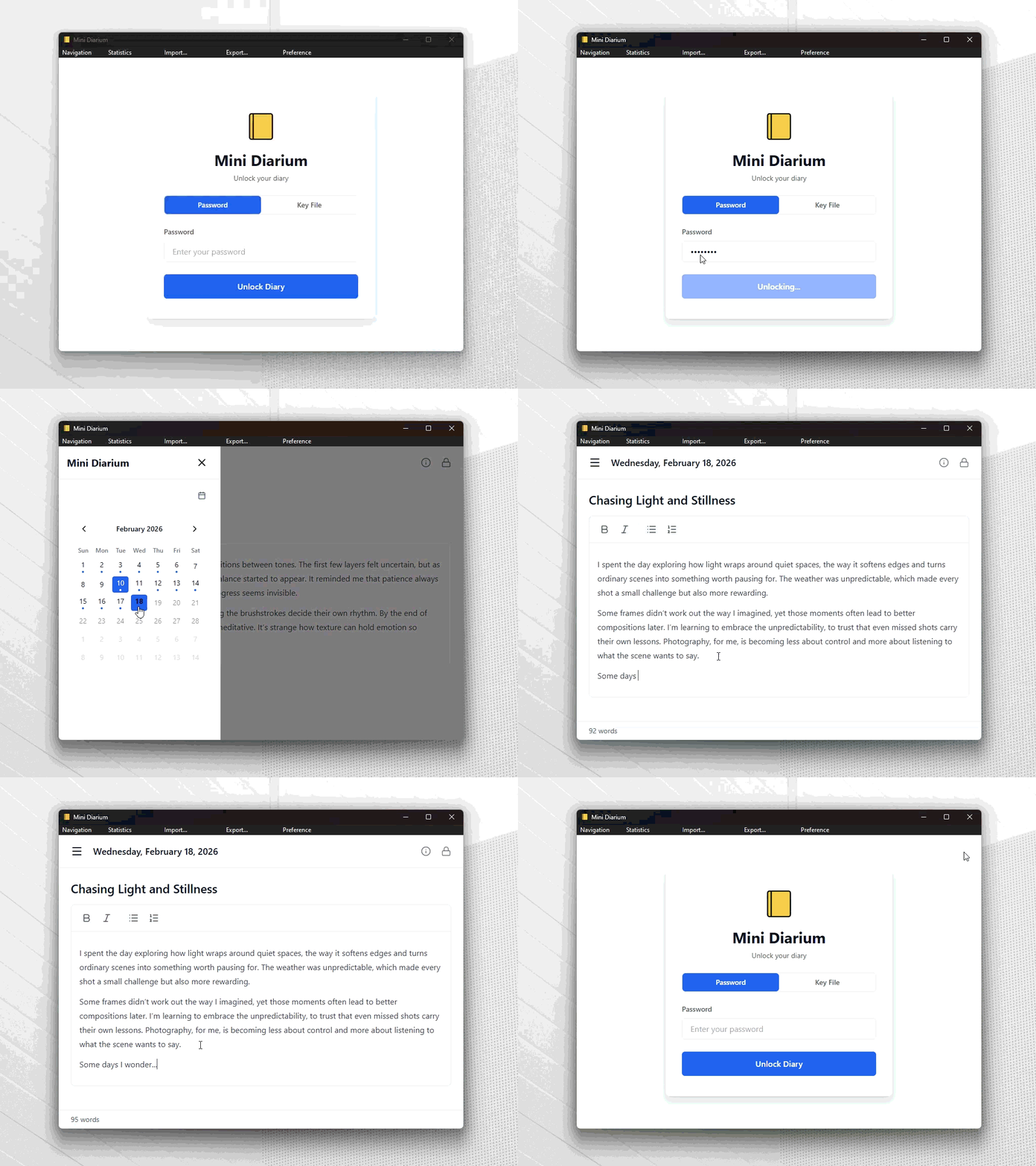
Mini Diarium is a privacy-focused journaling application designed for secure, local-only note-taking. Built with Tauri, SolidJS, and Rust, it prioritizes encryption and offline functionality to ensure your data remains private and untouchable by external forces.
Key Features:
Key File Authentication: Unlock your journal using an X25519 private key file for added security, similar to SSH keys. Manage multiple authentication methods seamlessly.
AES-256-GCM Encryption: All entries are encrypted with a random master key, ensuring robust protection against unauthorized access.
Rich Text Editor: Create and format notes with ease, supported by a user-friendly interface.
Multiple Entries Per Day: Organize your thoughts by creating separate entries for the same date without merging content.
Calendar Navigation: Quickly jump between dates using an intuitive calendar view.
Import/Export: Import from Mini Diary, Day One, and jrnl formats while exporting to JSON or Markdown for flexibility.
Themes: Customize your journaling experience with different themes.
Automatic Backups: Regular backups are created upon unlocking to safeguard your data.
Audience & Benefit:
Ideal for users who value privacy and security in their digital journaling, such as journalists, activists, or anyone requiring a secure space for personal thoughts. Mini Diarium ensures your entries remain encrypted, offline, and free from third-party interference, providing peace of mind for those who prioritize data control.
Install Mini Diarium via winget on Windows: winget install mini-diarium.
README
Mini Diarium
A local-only journal with serious encryption.
Free, open source, and never touches the internet.
Mini Diarium is free, open source, and will always be. If you find it useful and want to support its development, consider buying me a coffee on Ko-fi. Every donation goes directly toward keeping this project alive and improving.
Prefer crypto? Monero, Bitcoin, and Lightning are below and in DONATE.md.
Windows (WinGet): winget install fjrevoredo.MiniDiarium
macOS (Homebrew): brew tap fjrevoredo/mini-diarium then brew install --cask mini-diarium
Linux (Flatpak): flatpak install flathub io.github.fjrevoredo.mini-diarium
NixOS / Nix (Flakes): nix run github:fjrevoredo/mini-diarium
For package formats, first-run notes (Gatekeeper / SmartScreen), and checksum verification, see docs/INSTALLATION.md.
Quick Start
Launch Mini Diarium
Create a password (this encrypts your journal; there is no recovery if forgotten)
Write your first entry. It auto-saves as you type
Navigate between days with Ctrl+[ / Ctrl+] or click dates on the calendar
Lock your journal when you're done
Background
Mini Diarium is a spiritual successor to Mini Diary by Samuel Meuli. I loved the original tool. It was simple, private, and did exactly what a journal app should do. Unfortunately, it's been unmaintained for years and its dependencies have aged out. I initially thought about forking it and modernizing the stack, but turned out impractical. So I started over from scratch, keeping the same core philosophy (encrypted, local-only, focused) while rebuilding completely with Tauri 2, SolidJS, and Rust. The result is a lighter, faster app with stronger encryption and a few personal touches.
Philosophy First
Mini Diarium is intentionally opinionated. The philosophy is not a side note, it is the product:
Small, extensible core: keep core responsibilities tight (encrypt, store, authenticate) and push extras to extension points
Boring security: use established algorithms and audited libraries, never custom crypto
Local-only by design: no cloud sync, no telemetry, no analytics, no hidden network behavior
Easy in, easy out: import from common formats and export in open formats to avoid lock-in
Focused scope: private journaling over feature sprawl
Read the full principles and how these translates to the architecture in PHILOSOPHY.md.
> [!NOTE]
> Mini Diarium uses AI tooling as leverage for human engineers, never as a replacement. Every change still passes through deliberate design, careful implementation, proper testing, and direct feedback. Responsibility, authorship, and final judgment remain human.
Features
Key file authentication: unlock your journal with an X25519 private key file instead of (or alongside) your password, like SSH keys for your journal. See docs/KEY_FILE_AUTHENTICATION.md.
Local-only journals: create journals that auto-unlock on your device (no password prompt) while still encrypting entries at rest.
AES-256-GCM encryption: all entries are encrypted with a random master key. Each auth method holds its own wrapped copy of that key, so adding or removing a method is O(1), with no re-encryption of your entries.
Multiple journals: keep separate journals for different purposes (personal, work, travel).
Rich text editor: including images.
Tags
Multiple entries per day: keep separate entries for the same date without merging them together
Calendar navigation
Import: Mini Diary JSON, Day One JSON/TXT, and jrnl JSON with additive imports that preserve separate same-date entries
Export: JSON for structural fidelity and Markdown for human-readable best-effort export
Themes
Automatic backups: verified encrypted snapshots taken before migrations and destructive actions, with tiered retention going back a year
Statistics
Preferences: first day of week, future entries toggle, title visibility, spellcheck, auto-lock, password change, authentication method management
Cross-platform: Windows, macOS, and Linux
Zero network access: no telemetry, no analytics, no update checks
For the full list of known limitations, deliberate tradeoffs, and technical debt, see docs/KNOWN_ISSUES.md.
User-facing highlights:
Concurrent access to the same journal file is not supported (by design)
No password recovery — losing all credentials is permanent (by design)
Full-text search runs as an in-memory scan over decrypted entries (added back after the v0.2.0 FTS removal); nothing searchable is written to disk
Importing the same file twice creates duplicate entries (no deduplication)
Plugin changes require an app restart to take effect
Extending Mini Diarium
You can add local import/export extensions using Rhai scripts in your journal's plugins/ folder.
See docs/user-plugins/USER_PLUGIN_GUIDE.md for requirements, best practices, and a complete example plugin.
The page covers four areas: Argon2id key derivation (intentionally slow — ~200 ms to resist brute-force), AES-256-GCM encrypt/decrypt at three entry sizes, SQLite operations (insert, update, delete, date enumeration, full scan), and word-count calculation. Each card shows the latest timing and a Chart.js trend chart over the last 30 CI runs.
Contributing
See CONTRIBUTING.md for setup instructions, development workflow, and conventions.
For maintainers adding official plugins, see docs/BUILTIN_PLUGIN_GUIDE.md.
For maintainers changing frontend UI/state, the Rust backend, Tauri IPC boundary, WebView security, or CI, see docs/best-practices.
Translations
Mini Diarium ships in the following languages:
English
French (Français)
German (Deutsch)
Hindi (हिन्दी)
Italian (Italiano)
Portuguese (Brazil) (Português (Brasil))
Spanish (Español)
If you'd like to add support for another language, see docs/TRANSLATIONS.md for instructions on creating a locale file and submitting a PR.