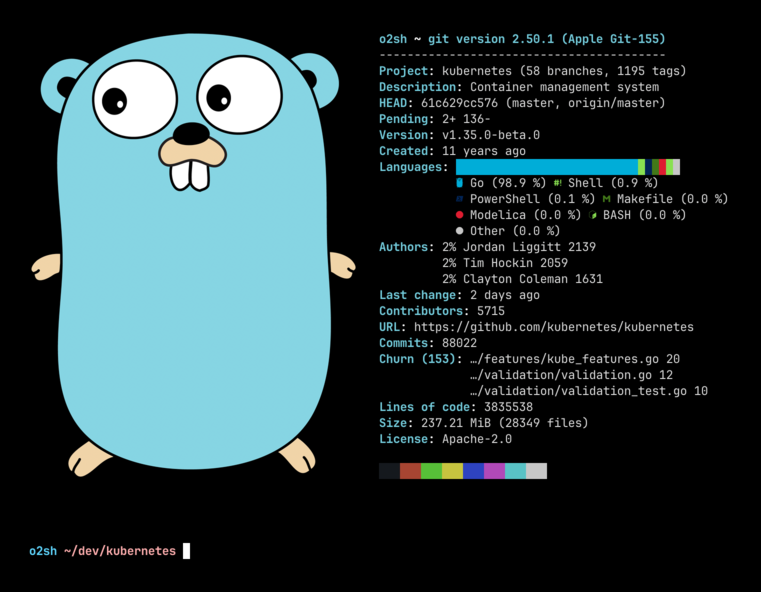
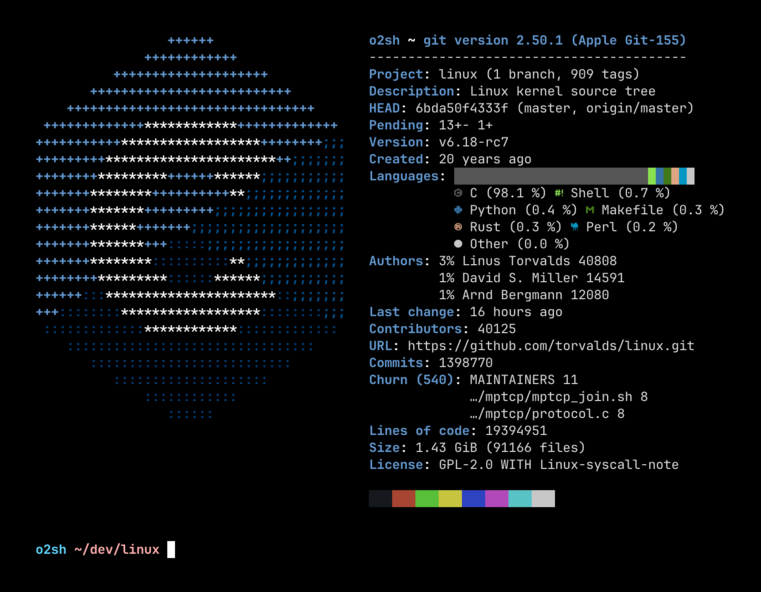
OneFetch is a command-line Git information tool designed to display project details and code statistics for local Git repositories directly in your terminal. This offline utility provides developers with essential insights into their projects, including code distribution, pending changes, dependencies, top contributors, disk size, creation date, lines of code (LOC), and more.
Key Features:
Offline Operation: No network access required.
Language Support: Works with over 100 programming languages.
Customizable Output: Configure ASCII/Text formatting, disable info lines, ignore files/directories, or output in JSON/YAML formats.
License Detection: Automatically identifies open-source licenses from project texts.
Detailed Statistics: Displays LOC, disk usage, contributors, dependencies, and more.
Audience & Benefit:
Ideal for developers, teams, and anyone working with Git repositories to streamline workflows, save time, and gain quick insights into project status. OneFetch enhances productivity by providing immediate access to critical information directly from the terminal.
Available for installation via winget, this tool is a versatile addition to any developer's toolkit.
Onefetch is a command-line Git information tool that displays project information and code statistics for a local Git repository directly in your terminal. The tool works completely offline with a focus on performance and customizability.
Installation
Onefetch is available on Linux, macOS, and Windows platforms. Binaries for Linux, Windows, and macOS are available on the release page.
Onefetch can be customized via command-line arguments to display exactly what you want, the way you want it: adjust the text styling, disable info lines, ignore files and directories, output in multiple formats (JSON, YAML), etc.
Frequently Asked Questions
Why isn't my language detected?
By default, onefetch only displays programming and markup languages. Languages classified as prose (like Org mode, Markdown, or Text) or data (like JSON, YAML, or TOML) are hidden unless you include them with --type.
onefetch --type programming markup prose data
Why do duplicate authors appear?
Onefetch reads authors from the Git history. If the same person committed with different names or emails, they may appear more than once.
To merge those entries, add a .mailmap file to the repository.
Contributing
Currently, onefetch supports more than 100 different programming languages; if your language of choice isn't supported, open an issue and support will be added.
Contributions are very welcome! See CONTRIBUTING for more info.