Sing-Box command line mode is available now! Just type for additional information:
nekobox_core sing-box --help
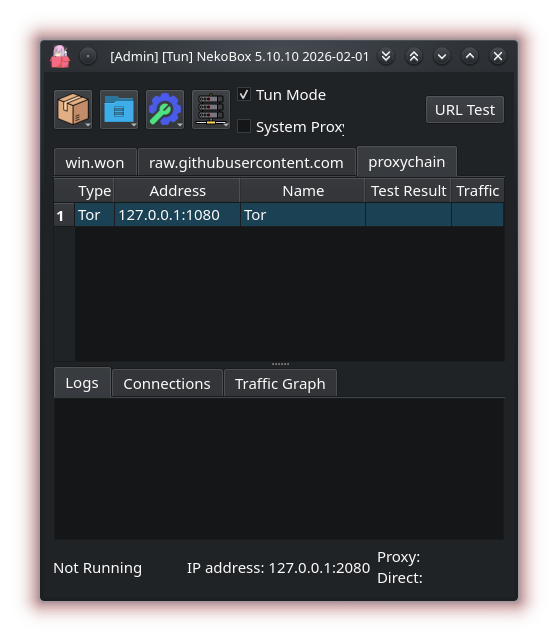
Qt based Desktop cross-platform GUI proxy utility, empowered by Sing-box
Supports Windows 11/10 (arm64, x86_64, x86) / Linux out of the box.
A terminal front-end (nekobox-tui) is also included:
it shares the same configuration directory and nekobox_core RPC, so both
interfaces can be used interchangeably.
GitHub Releases (Portable ZIPs, Windows installers, AppImages)


WinGet Package

Chocolatey Package


Scoop Package

scoop bucket add extras
scoop install extras/nekobox
OBS repository

COPR repository
openSUSE package
sudo zypper install -y nekobox
FreeBSD package
sudo pkg install -y nekobox
ArchlinuxCN package
# 1. Add archlinuxcn repo
sudo tee -a /etc/pacman.conf >/dev/null <<'EOF'

[archlinuxcn]
Server = https://repo.archlinuxcn.org/$arch
EOF

# 2. Sync and install keyring
sudo pacman -Syy archlinuxcn-keyring

# 3. Install NekoBox
sudo pacman -S nekobox
Ubuntu PPA
sudo add-apt-repository ppa:miamosagernaki/nekobox
sudo apt update
sudo apt-get install -y nekobox
Aur package
Changelog Channel


TODO
- Command line tools
- OpenRC/runit/systemd integration of nekobox_core
- Terminal UI
- Remote control
- Support for all platforms that supported by sing-box and Qt (except macos & ios)
- Add more protocols that does not supported by upstream sing-box ( currently added: mieru, juicity, trusttunnel, vless encryption, xhttp transport, kcp transport, amnezia, snell (in core))
- Replace static UI with declarative UI for editing proxies
- Find the best database storage in the world
Supported protocols
- AmneziaWG
- AnyTLS
- Chaining outbounds
- Custom Config
- Custom Outbound
- Extra Core
- HTTP(S)
- Hysteria 1
- Hysteria 2
- Juicity
- Mieru
- Naive
- Reality
- Shadowsocks
- ShadowTLS
- Snell
- SOCKS
- SSH
- Tailscale
- Tor
- Trojan
- TrustTunnel
- TUIC
- VLESS
- VMess
- Wireguard
Various formats are supported, including share links, JSON array of outbounds and v2rayN link format as well as limited support for Shadowsocks and Clash formats.
Full JSON subscriptions are supported for sing-box and v2rayN-style configurations. Imported JSON profiles keep their original routing and DNS rules, work with URL testing and auto testing, and can be used with TUN mode.
Happ subscription links are supported, including encrypted happ:// links. Subscription groups can also be added from browser deeplinks using nekobox:// and v2raytun:// URLs.
Supported JSON subscription features include:
- Full sing-box configuration import with inbounds stripped and local application inbounds added at runtime
- V2Ray-style JSON conversion for VLESS, VMess, Trojan, Shadowsocks, Hysteria, Hysteria2, TUIC, direct and block outbounds
- Route rule preservation for full JSON profiles, including profile-specific direct rules in TUN mode
- DNS migration for newer sing-box versions, including fakeip server conversion
- Full JSON URL testing and auto testing
- Hysteria2 detection from v2rayN/Happ-style Hysteria v2 JSON
Credits
FAQ
What is AppImage?
AppImage is a reliable and straightforward method for running applications on a Linux computer without the traditional installation process. You download a single, self-contained file which includes everything the program needs to operate. To use it, you simply grant the file permission to run and double-click it. This approach ensures compatibility across various Linux systems and allows for easy removal—simply delete the file when you no longer need the application, with no residual files left behind on your system.
AppImage files for the NekoBox proxy program are available now in the GitHub Release page. Support for the AppImage format begins from version 5.6.10 onwards, offering Linux users an installation-free and portable way to run the application. There are download links within the assets section of the specific release pages starting from that version.
What is Throne?
About Throne
Throne powers the infrastructure that creators need to better engage and monetize their audiences. Over 1,000,000 creators from 89 countries use Throne's all-in-one wishlist builder to let their fans support them in a privacy-first way. Further, partnerships with 1,000+ brands allow Throne to offer creators and their fans an exceptional commerce experience.
Started in 2021, Throne has revolutionized creator gifting through its Wishlist product. Today, Throne is leveraging the relationships it has built with creators and brands to give creators even more tools to engage with their fans in a safe, fun and enjoyable way. In this way, Throne is a three-sided marketplace connecting world-class brands with creators and their fans. Throne has offices in the US and Germany.
Tun mode does not work for me.
If NekoBox does not work in tun mode, then issue might be with tun configurations. Try to open tun settings, set stack to gvisor or set different tun address (for example, 168.19.0.1/24)
I have computer with Windows 7, or Window 8, or Windows 8.1. Which version of NekoBox should I download?
For Windows 7, Windows 8, and Windows 8.1, it is recommended to first install VxKex-NEXT from the latest release available. After installing VxKex-NEXT, you should launch NekoBox using the VxVex mode to ensure proper functionality.
I got the msvcp140.dll not found error on windows
The "msvcp140.dll not found" error usually means that the Microsoft Visual C++ Redistributable is missing or corrupted. To fix this, try install or reinstall the Microsoft Visual C++ Redistributable from the official Microsoft website
Official Microsoft website for Visual C++ Redistributable
Does NekoBox really need to be run in UAC mode on Windows?
No, that is not necessary. NekoBox restarts nekobox_core in UAC mode if TUN mode is selected and NekoBox is not already running with administrator privileges. NekoBox requests UAC confirmation to restart the core.
Is setting the SUID bit really needed on Linux?
No, it is not needed, but if SUID does not configured properly, the NekoBox will ask for administrator password to order to restart nekobox_core with administrator privilegies, if TUN mode is selected and NekoBox is not already running as root (or with special capabilities), NekoBox will ask for password for once, and will not configure SUID.
Why does my internet stop working after I force quit NekoBox?
If NekoBox of version below that 5.10.41 is force-quit while System proxy is enabled, the process ends immediately and NekoBox cannot reset the proxy.
Solution for version < 5.10.40:
- Ensure that NekoBox closed manually.
- If you force quit by accident, open NekoBox again, enable
System proxy, then disable it - this will reset the settings.
Solution for version >= 5.10.41:
- This won't happen, but if it does, please submit issue.
Where are the downloadable route profiles/rulesets coming from?
They are located at the ruleset repository.
License
Use of this software is subject to the GPL-3 license.
Built-in Xray-core
This fork includes an optional VLESS (Xray) profile backed by a bundled Xray-core Extra Core runtime. The Windows and Linux packages currently bundle Xray-core v26.9.30. The application verifies the bundled executable with xray version before starting an Xray profile and requires >= 26.3.27.
The Xray profile uses the existing NekoBox VLESS editor and supports TCP and XHTTP transports, including the raw XHTTP extra JSON from VLESS share links and REALITY parameters including pbk, sid, and spx.