ClipTyper
The last mile for text that cannot be pasted.
Type clipboard text as simulated keystrokes to bypass paste restrictions in VM consoles (vSphere, Proxmox, Hyper-V), iDRAC/iLO, RDP sessions, and paste-blocked fields.





winget install unpaved028.ClipTyper
Or grab ClipTyper-Setup.exe · Portable · All releases
> Official downloads only from GitHub Releases or Winget. Third-party mirrors (including Softonic) may ship outdated or wrapped builds.
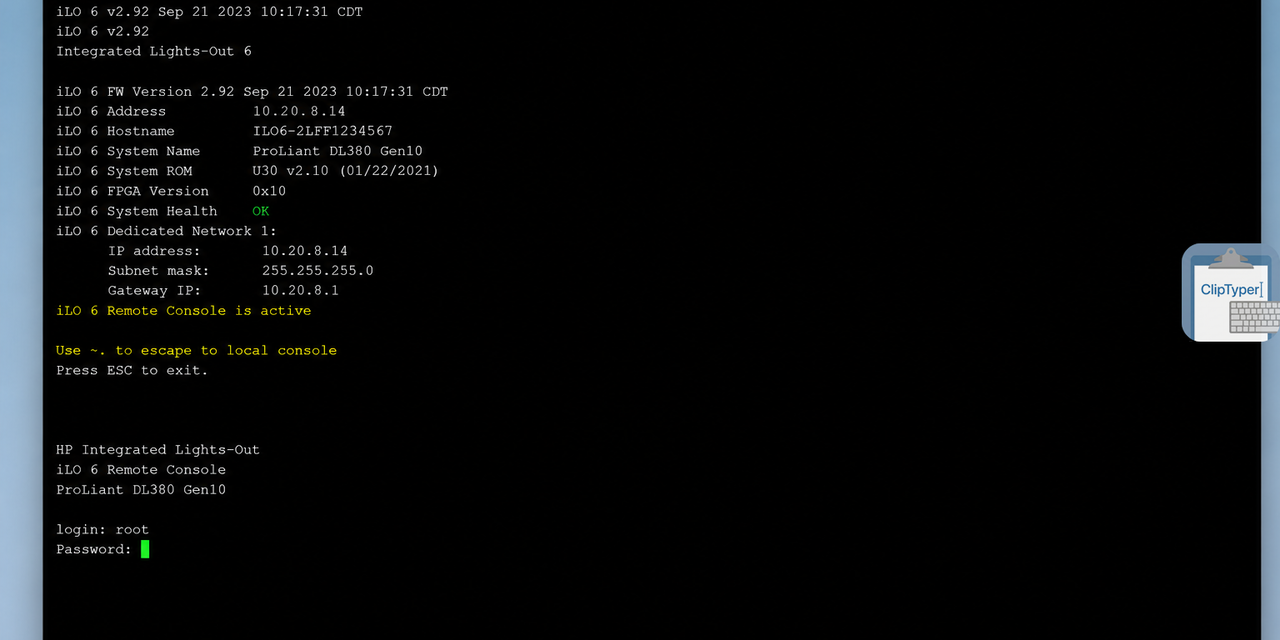
HPE iLO remote console — paste blocked; ClipTyper types the clipboard as keystrokes (overlay on the right). An animated demo GIF can be added later; this still shot is the real product in a real console.
Why ClipTyper?
When Ctrl+V is blocked or unavailable, retyping passwords and commands by hand is slow and error-prone. ClipTyper reads the Windows clipboard on your trigger and types the text character by character via native SendInput — no agents on the remote side, no admin rights required for normal use.
Lightweight alternative to ClickPaste, AutoHotkey paste scripts, or on-screen virtual keyboards — with a fullscreen RDP overlay, credential auto-type, Winget installs, and an explicit zero-telemetry policy.
Target scenarios / tested with
| Environment | Why paste fails | What to use |
|---|
| VMware vSphere / VMRC | Console has no (or blocked) clipboard channel | Delay 30–45 ms · Unicode or VK mode |
| Proxmox VE noVNC / SPICE | Browser console ≠ OS clipboard | Delay 30–45 ms · Unicode · Newline: Enter |
| Hyper-V VM Connection | Limited clipboard bridging | Delay 25–40 ms · Unicode |
| Dell iDRAC / HPE iLO / IPMI HTML5 | Canvas console accepts keystrokes only | Delay 40–60 ms · VK Compatibility Mode |
| KVM-over-IP (Raritan and similar) | No clipboard pipe into the session | Overlay or hotkey · slower delay if laggy |
| RDP / Citrix / Horizon (clipboard GPO-blocked) | Redirection disabled by policy | Hotkey in windowed mode · Overlay in fullscreen |
| AWS EC2 / Azure Serial Console | Raw TTY stream | Plain-text enforcement · Delay ~30 ms |
| MS Teams / Zoom remote control | Viewer clipboard not bridged | VK Compatibility Mode · Newline: Shift+Enter for chat |
| Paste-blocked web/password fields | onpaste / JS blocks clipboard | Credential Auto-Type · optional clipboard auto-clear |
> Tested another console? Open a Target Compatibility Report.
Quick settings cheat sheet
| Target | Recommended settings |
|---|
| RDP windowed | Delay 25 ms · Unicode · Ctrl + Shift + T |
| RDP fullscreen | Delay 25 ms · Unicode · Floating Overlay (Ctrl + Shift + H to toggle) |
| Citrix / Horizon | Delay 35–50 ms · Unicode or VK |
| iLO / iDRAC HTML5 | Delay 40–60 ms · VK Compatibility Mode |
Download & installation
Winget (recommended)
winget install unpaved028.ClipTyper
Manual download
Not sure? Use the Installer.
Integrity:
- Checksums:
SHA256SUMS.txt on every release
- ClipTyper-Setup.exe (v1.7.0) SHA-256:
bbaa17b32de4b381edbe98277b0a0a342331947b2e0f96c47d19276545a25c4c
- VirusTotal: 1 detection / 69 engines on the v1.7.0 installer. Microsoft is the only hit (
Trojan:Win32/Wacatac.C!ml); the other completed engines are clean. Unsigned SendInput tools can still trip heuristics — see SECURITY.md.
Trust & privacy
- Zero telemetry — no analytics and no product metrics. See SECURITY.md.
- Clipboard stays local — read only when you trigger typing; never written to disk or sent to a server.
- Almost offline — the only network call is an optional GitHub Releases update check. It is on by default and can be turned off in Settings. No other outbound traffic.
- Open source (MIT) — review the code; verify release checksums.
- UIPI respected — non-elevated ClipTyper will not silently type into Administrator windows.
Features
- Paste anywhere paste is blocked — RDP, KVM, web consoles, locked password fields
- Credential Auto-Type — two-stage username/password with Tab / Newline / custom delimiters
- Flexible newlines —
Enter, Shift + Enter, Space, or Ignore
- Plain-text clipboard preference (skip RTF/HTML)
- Optional humanized typing jitter (±1–50 ms)
- Portable single-exe or non-admin installer
SendInput Unicode typing + optional VK Compatibility Mode- Escape abort, focus-loss protection, single-instance guard, long-text confirmation, input sanitization
- Floating overlay for fullscreen RDP (edge snap, multi-monitor, scale 25–200%)
- Configurable hotkeys (type + overlay toggle)
- Optional auto update check with tray/overlay badge
Usage
Hotkey
- Start ClipTyper — tray icon appears
- Copy text (
Ctrl+C)
- Focus the target window
- Press
Ctrl + Shift + T — ClipTyper types the clipboard
Press Escape (or tray Stop Typing) to abort.
Overlay (fullscreen RDP / KVM)
Global hotkeys are often captured by the remote session. Enable Show Overlay Button in Settings (or toggle with Ctrl + Shift + H), hover the edge icon, click to type into the previously focused window.
Settings
Right-click the tray icon → Settings:
| Setting | Description | Default |
|---|
| Trigger Hotkey | Shortcut to start typing | Ctrl + Shift + T |
| Keystroke Delay | Delay between keystrokes (5–100 ms) | 25 ms |
| Newline Handling | Enter, Shift + Enter, Space, or Ignore | Enter |
| Enforce Plain-Text | Prefer plain-text clipboard format | Disabled |
| Typing Jitter | Random variance 1–50 ms (default ±5 ms) | Disabled |
| Credential Auto-Type | Two-stage login via delimiter detection | Disabled |
| Custom Transition Key | Tab or Enter between credential parts | Tab |
| Stage Pause | Pause between username and password (50–2000 ms) | 200 ms |
| Auto-Clear Clipboard | Clear clipboard after credential typing | Disabled |
| Clean Text | Strip BOM, nulls, zero-width chars | Enabled |
| Confirm Before Long Text | Confirm before very long clipboard text | Enabled (> 5,000 chars) |
| VK Compatibility Mode | Map chars to virtual keycodes (Teams / RDP / canvas) | Disabled |
| Play Sound Signal | Sound when typing finishes | Disabled |
| Diagnostic Logging | Local clip-typer.log (non-sensitive) | Enabled |
| Show Overlay Button | Floating overlay | Disabled |
| Scale | Overlay size 25–200% | 100% |
| Monitor | Overlay display | Primary |
| Overlay Toggle Hotkey | Show/hide overlay (can disable) | Ctrl + Shift + H |
| Reset Position | Reset overlay to default edge position | — |
| Run at Startup | (Installed) Start with Windows | Enabled |
| Automatically check for updates | GitHub check on launch (max 1× / 24 h) | Enabled |
How it works
Clipboard text → SendInput (Unicode or VK keystrokes) → Focused window
- Background typing worker; UI stays responsive
- Single typing session at a time
- User-space only (HKCU autostart) — no admin required for normal installs
Building from source
git clone https://github.com/unpaved028/ClipTyper.git
cd ClipTyper
dotnet test ClipTyper.sln -c Release

# Portable (self-contained + portable.marker)
dotnet publish -c Release -r win-x64 --self-contained true /p:PublishSingleFile=true /p:IncludeNativeLibrariesForSelfExtract=true -o ./publish-portable
New-Item -Path ./publish-portable/portable.marker -ItemType File

# Slim (framework-dependent + portable.marker)
dotnet publish -c Release -r win-x64 --self-contained false /p:PublishSingleFile=true -o ./publish-slim
New-Item -Path ./publish-slim/portable.marker -ItemType File

# Winget / installed mode (no marker; settings in AppData)
dotnet publish -c Release -r win-x64 --self-contained true /p:PublishSingleFile=true /p:IncludeNativeLibrariesForSelfExtract=true -o ./publish-winget

# Installer (Inno Setup)
iscc /DMyAppVersion=1.7.0 setup.iss
Requires .NET 10 SDK.
Changelog
v1.7.0
- ClipTyper now runs on the current supported .NET release (.NET 10)
- Settings are organized into Typing, Overlay, and App tabs with streamlined keyboard navigation
- Credential typing no longer writes how many characters were typed into the local log
- Clearer configuration for update checks and credential clipboard clearing delay
- Fully isolated hermetic unit test suite (29/29 tests passing)
v1.6.1
- Stop Typing from tray, overlay menu, or active overlay click
- Target compatibility matrix for RDP, Citrix, Horizon, iLO/iDRAC, serial consoles
- Security policy & zero-telemetry commitment (
SECURITY.md)
- Portable read-only media fallback to LocalAppData
- Diagnostic logging toggle; clearer tray balloons
- Custom credential transition key (
Tab / Enter)
SHA256SUMS.txt on every release; hermetic tests & analysis cleanup
v1.6.0
- Credential Auto-Type (Tab / Newline / custom delimiters)
- Credential safety (no password logging, focus check, optional clipboard clear)
- Configurable newlines, plain-text mode, typing jitter
TypingService isolation and stability fixes
v1.5.1
- Installer graceful shutdown while ClipTyper is running
v1.5.0
- Escape / focus-loss abort, single-instance guard
- VK compatibility mode, input sanitization, long-text confirmation
- UIPI elevation warning, overlay/tray progress, rotating log
v1.4.0
- Inno Setup installer, overlay scaling & multi-monitor, edge peek, overlay toggle hotkey
v1.2.0
- Manual update check; blocked hotkey validation
- Deprecated for download — use latest release.
License
MIT